Average score
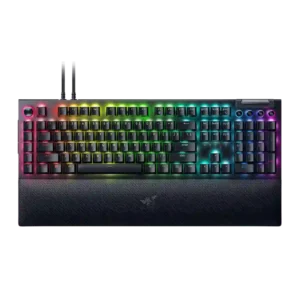
Razer BlackWidow V4 Pro
3.9
compatibility
Razer BlackWidow V4 Pro
2.0
Compatibility evidence was limited but negative where Mac support was described as lacking for the keyboard.
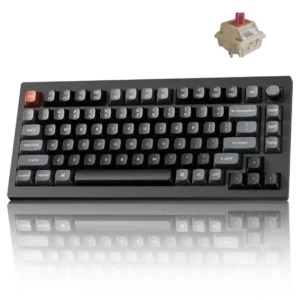
Keychron V1 Ultra 8K
5.0
Windows and macOS support is smooth, with painless mode switching and a browser launcher that works well on both platforms.
battery life
Razer BlackWidow V4 Pro
2.3
Battery evidence was split by model and settings, ranging from good light-use results to severe drain when RGB, OLED or wireless polling were active.
Keychron V1 Ultra 8K
4.9
Battery endurance is the standout feature: the 600- to 660-hour claim was not fully exhausted, but testers saw very little drain. RGB and 8K wireless polling reduce runtime, yet even a skeptical estimate still amounted to months.
desk space efficiency
Razer BlackWidow V4 Pro
2.6
Desk-space efficiency was weak on the full-size board because its macro column and wrist rest make it huge, while the 75% variants earned better space praise.
Keychron V1 Ultra 8K
5.0
The 75% footprint keeps arrows and a function row while removing the numpad, leaving noticeably more room on compact desks.
switch options
Razer BlackWidow V4 Pro
2.5
Switch options were a recurring weakness where reviewers wanted tactile, linear, or more checkout choices, especially on expensive or Pro models.
Keychron V1 Ultra 8K
4.8
Red, Brown, and Banana stock choices cover linear and tactile preferences, and broad MX-style hot-swap compatibility greatly expands the available alternatives.
onboard memory
Razer BlackWidow V4 Pro
3.0
Onboard memory was useful for profiles but limited by Synapse dependency, especially where custom dial modes did not carry over.
Keychron V1 Ultra 8K
5.0
Changes made in the launcher are stored on the keyboard, allowing remaps, lighting, and other settings to carry across devices and connection modes.
frame rigidity
Razer BlackWidow V4 Pro
4.5
Frame rigidity was praised where reviewers described the chassis and top plate as robust, solid, and free of noticeable creaking.
Keychron V1 Ultra 8K
2.5
The internal plate provides a stable base for key presses, yet several reviewers could flex or twist the plastic shell easily. Rigidity is the most consistent construction complaint.
connectivity
Razer BlackWidow V4 Pro
2.9
Connectivity was a recurring tradeoff: wired operation helped latency and passthrough, but reviewers missed wireless or noted cable-dependent clutter.
Keychron V1 Ultra 8K
4.8
Wired USB-C, 2.4GHz wireless, and Bluetooth cover nearly every setup, including multi-device use. Physical switching is easy, though Bluetooth runs at a much lower polling rate than 2.4GHz.
size and form factor
Razer BlackWidow V4 Pro
2.5
Size and form factor were a frequent concern on the full-size version, which reviewers called very large, while compact variants helped portability.
Keychron V1 Ultra 8K
4.1
The compact 75% footprint is efficient and functional, but the keyboard is much taller than many boards and can feel bulky at the front edge.
portability
Razer BlackWidow V4 Pro
3.0
Portability was variant-dependent: the 75% board was bag-friendly, while the full-size board was problematic for transport and mouse space.
Keychron V1 Ultra 8K
4.5
The plastic chassis makes the board lighter and easier to carry than a comparable metal model.
noise level
Razer BlackWidow V4 Pro
3.2
Noise level varied heavily by switch: Green switches were often loud, while Yellow or damped variants were quieter or satisfying rather than distracting.
Keychron V1 Ultra 8K
4.6
The dampened sound and non-clicky Brown switches are considered suitable for offices and shared spaces, with little risk of harsh clatter.
hot-swappable switches
Razer BlackWidow V4 Pro
3.6
Hot-swap support depended on variant: 75% boards were praised for easy switch changes, while full-size models were criticized for locking users into one switch choice.
Keychron V1 Ultra 8K
5.0
Hot-swap sockets accept broad three- and five-pin MX-style choices, so owners are not locked into the factory Red, Brown, or Banana switches.
software quality
Razer BlackWidow V4 Pro
3.4
Software quality was polarizing: Synapse could be intuitive and reliable, but reviewers often disliked needing it open for advanced functions.
Keychron V1 Ultra 8K
4.7
The browser-based Keychron Launcher is widely praised as fast, clear, and feature-rich without background bloatware. It does require a compatible Chromium browser and a wired connection for changes.
build quality
Razer BlackWidow V4 Pro
4.4
Build quality was broadly praised on the full-size model for solidity and premium feel, though one 75% Pro reviewer criticized the case quality for the price.
Keychron V1 Ultra 8K
3.2
Thick PBT caps, internal foam, metal reinforcement, and screw-in stabilizers give the board solid fundamentals. The flexible ABS outer shell keeps it from feeling truly premium.
acoustics
Razer BlackWidow V4 Pro
3.6
Reviewers varied by switch and model: some praised muted, clacky or lower-pitched sound, while others heard plasticky clicks, dinging, or a weaker stock sound.
Keychron V1 Ultra 8K
4.8
The gasket mount, foam, and stock switches usually produce a deep, rounded, or poppy sound that feels mature rather than harsh. The newer Silk switches are especially praised for sounding smoother and more premium.
wireless performance
Razer BlackWidow V4 Pro
3.4
Wireless performance evidence came from 75% Pro reviews and was mixed: wireless controls and performance were useful, but battery tradeoffs reduced appeal.
Keychron V1 Ultra 8K
4.6
The 2.4GHz connection delivered responsive, hiccup-free gaming, while ZMK improves Bluetooth efficiency. Bluetooth favors battery life over speed, and 2.4GHz does not match the headline endurance claim.
extra gaming features
Razer BlackWidow V4 Pro
4.3
Extra gaming features were praised most by macro-heavy and Snap Tap users, with reviewers highlighting benefits for tinkerers, strafing, and command-heavy games.
Keychron V1 Ultra 8K
3.2
N-key rollover is useful and a mechanical version of Snap Tap is available, but the board lacks the adjustable actuation and stronger Rapid Trigger behavior found on Hall Effect models.
value for money
Razer BlackWidow V4 Pro
3.5
Value was divided: many full-size reviewers felt the $230 price was justified by features, while 75% Pro reviewers objected strongly to $300 pricing.
Keychron V1 Ultra 8K
4.6
The board packs premium-level battery life, tri-mode connectivity, hot-swap support, advanced RGB, and strong gaming performance into roughly $115. One reviewer still prefers the cheaper original V1, but the broader consensus calls this excellent value.
volume control
Razer BlackWidow V4 Pro
3.9
Volume control was usually convenient and tactile, though some reviewers wanted a press-to-mute wheel or found dial-based volume less convenient.
Keychron V1 Ultra 8K
5.0
The clickable aluminum knob makes volume adjustment quick and satisfying, and it can be remapped for other functions.
profile management
Razer BlackWidow V4 Pro
4.0
Profile management was useful for switching setups and game-linked profiles, though some functions still depended on Synapse or required manual management.
Keychron V1 Ultra 8K
5.0
Multiple personalized profiles can be saved to internal memory for different devices or uses.
materials quality
Razer BlackWidow V4 Pro
4.8
Materials quality was praised through aluminum, premium finishes, and strong material choices across several full-size reviews.
Keychron V1 Ultra 8K
3.8
PBT keycaps, internal metal reinforcement, foam, and brass fittings are strong choices for the price. The all-ABS exterior is the notable compromise.
keycap quality
Razer BlackWidow V4 Pro
3.7
Keycap quality was mixed: texture, shine-through and feel earned praise, but ABS material, PBT comparisons, sound, and wear concerns lowered confidence.
Keychron V1 Ultra 8K
4.5
The double-shot PBT caps are thick, durable, and premium-feeling. Their sculpted OSA shape is more divisive, especially for fast, prolonged writing.
typing comfort
Razer BlackWidow V4 Pro
4.2
Typing comfort was generally strong when switches and wrist rest suited the reviewer, though one Green-switch reviewer wanted more cushioning for long writing.
Keychron V1 Ultra 8K
3.4
Comfort depends heavily on posture and session length. Some reviewers typed without fatigue, while others found the tall chassis and sculpted caps uncomfortable or less accurate during long writing sessions.
actuation consistency
Razer BlackWidow V4 Pro
4.3
Actuation balance was described positively where reviewers noted accidental strokes were avoided and productivity work was not littered with misinputs.
Keychron V1 Ultra 8K
5.0
N-key rollover worked cleanly across tested modes, with simultaneous presses registering together and no missed or dropped keystrokes reported.
media controls
Razer BlackWidow V4 Pro
4.3
Media controls were mostly liked for convenience and productivity, though some reviewers disliked the awkward height or difficult-to-see legends.
Keychron V1 Ultra 8K
5.0
The rotary knob is convenient for media use and can be remapped for scrolling, zooming, tab switching, brightness, and other actions.
RGB lighting quality
Razer BlackWidow V4 Pro
4.6
RGB lighting quality was heavily praised for brightness, underglow, flawless implementation, and desk-filling visual impact, with minor visibility caveats.
Keychron V1 Ultra 8K
3.9
The lighting is colorful, smooth, and clean between the keys, but solid non-shine-through caps substantially mute its visual impact.
legend visibility
Razer BlackWidow V4 Pro
2.6
Legend visibility was mixed: keycap shine-through could be clean and even, but media-key legends were criticized as hard to read or unlit.
Keychron V1 Ultra 8K
2.0
The solid PBT keycaps do not have shine-through legends, so RGB illuminates around the keys rather than making the labels easier to see.
RGB customization
Razer BlackWidow V4 Pro
4.3
RGB customization was a consistent Razer strength, with reviewers praising complex-to-simple controls, Chroma syncing, and game-reactive lighting.
Keychron V1 Ultra 8K
4.9
More than 20 effects, per-key control, and two independent Mix RGB zones provide unusually deep lighting customization.
typing feel
Razer BlackWidow V4 Pro
4.7
Typing feel was one of the clearest positives, with several reviewers calling the board satisfying, fast, or fantastic to type on.
Keychron V1 Ultra 8K
4.2
Most reviewers enjoy the cushioned, tactile, and satisfying typing experience. The same tall OSA profile that anchors fingers during gaming can slow adaptation and reduce accuracy for marathon writing.
customization options
Razer BlackWidow V4 Pro
4.5
Customization was one of the strongest themes, especially around remapping, the Command Dial, Chroma, and multi-layer programmability, with some Synapse limits.
Keychron V1 Ultra 8K
5.0
Key remapping, firmware controls, lighting, polling, macros, and even downloadable case files make this unusually open to personalization. It works well both as a ready-made board and as a platform for future mods.
reliability
Razer BlackWidow V4 Pro
2.6
Reliability concerns included one LED hiccup, app binding failures, an OLED darkening issue, and reported orange-switch problems on one 75% Pro review.
Keychron V1 Ultra 8K
3.1
Wireless inputs were stable in testing, but reviewers raised longer-term concerns about body flex and inconsistent factory stabilizer lubrication.
layout options
Razer BlackWidow V4 Pro
4.5
Layout evidence favored the 75% layout as a useful, welcome middle ground while the full-size layout drew space and adjustment complaints.
Keychron V1 Ultra 8K
5.0
The 75% layout is repeatedly called a practical sweet spot because it retains arrows, the function row, navigation keys, and a knob without full-size bulk.
polling rate
Razer BlackWidow V4 Pro
3.5
Polling rate impressed some reviewers with speed or snappiness, while others considered 8,000Hz niche or hard to notice on a keyboard.
Keychron V1 Ultra 8K
3.1
The 8,000Hz wired and 2.4GHz modes impress on paper and may matter to elite esports players. Most reviewers call the difference from 1,000Hz imperceptible, resource-heavy, or simply gimmicky.
stabilizer quality
Razer BlackWidow V4 Pro
3.6
Stabilizer quality ranged from peaceful and low-rattle to merely acceptable or needing work, especially on some 75% and Yellow-switch units.
Keychron V1 Ultra 8K
4.0
Several reviewers found the screw-in stabilizers stable and rattle-free, but one enthusiast encountered poor factory lubrication and ticking that required a manual relube.
key responsiveness
Razer BlackWidow V4 Pro
4.7
Key responsiveness was a major strength, with reviewers citing instant, smooth, accurate, and sensitive keypresses across gaming and productivity.
Keychron V1 Ultra 8K
5.0
The early tactile bump on the Banana switches makes them feel quicker and lighter than their force rating suggests, and gaming inputs were perceived as immediate.
switch feel
Razer BlackWidow V4 Pro
4.5
Switch feel was broadly strong, with praise for Yellow, Green, and Orange variants, though some reviewers wanted more checkout options or different stock switches.
Keychron V1 Ultra 8K
4.8
The Red switches are smoother and cleaner than earlier Keychron stock options, while Banana and Brown variants offer responsive tactile feedback. Heavier Banana switches remain comfortable for many users but are not universally ideal.
sound dampening
Razer BlackWidow V4 Pro
4.6
Sound dampening was generally effective, with reviewers crediting foam, tape mods, and damping for reduced ping, reverb, and a more refined sound.
Keychron V1 Ultra 8K
4.8
A gasket mount and several foam layers soften keypresses, suppress metallic ping, and create the rounded sound many reviewers liked.
gaming performance
Razer BlackWidow V4 Pro
4.8
Gaming performance was consistently strong, with reviewers reporting smooth play, no stutter or delay, top-tier responsiveness, and macro advantages in games.
Keychron V1 Ultra 8K
4.6
Inputs felt fast, clean, and dependable across competitive and casual games, with responsive switches and reliable multi-key registration. The board performs very well even when reviewers question the practical value of 8K polling.
ergonomics
Razer BlackWidow V4 Pro
2.9
Ergonomics were mixed: wrist comfort and long-use ergonomics could be excellent, but side buttons and the extra left column caused accidental presses or reach issues.
Keychron V1 Ultra 8K
2.8
Adjustable feet and a cushioned plate help, but the tall front edge often pushes wrists backward. Several reviewers recommend adding a wrist rest for extended typing.
latency
Razer BlackWidow V4 Pro
4.7
Latency was praised on the wired full-size board, especially alongside high polling, where reviewers reported zero lag, smoothness, and low-latency gaming.
Keychron V1 Ultra 8K
4.8
Reviewers experienced no meaningful input lag in games, whether using high polling rates or standard modes. Most also felt 1,000Hz would already be fast enough for ordinary users.
design aesthetics
Razer BlackWidow V4 Pro
4.3
Design reactions were mostly positive for premium, high-end styling and RGB-heavy looks, though one reviewer found the shine-through gamer look tacky.
Keychron V1 Ultra 8K
4.3
Most reviewers like the restrained black-and-gray, office-friendly look and its subtle accent keys. One enthusiast found the reused shell and poorly aligned rear labeling lazy.
macro customization
Razer BlackWidow V4 Pro
4.6
Macro customization was one of the best-supported positives, with reviewers praising the eight macros, creative freedom, productivity shortcuts, and game advantages.
Keychron V1 Ultra 8K
4.6
Macros can be recorded and assigned through the web launcher alongside key remapping. One enthusiast noted that macro work is less straightforward under standard ZMK tools.
durability
Razer BlackWidow V4 Pro
3.3
Durability evidence centered on a sturdy frame and repair/mod potential, offset by one reviewer’s concern about keycap wear from a prior BlackWidow generation.
Keychron V1 Ultra 8K
3.3
PBT keycaps, screw-in stabilizers, metal reinforcement, and brass fittings suggest good component longevity. Repeated concerns about chassis flex make the long-term durability of the outer body less reassuring.
ease of switch replacement
Razer BlackWidow V4 Pro
5.0
Switch replacement was excellent on hot-swap 75% variants, where reviewers found swapping solid or easy, but it was not a strength of the full-size board.
Keychron V1 Ultra 8K
5.0
Switches can be pulled and replaced without soldering, making experimentation or future repairs straightforward.
backlight brightness
Razer BlackWidow V4 Pro
4.0
Backlighting was generally viewed as focused and granular, with reviewers noticing improved brightness control and stronger LED presentation.
Keychron V1 Ultra 8K
4.0
The lighting has strong intensity and saturated color, although the opaque keycaps prevent much of that brightness from reaching the legends.
key stability
Razer BlackWidow V4 Pro
5.0
Key stability evidence was positive but limited, with one reviewer praising the switches for practically zero wobble.
Keychron V1 Ultra 8K
5.0
The keys show very little wobble, including the larger stabilized keys.
analog input support
Razer BlackWidow V4 ProNo score yet
Keychron V1 Ultra 8K
1.5
The mechanical switches do not offer Hall Effect-style adjustable sensitivity. Reviewers who want switch-level actuation tuning for serious competition are steered toward magnetic alternatives.
cable quality
Razer BlackWidow V4 Pro
2.8
Cabling drew mixed reactions: braided or detachable hardware felt solid, but two cables, non-coiled cabling, and a chunky dongle hurt desk neatness.
Keychron V1 Ultra 8KNo score yet
key spacing
Razer BlackWidow V4 Pro
4.3
Key spacing evidence was positive, with reviewers saying the spacing reduced errors and let them play without looking down.
Keychron V1 Ultra 8KNo score yet
overall satisfaction
Razer BlackWidow V4 ProNo score yet
Keychron V1 Ultra 8K
4.6
Reviewers broadly consider it a highly capable, enjoyable keyboard with exceptional battery life and customization for the price. Enthusiasm is tempered mainly by case flex, tall ergonomics, and skepticism about 8K polling.
passthrough features
Razer BlackWidow V4 Pro
3.2
Passthrough was viewed as useful but limited, especially by USB 2.0 speeds, voltage constraints, and the need for a second cable.
Keychron V1 Ultra 8KNo score yet
per-key lighting control
Razer BlackWidow V4 ProNo score yet
Keychron V1 Ultra 8K
5.0
Every key can be individually lit, while Mix RGB adds two independently controlled zones for more elaborate combinations.
rapid trigger support
Razer BlackWidow V4 ProNo score yet
Keychron V1 Ultra 8K
1.3
The mechanical switches do not provide true Rapid Trigger, and the available Snap Tap implementation is considered weaker than a Hall Effect version.
USB dongle storage
Razer BlackWidow V4 ProNo score yet
Keychron V1 Ultra 8K
5.0
The 2.4GHz receiver has a convenient onboard storage slot, described as neat, secure, and helpful for preventing loss.
wrist rest quality
Razer BlackWidow V4 Pro
4.5
Wrist rest quality was a consistent highlight on full-size reviews for plushness, comfort and RGB integration, with a few fit or height complaints.
Keychron V1 Ultra 8KNo score yet