Compare ASUS ROG Azoth X vs ASUS ROG Azoth Extreme

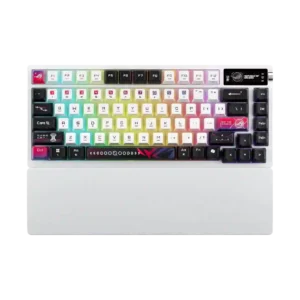
ASUS ROG Azoth X
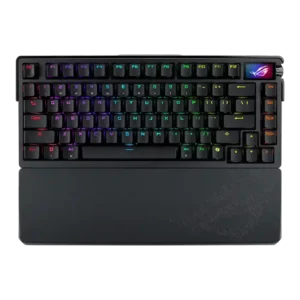
ASUS ROG Azoth Extreme

Quick verdict

What each product is best for

Choose ASUS ROG Azoth X for portability and software quality.

Choose ASUS ROG Azoth Extreme for materials quality and key spacing.

Comparison Takeaways

ASUS ROG Azoth X

Where It Has the Edge

  • portability is 4.5 vs 2.5. Portability had limited positive support, mainly from long battery life making the board better for LAN parties or...
  • software quality is 3.9 vs 2.1. Software quality was sharply mixed: Gear Link was praised as lightweight and easy, while Armoury Crate drew complaints...
  • compatibility is 4.6 vs 3.1. Compatibility was strong thanks to Mac support, PC/Mac switching, MX-style switch compatibility, and south-facing PCB keycap compatibility.
  • backlight brightness is 4.3 vs 3.2. Backlight brightness split reviewers: several found it exceptional or very bright, while one reviewer felt the lighting was...

ASUS ROG Azoth Extreme

Where It Has the Edge

  • materials quality is 4.9 vs 3.2. Materials quality was consistently praised, especially the aluminum body, carbon fiber plate, and premium-feeling construction.
  • key spacing is 5.0 vs 3.5. Key spacing had limited evidence but was praised as part of a very comfortable typing experience.
  • noise level is 4.5 vs 3.2. Noise level was favorable, with reviewers describing the sound as muted or quiet while still satisfying.
  • reliability is 5.0 vs 4.4. Reliability had limited but strong evidence, with one reviewer reporting no stability issues or perceivable latency.
Average score
ASUS ROG Azoth X
4.1
ASUS ROG Azoth Extreme
4.1
portability
ASUS ROG Azoth X
4.5

Portability had limited positive support, mainly from long battery life making the board better for LAN parties or mobile work.

ASUS ROG Azoth Extreme
2.5

Portability was weak because removable feet looked easy to lose and the overall package was treated as heavy and stationary.

software quality
ASUS ROG Azoth X
3.9

Software quality was sharply mixed: Gear Link was praised as lightweight and easy, while Armoury Crate drew complaints about bloat, crashes, and setup friction.

ASUS ROG Azoth Extreme
2.1

Software quality was a repeated concern; Armoury Crate was described as slow, frustrating, poorly laid out, or a least-favorite peripheral app.

materials quality
ASUS ROG Azoth X
3.2

Materials quality was mixed: PBT caps and metal elements helped, while plastic construction and finish complaints hurt the premium impression.

ASUS ROG Azoth Extreme
4.9

Materials quality was consistently praised, especially the aluminum body, carbon fiber plate, and premium-feeling construction.

key spacing
ASUS ROG Azoth X
3.5

Key spacing had limited mixed evidence, with one first-impression review noting the smaller-feeling keys may require adjustment.

ASUS ROG Azoth Extreme
5.0

Key spacing had limited evidence but was praised as part of a very comfortable typing experience.

compatibility
ASUS ROG Azoth X
4.6

Compatibility was strong thanks to Mac support, PC/Mac switching, MX-style switch compatibility, and south-facing PCB keycap compatibility.

ASUS ROG Azoth Extreme
3.1

Compatibility was mixed: aftermarket switch and keycap flexibility was appreciated, but north-facing switches created Cherry-profile and enthusiast-keycap caveats.

noise level
ASUS ROG Azoth X
3.2

Noise level was mixed: dampening helped keep the board acceptable, but several reviewers complained about a loud or thunky spacebar and higher overall volume.

ASUS ROG Azoth Extreme
4.5

Noise level was favorable, with reviewers describing the sound as muted or quiet while still satisfying.

backlight brightness
ASUS ROG Azoth X
4.3

Backlight brightness split reviewers: several found it exceptional or very bright, while one reviewer felt the lighting was underwhelming.

ASUS ROG Azoth Extreme
3.2

Backlight brightness was a common caveat, with reviewers saying the RGB was not the brightest, lackluster, or too dim at maximum.

size and form factor
ASUS ROG Azoth X
4.8

The 75% size was praised as practical, with reviewers calling it a useful and near-perfect form factor for gaming desks.

ASUS ROG Azoth Extreme
4.0

The size and form factor were generally positive for users wanting a compact 75% keyboard with enough dedicated keys, though the heavy build limits mobility.

RGB lighting quality
ASUS ROG Azoth X
4.3

RGB lighting quality was widely praised for its soft glow, strong brightness, and distinctive translucent-side effect, despite a few muted-lighting complaints.

ASUS ROG Azoth Extreme
3.6

RGB lighting quality was mixed: some liked vivid shine-through, while others found the lighting dull, lackluster, or aesthetically too blacked-out.

reliability
ASUS ROG Azoth X
4.4

Reliability was mixed: wireless operation was stable, but software instability and finish scratching hurt confidence.

ASUS ROG Azoth Extreme
5.0

Reliability had limited but strong evidence, with one reviewer reporting no stability issues or perceivable latency.

durability
ASUS ROG Azoth X
4.1

Durability evidence was positive but limited, mainly tied to durable dye-sub legends and premium construction.

ASUS ROG Azoth Extreme
4.7

Durability evidence was positive, with reviewers pointing to premium heft, durable feel, and sturdy magnetic feet.

build quality
ASUS ROG Azoth X
4.3

Build quality was generally sturdy and solid, but the plastic base, premium-price expectations, and scratch-prone finish produced mixed marks.

ASUS ROG Azoth Extreme
4.8

Build quality received the broadest praise, with reviewers repeatedly calling the Azoth Extreme premium, tank-like, solid, and among the best-built gaming keyboards.

typing feel
ASUS ROG Azoth X
4.4

Typing feel was the product’s strongest attribute: most reviewers found it smooth, satisfying, comfortable, and close to custom-keyboard quality, though one found it clunkier.

ASUS ROG Azoth Extreme
4.9

Typing feel was one of the strongest themes, with reviewers repeatedly calling the board excellent, premium, satisfying, and unusually good for daily typing.

macro customization
ASUS ROG Azoth X
4.5

Macro customization was positive where discussed, with reviewers noting easy macro creation and broad remapping support.

ASUS ROG Azoth Extreme
4.0

Macro customization had limited but positive evidence, with one reviewer noting many macro possibilities.

RGB customization
ASUS ROG Azoth X
4.5

RGB customization had limited but positive support, with one reviewer highlighting bold color behavior and preset variety.

ASUS ROG Azoth Extreme
4.0

RGB customization had limited opinionated support, but the available evidence praised adjustable lighting effects through the software and hardware controls.

wrist rest quality
ASUS ROG Azoth X
4.3

The wrist rest was broadly welcomed as comfortable and useful, though some disliked the lack of magnets or found it harder than alternatives.

ASUS ROG Azoth Extreme
3.8

Wrist rest quality was mixed: reviewers liked its comfort, heft, and fit, but criticized wear and the lack of magnetic attachment.

keycap quality
ASUS ROG Azoth X
3.9

Keycap quality was mixed-positive: many liked the texture, printing, durability, and RGB diffusion, while some disliked the smooth or tacky feel.

ASUS ROG Azoth Extreme
3.4

Keycap quality was mixed: reviewers liked PBT durability and shine-through capability, but several disliked the font, texture, or north-facing RGB tradeoff.

gaming performance
ASUS ROG Azoth X
4.2

Gaming performance was positive for casual and mainstream play, but reviewers noted it is less compelling for players seeking Hall-effect or esports-focused features.

ASUS ROG Azoth Extreme
4.7

Gaming performance was praised overall, especially with smooth switches and responsive feel, though one reviewer framed it as a better all-rounder than a pure gaming specialist.

ergonomics
ASUS ROG Azoth X
4.8

Ergonomics were positive where covered, mainly due to the wrist rest and FR4/typing changes that improved comfort.

ASUS ROG Azoth Extreme
4.3

Ergonomics were praised for wrist-rest comfort, softer typing options, and comfortable key spacing, though not every ergonomic element was universally loved.

legend visibility
ASUS ROG Azoth X
4.4

Legend visibility was mostly praised thanks to clear labeling, visible lettering, and sharper printing, though small display icons and stylized legends had caveats.

ASUS ROG Azoth Extreme
4.0

Legend visibility was acceptable rather than exceptional, with one reviewer saying the lighting was just enough to see the legends clearly.

design aesthetics
ASUS ROG Azoth X
4.3

Design aesthetics were divisive but mostly positive: reviewers often liked the bold sci-fi white theme, while acknowledging it will not suit every desk setup.

ASUS ROG Azoth Extreme
4.6

Design aesthetics were praised for premium machining, distinctive metal styling, and a striking look, with only minor taste-based caveats.

frame rigidity
ASUS ROG Azoth X
4.6

Frame rigidity was a strength, with reviewers repeatedly noting no deck flex, no rattle, and a stable body.

ASUS ROG Azoth Extreme
5.0

Frame rigidity was rated very highly because reviewers emphasized the aluminum frame, lack of flex, and tank-like solidity.

sound dampening
ASUS ROG Azoth X
4.4

Sound dampening was a clear strength, with reviewers crediting the foam stack and damping layers for reducing ping and improving sound.

ASUS ROG Azoth Extreme
4.7

Sound dampening was strongly praised for reducing ping, hollow reverberation, and case resonance through foam and silicone layers.

extra gaming features
ASUS ROG Azoth X
3.7

Extra gaming features were mixed: Speed Tap and the OLED were useful or fun, but reviewers questioned the OLED’s value and noted missing Hall-effect features.

ASUS ROG Azoth Extreme
4.0

Extra gaming features were mixed-positive: reviewers liked the OLED, KPS, polling booster, and novelty features, but often questioned practical need.

acoustics
ASUS ROG Azoth X
4.2

Acoustics were usually praised as crisp, deep, creamy, or fantastic, although the spacebar inconsistency kept this from being universally excellent.

ASUS ROG Azoth Extreme
4.5

Acoustics were praised across most reviews for refined, clean, thocky, or enthusiast-level sound, though one reviewer preferred the Q3 Max tone.

wireless performance
ASUS ROG Azoth X
5.0

Wireless performance was one of the strongest areas, with reviewers repeatedly reporting stable, drop-free, low-latency operation.

ASUS ROG Azoth Extreme
4.7

Wireless performance was consistently strong, with reviewers reporting stable, flawless, or very consistent wireless behavior.

battery life
ASUS ROG Azoth X
4.9

Battery life drew near-universal praise, with many reviewers calling it impressive even when RGB or OLED reduced rated endurance.

ASUS ROG Azoth Extreme
4.6

Battery life was praised as excellent, pretty good, incredible, or long-lasting, even when reviewers noted display and RGB settings affect endurance.

switch feel
ASUS ROG Azoth X
4.6

Reviewers generally liked the ROG NX Snow V2 switches, describing them as smooth, consistent, and pleasant, with a few noting they still lack Hall-effect gaming behavior.

ASUS ROG Azoth Extreme
4.9

Reviewers consistently praised the NX Snow switch feel as smooth, lubed, and enjoyable, with only preference-based caveats around linear versus tactile or clicky choices.

key stability
ASUS ROG Azoth X
4.8

Key stability was praised through minimal stem wobble, stable keypresses, and no wobble or echo in typing tests.

ASUS ROG Azoth Extreme
4.6

Key stability was praised for reduced wobble, commendable stability, and strong stabilization across the board.

polling rate
ASUS ROG Azoth X
3.7

Most reviewers found the 1,000Hz polling rate adequate, but several treated the paid 8,000Hz booster requirement as a caveat.

ASUS ROG Azoth Extreme
3.5

Polling rate was mixed: reviewers appreciated 8,000Hz as premium or useful for competitive users, but several said they could not feel a meaningful difference.

ease of switch replacement
ASUS ROG Azoth X
4.7

Switch replacement was praised as straightforward, with reviewers describing access or removal as quick and easy.

ASUS ROG Azoth Extreme
4.5

Ease of switch replacement was positive because reviewers found access or switching straightforward and appreciated included tools.

latency
ASUS ROG Azoth X
5.0

Latency evidence was strongly positive, with reviewers reporting delay-free input and no wireless latency problems in testing.

ASUS ROG Azoth Extreme
4.8

Latency evidence was strongly positive, with reviewers reporting no noticeable lag, near-zero latency, and improved reaction feel.

typing comfort
ASUS ROG Azoth X
4.6

Typing comfort was strong, with reviewers describing long sessions as comfortable, pleasant, and easy.

ASUS ROG Azoth Extreme
4.8

Typing comfort was a major strength, with reviewers calling it excellent for work, comfortable, and satisfying over extended use.

actuation consistency
ASUS ROG Azoth X
4.5

Actuation consistency was praised where discussed, with reviewers noting consistent switch feel and minimal friction across keypresses.

ASUS ROG Azoth Extreme
4.7

Actuation consistency was praised for quick, consistent actuation and direct keystrokes from the NX Snow setup.

volume control
ASUS ROG Azoth X
4.0

Volume control was useful for most reviewers, though the toggle implementation was less satisfying to some than a dedicated knob or roller.

ASUS ROG Azoth Extreme
4.2

Volume control was positive but not deeply tested; reviewers liked the knob's practical volume function while noting some tactility caveats.

hot-swappable switches
ASUS ROG Azoth X
4.2

Hot-swappable switches were seen as a meaningful enthusiast-friendly advantage, especially for users who want to experiment or replace switches.

ASUS ROG Azoth Extreme
4.1

Hot-swappable switches were viewed as useful and convenient, though one reviewer felt the feature is less valuable at such a high prebuilt price.

analog input support
ASUS ROG Azoth X
2.1

Analog input support was consistently marked down because reviewers repeatedly called out the absence of Hall-effect or analog switch features.

ASUS ROG Azoth Extreme
2.0

Analog input support was weak because reviewers pointed to missing analog or Hall-effect functionality as a drawback against speed-focused keyboards.

switch options
ASUS ROG Azoth X
4.0

Switch choice received limited but positive coverage, with reviewers noting the option between tactile/clicky and smooth linear ROG NX V2 switches.

ASUS ROG Azoth Extreme
4.1

Switch options were viewed positively because reviewers noted NX Snow, NX Storm, and mechanical switch choice, though evidence centered on available feel preferences rather than deep testing of every option.

value for money
ASUS ROG Azoth X
2.7

Value for money was the most common concern, with many reviewers calling the high price hard to justify despite the strong typing and wireless experience.

ASUS ROG Azoth Extreme
2.8

Value for money was the central tradeoff: reviewers loved the keyboard's quality but repeatedly questioned or criticized its $500-class price.

customization options
ASUS ROG Azoth X
4.6

Customization options were a major strength, covering disassembly, OLED settings, RGB, macros, web tools, and component tinkering.

ASUS ROG Azoth Extreme
4.5

Customization options were a defining strength, led by the adjustable gasket, hot-swap design, OLED options, and broad software controls.

connectivity
ASUS ROG Azoth X
4.8

Connectivity was highly praised: reviewers liked tri-mode support, dongle convenience, and smooth switching between wireless modes or devices.

ASUS ROG Azoth Extreme
4.8

Connectivity was praised for tri-mode support, seamless wireless setup, Bluetooth flexibility, and USB-port-saving receiver options.

media controls
ASUS ROG Azoth X
4.1

Media controls were generally useful through the OLED and knob, but some reviewers wanted a more conventional or more satisfying control.

ASUS ROG Azoth Extreme
4.1

Media controls were generally liked for tactile or improved knob control, though one reviewer wanted a more tactile feel.

stabilizer quality
ASUS ROG Azoth X
4.5

Stabilizers were consistently praised, with reviewers noting no rattle, tuned large keys, and clatter-free stability.

ASUS ROG Azoth Extreme
4.5

Stabilizer quality was mostly strong, with praise for tuned, smooth, low-rattle stabilizers and one minor backspace rattle caveat.

rapid trigger support
ASUS ROG Azoth X
2.0

Rapid trigger support was a repeated weakness because reviewers noted the Azoth X lacks true rapid trigger or relies on Speed Tap instead.

ASUS ROG Azoth Extreme
2.0

Rapid trigger support was the repeated weakness, with reviewers noting the lack of rapid trigger or Hall-effect-style competitive features.

key responsiveness
ASUS ROG Azoth X
4.6

Key response was consistently praised as snappy, fast, and responsive across typing and gaming, especially with the light linear switches.

ASUS ROG Azoth Extreme
4.6

Responsiveness was praised through fast response, quicker actuation, and improved reaction time in games.

desk space efficiency
ASUS ROG Azoth X
4.5

Desk space efficiency was praised because the keyboard stayed compact without feeling cramped and saved space versus larger layouts.

ASUS ROG Azoth Extreme
4.5

Desk space efficiency was supported by the 75% layout balancing compactness with practical functionality.

layout options
ASUS ROG Azoth X
4.5

Layout evidence was limited but positive, with one reviewer saying the layout made sense and was clearly labeled.

ASUS ROG Azoth Extreme
4.5

Layout options were viewed positively, especially the 75% layout and improved function-row spacing.

cable quality
ASUS ROG Azoth X
4.0

Cable quality had limited positive evidence: reviewers liked the sleeved/braided cable, though one noted its gray color did not match the white board.

ASUS ROG Azoth ExtremeNo score yet
passthrough features
ASUS ROG Azoth XNo score yet
ASUS ROG Azoth Extreme
3.0

Passthrough features had limited support and were only mildly positive because one reviewer called the USB passthrough dongle adapter slightly bulky.

profile management
ASUS ROG Azoth X
4.5

Profile management had limited positive evidence, with one reviewer saying profile switching was quick and easy.

ASUS ROG Azoth ExtremeNo score yet