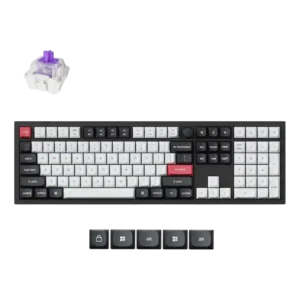
- Cheaper: polling rate and price The reviewer notes Corsair offers 8,000Hz wired polling for a substantially lower MSRP.
ASUS ROG Azoth X Review
Bottom Line
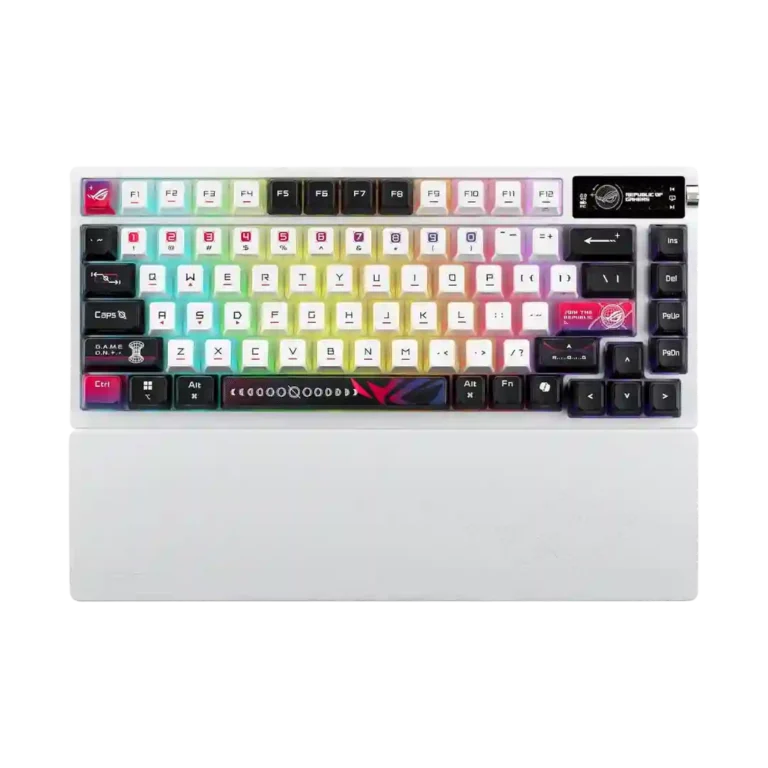
Choose the ASUS ROG Azoth X if you want a premium 75% wireless mechanical keyboard with smooth typing, strong RGB and long battery life. Skip it if you need Hall effect gaming features or better value.
It fits users who want a premium 75% wireless mechanical keyboard with smooth switches, hot-swap flexibility, bright RGB, OLED controls and long battery life. It is especially appealing for Asus ecosystem users or typists who also game.
It is not ideal for buyers chasing maximum competitive gaming features, Hall effect switches, analog input, true rapid trigger hardware or the strongest price-to-performance value. Reviewers also caution that the bold ROG styling and Armoury Crate experience will not suit everyone.
The ASUS ROG Azoth X earns its strongest praise as a typing-first wireless gaming keyboard. Across reviews, the smooth NX Snow V2 switches, hot-swap design, layered sound dampening, strong RGB diffusion, OLED controls and long battery life make it feel more refined than many mainstream gaming boards. The tradeoff is that its premium price sits beside obvious compromises: a plastic lower case, divisive ROG styling, mixed Armoury Crate feedback, no Hall effect switches, no analog input and no true rapid trigger hardware. It is still fast and feature-rich for most players, but reviewers repeatedly frame it as a luxury mechanical board rather than the best competitive-gaming value.
Compared in Reviews
Products reviewers directly compared with this model, grouped into quick takeaways.
- Cheaper: price justification The reviewer notes the Azoth X costs much more than the Keychron K2 HE and must justify that premium.
- Better: premium keyboard value At the same price, the reviewer considers Razer's competing 75% board the better package.
Feature Scorecards
Pros
-
Battery life drew strong praise, with reviewers citing 1,600-hour claims, multi-week use, and long runtime even with lighting enabled.
-
Hot-swap support was repeatedly confirmed through hot-swappable PCBs or sockets that allow switch changes without soldering.
-
Wireless performance was repeatedly praised as strong, stable, low latency, and drop-free over 2.4GHz or SpeedNova.
-
Connectivity was a clear strength, with repeated support for wired USB-C, Bluetooth, 2.4GHz wireless, and dongle or Omni receiver use.
-
Sound dampening is a strength, with reviewers repeatedly citing multiple foam or damping layers, gasket mounting, and reduced ping or vibration.
-
Latency evidence was positive, especially for SpeedNova and 2.4GHz wireless, with reviewers noting no lag or ultra-low-latency behavior.
-
Compatibility evidence is strong for Mac support, PC/Mac switching, MX-style or aftermarket keycap compatibility, and the south-facing PCB.
-
Frame rigidity scored well overall, with reviewers citing no deck flex, no rattle, torsional rigidity, and a solid top plate.
-
Key stability was supported by minimal stem wobble, stable large keys, and little wobble or echo during typing.
-
Typing comfort was strong where mentioned, with reviewers calling it comfortable, pleasant, and suitable for long sessions.
-
Switch replacement appears easy, with reviewers citing included pullers, hot-swap sockets, and quick swap experiences.
-
Switch feel was widely praised for smooth, pre-lubed linear action, consistent travel, and minimal scratchiness, though one reviewer found the board clunkier than other Asus models.
-
Customization is broad, covering key remapping, OLED adjustments, RGB changes, hot-swapping, disassembly, and Gear Link or Armoury Crate configuration.
-
Key responsiveness was praised across reviews, with switches described as snappy, responsive, quick, and registering commands without delay.
-
Supported reviews describe the switches as consistent across presses or switch-to-switch, with even keystrokes and responsive action.
-
Per-key lighting control has limited direct evidence, with one review explicitly listing per-key RGB among the gaming essentials.
-
Reliability evidence is limited but positive for the wireless connection, with one review reporting no connection interruptions during testing.
-
Typing feel was one of the best-supported strengths, with most reviewers calling it smooth, pleasant, satisfying, or fantastic despite a few texture and noise caveats.
-
The compact case was credited with saving desk space and avoiding excessive footprint while still keeping useful keys.
-
Ergonomics benefit from adjustable feet and the silicone wrist rest, with reviewers calling the wrist support useful for comfort.
-
The 75% layout was described as sensible, compact, and not cramped, with one reviewer calling it the perfect size.
-
Macro support is present through Armoury Crate, Gear Link, and FN or software customization according to multiple reviewers.
-
The form factor is consistently described as compact 75%, giving function-row and arrow-key access without a full-size footprint.
-
RGB lighting quality was widely praised for strong diffusion, bright output, soft glow, and visually distinctive translucent keycaps, though one reviewer found it muted.
-
Reviewers mostly liked the Azoth X's acoustics, describing good, crisp or creamy sound, though some noted the spacebar or overall tuning was not quite sublime.
-
RGB customization is supported through software or OLED controls, but direct evidence is thinner than evidence for lighting quality.
-
Media controls are a major recurring feature, usually handled through the OLED screen and three-way knob for playback, brightness, and other controls.
-
Build quality was generally solid, sturdy, or robust, though some reviewers felt the plastic-heavy construction weakened the premium impression.
-
Stabilizers were mostly praised as lubed, tuned, rattle-free, or stable, though one reviewer disliked the spacebar's clunkier feel.
-
Backlight brightness was split: some reviewers found the lighting exceptional and bright, while another felt the effect was underwhelming.
-
Onboard memory has limited but direct support, with one reviewer noting that profiles or settings can be saved after setup.
-
Gaming performance was considered responsive and capable for most users, but not the most advanced choice for esports or Hall effect-focused gaming.
-
The silicone wrist rest was generally welcomed as comfortable, sturdy, and helpful, though several reviewers noted it is not magnetic.
-
Switch options include Asus linear Snow V2 and clicky or Storm V2 choices, plus hot-swap support for trying other mechanical switches.
-
Legend visibility was mostly positive due to clear labels, front legends, and high contrast, though small OLED icons could be hard to read.
-
The included cable was described as braided, sleeved, robust, and useful for charging or wired use, though one reviewer wished it matched the white keyboard.
-
Speed Tap was the recurring extra gaming feature, but reviewers framed it as situational, controversial, or a workaround rather than a full Hall effect substitute.
-
Keycap quality drew broad attention: reviewers liked the PBT, dye-sub, sharp legends, and RGB diffusion, but some disliked the texture or gamer styling.
-
Portability evidence is limited, but one review connected the long battery life to LAN parties and working on the go.
-
Profile management evidence is limited to saved profiles or settings through onboard memory after software setup.
-
Volume control is supported through the OLED/knob interface, though one reviewer wanted more straightforward dedicated multimedia controls.
-
Materials quality is mixed: reviewers note aluminum or metal top parts and high-quality materials, but also plastic bases that reduce the premium feel.
-
The base polling rate is 1,000Hz, with several reviewers noting optional 8,000Hz support through a separate booster; most considered 1,000Hz adequate.
-
Software quality is mixed: Gear Link drew praise for being lightweight and web-based, while Armoury Crate was criticized for updates, weight, crashes, or bloat.
-
Key spacing evidence is limited and mixed: one reviewer found movement between keys slightly less accurate, while another noticed smaller-feeling keys.
-
Noise level is generally well controlled with little ping or rattle, though some reviewers found the keyboard loud or the spacebar thunky.
-
Durability evidence is mixed: one review praised PBT wear resistance, while another found the white finish easy to scratch.
Cons
-
Value for money was the most repeated concern, as reviewers repeatedly pointed to the high price and cheaper or more advanced alternatives.
-
Reviewers consistently treated analog input as a missing feature because the Azoth X uses mechanical switches rather than Hall effect or analog switches.
-
Rapid trigger support is a clear weakness: multiple reviewers note there is no rapid trigger or Hall effect-style hardware feature.
Compared With Category Average
Compared with other Gaming Keyboard, this product is above average in wrist rest quality, hot-swappable switches, wireless performance, below average in rapid trigger support, analog input support, value for money.
| Attribute | This product | Category average | Difference |
|---|---|---|---|
| rapid trigger support | 1.0 | 3.5 | -2.5 |
| analog input support | 1.1 | 3.2 | -2.1 |
| wrist rest quality | 4.3 | 2.7 | +1.6 |
| hot-swappable switches | 4.8 | 3.2 | +1.5 |
| wireless performance | 4.7 | 3.2 | +1.5 |
| value for money | 2.3 | 3.6 | -1.3 |
| ease of switch replacement | 4.6 | 3.4 | +1.2 |
| battery life | 4.8 | 3.9 | +0.8 |
FAQ
Is the ASUS ROG Azoth X good for typing?
Yes. Reviewers repeatedly praised the smooth NX Snow V2 switches, dampened sound, and comfortable typing feel, though some disliked the spacebar sound or smoother keycap texture.
Does the ASUS ROG Azoth X have Hall effect or analog switches?
No. Reviewers specifically noted that it lacks Hall effect switches, analog input, and true rapid trigger hardware, even though it includes Speed Tap.
How is the wireless performance?
Wireless performance was one of the strongest areas. Reviewers reported stable 2.4GHz or SpeedNova use, low latency, no dropouts, and flexible Bluetooth support.
Is the RGB lighting good?
Mostly yes. Reviews praised the three-sided translucent keycaps for strong diffusion, brightness, and a soft glow, though one reviewer felt the real-world lighting was more muted than expected.
Can you customize the switches and software settings?
Yes. The keyboard is hot-swappable, includes switch tools, and supports remapping, macros, OLED tweaks, RGB settings, and Gear Link or Armoury Crate configuration.
Is it worth the high price?
That was the biggest concern. Reviewers liked the keyboard, but several said cheaper rivals or Hall effect alternatives offer stronger value for gaming-focused buyers.
Consider This Instead
If you want better rapid trigger support
Choose Keychron K4 HE. It scores 4.9 vs 1.0 for rapid trigger support, with a 4.1 overall score.
If you want better analog input support
Choose Keychron Q5 HE. It scores 4.6 vs 1.1 for analog input support, with a 4.4 overall score.
If you want better value for money
Choose McHose GX87 Keyboard. It scores 4.9 vs 2.3 for value for money, with a 4.2 overall score.
If you want better polling rate
Choose Keychron Q3 HE 8K. It scores 5.0 vs 3.9 for polling rate, with a 4.5 overall score.
Overall Top Gaming Keyboard Alternatives
Best for 8K polling, magnetic-switch gaming control, premium build, and deep web customization. Skip it if you need broad switch compatibility, USB passthrough, a wrist rest, or a portable keyboard.
Pros: latency, polling rate
Cons: portability, switch options
Good if you want a premium full-size Hall Effect keyboard with smooth switches, strong gaming controls, and quiet acoustics. Skip it if you need a portable, budget, or broadly switch-compatible...
Pros: key stability, frame rigidity
Cons: portability, switch options
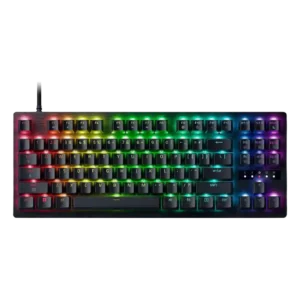
Best for a premium, quiet Hall Effect TKL with strong wireless, software, and gaming features. Skip it if price, switch flexibility, USB passthrough, or an included wrist rest matter most.
Pros: rapid trigger support, typing feel
Cons: switch options, portability
Best for a premium 96% metal keyboard with Hall Effect tuning, strong wireless, and excellent typing feel. Skip it for travel, bargain pricing, or maximum esports specs.
Pros: build quality, frame rigidity
Cons: portability, switch options