Compare Logitech G915 X Lightspeed vs Razer Joro

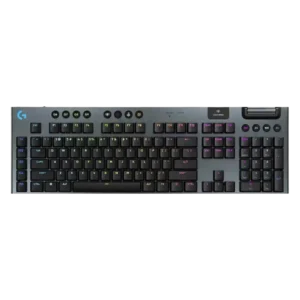
P1 Logitech G915 X Lightspeed
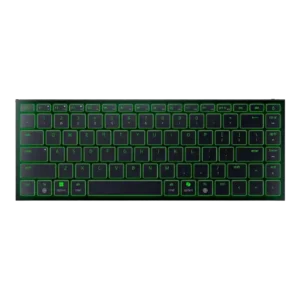
P2 Razer Joro

Comparison Takeaways

Logitech G915 X Lightspeed

Where It Has the Edge

  • per-key lighting control is 4.6 vs 2.4. Per-key lighting control was well supported, with reviewers praising individual key lighting and detailed color control through G...
  • latency is 4.7 vs 2.8. Latency was consistently praised in Lightspeed or wired use, with reviewers reporting no noticeable lag and very low...
  • wireless performance is 4.7 vs 2.9. Wireless performance was one of the strongest positives, with reviewers repeatedly describing Lightspeed as low-latency, stable, and close...
  • switch options is 4.1 vs 2.5. Switch options were appreciated for offering tactile, linear, and clicky choices, though buyers must choose before purchase.

Razer Joro

Where It Has the Edge

  • rapid trigger support is 4.0 vs 2.7. PCWorld explicitly tied Snap Tap to rapid-trigger-style support, giving the Joro credit for that gaming feature.
  • onboard memory is 4.5 vs 3.3. Macworld praised the ability to save function changes directly on the keyboard, supporting onboard memory usefulness.
  • noise level is 4.5 vs 3.4. Noise level was a strength, with reviewers describing the Joro as quiet, restrained, and suitable for offices, shared...
  • compatibility is 4.5 vs 3.4. Compatibility was a major strength, especially for users switching between Windows, macOS, mobile devices, and multiple paired systems.
Average score
Product 1: Logitech G915 X Lightspeed
4.0
Product 2: Razer Joro
3.8
acoustics
Product 1: Logitech G915 X Lightspeed
3.3

Reviewers were split on acoustics: tactile/clicky sounds were sometimes satisfying or improved, but rattling, ping, and membrane-like notes bothered enthusiasts.

Product 2: Razer Joro
4.3

Reviewers who discussed sound found the Joro's scissor switches pleasant, leaning deeper and subtly satisfying rather than loud or clicky.

actuation consistency
Product 1: Logitech G915 X Lightspeed
4.3

Actuation consistency received limited but positive evidence, with the linear switches described as smooth and consistent.

Product 2: Razer Joro
4.6

PCMag found the typing feel consistent across the whole board, supporting a strong actuation-consistency score.

analog input support
Product 1: Logitech G915 X Lightspeed
2.5

Analog input support was a weakness because reviewers noted competing boards offered analog functionality while the G915 X did not.

Product 2: Razer Joro
2.6

GamesRadar framed the Joro as missing the fancier analog-system actuation features found elsewhere in Razer's lineup.

backlight brightness
Product 1: Logitech G915 X Lightspeed
4.6

Backlighting brightness was praised as bright and useful, especially with per-key lighting, though it directly affected battery expectations.

Product 2: Razer Joro
4.2

GamesRadar found the RGB strong enough that half brightness still looked fantastic, though this was discussed alongside battery impact.

battery life
Product 1: Logitech G915 X Lightspeed
4.4

Battery life was one of the strongest recurring positives, usually described as solid to excellent depending on RGB brightness.

Product 2: Razer Joro
3.5

Battery impressions were split: several reviewers praised all-day or weeklong use with modest lighting, while others criticized short runtime with RGB enabled.

build quality
Product 1: Logitech G915 X Lightspeed
4.3

Build quality was generally praised for a sturdy, premium body, though a few reviewers felt it was only mediocre or less premium than rivals.

Product 2: Razer Joro
4.6

Build quality was one of the strongest themes, with reviewers repeatedly praising the rigid, sturdy construction despite the ultra-thin chassis.

cable quality
Product 1: Logitech G915 X Lightspeed
4.2

Cable feedback was mostly positive for length, USB-C charging, and acceptable quality, with one reviewer noting the loss of the old braided cable.

Product 2: Razer Joro
3.9

The included braided USB-C cable was generally appreciated as premium, though one reviewer noted practical limits from its short USB-C-to-C design.

compatibility
Product 1: Logitech G915 X Lightspeed
3.4

Compatibility was mixed: reviewers liked Windows, macOS, Bluetooth, and USB use, but called out missing Bolt/Unifying support, Linux gaps, and limited Bluetooth switching.

Product 2: Razer Joro
4.5

Compatibility was a major strength, especially for users switching between Windows, macOS, mobile devices, and multiple paired systems.

connectivity
Product 1: Logitech G915 X Lightspeed
4.5

Connectivity was widely praised for tri-mode flexibility and easy switching, with the main caveat being limited multi-device Bluetooth support.

Product 2: Razer Joro
4.0

Connectivity was praised for easy pairing and device switching, but Bluetooth-only wireless and dongle omissions created caveats.

customization options
Product 1: Logitech G915 X Lightspeed
4.6

Customization options were a major strength thanks to remapping layers, G-Shift, Keycontrol, lighting controls, and broad key assignment options.

Product 2: Razer Joro
4.0

Customization was often useful through Synapse, remapping, lighting, and profiles, though some reviewers found limits around remappable keys and software dependence.

design aesthetics
Product 1: Logitech G915 X Lightspeed
4.6

Design aesthetics were consistently praised for a sleek, premium, low-profile look that fit both gaming and professional desks.

Product 2: Razer Joro
4.6

Design reactions were strongly positive, with reviewers calling the Joro stunning, clean, minimalist, gorgeous, and premium-looking.

desk space efficiency
Product 1: Logitech G915 X Lightspeed
3.8

Desk space efficiency depended on layout: TKL models were praised for saving space, while the full-size model was criticized for taking more room.

Product 2: Razer Joro
4.5

Reviewers liked how the compact 75% layout preserved useful controls while saving space and staying productivity-friendly.

durability
Product 1: Logitech G915 X Lightspeed
4.6

Durability evidence focused on improved PBT keycaps and stronger long-term wear resistance, with reviewers expecting better resistance to shine and damage.

Product 2: Razer Joro
4.5

One long-term tester found the Joro held up without visible wear after several weeks, supporting a positive durability score.

ease of switch replacement
Product 1: Logitech G915 X Lightspeed
1.8

Ease of switch replacement was a clear weakness because reviewers repeatedly criticized soldered, non-hot-swappable switches.

Product 2: Razer Joro
No score yet
ergonomics
Product 1: Logitech G915 X Lightspeed
3.7

Ergonomics were mixed: low-profile typing and adjustable feet helped some reviewers, while shallow tilt or sensitivity frustrated others.

Product 2: Razer Joro
2.9

Ergonomics were mixed to negative overall: some liked the flat angle, but many criticized the lack of adjustable feet and fatigue over time.

extra gaming features
Product 1: Logitech G915 X Lightspeed
4.5

Extra gaming features received limited but positive evidence, especially for configurable Game Mode and key blocking.

Product 2: Razer Joro
4.1

Gaming extras such as Snap Tap, NKRO, and gaming-mode features were appreciated, although they did not fully overcome the keyboard's travel-first limits.

frame rigidity
Product 1: Logitech G915 X Lightspeed
4.6

Frame rigidity was one of the strongest areas, with reviewers repeatedly reporting little to no flex and a rigid aluminum-reinforced frame.

Product 2: Razer Joro
4.7

Frame rigidity was consistently praised, with multiple reviewers noting almost no flex or bending from the thin deck.

gaming performance
Product 1: Logitech G915 X Lightspeed
4.6

Gaming performance was broadly positive, with reviewers describing the keyboard as responsive, capable, and suitable even for competitive play, despite some rival-performance caveats.

Product 2: Razer Joro
3.2

Gaming performance was context-dependent: reviewers found it acceptable or speedy for casual use, but weak for serious or PC-focused competitive gaming.

hot-swappable switches
Product 1: Logitech G915 X Lightspeed
1.8

Hot-swappable switch support was consistently criticized because the switches are soldered and cannot be easily replaced.

Product 2: Razer Joro
No score yet
keycap quality
Product 1: Logitech G915 X Lightspeed
4.4

Keycap quality was mostly praised for PBT texture, durability, and resistance to shine, though some reviewers still found the feel cheap or scratchy.

Product 2: Razer Joro
3.3

Keycap feedback was mixed: reviewers liked smooth, comfortable caps and etched legends, but several complained about smudges, fingerprints, or clammy feel.

key responsiveness
Product 1: Logitech G915 X Lightspeed
4.3

Key responsiveness was generally praised for shallow actuation and snappy inputs, though one negative reviewer found the tactile switch actuation unclear.

Product 2: Razer Joro
3.5

Responsiveness varied by use case, with some reviewers reporting quick input while others found the keys slow or less responsive than mechanical alternatives.

key spacing
Product 1: Logitech G915 X Lightspeed
3.7

Key spacing was mixed: roomy spacing helped typing for some, while the left-side G keys and cramped TKL layout caused awkwardness for others.

Product 2: Razer Joro
3.6

Key spacing drew mixed reactions: some reviewers liked the spacing and full-size keys, while others found the compact layout cramped or hard to navigate.

key stability
Product 1: Logitech G915 X Lightspeed
4.5

Key stability improved over prior models, with reviewers noting reduced wobble, stable keys, and less rattling.

Product 2: Razer Joro
4.6

PCMag specifically found no wobble or mush in the keys, supporting a strong key-stability score.

latency
Product 1: Logitech G915 X Lightspeed
4.7

Latency was consistently praised in Lightspeed or wired use, with reviewers reporting no noticeable lag and very low input delay.

Product 2: Razer Joro
2.8

Latency was a key concern outside wired mode, with multiple reviewers calling out Bluetooth input delay or the lack of low-latency wireless support.

layout options
Product 1: Logitech G915 X Lightspeed
4.4

Layout options received limited positive evidence, with the full-size layout described as sensible and complete.

Product 2: Razer Joro
3.4

Layout opinions split sharply: some reviewers found the 75% layout efficient, while others disliked the small Shift, spacebar, or right-side key choices.

legend visibility
Product 1: Logitech G915 X Lightspeed
3.6

Legend visibility was mixed: some reviewers found the legends legible and durable, while others said visibility suffers when RGB is off or uneven.

Product 2: Razer Joro
3.8

Legend visibility was mostly positive thanks to readable fonts and illuminated legends, but one reviewer missed backlighting on secondary functions.

macro customization
Product 1: Logitech G915 X Lightspeed
4.6

Macro customization was a major strength, especially on the full-size model with G keys, app-specific macros, and deep assignment layers.

Product 2: Razer Joro
3.8

Macro customization was useful where Synapse and onboard tools allowed it, but reviewers criticized the lack of on-the-fly macro recording and limited remap space.

materials quality
Product 1: Logitech G915 X Lightspeed
4.3

Materials quality was mostly praised for aluminum, PBT, and premium finishes, though one reviewer felt the light body still seemed plasticky.

Product 2: Razer Joro
4.3

Materials quality was mostly strong thanks to the aluminum top plate, though one reviewer found the plastic base comparatively cheap.

media controls
Product 1: Logitech G915 X Lightspeed
4.2

Media controls were usually praised, especially the dedicated top controls, though some reviewers found them wasteful or less tactile than main switches.

Product 2: Razer Joro
3.3

Media controls worked through function layers and were reachable for some, but other reviewers found their placement awkward or annoying.

noise level
Product 1: Logitech G915 X Lightspeed
3.4

Noise level was mixed: some found tactile switches muted or mic-friendly, while others called the board clicky, loud, or mushy-sounding.

Product 2: Razer Joro
4.5

Noise level was a strength, with reviewers describing the Joro as quiet, restrained, and suitable for offices, shared spaces, or travel.

onboard memory
Product 1: Logitech G915 X Lightspeed
3.3

Onboard memory was mixed: one reviewer valued portable saved profiles, while another found onboard support too limited for complex macros.

Product 2: Razer Joro
4.5

Macworld praised the ability to save function changes directly on the keyboard, supporting onboard memory usefulness.

per-key lighting control
Product 1: Logitech G915 X Lightspeed
4.6

Per-key lighting control was well supported, with reviewers praising individual key lighting and detailed color control through G Hub.

Product 2: Razer Joro
2.4

Per-key lighting control was a recurring limitation because reviewers noted single-zone RGB and no individual key effects.

polling rate
Product 1: Logitech G915 X Lightspeed
3.3

Polling rate was mixed: one reviewer found 1,000 Hz steady and suitable, while another criticized it as capped versus newer high-end boards.

Product 2: Razer Joro
4.0

A wired 1,000Hz mode was praised as a useful fallback when battery or wireless gaming performance mattered.

portability
Product 1: Logitech G915 X Lightspeed
3.9

Portability was better on TKL models, which reviewers said could travel easily, while full-size and fragile-feeling concerns reduced enthusiasm.

Product 2: Razer Joro
4.6

Portability was the strongest consensus point: reviewers repeatedly praised the thin, light, bag-friendly body for travel and mobile work.

profile management
Product 1: Logitech G915 X Lightspeed
4.5

Profile management was generally useful for app and game-specific setups, but some dependence on G Hub remained a limitation.

Product 2: Razer Joro
4.1

Profile management was helpful through onboard profiles, although one reviewer still found broader customization flexibility limited.

rapid trigger support
Product 1: Logitech G915 X Lightspeed
2.7

Rapid trigger support was a weakness because reviewers noted the G915 X lacks rapid trigger while competitors offer it.

Product 2: Razer Joro
4.0

PCWorld explicitly tied Snap Tap to rapid-trigger-style support, giving the Joro credit for that gaming feature.

reliability
Product 1: Logitech G915 X Lightspeed
4.1

Reliability evidence was generally positive for spill survival and issue-free use, though wake-from-sleep sluggishness was a minor frustration.

Product 2: Razer Joro
4.1

Reliability was generally positive for device switching and daily use, with only isolated connection caveats.

RGB customization
Product 1: Logitech G915 X Lightspeed
4.2

RGB customization was strong overall, with many lighting effects and per-key options, but some reviewers found G Hub lighting tools limited or underwhelming.

Product 2: Razer Joro
3.9

RGB customization was considered useful through Synapse and onboard controls, though it remained constrained by single-zone behavior.

RGB lighting quality
Product 1: Logitech G915 X Lightspeed
4.3

RGB lighting quality was mostly praised for brightness and evenness, though uneven legend illumination and reliance on RGB for visibility were drawbacks.

Product 2: Razer Joro
4.3

RGB lighting quality was widely praised as vibrant, beautiful, bright, colorful, and unusually polished for this kind of travel keyboard.

size and form factor
Product 1: Logitech G915 X Lightspeed
4.1

Size and form factor were praised for slimness and compact TKL efficiency, but some reviewers still found layouts cramped or moderately sized.

Product 2: Razer Joro
4.7

The slim, light form factor impressed reviewers, with hands-on comments emphasizing how thin and capable the keyboard felt.

software quality
Product 1: Logitech G915 X Lightspeed
3.6

Software quality was highly mixed: some reviewers liked G Hub's interface and power, while others called it awful, convoluted, unintuitive, or limited.

Product 2: Razer Joro
3.9

Software quality was mixed: reviewers liked Synapse's growing Mac support and clearer layout, but some encountered availability or dependency frustrations.

sound dampening
Product 1: Logitech G915 X Lightspeed
2.2

Sound dampening was a weakness in the limited evidence, with one reviewer saying Logitech lacked the foam and tuning used by more enthusiast boards.

Product 2: Razer Joro
2.0

TechRadar specifically criticized the lack of dampening, saying the keys could feel harsh under heavier typing.

stabilizer quality
Product 1: Logitech G915 X Lightspeed
4.8

Stabilizer quality received limited but strong praise, with the space bar described as solid no matter where it was pressed.

Product 2: Razer Joro
No score yet
switch feel
Product 1: Logitech G915 X Lightspeed
4.1

Switch feel was mixed but leaned positive: many liked the tactile, smooth, or balanced feel, while detractors found the switches mushy or resistant.

Product 2: Razer Joro
4.1

Switch feel was divisive but often positive for scissor switches, with praise for crisp tactility offset by complaints of sluggishness from critics.

switch options
Product 1: Logitech G915 X Lightspeed
4.1

Switch options were appreciated for offering tactile, linear, and clicky choices, though buyers must choose before purchase.

Product 2: Razer Joro
2.5

Switch options were a limitation because the Joro is not mechanical, which reviewers said may deter buyers who want that feel.

typing comfort
Product 1: Logitech G915 X Lightspeed
4.2

Typing comfort was generally positive for low-profile use and long sessions, but cramped layout, shallow angle, and enthusiast feel concerns created mixed opinions.

Product 2: Razer Joro
3.5

Typing comfort ranged from comfortable long writing sessions to fatigue and frustration, mostly depending on angle and layout tolerance.

typing feel
Product 1: Logitech G915 X Lightspeed
4.2

Typing feel was often praised as satisfying and tactile, though one negative reviewer found it poor and mushy.

Product 2: Razer Joro
4.1

Typing feel was generally pleasant for a slim scissor-switch keyboard, though not all reviewers found it satisfying versus mechanical alternatives.

value for money
Product 1: Logitech G915 X Lightspeed
3.5

Value for money was the most divided area: some reviewers said the feature set justified the price, while others found it overpriced against rivals.

Product 2: Razer Joro
2.9

Value for money was one of the weakest areas, with many reviewers calling the Joro expensive unless portability is the buyer's top priority.

volume control
Product 1: Logitech G915 X Lightspeed
4.4

Volume control was consistently praised for the large smooth roller, its responsiveness, and its daily convenience.

Product 2: Razer Joro
3.2

Volume control opinions split: Macworld liked one-hand Fn access, while a comparison reviewer disliked the volume placement.

wireless performance
Product 1: Logitech G915 X Lightspeed
4.7

Wireless performance was one of the strongest positives, with reviewers repeatedly describing Lightspeed as low-latency, stable, and close to wired.

Product 2: Razer Joro
2.9

Wireless performance was mixed: Bluetooth was often stable for productivity, but sleep delays, input lag, and competitive-gaming limitations were repeated concerns.

wrist rest quality
Product 1: Logitech G915 X Lightspeed
3.1

Wrist rest feedback was mixed because the low profile reduced the need for one, but multiple reviewers disliked that no palm or wrist support was included.

Product 2: Razer Joro
No score yet