Reviews describe a controlled, mature sound that avoids the hollow, pingy character common on gaming boards, and one reviewer says it sounds better than expected.
Reviews describe a pleasant overall sound with foam reducing ping and rattle, though one review still heard some plasticky rattle.
One review specifically calls out very consistent key response, supporting precise Hall-effect actuation behavior across the board.
One review found the switch feel reasonably consistent across all keys.
Analog-style input is absent; one reviewer explicitly states that there is no analog mode here.
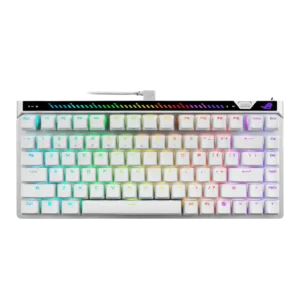
RGB backlighting is described as bright and evenly lit in the reviews that mention brightness directly.
Backlighting is visible and generally attractive, but brightness is not class-leading and some reviews found it dimmer than top rivals.
Battery life is good rather than class-leading, with several tests clustering around the mid-30s to mid-40s hours with lighting and longer runtimes possible with power-saving settings.
Across reviews, the keyboard is repeatedly described as solid, premium, and well assembled, with strong fit and finish.
Despite the plastic chassis, reviews consistently describe the board as solid, sturdily built, and better made than the price might suggest.
One review says the included L-shaped cable works but looks awkward in a typical desk setup.
The included USB-C cable is described as rubberized, flexible, and perfectly serviceable for charging or wired use.
The web-based setup is praised for working across different computers, giving the board good multi-system flexibility.
Compatibility evidence includes macOS support, pairing with compatible Logitech Lightspeed devices, multi-device use, and support for aftermarket low-profile keycaps.
Connectivity is stable and fast over a wired connection, but several reviewers criticize the lack of any wireless option.
Tri-mode connectivity is a recurring strength, with 2.4GHz Lightspeed, Bluetooth, and wired USB-C all repeatedly confirmed.
Customization is a major strength, with reviewers praising easy tuning for actuation, rapid trigger, mappings, and other settings.
Customization is a major strength, with G Hub and KEYCONTROL providing deep remapping, layering, and setup flexibility beyond basic lighting tweaks.
The 75% layout is repeatedly framed as compact while still preserving important keys, which helps desk efficiency.
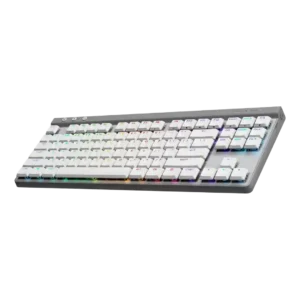
The TKL layout is explicitly praised for freeing up desk space.
Durability looks strong from the available evidence, with wear-resistant keycaps and wear-free magnetic switch operation highlighted.
PBT caps and, in one review, a replaceable battery help the G515 make a stronger long-term durability case than many wireless boards.
Switch swapping is supported, but reviewers note that compatible magnetic options are limited, which reduces modding freedom.
Switch replacement is limited because the switches are explicitly described as not hot-swappable.
General comfort is good, but the rear touchbar gets mixed ergonomic feedback because some reviewers find it awkward to reach.
Low-profile height and adjustable tilt contribute to a comfortable, easy-to-reach typing posture.
The board offers a rich competitive feature set, including rapid trigger, SOCD-style features, on-board controls, and fast tuning tools.
Game Mode and Logitech-specific extras are present, but some reviews still felt the board lacked more advanced gaming hardware features.
Rigidity is a clear strength, with reviewers describing the chassis as solid and free from flex.
Despite its slim plastic build, the frame is described as hard to bend with very little flex.
Gaming performance is one of the clearest positives, with reviewers praising fast movement, precise control, and very responsive feel.
Gaming performance is generally strong and responsive, though the board is not positioned as the most hardcore esports feature set.
Hot-swap support is present, but the practical upside is reduced by limited magnetic switch compatibility.
Multiple reviews explicitly note that the switches are not hot-swappable.
Keycaps are consistently praised for their feel and quality, with multiple reviews highlighting PBT caps and solid finishing.
Double-shot PBT keycaps are a repeated highlight for texture, grip, and durability, though some reviewers still criticized flatness, looseness, or smoothness.
Input response is described as immediate and controlled, giving the keys a very quick feel in play.
Short-travel switches and responsive action make inputs feel quick across both work and gaming.
Key spacing is described as familiar and close to a standard ANSI layout, which eases adaptation.
Key stability is strong in the reviews, with minimal wobble and solid larger-key behavior called out directly.
Key stability is mostly positive, with some reviews praising minimal wobble and others noting more movement than ideal.
Wired performance is described as latency-free, matching the product’s competitive focus.
2.4GHz Lightspeed is repeatedly described as low-latency or lag-free, while Bluetooth carries the usual latency penalty.
The 75% layout is widely praised for balancing compact size with useful extras like arrows, F-keys, and a small nav cluster.
The board sticks to a familiar TKL layout rather than offering alternate size variants, and reviewers found that layout practical and easy to learn.
Legend styling is divisive: reviewers note clean alignment and shine-through support, but several dislike the aggressive ROG font.
Shine-through legends are generally easy to read, but a few reviews noted uneven illumination or incomplete legend coverage on some keys.
Macro and advanced mapping support are available through Gear Link, including macros and more advanced remap functions.
Macro and layer functionality is deep, with several reviews highlighting the ability to assign up to 15 functions per key.
Materials are generally well regarded, especially the metal top construction, though some reviewers still note mixed-material tradeoffs at this price.
Materials quality lands above expectations for the price, with sturdy plastics and a generally premium-feeling finish.
Media control is well covered through the touch area and physical controls, though some users find the touchbar less intuitive than the wheel.
Media functions exist, but mostly as secondary Fn commands rather than dedicated hardware controls.
Noise control is a strength, with reviewers describing restrained acoustics and reduced ping or hollowness.
The board is repeatedly described as quiet or audibly muted for a mechanical keyboard.
Onboard or built-in memory is confirmed for storing settings, profiles, or lighting when moving between systems.
One review explicitly notes the absence of a USB passthrough port.
Per-key RGB control is directly supported through Logitech software.
Polling rate support is a headline feature, with multiple reviews calling out the 8K capability.
One review explicitly confirms a 1,000 Hz wireless polling rate.
Portability is helped by the included carrying case, which reviewers call out as a useful travel extra.
The slim TKL shape, dongle storage, and travel-friendly framing make the keyboard easy to carry and use in tighter spaces.
Profiles can be stored in the cloud, giving the board practical profile management across multiple systems.
Reviews describe multiple profiles, presets, community profile sharing, or per-program configs, giving the board solid profile-management flexibility.
Rapid Trigger support is heavily praised and positioned as one of the keyboard’s standout competitive features.
A review explicitly flags the absence of rapid-trigger-style features.
Reliability looks strong from the available evidence, with wear-free switch design and stable in-game performance both highlighted.
Connection stability and day-to-day reliability are called out as strong.
RGB customization is well supported, with reviewers noting flexible lighting controls through both software and on-board inputs.
G Hub allows custom RGB effects and animations rather than limiting users to presets alone.
Lighting quality is generally praised, with reviewers calling the RGB well integrated, bright, and evenly lit.
RGB looks clean and appealing overall, but several reviews note uneven legends or less-than-ideal consistency across the lighting.
Reviewers repeatedly present the form factor as a sweet spot, offering compact dimensions without giving up everyday usability.
The 22mm-tall low-profile TKL form factor is one of the keyboard’s clearest strengths.
Gear Link is consistently viewed as a strong point: it is lighter, faster, and easier to live with than older Armoury Crate workflows.
G Hub is broadly seen as capable and feature-rich, with strong programming tools, though some reviews imply a learning curve.
Internal dampening is a recurring positive, with multiple reviews pointing to layered foam and reduced resonance.
Foam and layered dampening are repeatedly cited as meaningful contributors to the quieter sound.
Stabilizers are praised for low rattle and a solid feel on larger keys.
Direct stabilizer evidence is positive, with one review saying they do their job well and keep wobble low on larger keys.
Switch feel is widely praised for being smooth and controlled, though some reviewers find the feel lighter or less engaging than other HE options.
Switch feel is generally praised as tactile, smooth, and satisfying for a low-profile board.
ROG offers multiple compatible magnetic switch options, but reviewers still describe the overall ecosystem as limited.
Buyers get tactile or linear switch choices, but the scored reviews do not support a third clicky option.
Typing comfort is strong overall, with reviewers saying long sessions stay comfortable and low-fatigue once settings are dialed in.
Typing comfort is consistently strong once users adjust to the low-profile form factor.
Typing feel is generally described as controlled, easy, and satisfying rather than harsh or sloppy.
Typing feel is a standout, with reviewers describing it as fast, satisfying, and productive.
Value is the biggest tradeoff: several reviewers like the board but still question the price against cheaper rivals.
Value is viewed as good but not unbeatable, with a lower price than pricier Logitech low-profile models offset by a few compromises.
Volume adjustment is easy to access through the touch controls and related physical inputs.
Volume adjustment exists through secondary keys, but the missing dial or dedicated controls is a recurring complaint.
Wireless performance is effectively absent because the board is wired-only and reviewers repeatedly call out the missing wireless option.
Lightspeed wireless performance is one of the product’s most consistent strengths, with repeated praise for stability and wired-like behavior.
One reviewer specifically criticizes the lack of any included wrist rest at this price.
There is no included wrist rest, and several reviews mention that absence as a drawback even if the low profile reduces the need.