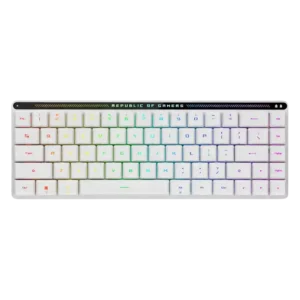
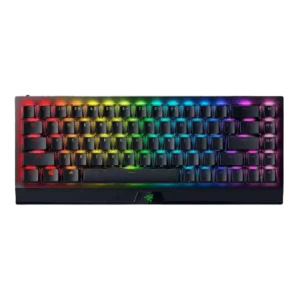
Compare ASUS ROG Falchion RX vs Razer BlackWidow V3 Mini HyperSpeed

P1 ASUS ROG Falchion RX
P2 Razer BlackWidow V3 Mini HyperSpeed

Comparison Takeaways

ASUS ROG Falchion RX

Where It Has the Edge

  • compatibility is 4.7 vs 2.0. Compatibility is a strength because reviewers appreciated Mac support, Mac/PC switching, and usefulness across operating systems.
  • stabilizer quality is 4.5 vs 2.0. Stabilizer quality is praised, especially for limited spacebar rattle and lack of ticking.
  • media controls is 4.4 vs 2.4. Media controls are widely praised as useful and space-efficient, though a few reviewers found the touch panel less...
  • volume control is 4.4 vs 2.5. Volume control is generally useful and convenient through the touch panel, though one reviewer rated it only a...

Razer BlackWidow V3 Mini HyperSpeed

Where It Has the Edge

  • cable quality is 4.4 vs 2.0. Cable quality was praised when mentioned, with reviewers liking the long, braided, thick cable and practical wired charging...
  • ease of switch replacement is 4.5 vs 2.5. One review gave positive opinionated evidence that swapping between the two sets of keys or switches was easy.
  • durability is 4.7 vs 3.2. Durability evidence was strong, including confidence against scratches, surviving drops, child use, and expectations of long service life.
  • key spacing is 4.3 vs 3.0. Key spacing was mostly praised for making inputs easier and avoiding distractions, with one review finding the keys...
Average score
Product 1: ASUS ROG Falchion RX
4.2
Product 2: Razer BlackWidow V3 Mini HyperSpeed
4.0
acoustics
Product 1: ASUS ROG Falchion RX
4.3

Most reviewers praised the sound profile as quiet, pleasant, or refined, though one clicky-switch review found the sound annoying for long work sessions.

Product 2: Razer BlackWidow V3 Mini HyperSpeed
3.7

Acoustics were mixed: several reviewers liked the soft clack or subtle tap, while others heard pinging, rattle, or an irritating clack.

actuation consistency
Product 1: ASUS ROG Falchion RX
4.8

Evidence is limited but positive: the switches are described as wobble-free with near-zero debounce behavior.

Product 2: Razer BlackWidow V3 Mini HyperSpeed
4.6

One review gave clear positive evidence that key registration was consistent, saying every key registered as expected during typing and gaming.

backlight brightness
Product 1: ASUS ROG Falchion RX
4.8

Backlighting is judged bright enough for low-light use, with one reviewer especially praising its daytime brightness.

Product 2: Razer BlackWidow V3 Mini HyperSpeed
4.7

One review gave explicit positive evidence for brightness, describing the RGB as nice, bright, and vivid.

battery life
Product 1: ASUS ROG Falchion RX
4.7

Battery life is a consistent strength, with reviewers reporting long multi-day use and calling endurance fantastic or impressive.

Product 2: Razer BlackWidow V3 Mini HyperSpeed
3.4

Battery life was the most mixed major attribute: reviewers praised long life with lighting off or low, but full RGB drained the battery quickly.

build quality
Product 1: ASUS ROG Falchion RX
4.7

Build quality is broadly praised as solid, premium, and well put together despite the compact low-profile body.

Product 2: Razer BlackWidow V3 Mini HyperSpeed
4.7

Build quality was one of the strongest consensus areas, with reviews calling it excellent, sturdy, robust, substantial, and well built.

cable quality
Product 1: ASUS ROG Falchion RX
2.0

The bundled USB cable is the clear weak point, with one reviewer calling it overly stiff.

Product 2: Razer BlackWidow V3 Mini HyperSpeed
4.4

Cable quality was praised when mentioned, with reviewers liking the long, braided, thick cable and practical wired charging use.

compatibility
Product 1: ASUS ROG Falchion RX
4.7

Compatibility is a strength because reviewers appreciated Mac support, Mac/PC switching, and usefulness across operating systems.

Product 2: Razer BlackWidow V3 Mini HyperSpeed
2.0

Compatibility scored low from one review because the keyboard could not connect to the reviewer’s PlayStation 5.

connectivity
Product 1: ASUS ROG Falchion RX
4.8

Connectivity is repeatedly praised for wired, Bluetooth, and 2.4GHz options, with several reviewers calling switching or setup easy.

Product 2: Razer BlackWidow V3 Mini HyperSpeed
4.2

Connectivity was broadly strong thanks to USB-C, Bluetooth, HyperSpeed, and multi-device support, but a few reviews noted buggy pairing or inconvenient mode switching.

customization options
Product 1: ASUS ROG Falchion RX
4.3

Customization is generally strong thanks to remapping, profiles, touch-panel options, and RGB controls, though software quality varies.

Product 2: Razer BlackWidow V3 Mini HyperSpeed
4.6

Customization options were a major strength, with reviewers praising key remaps, macros, RGB, power settings, and broad Synapse controls.

design aesthetics
Product 1: ASUS ROG Falchion RX
4.9

Design is one of the strongest areas, with reviewers repeatedly calling the keyboard elegant, futuristic, clean, or premium-looking.

Product 2: Razer BlackWidow V3 Mini HyperSpeed
4.2

Design aesthetics were mostly positive, with reviewers liking the sleek Razer styling, RGB look, and compact desk presence, though some found it plain or fingerprint-prone.

desk space efficiency
Product 1: ASUS ROG Falchion RX
4.6

The compact design is praised for saving desk space and leaving more room for mouse movement or small-desk setups.

Product 2: Razer BlackWidow V3 Mini HyperSpeed
4.6

Desk space efficiency was highly praised, with reviewers valuing the extra mouse room, reduced footprint, and less clutter.

durability
Product 1: ASUS ROG Falchion RX
3.2

Durability evidence is limited and mixed, focused on concern that ABS keycaps may wear over time.

Product 2: Razer BlackWidow V3 Mini HyperSpeed
4.7

Durability evidence was strong, including confidence against scratches, surviving drops, child use, and expectations of long service life.

ease of switch replacement
Product 1: ASUS ROG Falchion RX
2.5

Switch replacement flexibility is weak because reviewers suggest tinkerers may need another keyboard if they want to swap switches.

Product 2: Razer BlackWidow V3 Mini HyperSpeed
4.5

One review gave positive opinionated evidence that swapping between the two sets of keys or switches was easy.

ergonomics
Product 1: ASUS ROG Falchion RX
4.4

Ergonomics are mostly positive thanks to comfort, height options, and low fatigue, though one reviewer found the stock height very low.

Product 2: Razer BlackWidow V3 Mini HyperSpeed
3.3

Ergonomics were mixed: the small layout and feet could help posture, but height, wrist angle, and lack of palm rest caused discomfort for some.

extra gaming features
Product 1: ASUS ROG Falchion RX
4.6

Gaming extras are viewed positively, including high rollover, Omni receiver sharing, and profile or macro features that gamers still use.

Product 2: Razer BlackWidow V3 Mini HyperSpeed
4.5

Extra gaming features were praised for strong 65% gaming functionality, macro-ready keys, and dongle-related gaming features.

frame rigidity
Product 1: ASUS ROG Falchion RX
4.9

Frame rigidity is a major strength; multiple reviewers report no deck flex, creaking, or a rock-solid base.

Product 2: Razer BlackWidow V3 Mini HyperSpeed
4.5

Frame rigidity scored well where discussed, with reviewers describing the keyboard as planted, rigid, free of flex, and unlikely to budge.

gaming performance
Product 1: ASUS ROG Falchion RX
4.7

Gaming performance is praised by most reviewers for responsiveness and real-world play, with one reviewer seeing it more as a work keyboard.

Product 2: Razer BlackWidow V3 Mini HyperSpeed
4.5

Gaming performance was a consistent highlight thanks to the compact footprint, quick switches, and responsive wireless, though one review reported a shift-key catch while gaming.

hot-swappable switches
Product 1: ASUS ROG Falchion RX
2.5

Hot-swappability is a limitation: several reviewers note the board is not hot-swappable, with only one reviewer downplaying the issue.

Product 2: Razer BlackWidow V3 Mini HyperSpeed
No score yet
keycap quality
Product 1: ASUS ROG Falchion RX
4.3

Keycaps are mostly praised for feel, coating, shine-through lighting, and stability, but ABS material and replacement concerns temper scores.

Product 2: Razer BlackWidow V3 Mini HyperSpeed
4.3

Keycap quality drew praise for doubleshot ABS construction, clean legends, and durability, but reviewers still noted ABS tradeoffs such as slipperiness, shine, or clamminess.

key responsiveness
Product 1: ASUS ROG Falchion RX
4.4

Key responsiveness is generally strong and fast, though a few reviewers mention sensitivity can cause accidental inputs during adjustment.

Product 2: Razer BlackWidow V3 Mini HyperSpeed
4.6

Key responsiveness was a major strength, with reviewers repeatedly saying inputs felt fast, precise, and able to keep up during games and typing.

key spacing
Product 1: ASUS ROG Falchion RX
3.0

Key spacing is one of the main compromises, with reviewers citing cramped keys, accidental presses, and a short right Shift learning curve.

Product 2: Razer BlackWidow V3 Mini HyperSpeed
4.3

Key spacing was mostly praised for making inputs easier and avoiding distractions, with one review finding the keys slightly cramped.

key stability
Product 1: ASUS ROG Falchion RX
4.8

Key stability is highly praised; reviewers repeatedly mention minimal wobble, secure keycaps, and uniform feel.

Product 2: Razer BlackWidow V3 Mini HyperSpeed
4.7

Key stability evidence was mostly positive where scored, with reviewers noting no wobble or very minimal wobble on the keys they tested.

latency
Product 1: ASUS ROG Falchion RX
4.9

Latency evidence is strongly positive, with reviewers reporting near-zero latency, no perceivable input delay, and strong low-latency wireless performance.

Product 2: Razer BlackWidow V3 Mini HyperSpeed
4.5

Latency feedback was mostly strong for wired and HyperSpeed use, with reviewers seeing little or no delay; lag mainly appeared with Bluetooth, low battery, or unified dongle issues.

layout options
Product 1: ASUS ROG Falchion RX
3.6

Layout feedback is mixed: reviewers like the compact function access, but missing dedicated function-row keys can be inconvenient.

Product 2: Razer BlackWidow V3 Mini HyperSpeed
4.5

The 65% layout with arrows was widely praised as a useful middle ground, although some reviewers noted a learning curve and missing full-size keys.

legend visibility
Product 1: ASUS ROG Falchion RX
2.8

Legend visibility is mixed to weak because side or secondary legends do not receive as much light and can be hard to see in the dark.

Product 2: Razer BlackWidow V3 Mini HyperSpeed
4.0

Legend visibility was usually good, especially side legends and clean lettering, but a few reviewers criticized dark keys or non-backlit secondary legends.

macro customization
Product 1: ASUS ROG Falchion RX
4.5

Macro customization is a strength, with reviewers praising on-the-fly macro recording and programmable macro support.

Product 2: Razer BlackWidow V3 Mini HyperSpeed
3.7

Macro customization was useful for the right-side keys and software recording, but some reviewers found Synapse requirements or limited dedicated buttons restrictive.

materials quality
Product 1: ASUS ROG Falchion RX
4.5

Materials quality is positive, especially the metal top plate and premium feel, despite plastic being used elsewhere.

Product 2: Razer BlackWidow V3 Mini HyperSpeed
4.1

Materials were generally praised for aluminum, textured plastic, and component quality, but one review criticized fingerprint-prone surfaces.

media controls
Product 1: ASUS ROG Falchion RX
4.4

Media controls are widely praised as useful and space-efficient, though a few reviewers found the touch panel less useful or only moderately responsive.

Product 2: Razer BlackWidow V3 Mini HyperSpeed
2.4

Media controls were a drawback for reviewers who wanted dedicated keys and missed full-size media/function controls.

noise level
Product 1: ASUS ROG Falchion RX
4.9

Noise level is a major strength for red-switch units, repeatedly described as very quiet or near-silent.

Product 2: Razer BlackWidow V3 Mini HyperSpeed
3.8

Noise level was context-dependent: many found the Yellow switches relatively quiet, but reviewers stressed the board was not silent and could still bother people nearby.

onboard memory
Product 1: ASUS ROG Falchion RX
4.2

Onboard memory receives positive but limited evidence, with one review noting storage for five profiles.

Product 2: Razer BlackWidow V3 Mini HyperSpeed
4.0

Onboard memory was useful for saved profiles and basic settings, but reviewers noted limitations such as RGB settings not carrying over.

passthrough features
Product 1: ASUS ROG Falchion RX
No score yet
Product 2: Razer BlackWidow V3 Mini HyperSpeed
1.5

Passthrough features scored poorly because a review explicitly criticized the lack of USB passthrough.

per-key lighting control
Product 1: ASUS ROG Falchion RX
4.7

Per-key lighting control is supported positively by fully configurable RGB that can assign colors and patterns per key.

Product 2: Razer BlackWidow V3 Mini HyperSpeed
4.8

One review specifically praised per-key RGB control through Synapse, supporting a strong score for granular lighting control.

polling rate
Product 1: ASUS ROG Falchion RX
4.7

Polling-rate evidence is limited but positive, with one reviewer calling the high-rate 2.4GHz mode suitable for gaming.

Product 2: Razer BlackWidow V3 Mini HyperSpeed
No score yet
portability
Product 1: ASUS ROG Falchion RX
4.3

Portability is strongly supported by the compact size and cover, though some reviewers dislike how the cover or dongle storage works for travel.

Product 2: Razer BlackWidow V3 Mini HyperSpeed
4.6

Portability was consistently strong because reviewers liked the compact size, wireless use, travel friendliness, and easy movement around the home.

profile management
Product 1: ASUS ROG Falchion RX
4.6

Profile management is positive, with reviewers noting five or six profiles and customization that can carry between devices.

Product 2: Razer BlackWidow V3 Mini HyperSpeed
4.0

Profile management was helpful thanks to onboard/local profiles, though one review found toggling profiles unintuitive and onboard behavior limited.

reliability
Product 1: ASUS ROG Falchion RX
4.9

Reliability is excellent in the available evidence, with reviewers reporting stable wireless use and no dropouts or missed keypresses.

Product 2: Razer BlackWidow V3 Mini HyperSpeed
3.2

Reliability had limited mixed evidence, with one review reporting missed keystrokes over Bluetooth.

RGB customization
Product 1: ASUS ROG Falchion RX
4.7

RGB customization is praised where tested, with a reviewer highlighting many lighting-effect options in Armoury Crate.

Product 2: Razer BlackWidow V3 Mini HyperSpeed
4.6

RGB customization was a clear strength, with reviewers noting broad Chroma color options, effects, sync, and onboard or software-based control.

RGB lighting quality
Product 1: ASUS ROG Falchion RX
4.6

RGB lighting quality is consistently praised for brightness, vividness, shine-through legends, and attractive integration with the white design.

Product 2: Razer BlackWidow V3 Mini HyperSpeed
4.5

RGB lighting quality was praised as bright, vivid, even, and visually appealing across multiple reviews.

size and form factor
Product 1: ASUS ROG Falchion RX
4.1

Size and form factor are useful but polarizing: reviewers like the compact 65%-in-60% footprint while noting cramped keys and adjustment time.

Product 2: Razer BlackWidow V3 Mini HyperSpeed
4.6

The compact 65% form factor was one of the strongest positives, repeatedly described as useful, functional, and well suited to gaming or travel.

software quality
Product 1: ASUS ROG Falchion RX
2.7

Software quality is the weakest repeated theme; Armoury Crate is called bloated, frustrating, difficult, or mixed despite offering useful controls.

Product 2: Razer BlackWidow V3 Mini HyperSpeed
4.0

Software quality was generally good because Synapse is powerful and improved, but reviewers disliked dependence on it, navigation friction, and occasional bugs.

sound dampening
Product 1: ASUS ROG Falchion RX
4.6

Sound dampening is strongly praised for reducing ping, rattle, echo, and case noise through silicone foam layers.

Product 2: Razer BlackWidow V3 Mini HyperSpeed
4.5

Sound dampening was praised in the Yellow-switch versions, with reviewers saying the dampeners made the board quieter and worked well.

stabilizer quality
Product 1: ASUS ROG Falchion RX
4.5

Stabilizer quality is praised, especially for limited spacebar rattle and lack of ticking.

Product 2: Razer BlackWidow V3 Mini HyperSpeed
2.0

Stabilizer quality was the clearest repeated weakness, with reviews citing rattly stabilizers, loud larger keys, a catching shift key, and poor sound on stabilized keys.

switch feel
Product 1: ASUS ROG Falchion RX
4.8

Switch feel is one of the keyboard’s strongest attributes, with reviewers describing the low-profile switches as smooth, refined, snappy, or surprisingly good.

Product 2: Razer BlackWidow V3 Mini HyperSpeed
4.6

Reviewers broadly liked the switch feel, especially the smooth Yellow switches and tactile Green option; the main caveat was that the light actuation could feel sensitive for some typists.

switch options
Product 1: ASUS ROG Falchion RX
No score yet
Product 2: Razer BlackWidow V3 Mini HyperSpeed
4.3

The Green and Yellow switch choices were viewed positively because they suit different typing and gaming preferences, though reviewers did not describe a wider switch ecosystem.

typing comfort
Product 1: ASUS ROG Falchion RX
4.9

Typing comfort is very positive in the limited evidence, with reviewers describing long typing as joyful and non-cramping.

Product 2: Razer BlackWidow V3 Mini HyperSpeed
4.1

Typing comfort was mostly positive once users adjusted, but prolonged work, cramped keys, and wrist fatigue produced mixed evidence.

typing feel
Product 1: ASUS ROG Falchion RX
4.7

Typing feel is broadly excellent, especially on red-switch units, though one reviewer found it less satisfying than traditional mechanical switches.

Product 2: Razer BlackWidow V3 Mini HyperSpeed
3.9

Typing feel was generally smooth and satisfying, but compact-layout adjustment, sensitive switches, and accidental inputs made it mixed for heavier typists.

value for money
Product 1: ASUS ROG Falchion RX
3.9

Value is mixed: many reviewers think the premium experience justifies the price, while others call the keyboard expensive or not especially affordable.

Product 2: Razer BlackWidow V3 Mini HyperSpeed
3.0

Value was divisive and often critical: the keyboard’s feature set impressed some reviewers, but most repeatedly called the price high, premium, or hard to justify.

volume control
Product 1: ASUS ROG Falchion RX
4.4

Volume control is generally useful and convenient through the touch panel, though one reviewer rated it only a decent interface.

Product 2: Razer BlackWidow V3 Mini HyperSpeed
2.5

Volume control had limited negative evidence from one reviewer who specifically wanted a volume scroll wheel.

wireless performance
Product 1: ASUS ROG Falchion RX
4.7

Wireless performance is strong overall, with reviewers praising stable 2.4GHz behavior, while Bluetooth delay is mentioned as a minor limitation.

Product 2: Razer BlackWidow V3 Mini HyperSpeed
4.2

Wireless performance was usually excellent on HyperSpeed, but the unified dongle, Bluetooth, or interference produced notable negative cases in some reviews.

wrist rest quality
Product 1: ASUS ROG Falchion RX
2.5

Wrist-rest evidence is negative because the keyboard lacks one and a reviewer wished the cover had been replaced by a slim wrist rest.

Product 2: Razer BlackWidow V3 Mini HyperSpeed
2.2

Wrist rest feedback was negative because reviewers felt the tall board needed a compact wrist rest and none was included.