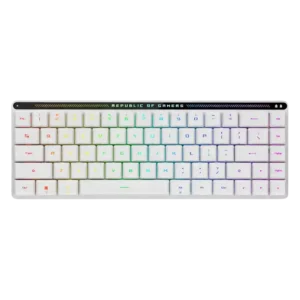
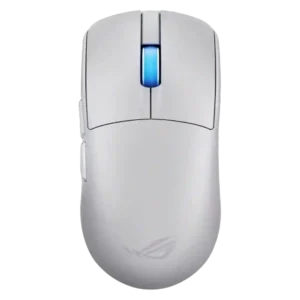
Average score
ASUS ROG Harpe II Ace
4.6
2.4GHz connectivity
ASUS ROG Falchion RXNo score yet
ASUS ROG Harpe II Ace
4.7
2.4GHz connectivity received strong marks for gaming preference, lag-free behavior, and wireless 8K support without extra add-ons.
acceleration control
ASUS ROG Falchion RXNo score yet
ASUS ROG Harpe II Ace
5.0
Acceleration control was specifically praised in testing where the reviewer found no jitter, skipping, or unwanted acceleration.
Accuracy and tracking precision
ASUS ROG Falchion RXNo score yet
ASUS ROG Harpe II Ace
4.8
Reviewers consistently described accurate, stable aiming and precise corrections, with especially strong praise in shooter and aim-control contexts.
acoustics
ASUS ROG Falchion RX
4.3
Most reviewers praised the sound profile as quiet, pleasant, or refined, though one clicky-switch review found the sound annoying for long work sessions.
ASUS ROG Harpe II AceNo score yet
actuation consistency
ASUS ROG Falchion RX
4.8
Evidence is limited but positive: the switches are described as wobble-free with near-zero debounce behavior.
ASUS ROG Harpe II AceNo score yet
backlight brightness
ASUS ROG Falchion RX
4.8
Backlighting is judged bright enough for low-light use, with one reviewer especially praising its daytime brightness.
ASUS ROG Harpe II AceNo score yet
balance and weight distribution
ASUS ROG Falchion RXNo score yet
ASUS ROG Harpe II Ace
4.7
Balance and weight distribution received strong praise from reviewers who found the mouse well balanced and natural in hand.
battery life
ASUS ROG Falchion RX
4.7
Battery life is a consistent strength, with reviewers reporting long multi-day use and calling endurance fantastic or impressive.
ASUS ROG Harpe II AceNo score yet
battery life
ASUS ROG Falchion RXNo score yet
ASUS ROG Harpe II Ace
4.3
Battery life was good at standard polling but mixed at 8K, where reviewers reported notably shorter runtimes.
Bluetooth support
ASUS ROG Falchion RXNo score yet
ASUS ROG Harpe II Ace
4.6
Bluetooth support was praised for stable productivity use and broader multi-device convenience, though competitive use favored 2.4GHz.
build quality
ASUS ROG Falchion RX
4.7
Build quality is broadly praised as solid, premium, and well put together despite the compact low-profile body.
ASUS ROG Harpe II AceNo score yet
build quality
ASUS ROG Falchion RXNo score yet
ASUS ROG Harpe II Ace
4.7
Build quality was strongly praised, with repeated comments about rigidity, no flex, no creaks, and premium shell integrity.
button customization
ASUS ROG Falchion RXNo score yet
ASUS ROG Harpe II Ace
4.7
Button customization was rated well because Gear Link exposes broad assignment controls and reviewers found the interface comprehensive.
button responsiveness
ASUS ROG Falchion RXNo score yet
ASUS ROG Harpe II Ace
4.7
Button responsiveness was widely positive, with reviewers calling the clicks immediate, quick, consistent, and dependable in play.
cable flexibility
ASUS ROG Falchion RXNo score yet
ASUS ROG Harpe II Ace
4.8
Cable flexibility had limited but positive evidence, with one reviewer calling the included cable thin and flexible.
cable quality
ASUS ROG Falchion RX
2.0
The bundled USB cable is the clear weak point, with one reviewer calling it overly stiff.
ASUS ROG Harpe II AceNo score yet
charging convenience
ASUS ROG Falchion RXNo score yet
ASUS ROG Harpe II Ace
4.8
Charging convenience was positive because reviewers could keep playing while charging or recover hours of play from short top-ups.
claw grip comfort
ASUS ROG Falchion RXNo score yet
ASUS ROG Harpe II Ace
4.6
Claw grip comfort was a major strength, with multiple reviewers calling the shape suitable, easy, or ideal for claw users.
click latency
ASUS ROG Falchion RXNo score yet
ASUS ROG Harpe II Ace
4.8
Click latency evidence was limited but positive, with optical switches described as avoiding debounce delay.
click noise
ASUS ROG Falchion RXNo score yet
ASUS ROG Harpe II Ace
3.9
Click noise was acceptable to positive: one reviewer found clicks louder than the predecessor, while another found the optical sound mild.
compatibility
ASUS ROG Falchion RX
4.7
Compatibility is a strength because reviewers appreciated Mac support, Mac/PC switching, and usefulness across operating systems.
ASUS ROG Harpe II AceNo score yet
connection stability
ASUS ROG Falchion RXNo score yet
ASUS ROG Harpe II Ace
4.8
Connection stability was a strength across Bluetooth, dongle, and wireless sessions, with no dropouts, desyncs, or odd behavior reported.
connectivity
ASUS ROG Falchion RX
4.8
Connectivity is repeatedly praised for wired, Bluetooth, and 2.4GHz options, with several reviewers calling switching or setup easy.
ASUS ROG Harpe II AceNo score yet
cross-platform compatibility
ASUS ROG Falchion RXNo score yet
ASUS ROG Harpe II Ace
4.7
Cross-platform compatibility was positive because web-based settings and easy PC/Mac switching made the mouse flexible across devices.
customization options
ASUS ROG Falchion RX
4.3
Customization is generally strong thanks to remapping, profiles, touch-panel options, and RGB controls, though software quality varies.
ASUS ROG Harpe II AceNo score yet
design aesthetics
ASUS ROG Falchion RX
4.9
Design is one of the strongest areas, with reviewers repeatedly calling the keyboard elegant, futuristic, clean, or premium-looking.
ASUS ROG Harpe II AceNo score yet
desk space efficiency
ASUS ROG Falchion RX
4.6
The compact design is praised for saving desk space and leaving more room for mouse movement or small-desk setups.
ASUS ROG Harpe II AceNo score yet
DPI range
ASUS ROG Falchion RXNo score yet
ASUS ROG Harpe II Ace
3.9
The 42,000 DPI ceiling was seen as impressive but partly overkill, with reviewers noting most players will never use such a high range.
durability
ASUS ROG Falchion RX
3.2
Durability evidence is limited and mixed, focused on concern that ABS keycaps may wear over time.
ASUS ROG Harpe II AceNo score yet
durability over time
ASUS ROG Falchion RXNo score yet
ASUS ROG Harpe II Ace
4.6
Durability over time evidence was positive but short-term, with click feel and button consistency holding up after intensive use.
ease of switch replacement
ASUS ROG Falchion RX
2.5
Switch replacement flexibility is weak because reviewers suggest tinkerers may need another keyboard if they want to swap switches.
ASUS ROG Harpe II AceNo score yet
ergonomic design
ASUS ROG Falchion RXNo score yet
ASUS ROG Harpe II Ace
4.6
Ergonomic design was praised for comfort and not fighting the user's grip, but reviewers stressed that shape fit remains personal.
ergonomics
ASUS ROG Falchion RX
4.4
Ergonomics are mostly positive thanks to comfort, height options, and low fatigue, though one reviewer found the stock height very low.
ASUS ROG Harpe II AceNo score yet
extra gaming features
ASUS ROG Falchion RX
4.6
Gaming extras are viewed positively, including high rollover, Omni receiver sharing, and profile or macro features that gamers still use.
ASUS ROG Harpe II AceNo score yet
fingertip grip comfort
ASUS ROG Falchion RXNo score yet
ASUS ROG Harpe II Ace
4.5
Fingertip grip comfort was also strong, with praise for low-hump control and micro-adjustments, though size may affect smaller-hand users.
FPS gaming suitability
ASUS ROG Falchion RXNo score yet
ASUS ROG Harpe II Ace
4.8
FPS suitability was extremely strong, with repeated shooter-focused praise around instant reactions, precision, and competitive advantage.
frame rigidity
ASUS ROG Falchion RX
4.9
Frame rigidity is a major strength; multiple reviewers report no deck flex, creaking, or a rock-solid base.
ASUS ROG Harpe II AceNo score yet
gaming performance
ASUS ROG Falchion RX
4.7
Gaming performance is praised by most reviewers for responsiveness and real-world play, with one reviewer seeing it more as a work keyboard.
ASUS ROG Harpe II AceNo score yet
glide smoothness
ASUS ROG Falchion RXNo score yet
ASUS ROG Harpe II Ace
4.7
Glide smoothness was one of the clearest strengths, with reviewers praising smooth, low-friction movement across pads and stock feet.
grip texture
ASUS ROG Falchion RXNo score yet
ASUS ROG Harpe II Ace
4.4
Grip texture was mostly positive for grippy coatings and matte finishes, but some reviewers disliked slipperiness or fingerprints.
handedness options
ASUS ROG Falchion RXNo score yet
ASUS ROG Harpe II Ace
3.4
Handedness evidence was mixed: one left-handed reviewer liked it, while others noted the side-button layout favors right-handed users.
hot-swappable switches
ASUS ROG Falchion RX
2.5
Hot-swappability is a limitation: several reviewers note the board is not hot-swappable, with only one reviewer downplaying the issue.
ASUS ROG Harpe II AceNo score yet
keycap quality
ASUS ROG Falchion RX
4.3
Keycaps are mostly praised for feel, coating, shine-through lighting, and stability, but ABS material and replacement concerns temper scores.
ASUS ROG Harpe II AceNo score yet
key responsiveness
ASUS ROG Falchion RX
4.4
Key responsiveness is generally strong and fast, though a few reviewers mention sensitivity can cause accidental inputs during adjustment.
ASUS ROG Harpe II AceNo score yet
key spacing
ASUS ROG Falchion RX
3.0
Key spacing is one of the main compromises, with reviewers citing cramped keys, accidental presses, and a short right Shift learning curve.
ASUS ROG Harpe II AceNo score yet
key stability
ASUS ROG Falchion RX
4.8
Key stability is highly praised; reviewers repeatedly mention minimal wobble, secure keycaps, and uniform feel.
ASUS ROG Harpe II AceNo score yet
latency
ASUS ROG Falchion RX
4.9
Latency evidence is strongly positive, with reviewers reporting near-zero latency, no perceivable input delay, and strong low-latency wireless performance.
ASUS ROG Harpe II AceNo score yet
layout options
ASUS ROG Falchion RX
3.6
Layout feedback is mixed: reviewers like the compact function access, but missing dedicated function-row keys can be inconvenient.
ASUS ROG Harpe II AceNo score yet
left and right click quality
ASUS ROG Falchion RXNo score yet
ASUS ROG Harpe II Ace
4.3
Left and right click quality was mostly strong, but one early unit had main-trigger rattle, creating a mild build-related caveat.
legend visibility
ASUS ROG Falchion RX
2.8
Legend visibility is mixed to weak because side or secondary legends do not receive as much light and can be hard to see in the dark.
ASUS ROG Harpe II AceNo score yet
long-session comfort
ASUS ROG Falchion RXNo score yet
ASUS ROG Harpe II Ace
4.5
Long-session comfort was positive for low fatigue and wrist relief, though palm-grip marathon comfort favored larger ergonomic alternatives.
macro customization
ASUS ROG Falchion RX
4.5
Macro customization is a strength, with reviewers praising on-the-fly macro recording and programmable macro support.
ASUS ROG Harpe II AceNo score yet
materials quality
ASUS ROG Falchion RX
4.5
Materials quality is positive, especially the metal top plate and premium feel, despite plastic being used elsewhere.
ASUS ROG Harpe II AceNo score yet
materials quality
ASUS ROG Falchion RXNo score yet
ASUS ROG Harpe II Ace
4.5
Materials quality was praised for the bio-based nylon's feel, rigidity, and grippy surface, with minor smudge and slipperiness caveats.
media controls
ASUS ROG Falchion RX
4.4
Media controls are widely praised as useful and space-efficient, though a few reviewers found the touch panel less useful or only moderately responsive.
ASUS ROG Harpe II AceNo score yet
MMO gaming suitability
ASUS ROG Falchion RXNo score yet
ASUS ROG Harpe II Ace
2.5
MMO suitability was weak because one reviewer found the five-button layout limited for MMO gamers.
motion consistency
ASUS ROG Falchion RXNo score yet
ASUS ROG Harpe II Ace
4.9
Motion consistency was rated strongly, with reviewers reporting stable cursors, reliable tracking, and no jitter under fast movement.
noise level
ASUS ROG Falchion RX
4.9
Noise level is a major strength for red-switch units, repeatedly described as very quiet or near-silent.
ASUS ROG Harpe II AceNo score yet
onboard memory
ASUS ROG Falchion RX
4.2
Onboard memory receives positive but limited evidence, with one review noting storage for five profiles.
ASUS ROG Harpe II AceNo score yet
onboard memory
ASUS ROG Falchion RXNo score yet
ASUS ROG Harpe II Ace
2.0
Onboard memory was the clearest functional drawback: one reviewer explicitly called its absence a downside for multi-PC use.
palm grip comfort
ASUS ROG Falchion RXNo score yet
ASUS ROG Harpe II Ace
3.6
Palm-grip comfort was mixed: one reviewer fit it well, while others preferred fuller right-handed shapes for long palm-heavy use.
per-key lighting control
ASUS ROG Falchion RX
4.7
Per-key lighting control is supported positively by fully configurable RGB that can assign colors and patterns per key.
ASUS ROG Harpe II AceNo score yet
polling rate
ASUS ROG Falchion RX
4.7
Polling-rate evidence is limited but positive, with one reviewer calling the high-rate 2.4GHz mode suitable for gaming.
ASUS ROG Harpe II AceNo score yet
polling rate
ASUS ROG Falchion RXNo score yet
ASUS ROG Harpe II Ace
4.4
8K polling was praised as a serious competitive feature, though several reviewers said gains can be subtle and battery cost rises at high rates.
portability
ASUS ROG Falchion RX
4.3
Portability is strongly supported by the compact size and cover, though some reviewers dislike how the cover or dongle storage works for travel.
ASUS ROG Harpe II AceNo score yet
portability
ASUS ROG Falchion RXNo score yet
ASUS ROG Harpe II Ace
4.2
Portability was good thanks to low weight and travel-friendly size, though one reviewer wanted a carrying bag.
premium feel
ASUS ROG Falchion RXNo score yet
ASUS ROG Harpe II Ace
4.7
Premium feel was consistently strong, with reviewers describing high-quality impressions, sturdy construction, and a solid premium feel.
profile management
ASUS ROG Falchion RX
4.6
Profile management is positive, with reviewers noting five or six profiles and customization that can carry between devices.
ASUS ROG Harpe II AceNo score yet
profile switching
ASUS ROG Falchion RXNo score yet
ASUS ROG Harpe II Ace
4.3
Profile and mode switching drew positive reactions for Zone Mode convenience, but underside DPI/profile controls created a usability caveat.
programmable buttons
ASUS ROG Falchion RXNo score yet
ASUS ROG Harpe II Ace
4.7
Programmable button evidence was positive but limited, centered on freely assignable buttons and full-feature button remapping.
reliability
ASUS ROG Falchion RX
4.9
Reliability is excellent in the available evidence, with reviewers reporting stable wireless use and no dropouts or missed keypresses.
ASUS ROG Harpe II AceNo score yet
RGB customization
ASUS ROG Falchion RX
4.7
RGB customization is praised where tested, with a reviewer highlighting many lighting-effect options in Armoury Crate.
ASUS ROG Harpe II AceNo score yet
RGB features
ASUS ROG Falchion RXNo score yet
ASUS ROG Harpe II Ace
4.4
RGB was treated as a small but useful extra, mainly around the illuminated scroll wheel and controllable logo lighting.
RGB lighting quality
ASUS ROG Falchion RX
4.6
RGB lighting quality is consistently praised for brightness, vividness, shine-through legends, and attractive integration with the white design.
ASUS ROG Harpe II AceNo score yet
scroll wheel quality
ASUS ROG Falchion RXNo score yet
ASUS ROG Harpe II Ace
4.5
Scroll wheel feedback was positive overall for precision, tactile notches, smoothness, and tension, with some productivity limitations noted.
sensor performance
ASUS ROG Falchion RXNo score yet
ASUS ROG Harpe II Ace
4.7
Sensor feedback was highly positive overall, with reviewers reporting precise or flawless tracking and only mild caveats that extreme DPI is mostly beyond normal use.
shape comfort
ASUS ROG Falchion RXNo score yet
ASUS ROG Harpe II Ace
4.6
Shape comfort was broadly positive for neutral, refined handling, though one reviewer found the mouse a little too big.
side button quality
ASUS ROG Falchion RXNo score yet
ASUS ROG Harpe II Ace
4.6
Side buttons were broadly praised for placement, crispness, accessibility, and reduced accidental presses.
size and form factor
ASUS ROG Falchion RX
4.1
Size and form factor are useful but polarizing: reviewers like the compact 65%-in-60% footprint while noting cramped keys and adjustment time.
ASUS ROG Harpe II AceNo score yet
software quality
ASUS ROG Falchion RX
2.7
Software quality is the weakest repeated theme; Armoury Crate is called bloated, frustrating, difficult, or mixed despite offering useful controls.
ASUS ROG Harpe II AceNo score yet
software stability
ASUS ROG Falchion RXNo score yet
ASUS ROG Harpe II Ace
3.0
Software stability had a concern: moving settings to a web server raised worries about future access if the service goes down.
software usability
ASUS ROG Falchion RXNo score yet
ASUS ROG Harpe II Ace
4.7
Software usability was a major win, with Gear Link described as clear, responsive, resource-saving, handy, full-featured, and better than Armoury Crate.
sound dampening
ASUS ROG Falchion RX
4.6
Sound dampening is strongly praised for reducing ping, rattle, echo, and case noise through silicone foam layers.
ASUS ROG Harpe II AceNo score yet
stabilizer quality
ASUS ROG Falchion RX
4.5
Stabilizer quality is praised, especially for limited spacebar rattle and lack of ticking.
ASUS ROG Harpe II AceNo score yet
surface compatibility
ASUS ROG Falchion RXNo score yet
ASUS ROG Harpe II Ace
4.7
Surface compatibility was positive, including praise for tracking on varied surfaces and tempered glass, with one reviewer still recommending cloth pads.
switch durability
ASUS ROG Falchion RXNo score yet
ASUS ROG Harpe II Ace
4.6
Switch durability evidence came from short-to-medium use outcomes: reviewers said the click feel stayed consistent after intensive sessions.
switch feel
ASUS ROG Falchion RX
4.8
Switch feel is one of the keyboard’s strongest attributes, with reviewers describing the low-profile switches as smooth, refined, snappy, or surprisingly good.
ASUS ROG Harpe II AceNo score yet
switch feel
ASUS ROG Falchion RXNo score yet
ASUS ROG Harpe II Ace
4.6
Switch feel was generally crisp and clean, though one reviewer found the switches merely okay rather than best-in-class.
typing comfort
ASUS ROG Falchion RX
4.9
Typing comfort is very positive in the limited evidence, with reviewers describing long typing as joyful and non-cramping.
ASUS ROG Harpe II AceNo score yet
typing feel
ASUS ROG Falchion RX
4.7
Typing feel is broadly excellent, especially on red-switch units, though one reviewer found it less satisfying than traditional mechanical switches.
ASUS ROG Harpe II AceNo score yet
value for money
ASUS ROG Falchion RX
3.9
Value is mixed: many reviewers think the premium experience justifies the price, while others call the keyboard expensive or not especially affordable.
ASUS ROG Harpe II AceNo score yet
value for money
ASUS ROG Falchion RXNo score yet
ASUS ROG Harpe II Ace
4.3
Value was mixed-to-positive: reviewers called it competitive or easy to recommend, but several noted the high premium-mouse price.
volume control
ASUS ROG Falchion RX
4.4
Volume control is generally useful and convenient through the touch panel, though one reviewer rated it only a decent interface.
ASUS ROG Harpe II AceNo score yet
weight
ASUS ROG Falchion RXNo score yet
ASUS ROG Harpe II Ace
4.7
The ultralight weight was one of the strongest points across reviews, repeatedly described as excellent, headline-worthy, and easy to move.
wireless latency
ASUS ROG Falchion RXNo score yet
ASUS ROG Harpe II Ace
4.9
Wireless latency was rated very highly, with reviewers reporting no noticeable delay, little to no input lag, and instant 2.4GHz response.
wireless performance
ASUS ROG Falchion RX
4.7
Wireless performance is strong overall, with reviewers praising stable 2.4GHz behavior, while Bluetooth delay is mentioned as a minor limitation.
ASUS ROG Harpe II AceNo score yet
wireless performance
ASUS ROG Falchion RXNo score yet
ASUS ROG Harpe II Ace
4.9
Wireless performance was consistently excellent, with reviewers reporting standout wireless, low interference, lag-free use, and strong real-play results.
wrist rest quality
ASUS ROG Falchion RX
2.5
Wrist-rest evidence is negative because the keyboard lacks one and a reviewer wished the cover had been replaced by a slim wrist rest.
ASUS ROG Harpe II AceNo score yet