- Better: palm-grip comfort PowerUp finds Razer more relaxing for palm-heavy marathon use, while ASUS feels more nimble.
- Better: battery life Can Buy or Not says Razer claims longer conservative battery life than the Harpe II Ace.
- Worse: weight HardwareZone notes the Harpe II Ace is lighter than the already-light DeathAdder V4 Pro.
ASUS ROG Harpe II Ace Review
Bottom Line
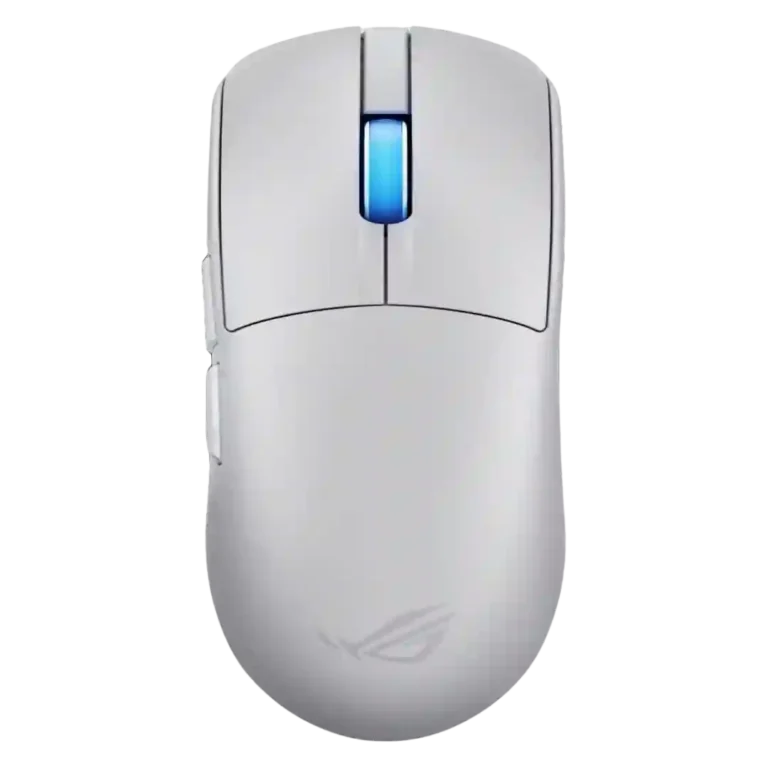
Choose the ASUS ROG Harpe II Ace if you want an ultra-light esports mouse with 8K wireless, precise tracking, and web setup. Skip it if you need MMO buttons, onboard memory, large-hand palm support, or the lowest price.
Best for competitive FPS players who use claw or fingertip grip and want a very light wireless mouse with 8K polling, precise tracking, and quick web-based setup. It also suits users who switch between 2.4GHz, Bluetooth, and wired USB-C.
Not for MMO players who need many buttons, buyers who rely on onboard profiles across PCs, or large-hand palm grippers who want a fuller ergonomic shell. It also may feel excessive for casual users who will not use the high-polling features.
Reviewers present the ASUS ROG Harpe II Ace as a serious esports mouse built around light weight, fast wireless, and precise tracking. The 42K AimPoint Pro sensor, 8K polling, solid shell, smooth glide, and crisp optical switches draw broad praise, and Gear Link is repeatedly described as easier than a heavy software install. The tradeoff is specialization: the low, symmetric shape strongly favors claw and fingertip players, while large-hand palm users, MMO players, or buyers wanting onboard memory get less support. Battery life is excellent at standard polling, but reviewers consistently note that 8K mode cuts endurance, and the premium price makes sense mainly for players who will use the performance headroom.
Compared in Reviews
Products reviewers directly compared with this model, grouped into quick takeaways.
- Similar: shape The reviewer finds the Harpe II Ace closest to the Viper V3 Pro, though not identical.
- Worse: features and refinements The video reviewer says the Harpe II Ace plays similarly to the Viper V3 Pro but improves several areas.
- Similar: performance tier Basic Tutorials says the Harpe II Ace reaches the more expensive Extreme model's technical level.
Feature Scorecards
Pros
-
Reviewers strongly confirm 8K polling support, including wireless 8K without an external booster, making polling rate one of the clearest upgrades.
-
Click latency is rated highly because reviewers describe immediate key response, quick optical triggering, and no debounce delay.
-
Acceleration control is supported by reviews noting 50G capability and no odd acceleration during exaggerated swipes.
-
The 42K DPI/CPI ceiling is repeatedly cited as very high, often more than most users need but still part of the mouse's pro-grade specification.
-
Weight is one of the strongest advantages, with most reviewers citing roughly 48 grams and some measuring around 46 to 47.5 grams.
-
Wireless latency is one of the product's core strengths, with reviewers describing low-latency or instant wireless response.
-
Wireless performance is excellent across reviews, with 8K wireless, strong 2.4GHz behavior, and no meaningful in-game wireless issues reported.
-
The AimPoint Pro sensor is consistently treated as a flagship strength, with reviewers describing excellent tracking, high precision, and no meaningful sensor complaints.
-
Switch durability is strongly supported by the repeated 100-million-click rating and durable optical switch references.
-
Reviewers praise the mouse for spot-on fine corrections, stable aim, and reliable precision in practical gaming and tracking tests.
-
Motion consistency is a major positive, with evidence of stable flicks, steady tracking, limited jitter, motion sync, and reliable wireless signal behavior.
-
FPS gaming suitability is very strong, with repeated shooter-focused evidence and praise for competitive, twitchy, or tournament play.
-
Connection stability is strong, with stable Bluetooth, lag-free connection, no desyncs, no dropouts, minimal interference, and reliable wireless signal evidence.
-
Button responsiveness is strong, with reviewers describing immediate main-key response, quick optical triggering, and consistent clicks.
-
2.4GHz connectivity is a major strength because reviewers consistently describe the dongle, 2.4GHz mode, and wireless 8K as core competitive features.
-
Surface compatibility is strong, with track-on-glass, surface calibration, and good tracking across glass, cloth, hard, wood, and other surfaces.
-
Long-session comfort is positive for wrist and fatigue reduction, though broader comfort still depends on grip style and hand size.
-
Balance is rated highly where discussed, with reviewers noting better hand balance and spot-on weight distribution.
-
Software usability is a major positive because Gear Link is described as web-based, clear, intuitive, responsive, resource-saving, and easier than Armoury Crate.
-
Glide smoothness is consistently praised, with PTFE feet, larger skates, rounded edges, and low-friction movement repeatedly mentioned.
-
Button customization is repeatedly praised through Gear Link, including key assignment, button remapping, DPI, lighting, and other mouse settings.
-
Cross-platform compatibility is positive where discussed, especially browser-based settings and Bluetooth pairing to a MacBook or shared PCs.
-
Debounce customization and behavior are supported through Gear Link's debounce settings and the optical switches' no-debounce-delay design.
-
Left and right click quality is positive, with precise feedback and consistent main-button implementation noted in reviews.
-
Build quality is praised as solid, rigid, creak-free, and not hollow despite the very low weight.
-
Portability is supported by the light shell and dongle storage, with reviewers calling it easy to travel with.
-
Programmable button support is good, with freely assignable buttons and remapping through Gear Link, though the button count remains modest.
-
Fingertip grip comfort is also strong because the low hump, lighter shape, and fingertip micro-adjustment support are repeatedly praised.
-
Claw grip comfort is strongly supported, with many reviewers describing the shape as well suited or easy to use for claw grip.
-
Profile and mode switching is a strength through Zone Mode and performance profiles that can shift DPI, polling, lighting, and active-state behavior.
-
Bluetooth support is confirmed by many reviews and is useful for productivity or multi-device use, even though competitive play favors 2.4GHz.
-
Premium feel is strongly positive, with reviewers noting high-quality impressions, polish, top-tier build quality, and a premium rigid shell.
-
Switch feel is broadly praised as crisp, clicky, consistent, and better implemented than some optical-switch rivals.
-
Shape comfort is broadly positive for its low, neutral, refined shell, though several reviews stress that shape preference remains personal.
-
The ergonomic design is effective for many players because the flat, tapered, easy-to-lift shape helps the mouse avoid fighting the user's hand.
-
The included cable is viewed positively where discussed, with reviewers calling it flexible or useful as a wired fallback.
-
Charging convenience is positive because reviews mention quick top-ups, play-while-charging, and USB-C fallback use.
-
Durability over time is positive where tested, including consistent clicks after days and a pristine shell after weeks.
-
Skate durability evidence is limited but positive, mainly from the reviewer describing the stock feet as super thick.
-
Side button quality is generally strong, with praise for spacing, crispness, placement, and low travel, though one reviewer found them small for long fingers.
-
Materials quality is strong, with repeated mentions of the bio-based nylon shell feeling solid, rigid, premium, and weight-efficient.
-
Battery life is good at standard polling but mixed at 8K; reviewers cite long 1K runtimes while warning that high polling drains faster.
-
Lift-off distance is configurable or measured as low, with Gear Link support for lift-off settings and manual calibration contexts.
-
The scroll wheel is generally precise, tactile, smooth, and quiet, but it lacks extra productivity features such as horizontal tilt.
-
Grip texture is generally positive thanks to a grippy matte or rubberized feel, but some reviewers mention smoothness, slipperiness, or fingerprinting.
-
Ecosystem integration has limited but positive evidence from Gear Link support extending across ROG input devices.
-
RGB support is present but modest, focused mostly on lighting adjustment and the RGB scroll wheel rather than elaborate lighting effects.
-
Value for money is mixed: reviewers call it premium or not cheap, but several also say it is competitive against flagship rivals.
-
Click noise is only lightly covered; one review says the primary clicks are slightly louder than the predecessor but still quieter than some rivals.
-
Handedness is mixed: some reviews call the shape ambidextrous or left-hander usable, while others note left-side buttons make it more right-handed.
Cons
-
Palm grip comfort is mixed: some users can palm it, but large-hand palm reviewers often prefer fuller ergonomic alternatives.
-
Software stability is mixed because Gear Link is responsive, but one reviewer worries about settings depending on an online service.
-
MMO suitability is weak because the limited button count is explicitly described as restrictive for MMO gamers.
-
Onboard memory is a weakness because one review explicitly says profiles are not stored permanently on the mouse.
-
Tilt gesture controls are weak because one review explicitly says the wheel does not tilt horizontally or spin freely.
Compared With Category Average
Compared with other Gaming Mouse, this product is above average in Bluetooth support, RGB features, weight, below average in onboard memory, MMO gaming suitability, tilt gesture controls.
| Attribute | This product | Category average | Difference |
|---|---|---|---|
| onboard memory | 1.5 | 4.1 | -2.6 |
| Bluetooth support | 4.6 | 3.2 | +1.4 |
| MMO gaming suitability | 2.0 | 3.4 | -1.4 |
| RGB features | 4.2 | 3.1 | +1.1 |
| weight | 5.0 | 4.1 | +0.9 |
| debounce customization | 4.7 | 3.5 | +1.1 |
| tilt gesture controls | 1.5 | 2.6 | -1.1 |
| polling rate | 5.0 | 4.2 | +0.8 |
FAQ
Is the ASUS ROG Harpe II Ace good for FPS games?
Yes. Multiple reviews describe instant response, stable flick tracking, low-latency wireless, and strong performance in shooters such as CS2, Valorant, Apex Legends, Call of Duty, and Counter-Strike 2.
Which grip styles fit it best?
The strongest evidence favors claw and fingertip grips because of the low hump, tapered sides, and light shell. Palm grip can work for some users, but reviewers note that larger hands may want more support.
Does 8K polling work wirelessly?
Yes. Reviewers repeatedly note that the mouse supports 8K polling over wireless without the older external polling-rate booster.
How is the battery life?
Battery life is strong at standard 1K polling, with reviewers citing roughly 70 to 100-plus hours depending on settings. Runtime drops sharply in 8K or Zone Mode, with some reviewers estimating or measuring much shorter endurance.
Does it require Armoury Crate?
No. Reviewers highlight Gear Link, a browser-based configurator for DPI, buttons, polling, lighting, surface calibration, and Zone Mode, though one reviewer raised a concern about relying on a web service long term.
Is it good for MMO gaming?
It is not ideal for MMO players. One review explicitly says the five-button layout plus DPI switch is enough for shooters but limited for MMO gamers.
Consider This Instead
If you want better onboard memory
Choose Razer Naga V2 Pro. It scores 5.0 vs 1.5 for onboard memory, with a 4.3 overall score.
If you want better tilt gesture controls
Choose Turtle Beach Kone II. It scores 4.6 vs 1.5 for tilt gesture controls, with a 4.2 overall score.
If you want better MMO gaming suitability
Choose ASUS ROG Gladius III Wired. It scores 4.8 vs 2.0 for MMO gaming suitability, with a 4.2 overall score.
If you want better palm grip comfort
Choose Turtle Beach Kone II Air. It scores 4.8 vs 3.3 for palm grip comfort, with a 4.3 overall score.
Overall Top Gaming Mouse Alternatives
Best for a 47g, high-performance 8K wireless mouse with excellent shape, skates, clicks, and web controls. Skip it if stiff side buttons, shorter high-polling battery life, or app/cable quirks would...
Pros: Accuracy and tracking precision, sensor performance
Cons: cable flexibility
Choose it if you want a comfortable, feature-rich wireless mouse for mixed gaming and productivity. Skip it if you need ultralight FPS speed, left-handed support, or better value than discounted...
Pros: programmable buttons, Bluetooth support
Cons: handedness options, firmware reliability
Good if you want an ultra-light esports mouse with 8K wireless, precise tracking, and web setup. Skip it if you need MMO buttons, onboard memory, large-hand palm support, or the...
Pros: polling rate, click latency
Cons: onboard memory, tilt gesture controls
Good if you want ergonomic wireless gaming with hot-swappable batteries and strong tuning. Skip it if price, dock clutter, or short 8K battery life matters most.
Pros: switch durability, DPI range
Cons: grip texture, portability