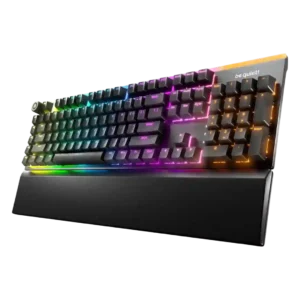
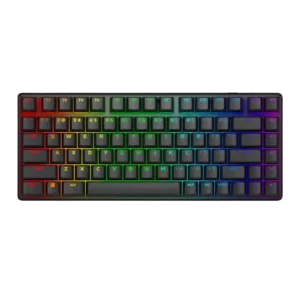
Reviews consistently describe the sound as very quiet, muted, and low on echo for a mechanical keyboard.
Across reviews, the board produces a pleasing thock, tock, or clicky sound that several testers actively enjoyed.
Supported review coverage says actuation feels responsive and precise.
Keystrokes are described as accurate and reliably registering on the first press.
One review explicitly says the keyboard does not provide an analog response.
Reviews describe the lighting as bright and vivid overall, though one review says the underside lighting could be brighter.
Lighting is described as bright and sharp, with reviewers noting stronger illumination than expected.
Battery life is a major strength, with very long quoted runtimes and solid real-world stamina, though RGB cuts endurance sharply.
Reviews describe a solid, refined build with metal-and-plastic construction and good overall fit and finish.
Reviews consistently describe the chassis as premium, solid, and well-built.
The included cable is described as braided, detachable, and reasonably thick.
Included cables are noted as paracord or braided, suggesting a premium bundled wired setup.
Reviews cite 5-pin switch compatibility, Microsoft Dynamic Lighting support, and browser-based setup for Mac and Linux users.
Reviews mention broad switch compatibility with 3-pin and 5-pin aftermarket options, and one reviewer reported MacOS worked in testing.
Reviews say the Light Mount has a dependable wired USB connection, but no wireless option.
Tri-mode connectivity is repeatedly praised, with wired, 2.4GHz, and Bluetooth modes plus multi-device switching.
Reviews repeatedly mention deep control over lighting, remapping, macros, and software settings.
Reviewers say the keyboard is highly customizable through software and switch or keycap support.
Reviews say the full-size layout takes up a lot of desk space.
The 75% layout is repeatedly praised for freeing desk and mouse space.
PBT double-shot caps and durability-focused materials are cited as hard-wearing and long-lasting.
Durability looks strong from the evidence, including long switch lifespan, durable PBT caps, and claims it should hold up over time.
Multiple reviews say switch swaps are straightforward thanks to 5-pin hot-swap support and included tools.
Reviewers say the hot-swap design and included tool make switch changes straightforward.
Reviews praise the adjustable feet and wrist support for better comfort and posture.
Angle adjustment helps, but the lack of a wrist or palm rest creates comfort tradeoffs for some users.
Reviews note useful basics like macro keys and game mode, but they also call out missing advanced gaming features.
It includes useful gaming extras such as lockout settings, profile or macro shortcuts, and preset controls, but reviewers also call it light on extras for the price.
Reviews describe the chassis as solid and fairly rigid, though not the heaviest premium build in its class.
Multiple reviewers report essentially no flex in the chassis.
Reviews say it performs well in games with responsive input, but it is not positioned as an esports-first board.
Gaming performance is a core strength, especially in fast-paced shooters and esports-style play.
Multiple reviews explicitly confirm hot-swappable 5-pin switch support.
Hot-swap support is repeatedly confirmed, including compatibility with user-supplied switches.
Reviews consistently highlight PBT double-shot keycaps with textured or translucent shine-through legends.
The included double-shot PBT keycaps are described as durable, textured, and comfortable.
Reviews describe the keys as fast and responsive, with short actuation and precise input.
Reviewers consistently describe the keys as very responsive and quick to actuate.
Several reviews report accidental presses caused by the left-side macro column near common keys.
The compact layout creates mixed feedback: some adapt easily, while others report tight spacing and a shrunken right Shift.
Reviews praise stable keys, especially larger ones, with little wobble or rattle.
Large keys and switches are described as stable, with minimal wobble or rattle.
One review explicitly says input stays responsive without noticeable delay.
Low-latency wired and 2.4GHz performance is praised, with reviewers reporting no noticeable lag.
Reviews confirm ISO and ANSI choices, but the board is still limited to a full-size layout.
Shine-through and translucent legends are praised, though some labels or indicators are criticized as harder to read or oversized.
Legends are easy to read and benefit from even shine-through lighting.
Reviews say keys and macro buttons can be remapped and assigned through the software.
Macros and keybind remapping are available through Alienware Command Center.
Reviews like the brushed aluminum top plate but note an ABS or plastic lower shell and some less-premium touches.
Materials are a premium highlight, especially the aluminum case and PBT caps.
Reviews consistently note the wheel or knob and mute/media functions as convenient and easy to use.
Media controls are present and usable, though implementation varies between dedicated buttons and secondary functions.
Nearly every review highlights very low typing noise for a mechanical keyboard.
Noise levels are mixed: some reviewers call it surprisingly controlled, while others say the clack carries further than expected.
Reviews mention saved onboard profiles or lighting memory that can be edited from the browser or keyboard software.
Onboard memory supports stored settings or profiles that can travel with the keyboard.
Reviews explicitly mention per-key lighting and individual-zone or per-key control options.
Per-key lighting control is supported through Alienware Command Center.
Reviews repeatedly cite a standard 1,000Hz polling rate with NKRO.
The keyboard runs at around 1,000Hz, which reviewers found fast enough for most use but not class-leading for elite competitive play.
A few reviews call it lighter than expected for a full-size board and somewhat portable, though still large.
The compact 75% form factor and wireless design make it easy to pack and travel with.
Reviews mention creating, saving, editing, and switching multiple profiles, including onboard browser-based profile handling.
Multiple profiles can be saved and switched, with game-linked or onboard profile behavior mentioned in reviews.
Reviews explicitly state that Rapid Trigger and similar adjustable actuation features are absent.
Reviews explicitly note the lack of Hall-effect or Rapid Trigger style functionality.
Wired use is described as reliable, but one review reports occasional RGB or profile confusion after reconnecting.
Connection stability and general dependability are praised, especially in wireless gaming use.
Reviews describe preset effects, per-zone editing, layered lighting, Dynamic Lighting support, and strong customization control.
RGB modes, per-key changes, and profile-based lighting customization are supported.
Reviews consistently praise the RGB as bright, vibrant, even, and visually striking, with only minor criticism of some zones or bars.
RGB lighting is one of the standout strengths, described as bright, vivid, and visually impressive.
Reviews emphasize that this is a full-size keyboard and note that the large format will not suit everyone.
The compact 75% layout is widely seen as the sweet spot between saving space and retaining essential keys.
Most reviews praise IO Center as intuitive and capable, though at least one calls it underdeveloped and notes profile quirks.
Software is functional and often easy to use, but several reviews still call it unreliable or limited.
Reviews repeatedly credit the three-layer dampening design for suppressing reverb and resonance.
Internal dampening layers or foam reduce ping, hollow notes, and unwanted resonance.
Reviews note lubed stabilizers, low rattle, even large-key movement, and strong noise control on stabilized keys.
Stabilizers are praised for reducing rattle and keeping large keys sounding and feeling cleaner.
Reviews describe the switches as soft, cushioned, smooth, or pleasantly resistant depending on the variant.
The stock linear switches are widely described as smooth, light, and satisfying under the fingers.
Reviews say the board ships with Silent Linear or Silent Tactile switches, so stock options exist but are limited.
Stock switch choice is limited to Alienware linears, but hot-swap support expands aftermarket replacement options.
Reviews repeatedly describe long sessions as easy and comfortable, helped by the palm rest and subdued acoustics.
Typing comfort is acceptable to good, but the missing wrist rest can reduce long-session comfort.
Reviews describe the typing feel as soft, cushioned, satisfying, and controlled rather than mushy.
Typing feel is generally strong, though not every reviewer found it exceptional for productivity.
Value impressions are mixed: some reviews see fair value for the feature set, while others call it expensive for a wired full-size board.
Value is the biggest drawback: many reviewers like the keyboard but think the price is too high, even if a few still find it worthwhile.
Reviews consistently praise the volume wheel or knob and mute function as easy to access and useful.
Volume control exists via buttons rather than a knob, which some reviewers see as less convenient.
Multiple reviews explicitly state that the Light Mount has no wireless mode.
Wireless performance is a major strength, with stable 2.4GHz behavior and no obvious slowdowns reported.
Most reviews like the magnetic wrist rest for comfort and softness, though one says it feels a bit thin.
There is no included wrist or palm rest, which several reviewers call out as a drawback.