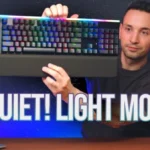
- Compared: price tier The Light Mount is placed in the same premium price tier as Corsair K70 Pro.
- Better: rapid trigger and esports features Corsair K70 Pro TKL is favored for rapid trigger, customizable actuation, and high polling at a similar price.
be quiet! Light Mount Review
Bottom Line
Choose the Light Mount for quiet mechanical typing, vivid RGB, and comfortable full-size use. Skip it if you need wireless, compact layouts, or esports features like rapid trigger and adjustable actuation.
Best for writers, productivity users, casual gamers, and shared-space setups where quiet mechanical typing, vivid RGB, and a full-size layout matter more than wireless or esports tuning.
Not for competitive gamers chasing analog switches, rapid trigger, SOCD, or adjustable actuation, and not for users who need a compact or wireless keyboard.
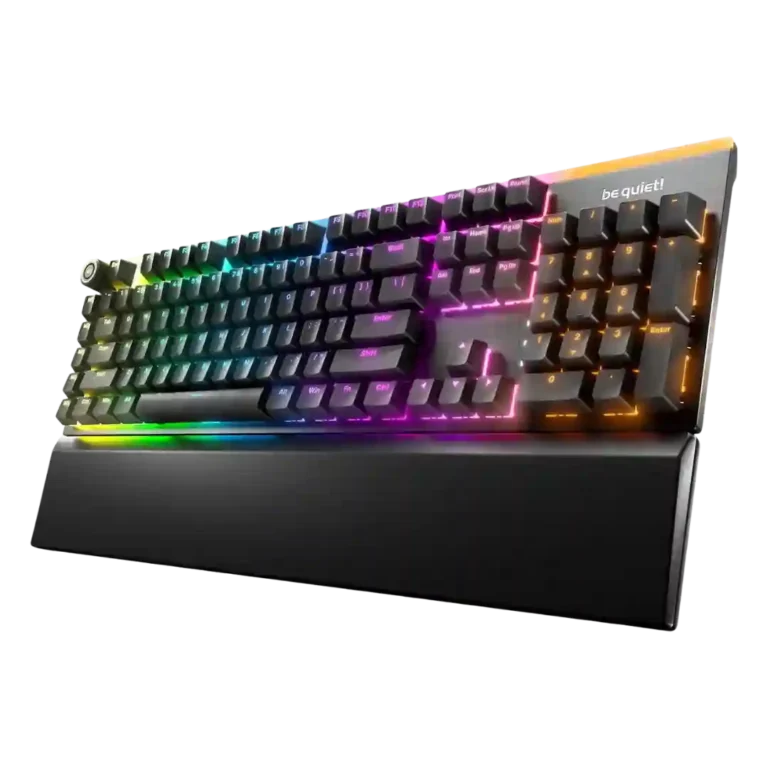
Reviewers portray the be quiet! Light Mount as a focused silent mechanical keyboard rather than an esports-first board. Its strongest wins are the cushioned, quiet typing feel, effective multilayer dampening, stable large keys, vivid RGB, approachable IO Center software, and comfortable wrist support. The tradeoff is that its full-size wired design and high price compete with boards that offer wireless, compact layouts, Hall Effect or analog switches, rapid trigger, and deeper gaming controls. Several reviewers still find it responsive enough for normal gaming, writing, and productivity, but the consensus is that its premium mainly pays for acoustics, lighting, and comfort rather than cutting-edge competitive features.
Compared in Reviews
Products reviewers directly compared with this model, grouped into quick takeaways.
- Better: full-width mechanical keyboard alternative The Asus is recommended for buyers who only want a full-width mechanical board and do not need quiet switches.
- Worse: typing noise The Light Mount is described as a starkly quieter contrast to the Corsair K70.
Feature Scorecards
Summary
48 reviewed features- Very positive 4.5-5.0 15% 7 features
- Positive 3.5-4.4 67% 32 features
- Neutral 2.5-3.4 15% 7 features
- Negative 1.5-2.4 0% 0 features
- Very negative below 1.5 4% 2 features
Pros
-
Switch replacement is praised as easy and flexible thanks to included tools and 5-pin hot-swappable compatibility.
-
Reviewers consistently describe the keyboard as quiet, muted, or acoustically refined, with only a few noting it is not completely silent.
-
Stabilizer quality is a standout strength, with repeated praise for lubed, quiet, stable, rattle-free larger keys.
-
Sound dampening is strongly praised, especially the multilayer foam/silicone approach that reduces echo, reverb, and harsh keystroke noise.
-
Compatibility is a strength thanks to web-based IO Center access for Mac, Linux, Chromium browsers, and locked-down machines.
-
Hot-swappable switch support is praised when reviewers connect it to easy customization and 5-pin switch flexibility.
-
Key stability is a strength, with reviewers praising stable large keys, minimal rattle, and strong stabilizer behavior.
-
Noise level is the product’s strongest theme, with reviewers finding it impressively quiet even when noting specific louder buttons or comparisons.
-
Switch feel is praised as smooth, cushioned, satisfying, and quiet, without the mushiness some users might fear.
-
Typing feel is consistently praised as satisfying, smooth, quiet, and premium, though some reviewers note it is a different feel from clickier boards.
-
Typing comfort is strong thanks to quiet switches, cushioned feel, supportive rest, and low-fatigue long-session use.
-
RGB lighting quality is a major strength, praised as vibrant, crisp, bright, even, and visually striking.
-
Customization is praised across lighting, remapping, macros, layers, profiles, and web/software controls.
-
Per-key lighting control is praised for vivid individual-key control, custom zones, and layered effects.
-
RGB customization is broadly praised for layers, colors, Dynamic Lighting support, and broad software control, with some preset-selection complaints.
-
Ergonomics are mostly positive due to adjustable feet and a comfortable magnetic wrist rest, with one reviewer wanting a thicker rest.
-
Latency evidence is limited but positive, with reviewers reporting no noticeable delay or performance limitation.
-
Software quality is generally praised as simple, polished, responsive, and web-accessible, with one notable complaint about underdevelopment.
-
Key responsiveness is viewed as fast and precise enough for normal gaming and typing, even without advanced analog features.
-
The wrist rest is generally praised as comfortable, supportive, magnetic, and well positioned, with one reviewer finding it too thin.
-
Durability evidence centers on PBT keycaps and legends that should resist wear, giving reviewers confidence in long-term keycap life.
-
Onboard memory is useful for saved lighting/profile behavior and reducing reliance on always-running software.
-
Macro customization is a clear strength, with reviewers praising remapping, recording macros, programmable M keys, and FN-layer possibilities.
-
Keycap quality is praised for PBT double-shot construction, texture, shine-through clarity, and lack of visible imperfections.
-
Build quality is generally viewed as solid and refined, with some criticism of the plastic base or less premium heft.
-
Backlighting is usually praised as bright and vivid, though some reviewers find the top bar jarring or the underside lighting too dim.
-
Switch options are viewed positively because linear and tactile choices cover preferences, though options remain narrower than enthusiast boards.
-
Cable quality gets positive comments where discussed, mainly because the included USB cable is braided, thick, detachable, and practical.
-
Gaming performance is good for mainstream play, but several reviewers distinguish it from esports-focused or analog-switch boards.
-
Media controls are mostly praised for easy access and satisfying operation, though one review finds the knob somewhat wobbly.
-
Volume control is praised for being accessible, satisfying, and easy to use through the knob/dial.
-
Design opinions are mostly positive for its clean RGB-forward look, but some reviewers find the overall gaming-keyboard shape plain or dated.
-
Materials are often called premium or high-quality, but some reviewers criticize the plastic underside at this price.
-
The available evidence says actuation is consistent enough for fast-paced games, but this attribute is not discussed broadly.
-
Frame rigidity is generally solid, especially where reviewers note stiffness or aluminum support, though one review says it lacks premium heft.
-
Profile management is mostly positive where IO Center profiles are discussed, but one reviewer reports confusion between hardware and software profiles.
-
Value for money is split: reviewers recognize the quality and quietness, but several see the price as high against wireless or gaming-feature competitors.
-
Legend visibility is mixed because shine-through clarity is praised, while some icons, lock indicators, or large side-key legends draw criticism.
-
Polling rate is considered adequate or standard at 1,000 Hz, supporting mainstream gaming but not a headline feature.
Cons
-
Portability is mixed: lighter weight and web configuration help movement, but the full-size footprint works against travel use.
-
Reliability evidence is mixed, combining praise for wired dependability with isolated software/profile reliability issues.
-
Layout options are mixed: ISO/ANSI availability helps, but the lack of TKL or smaller layouts limits choice.
-
Connectivity is mixed because reviewers appreciate the reliable wired connection but repeatedly note the absence of wireless.
-
Size and form factor are mixed to negative: the full-size layout suits users who need every key but feels large and inflexible to others.
-
Gaming extras are limited: reviewers like basic game mode and macro keys, but miss rapid trigger, adjustable actuation, SOCD, or deeper esports tools.
-
Desk space efficiency is a weakness because the Light Mount is a full-size board with extra keys and can feel large on a desk.
-
Reviewers who discuss analog input say the Light Mount lacks magnetic or optical analog response, making it weaker for cutting-edge gaming features.
-
Rapid trigger support is a clear weakness because multiple reviewers explicitly say it is absent.
Compared With Category Average
Compared with other Gaming Keyboard, this product is above average in hot-swappable switches, wrist rest quality, ease of switch replacement, below average in rapid trigger support, analog input support, desk space efficiency.
Summary
8 compared features- Above average 0.4+ pts higher 38% 3 features
- Same as average within 0.3 pts 0% 0 features
- Below average 0.4+ pts lower 63% 5 features
| Attribute | This product | Category average | Difference |
|---|---|---|---|
| rapid trigger support | 1.3 | 3.8 | -2.5 |
| analog input support | 1.4 | 3.4 | -2.0 |
| desk space efficiency | 2.5 | 4.1 | -1.6 |
| extra gaming features | 2.6 | 4.0 | -1.4 |
| hot-swappable switches | 4.6 | 3.3 | +1.2 |
| size and form factor | 3.0 | 4.1 | -1.1 |
| wrist rest quality | 4.3 | 3.3 | +1.0 |
| ease of switch replacement | 4.7 | 3.7 | +1.0 |
FAQ
Is the be quiet! Light Mount actually quiet?
Yes. Reviewers repeatedly call it one of the quietest or most muted mechanical keyboards they have used, though several note it is not completely silent.
How does it feel for typing?
The typing feel is generally praised as soft, cushioned, smooth, and satisfying without becoming mushy. Long-session comfort is helped by stable keys and the magnetic wrist rest.
Is it good for gaming?
It is responsive enough for mainstream gaming, with 1,000Hz polling and N-key rollover. Reviewers do not treat it as an esports-focused board because it lacks rapid trigger, analog sensing, and adjustable actuation.
Does the RGB stand out?
Yes. Reviews praise the bright per-key RGB, top light bar, side or underglow effects, and strong software customization, although a few found the top bar too prominent or the underside lighting not bright enough.
Can you customize keys and macros?
Yes. Reviews describe remapping, macro recording, programmable M keys, FN-layer commands, profiles, and extensive lighting controls through IO Center or its web version.
Is the software good?
Most reviewers call IO Center simple, polished, responsive, and useful, especially because of the browser-based option. One review reports profile confusion and calls the software underdeveloped.
What are the biggest drawbacks?
The main drawbacks are wired-only connectivity, full-size desk footprint, a premium price, limited switch/layout options, and missing competitive gaming features.
Consider This Instead
If you want better rapid trigger support
Choose Keychron K2 HE. It scores 4.9 vs 1.3 for rapid trigger support, with a 4.2 overall score.
If you want better analog input support
Choose NZXT Function Elite MiniTKL. It scores 4.7 vs 1.4 for analog input support, with a 3.7 overall score.
If you want better desk space efficiency
Choose Lemokey P1 HE. It scores 5.0 vs 2.5 for desk space efficiency, with a 4.2 overall score.
If you want better extra gaming features
Choose Keychron Q5 HE. It scores 4.9 vs 2.6 for extra gaming features, with a 4.5 overall score.
Overall Top Gaming Keyboard Alternatives
Good if you want a premium 96% Hall Effect keyboard for work and gaming with excellent build, sound, and customization. Skip it if you need cheaper esports-first speed, 8,000Hz polling,...
Pros: cable quality, typing comfort
Cons: portability, switch options

Good if you want a premium full-size Hall Effect keyboard with smooth switches, quiet sound, and deep customization. Skip it if you need a portable, budget-friendly board or broad switch...
Pros: key stability, frame rigidity
Cons: portability, switch options

Good if you want a compact Hall Effect keyboard with smooth typing, strong gaming response, bright RGB, and good value. Skip it if you need polished software, quiet heavy presses,...
Pros: desk space efficiency, layout options
Cons: compatibility
Good if you want a premium, quiet TKL Hall Effect keyboard for typing and gaming. Skip it if price, portability, 8,000Hz polling, or broad switch choice matters most.
Pros: build quality, extra gaming features
Cons: switch options, hot-swappable switches