Compare be quiet! Light Mount vs Corsair K70 Core

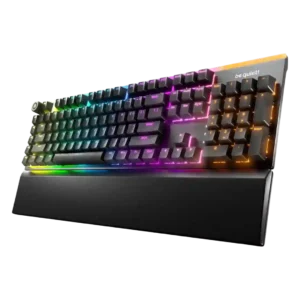
P1 be quiet! Light Mount
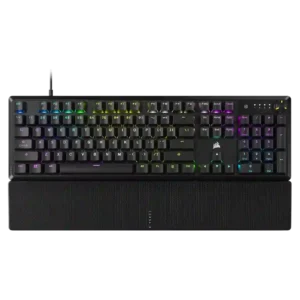
P2 Corsair K70 Core

Comparison Takeaways

be quiet! Light Mount

Where It Has the Edge

  • ease of switch replacement is 4.7 vs 1.0. Switch replacement is praised as easy and flexible thanks to included tools and 5-pin hot-swappable compatibility.
  • hot-swappable switches is 4.6 vs 1.6. Hot-swappable switch support is praised when reviewers connect it to easy customization and 5-pin switch flexibility.
  • cable quality is 4.1 vs 2.0. Cable quality gets positive comments where discussed, mainly because the included USB cable is braided, thick, detachable, and...
  • switch options is 4.1 vs 2.0. Switch options are viewed positively because linear and tactile choices cover preferences, though options remain narrower than enthusiast...

Corsair K70 Core

Where It Has the Edge

  • connectivity is 4.5 vs 3.1. Connectivity was judged positively when discussed, mainly because the wired connection avoided disconnects and wireless-interference concerns.
  • desk space efficiency is 3.5 vs 2.5. Desk space opinions depended on layout: the TKL Wireless was efficient, while the full-size Core was called large...
  • per-key lighting control is 5.0 vs 4.3. Per-key lighting control was praised where discussed, with reviewers noting individual key color control and granular lighting customization.
  • polling rate is 4.2 vs 3.5. Most reviewers found the 1,000Hz polling rate sufficient or excellent for this class, even if it lacks higher-end...
Average score
Product 1: be quiet! Light Mount
3.9
Product 2: Corsair K70 Core
3.7
acoustics
Product 1: be quiet! Light Mount
4.6

Reviewers consistently describe the keyboard as quiet, muted, or acoustically refined, with only a few noting it is not completely silent.

Product 2: Corsair K70 Core
4.2

Acoustics were a clear strength for most reviewers thanks to a deeper, quieter sound, though one negative review found the sound unpleasant.

actuation consistency
Product 1: be quiet! Light Mount
4.0

The available evidence says actuation is consistent enough for fast-paced games, but this attribute is not discussed broadly.

Product 2: Corsair K70 Core
2.5

Evidence is split: one review said actuation behaved as expected, while another reported severe switch chatter on multiple keys.

analog input support
Product 1: be quiet! Light Mount
1.4

Reviewers who discuss analog input say the Light Mount lacks magnetic or optical analog response, making it weaker for cutting-edge gaming features.

Product 2: Corsair K70 Core
No score yet
backlight brightness
Product 1: be quiet! Light Mount
4.2

Backlighting is usually praised as bright and vivid, though some reviewers find the top bar jarring or the underside lighting too dim.

Product 2: Corsair K70 Core
4.5

Backlight brightness earned positive remarks, with reviewers calling the lighting impressively bright or noting strong shine.

build quality
Product 1: be quiet! Light Mount
4.2

Build quality is generally viewed as solid and refined, with some criticism of the plastic base or less premium heft.

Product 2: Corsair K70 Core
3.9

Build quality was generally solid, especially for the price, but opinions were pulled down by plastic construction and one strongly negative durability critique.

cable quality
Product 1: be quiet! Light Mount
4.1

Cable quality gets positive comments where discussed, mainly because the included USB cable is braided, thick, detachable, and practical.

Product 2: Corsair K70 Core
2.0

Cable quality was the most repeated hardware complaint: reviewers disliked the fixed, rubber, non-braided, non-detachable cable.

compatibility
Product 1: be quiet! Light Mount
4.6

Compatibility is a strength thanks to web-based IO Center access for Mac, Linux, Chromium browsers, and locked-down machines.

Product 2: Corsair K70 Core
5.0

Compatibility evidence was positive, with reviewers reporting Windows/Mac support and console testing without issues.

connectivity
Product 1: be quiet! Light Mount
3.1

Connectivity is mixed because reviewers appreciate the reliable wired connection but repeatedly note the absence of wireless.

Product 2: Corsair K70 Core
4.5

Connectivity was judged positively when discussed, mainly because the wired connection avoided disconnects and wireless-interference concerns.

customization options
Product 1: be quiet! Light Mount
4.4

Customization is praised across lighting, remapping, macros, layers, profiles, and web/software controls.

Product 2: Corsair K70 Core
4.3

Customization options were broadly strong, covering key remaps, RGB, dial behavior, and iCUE controls, though dial programmability was limited.

design aesthetics
Product 1: be quiet! Light Mount
4.0

Design opinions are mostly positive for its clean RGB-forward look, but some reviewers find the overall gaming-keyboard shape plain or dated.

Product 2: Corsair K70 Core
3.7

Design aesthetics were mixed to positive, with praise for striking or sleek styling offset by comments that it was basic or even unattractive.

desk space efficiency
Product 1: be quiet! Light Mount
2.5

Desk space efficiency is a weakness because the Light Mount is a full-size board with extra keys and can feel large on a desk.

Product 2: Corsair K70 Core
3.5

Desk space opinions depended on layout: the TKL Wireless was efficient, while the full-size Core was called large and space-hungry.

durability
Product 1: be quiet! Light Mount
4.3

Durability evidence centers on PBT keycaps and legends that should resist wear, giving reviewers confidence in long-term keycap life.

Product 2: Corsair K70 Core
2.8

Durability evidence was mixed, with positive bend-test comments offset by concerns about the fixed cable and one review calling the keycaps non-durable.

ease of switch replacement
Product 1: be quiet! Light Mount
4.7

Switch replacement is praised as easy and flexible thanks to included tools and 5-pin hot-swappable compatibility.

Product 2: Corsair K70 Core
1.0

Ease of switch replacement scored poorly because the negative review stressed difficult serviceability without hot-swap or easy disassembly.

ergonomics
Product 1: be quiet! Light Mount
4.3

Ergonomics are mostly positive due to adjustable feet and a comfortable magnetic wrist rest, with one reviewer wanting a thicker rest.

Product 2: Corsair K70 Core
3.8

Ergonomics were mixed, with positive comments on height, palm support, and hand comfort but complaints about tall chassis positioning.

extra gaming features
Product 1: be quiet! Light Mount
2.6

Gaming extras are limited: reviewers like basic game mode and macro keys, but miss rapid trigger, adjustable actuation, SOCD, or deeper esports tools.

Product 2: Corsair K70 Core
3.2

Extra gaming features were adequate but not standout; reviewers liked useful basics but criticized limited or delayed advanced features.

frame rigidity
Product 1: be quiet! Light Mount
3.9

Frame rigidity is generally solid, especially where reviewers note stiffness or aluminum support, though one review says it lacks premium heft.

Product 2: Corsair K70 Core
4.5

Frame rigidity was usually praised, with reviewers citing low flex, good rigidity, and torsional stiffness.

gaming performance
Product 1: be quiet! Light Mount
4.1

Gaming performance is good for mainstream play, but several reviewers distinguish it from esports-focused or analog-switch boards.

Product 2: Corsair K70 Core
4.4

Gaming performance was consistently solid to excellent, with reviewers reporting responsive play and no major speed or registration issues in games.

hot-swappable switches
Product 1: be quiet! Light Mount
4.6

Hot-swappable switch support is praised when reviewers connect it to easy customization and 5-pin switch flexibility.

Product 2: Corsair K70 Core
1.6

Hot-swappable switch support was consistently negative because reviewers emphasized that the board is not hot-swappable.

keycap quality
Product 1: be quiet! Light Mount
4.2

Keycap quality is praised for PBT double-shot construction, texture, shine-through clarity, and lack of visible imperfections.

Product 2: Corsair K70 Core
3.3

Keycap quality drew mixed reactions: some liked the ABS texture and feel, while others disliked slickness, shine risk, thinness, or durability concerns.

key responsiveness
Product 1: be quiet! Light Mount
4.3

Key responsiveness is viewed as fast and precise enough for normal gaming and typing, even without advanced analog features.

Product 2: Corsair K70 Core
4.3

Gaming and general input responsiveness were mostly praised, with reviewers describing presses as snappy, responsive, or quick enough in actual play.

key stability
Product 1: be quiet! Light Mount
4.5

Key stability is a strength, with reviewers praising stable large keys, minimal rattle, and strong stabilizer behavior.

Product 2: Corsair K70 Core
4.2

Key stability was viewed positively overall, with limited wobble noted across keycaps and stabilizer-supported keys.

latency
Product 1: be quiet! Light Mount
4.3

Latency evidence is limited but positive, with reviewers reporting no noticeable delay or performance limitation.

Product 2: Corsair K70 Core
4.0

One reviewer judged latency and speed solid overall, aided by the wired design and mainstream 1,000Hz behavior.

layout options
Product 1: be quiet! Light Mount
3.3

Layout options are mixed: ISO/ANSI availability helps, but the lack of TKL or smaller layouts limits choice.

Product 2: Corsair K70 Core
2.5

Layout option criticism came from a reviewer who wanted a TKL version of the model they tested.

legend visibility
Product 1: be quiet! Light Mount
3.7

Legend visibility is mixed because shine-through clarity is praised, while some icons, lock indicators, or large side-key legends draw criticism.

Product 2: Corsair K70 Core
3.8

Legend visibility was mostly usable, but not perfect; one review noted uneven illumination while another found legends clear and easy to see.

macro customization
Product 1: be quiet! Light Mount
4.2

Macro customization is a clear strength, with reviewers praising remapping, recording macros, programmable M keys, and FN-layer possibilities.

Product 2: Corsair K70 Core
4.6

Macro customization was praised, especially through iCUE, with reviewers noting useful shortcuts, remapping, and macro recording.

materials quality
Product 1: be quiet! Light Mount
4.0

Materials are often called premium or high-quality, but some reviewers criticize the plastic underside at this price.

Product 2: Corsair K70 Core
3.7

Materials quality was mixed: reviewers liked the metal or aluminum elements but repeatedly noted budget plastic and less premium construction.

media controls
Product 1: be quiet! Light Mount
4.0

Media controls are mostly praised for easy access and satisfying operation, though one review finds the knob somewhat wobbly.

Product 2: Corsair K70 Core
3.3

Media controls were mixed: reviewers liked the multifunction dial, but criticized registration issues, limited programmability, and lack of dedicated media keys.

noise level
Product 1: be quiet! Light Mount
4.4

Noise level is the product’s strongest theme, with reviewers finding it impressively quiet even when noting specific louder buttons or comparisons.

Product 2: Corsair K70 Core
4.4

Noise level was generally considered low for a mechanical board, with reviewers praising subdued, quiet, or less annoying operation.

onboard memory
Product 1: be quiet! Light Mount
4.3

Onboard memory is useful for saved lighting/profile behavior and reducing reliance on always-running software.

Product 2: Corsair K70 Core
4.0

Onboard memory was mostly valued for portable profiles, though one review wanted stronger onboard behavior and another noted software-profile limitations.

passthrough features
Product 1: be quiet! Light Mount
No score yet
Product 2: Corsair K70 Core
2.0

Passthrough features scored low because a reviewer explicitly wanted a USB hub but noted it was absent.

per-key lighting control
Product 1: be quiet! Light Mount
4.3

Per-key lighting control is praised for vivid individual-key control, custom zones, and layered effects.

Product 2: Corsair K70 Core
5.0

Per-key lighting control was praised where discussed, with reviewers noting individual key color control and granular lighting customization.

polling rate
Product 1: be quiet! Light Mount
3.5

Polling rate is considered adequate or standard at 1,000 Hz, supporting mainstream gaming but not a headline feature.

Product 2: Corsair K70 Core
4.2

Most reviewers found the 1,000Hz polling rate sufficient or excellent for this class, even if it lacks higher-end AXON-style rates.

portability
Product 1: be quiet! Light Mount
3.4

Portability is mixed: lighter weight and web configuration help movement, but the full-size footprint works against travel use.

Product 2: Corsair K70 Core
3.3

Portability was mixed: the board is reasonably light, but full-size dimensions and the fixed cable limit easy travel.

profile management
Product 1: be quiet! Light Mount
3.8

Profile management is mostly positive where IO Center profiles are discussed, but one reviewer reports confusion between hardware and software profiles.

Product 2: Corsair K70 Core
2.5

Profile management was a weakness in the cited reviews, mainly because software and onboard profiles could be awkward or disconnected.

rapid trigger support
Product 1: be quiet! Light Mount
1.3

Rapid trigger support is a clear weakness because multiple reviewers explicitly say it is absent.

Product 2: Corsair K70 Core
No score yet
reliability
Product 1: be quiet! Light Mount
3.4

Reliability evidence is mixed, combining praise for wired dependability with isolated software/profile reliability issues.

Product 2: Corsair K70 Core
3.3

Reliability evidence was split between positive long-term/no-issue impressions and one severe switch-chatter complaint.

RGB customization
Product 1: be quiet! Light Mount
4.3

RGB customization is broadly praised for layers, colors, Dynamic Lighting support, and broad software control, with some preset-selection complaints.

Product 2: Corsair K70 Core
4.7

RGB customization was a major positive, with reviewers highlighting deep iCUE control, effects, per-zone options, and ecosystem integration.

RGB lighting quality
Product 1: be quiet! Light Mount
4.4

RGB lighting quality is a major strength, praised as vibrant, crisp, bright, even, and visually striking.

Product 2: Corsair K70 Core
4.4

RGB lighting quality was widely praised as bright, uniform, crisp, or attractive, though one reviewer noticed inconsistent shine-through on some keys.

size and form factor
Product 1: be quiet! Light Mount
3.0

Size and form factor are mixed to negative: the full-size layout suits users who need every key but feels large and inflexible to others.

Product 2: Corsair K70 Core
3.3

The full-size form factor pleased some users but was also criticized for taking up desk space and not fitting every setup.

software quality
Product 1: be quiet! Light Mount
4.3

Software quality is generally praised as simple, polished, responsive, and web-accessible, with one notable complaint about underdevelopment.

Product 2: Corsair K70 Core
3.6

Software quality was mixed: iCUE was powerful and sometimes easy, but several reviewers called it convoluted, complicated, or difficult for newcomers.

sound dampening
Product 1: be quiet! Light Mount
4.6

Sound dampening is strongly praised, especially the multilayer foam/silicone approach that reduces echo, reverb, and harsh keystroke noise.

Product 2: Corsair K70 Core
4.6

Sound dampening was one of the most consistently praised attributes, with foam layers credited for lower ping, quieter typing, and better acoustics.

stabilizer quality
Product 1: be quiet! Light Mount
4.6

Stabilizer quality is a standout strength, with repeated praise for lubed, quiet, stable, rattle-free larger keys.

Product 2: Corsair K70 Core
4.1

Stabilizers and the spacebar were mostly praised for reduced rattle and good tuning, though one reviewer still wanted more lube.

switch feel
Product 1: be quiet! Light Mount
4.4

Switch feel is praised as smooth, cushioned, satisfying, and quiet, without the mushiness some users might fear.

Product 2: Corsair K70 Core
4.2

Reviewers generally liked the pre-lubed linear switch feel, often calling it smooth or buttery, though a few criticized gumminess, sluggishness, stiffness, or reliability.

switch options
Product 1: be quiet! Light Mount
4.1

Switch options are viewed positively because linear and tactile choices cover preferences, though options remain narrower than enthusiast boards.

Product 2: Corsair K70 Core
2.0

Switch choice is limited: reviewers noted buyers effectively get Corsair Red linear switches, with no tactile or clicky options for different preferences.

typing comfort
Product 1: be quiet! Light Mount
4.4

Typing comfort is strong thanks to quiet switches, cushioned feel, supportive rest, and low-fatigue long-session use.

Product 2: Corsair K70 Core
4.8

Typing comfort was strongly positive where discussed, with reviewers describing the board as comfortable or useful for long work sessions.

typing feel
Product 1: be quiet! Light Mount
4.4

Typing feel is consistently praised as satisfying, smooth, quiet, and premium, though some reviewers note it is a different feel from clickier boards.

Product 2: Corsair K70 Core
4.6

Typing feel is the strongest consensus win, with most reviewers praising smooth, quiet, satisfying typing despite a few reservations about sluggishness or stiffness.

value for money
Product 1: be quiet! Light Mount
3.7

Value for money is split: reviewers recognize the quality and quietness, but several see the price as high against wireless or gaming-feature competitors.

Product 2: Corsair K70 Core
4.3

Value for money was widely praised around the $100/£90 class, though a few reviewers felt feature cuts or market competition weakened the deal.

volume control
Product 1: be quiet! Light Mount
4.0

Volume control is praised for being accessible, satisfying, and easy to use through the knob/dial.

Product 2: Corsair K70 Core
3.7

Volume control was generally useful through the dial, though some reviewers found the dial resistive or unreliable at fast scrolling.

wireless performance
Product 1: be quiet! Light Mount
No score yet
Product 2: Corsair K70 Core
4.0

Wireless performance evidence came from the TKL Wireless review, which noted the wireless mode could exceed wired polling, though the gain was small.

wrist rest quality
Product 1: be quiet! Light Mount
4.3

The wrist rest is generally praised as comfortable, supportive, magnetic, and well positioned, with one reviewer finding it too thin.

Product 2: Corsair K70 Core
3.0

Wrist rest quality was the most divided comfort issue: some found it supportive or comfortable, while many disliked the hard, rough texture.