The sound profile is a major strength, with reviewers calling it amazing, tighter, quieter, thocky, or creamy depending on preference.
Reviews consistently describe the Azoth as unusually good-sounding for a gaming keyboard, with a refined, quiet, and well-controlled sound profile.
Fresh units feel consistent and measured, though one long-term review reports occasional repeat presses as the board ages.
Several reviews note controller-like analog behavior, including light presses, variable input depth, and better fit for racing or movement control.
Reviews mention onboard brightness controls and say the lighting remains visible even under strong ambient light.
The backlighting and OLED brightness are easy to adjust, and reviewers found the board usable even with RGB set fairly high.
One review cites up to 120 hours with RGB off, but notes heavier lighting use can require recharging every few days.
Battery life is a major strength, with multiple reviewers reporting strong real-world endurance even before disabling the OLED or RGB.
Reviews consistently describe the keyboard as premium, solid, and well made, with aluminum, wood accents, and strong overall finish.
Build quality is a standout, with reviewers repeatedly calling the board solid, premium, and unusually hefty for its size.
Cable mentions are limited but positive, calling out a braided USB-A to USB-C cable and a nice angled USB connector.
The included USB cable is consistently described as a long braided cable, which supports the board’s premium feel.
Reviews confirm support across Mac, Windows, Android, and major browsers for the web launcher.
The Azoth works across multiple platforms, with reviewers specifically noting Windows and Mac support and broader cross-platform compatibility.
Reviews consistently note triple-mode use, covering Bluetooth, 2.4 GHz wireless, wired USB-C, and multi-device pairing.
Tri-mode connectivity is a clear plus, giving users wired USB-C, Bluetooth, and 2.4GHz wireless options that reviewers found easy to use.
Reviews repeatedly highlight adjustable actuation, per-key tuning, remapping, and other configuration depth as major strengths.
Customization is broad, covering key remaps, macros, OLED content, lighting, profiles, and mod-friendly hardware touches.
One review says the large full-size layout is not ideal for small desks.
The 75% layout saves desk space while still leaving room for mouse movement and core keys that smaller boards often drop.
Reviews connect durability to the aluminum frame, PBT caps, matte finish, and oil resistance.
Long-term and shorter reviews both point to durable construction, with strong materials and good aging characteristics over extended use.
One review says switch swapping is seamless when using compatible switches.
Switch replacement is easy thanks to hot-swap support and included tools, making experimentation much easier than on typical gaming boards.
Adjustable feet and multiple typing angles are praised, and one reviewer explicitly says a higher incline feels more comfortable.
Ergonomics are mixed: the feet and typing angle help, but the high profile and control design can become tiring or awkward.
Reviews call out advanced gaming tools such as DKS, Snap Click, turbo-like long press behavior, and rapid trigger-based input tricks.
Gaming extras are plentiful, including macros, Windows lock, stealth shortcuts, and other gamer-focused convenience features.
Reviewers describe the board as weighty, stable on the desk, and resistant to twisting.
The chassis feels impressively rigid, with reviewers calling it solid and noting very little unwanted flex.
Reviews describe gaming as fluid, accurate, and highly responsive, with clear benefits in FPS and other input-sensitive games.
Gaming performance is a major strength, with reviewers praising responsiveness, wireless play, and all-around feel in fast-paced use.
One review confirms support for hot-swapping compatible magnetic switches.
Hot-swap support is one of the Azoth’s defining enthusiast features and is repeatedly highlighted across reviews.
Reviews praise the double-shot PBT keycaps for grip and oil resistance, though one review notes the special edition does not use shine-through caps.
The stock PBT keycaps are generally well liked for texture and durability, even if not every reviewer loved every detail.
Reviews highlight fast, responsive inputs with precise control and especially strong responsiveness in gaming use.
Key response is consistently described as quick and responsive, whether the board is used for gaming or general work.
Key spacing is mostly praised for feeling natural on a compact layout, though the screen does force some keys closer together than ideal.
Reviews report stable keypresses and improved large-key stability from the upgraded stabilizers.
Stability is strong, especially on larger keys, with reviewers calling out controlled stabilizers and reduced wobble.
One review explicitly describes the Hall Effect implementation as ultra low latency.
Latency is a strength, with reviewers repeatedly describing the board as low-latency and hard to distinguish from wired use.
Layout flexibility is decent for this category, with reviewers noting the 75% format and availability beyond a single regional layout.
Legend visibility is mixed. One reviewer found the legends more legible than an older K10, while others note the caps are not shine-through, which can limit readability in darker conditions.
Legend visibility is a weak point when the lighting is off, with multiple reviewers saying the legends are hard to see.
Multiple reviews confirm macro support through the launcher, including standard macro assignment and more advanced command behavior.
Macro support exists, but reviewers repeatedly note limits around secondary layers and more advanced mapping flexibility.
Aluminum, rosewood, and PBT keycaps are repeatedly highlighted as premium materials.
Material quality is high, mixing aluminum, steel, quality plastics, and enthusiast-style components in a premium package.
One review highlights F-row shortcuts for media control.
Media control support is useful overall, though the dial and rocker implementation can be less satisfying than a traditional wheel.
Reviews generally describe the board as quieter than expected, with smooth linear switches and calmer large-key sound.
Noise is well managed, especially with quieter switches, and several reviews call the board notably quiet for a gaming keyboard.
One review explicitly says the keyboard can store two layouts onboard.
Onboard profile storage is a real advantage, letting users keep multiple saved configurations on the keyboard itself.
Passthrough and extra ports are a clear weakness, because reviewers explicitly note the lack of USB passthrough and audio jacks.
One review explicitly confirms per-key RGB adjustment.
Per-key lighting control is well supported, with reviewers highlighting both per-key RGB hardware and detailed tuning options.
Multiple reviews call out the 1000 Hz polling rate as a reason the keyboard feels responsive for gaming and close to wired performance.
The 1,000Hz polling rate is in line with premium wireless gaming boards and was treated as fully competitive in reviews.
One review says the full-size chassis is heavier and less portable than a smaller board.
Portability is mixed: the compact layout helps with travel, but the weight makes it less convenient than lighter small boards.
Reviews mention customizable modes and onboard storage for two layouts, suggesting some profile-style management even if it is not deeply discussed.
Profile management is solid, with multiple stored profiles and quick switching available for different setups or tasks.
Reviews confirm Rapid Trigger support and frame it as one of the K10 HE’s main performance features for faster repeated inputs.
Reliability is strong overall, with reviewers reporting stable wireless use, no missed inputs, and good long-term behavior.
Reviews note lots of RGB effects and modes, plus lighting customization through the web tool.
RGB customization is deep, covering effects, brightness, presets, and software-driven personalization.
One review says the RGB looks fantastic and visually appealing around the keys rather than through them.
Lighting quality is generally praised as attractive and useful, though it is more subtle than flashier gaming keyboards.
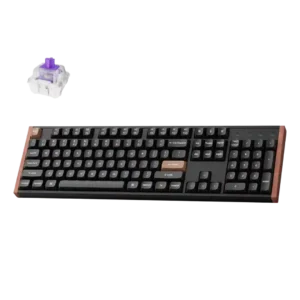
The K10 HE is consistently presented as a full-size or 100% board that keeps the numpad and favors users who want the full layout.
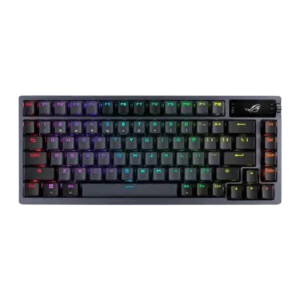
The 75% form factor is one of the board’s biggest strengths, balancing compact size with much better everyday usability than 60% boards.
Software impressions are mixed but mostly positive. Reviews like the web-based launcher for ease, labeling, and no-install setup, while one says it still feels barebones and lacks better macro tools or offline access.
Software quality is the clearest drawback, with repeated complaints about Armoury Crate being bloated, slow, unstable, or frustrating.
Multiple reviews explicitly mention acoustic foams or damping layers contributing to the board’s sound and feel.
Sound dampening is excellent thanks to multiple foam and silicone layers that reduce ping, echo, and hollowness.
Upgraded stabilizers are credited with firmer large keys, reduced rattle, and quieter operation.
Stabilizers are a strength, with pre-lubed larger keys delivering smoother travel and better consistency than usual for gaming boards.
Reviewers consistently describe the magnetic switches as nice, smooth, and stable, though one review says the linear action can feel a bit sterile for general typing.
Switch feel is strong overall, with smooth stock switches and good variety, though some reviewers still preferred other switch types.
One review notes the switch ecosystem is limited because compatible switches are proprietary and must be bought from Keychron.
Switch choice is solid, with multiple stock switch variants that cover linear, tactile, and clicky preferences.
Reviews describe the full-size layout as comfortable for work and say actuation tuning lets users shape the feel to preference.
Typing comfort is very good for most users thanks to the gasket-style build and compact but still practical layout, though a full-size board can still feel easier for long writing sessions.
Typing is described as butter smooth and very smooth overall, but one review says the linear feel can come across as sterile for general typing.
Typing feel is one of the Azoth’s biggest strengths, with many reviewers describing it as premium, smooth, and enthusiast-leaning.
Reviews generally say the K10 HE justifies its price through its build, switch tech, and feature set, though the cost is still premium.
Value is mixed: reviewers love the hardware, but many still question whether the premium price is easy to justify.
Volume control works, but the dial and rocker can feel finicky enough that some reviewers found it less convenient than expected.
Reviews say wireless feels close to wired, with no obvious performance loss in use.
Wireless performance is a standout, with stable 2.4GHz results, minimal lag, and behavior reviewers considered effectively wired-grade.
The lack of an included wrist rest hurts long-session comfort for some users, especially given the board’s higher profile.