If you want better macro customization
Choose Keychron K2 HE. It scores 4.7 vs 3.5 for macro customization, with a 4.4 overall score.
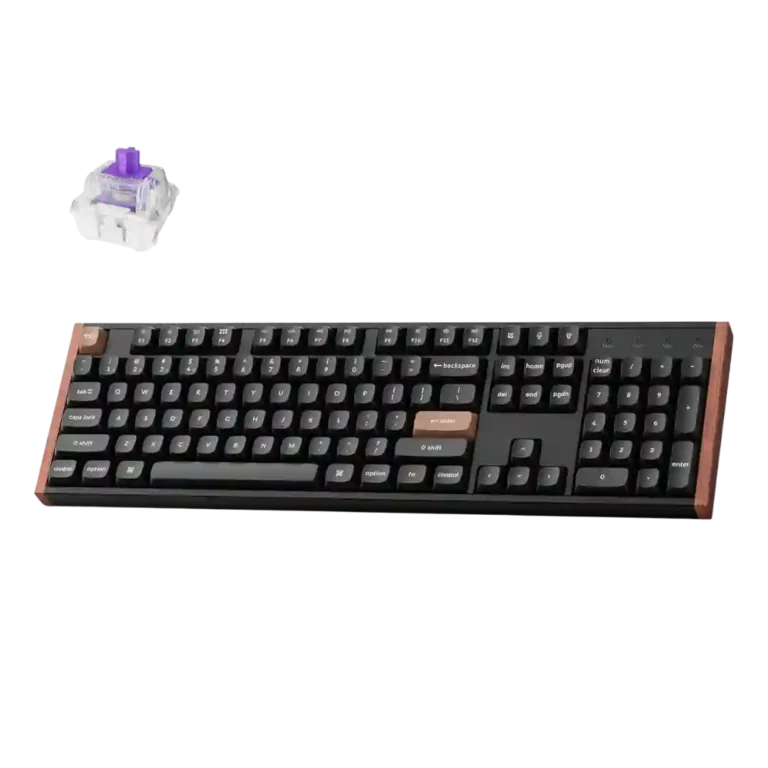
Choose the Keychron K10 HE if you want a refined full-size Hall Effect board with fast gaming response, creamy sound, and deep customization. Skip it if desk space, portability, offline software, shine-through legends, or a hardware volume knob matter most.
Best for users who want one full-size keyboard for work and gaming, especially if they value a number pad, smooth Hall Effect switches, analog-style controls, and deep actuation customization.
Not for small desks, frequent travel, or users who need tactile switch feel, shine-through legends, a hardware volume knob, or a more mature offline software suite.
Reviewers consistently frame the Keychron K10 HE as a polished full-size keyboard that blends office usefulness with serious gaming controls. Its strongest praise centers on smooth, responsive magnetic switches, thocky or creamy acoustics, sturdy materials, and extensive actuation, RGB, and key behavior customization. The tradeoff is that the same full-size build that makes the number pad useful also takes up desk space and reduces portability. Software impressions are also split: reviewers like the web app’s ease and breadth, but some find it barebones or dislike that it is online-only. Overall, the review evidence points to a premium-feeling board with unusually strong gaming flexibility and a few practical compromises.
Compared with other Gaming Keyboards, this product is above average in analog input support, hot-swappable switches, rapid trigger support, near average in design aesthetics, gaming performance, below average in desk space efficiency, portability, volume control.
| Attribute | This product | Category average | Difference |
|---|---|---|---|
| desk space efficiency | 2.0 | 4.2 | -2.2 |
| analog input support | 4.5 | 3.1 | +1.4 |
| portability | 2.0 | 3.5 | -1.5 |
| volume control | 2.5 | 3.9 | -1.4 |
| hot-swappable switches | 4.8 | 3.4 | +1.4 |
| rapid trigger support | 4.8 | 3.5 | +1.3 |
| switch options | 2.0 | 3.2 | -1.2 |
| ease of switch replacement | 4.8 | 3.7 | +1.1 |
Choose Keychron K2 HE. It scores 4.7 vs 3.5 for macro customization, with a 4.4 overall score.
Choose ASUS ROG Strix Scope II 96 Wireless. It scores 4.8 vs 3.2 for battery life, with a 4.2 overall score.
Choose Keychron Q1 HE. It scores 4.6 vs 2.5 for volume control, with a 4.2 overall score.
Choose Keychron K4 HE. It scores 4.6 vs 2.0 for desk space efficiency, with a 4.3 overall score.
Products reviewers directly compared with this model, grouped into quick takeaways.
Yes. Reviewers praised its fast magnetic switches, rapid trigger behavior, analog-style input, and FPS-focused features such as Snap Click and Last Key Priority.
Typing impressions are mostly positive, with reviewers calling the switches smooth, stable, and comfortable. One reviewer noted that the linear feel can seem sterile if you expect tactile satisfaction.
Reviewers generally described it as quieter, creamy, thocky, or not very loud, crediting the internal acoustic layers and upgraded stabilizers.
The reviews describe Keychron Launcher as a web-based tool. Some reviewers liked avoiding local software, while others wanted offline access or better macro tools.
On the Special Edition, reviewers noted that the keycaps are not shine-through. Some still liked the lighting around the keys, but others would have preferred readable legends in the dark.
Most reviewers thought the price was fair or justified by the build, customization, and switch technology, though one unboxing called it somewhat excessive compared with cheaper mechanical keyboards.
These are a few of the reviews included in our analysis.



Good if you want a premium 96% Hall Effect keyboard for work and gaming with excellent build, sound, and customization. Skip it if you need cheaper esports-first speed, 8,000Hz polling,...
Pros: cable quality, typing comfort
Cons: portability, switch options

Good if you want a premium, quiet TKL Hall Effect keyboard for typing and gaming. Skip it if price, portability, 8,000Hz polling, or broad switch choice matters most.
Pros: build quality, extra gaming features
Cons: switch options, hot-swappable switches

Good if you want a premium full-size Hall Effect keyboard with smooth switches, quiet sound, and deep customization. Skip it if you need a portable, budget-friendly board or broad switch...
Pros: key stability, frame rigidity
Cons: portability, switch options

Good if you want esports speed, analog tuning, and deep customization. Skip it if typing comfort, quiet office use, or included extras matter more.
Pros: polling rate, RGB customization
Cons: key stability, typing comfort