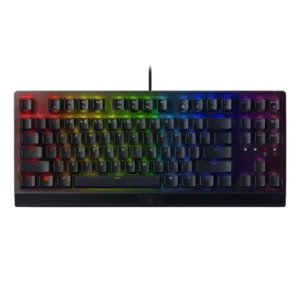
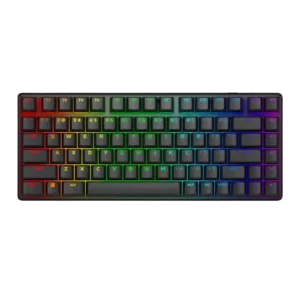
The keyboard’s sound profile draws criticism in the scored reviews. Instead of refined acoustics, reviewers point to ping and generally unpleasant sound character.
Across reviews, the board produces a pleasing thock, tock, or clicky sound that several testers actively enjoyed.
Keystrokes are described as accurate and reliably registering on the first press.
Backlight brightness is generally described as vibrant, but not every reviewer sees it as intense. One reviewer specifically calls it more toned down than a brighter competitor.
Lighting is described as bright and sharp, with reviewers noting stronger illumination than expected.
Battery life is a major strength, with very long quoted runtimes and solid real-world stamina, though RGB cuts endurance sharply.
Build quality is one of the clearest positives across the reviews. The keyboard is repeatedly described as quality, sturdy, and premium-feeling.
Reviews consistently describe the chassis as premium, solid, and well-built.
Cable quality is consistently positive. Reviewers like the braided cable and routing options, even though the cable is not detachable.
Included cables are noted as paracord or braided, suggesting a premium bundled wired setup.
Compatibility is functional but limited. Reviews indicate straightforward PC use, while deeper customization is tied to Windows-focused software requirements.
Reviews mention broad switch compatibility with 3-pin and 5-pin aftermarket options, and one reviewer reported MacOS worked in testing.
Connectivity is clearly wired-only in the scored reviews. This version is repeatedly described as using a fixed USB-A cable rather than wireless options.
Tri-mode connectivity is repeatedly praised, with wired, 2.4GHz, and Bluetooth modes plus multi-device switching.
Broader customization is one of the keyboard’s strengths. Reviews mention remapping, secondary functions, lighting changes, and deeper software control.
Reviewers say the keyboard is highly customizable through software and switch or keycap support.
Desk space efficiency is a weakness in the scored reviews. Writers explicitly mention struggling to fit the keyboard comfortably next to a mouse setup.
The 75% layout is repeatedly praised for freeing desk and mouse space.
Durability is a repeated theme, with mentions of long-lasting doubleshot caps, high keystroke lifespan, and good resistance to wear. Reviewers generally treat the keyboard as built to last.
Durability looks strong from the evidence, including long switch lifespan, durable PBT caps, and claims it should hold up over time.
Reviewers say the hot-swap design and included tool make switch changes straightforward.
Ergonomics are generally positive once the board is positioned correctly. Reviews praise typing angles, wrist support, and comfortable hand positioning, though size can make ideal placement harder.
Angle adjustment helps, but the lack of a wrist or palm rest creates comfort tradeoffs for some users.
The scored reviews mention gaming-specific extras such as gaming mode, anti-ghosting behavior, and Windows-key lock functionality. These features add practical gaming utility beyond basic typing.
It includes useful gaming extras such as lockout settings, profile or macro shortcuts, and preset controls, but reviewers also call it light on extras for the price.
Frame rigidity is praised in the scored reviews. Writers call out very low flex and a notably stable feel.
Multiple reviewers report essentially no flex in the chassis.
In gaming, the keyboard is described as responsive and dependable. Reviewers report that it keeps up in play without causing missed actions or obvious input problems.
Gaming performance is a core strength, especially in fast-paced shooters and esports-style play.
One review explicitly states that the keyboard does not support hot swapping. There is no contradictory evidence in the uploaded review set.
Hot-swap support is repeatedly confirmed, including compatibility with user-supplied switches.
The doubleshot ABS keycaps are repeatedly viewed as solid and durable, with praise for their texture and toughness. Reviews do not position them as a premium PBT solution, but they are still well regarded.
The included double-shot PBT keycaps are described as durable, textured, and comfortable.
Key response is a clear strength in the reviews. Writers describe the keys as immediately or highly responsive, with no missed combos in use.
Reviewers consistently describe the keys as very responsive and quick to actuate.
Reviews say the key shape and spacing feel standard and comfortable. Nothing suggests an unusual or cramped layout here.
The compact layout creates mixed feedback: some adapt easily, while others report tight spacing and a shrunken right Shift.
Key stability is generally decent, with one review praising the switch design for added stability. Another review notes slight wobble on some larger keys, so stability is good rather than flawless.
Large keys and switches are described as stable, with minimal wobble or rattle.
One review explicitly says latency is remarkably low. No conflicting latency complaints appear in the uploaded full-size reviews used for scoring.
Low-latency wired and 2.4GHz performance is praised, with reviewers reporting no noticeable lag.
One review frames the standard BlackWidow V3 as the full-size layout option within the V3 family. That gives the line some layout variety even though this specific model is the standard full-size board.
One review says the lighting can look uneven and smudged, which hurts how cleanly the legends present. That makes legend clarity less convincing than the keyboard’s stronger areas.
Legends are easy to read and benefit from even shine-through lighting.
Macro support is consistently confirmed. Reviews mention both software-based macro setup and on-the-fly macro recording.
Macros and keybind remapping are available through Alienware Command Center.
Reviews consistently mention the aluminum top and overall premium-feeling material mix. The build is not all-metal, but the material choices still leave a strong impression.
Materials are a premium highlight, especially the aluminum case and PBT caps.
Media controls are a consistent convenience feature in the reviews. Writers repeatedly mention the roller/button setup for playback functions.
Media controls are present and usable, though implementation varies between dedicated buttons and secondary functions.
Noise level is a recurring tradeoff. The keyboard is repeatedly described as clicky and can be loud enough to bother others, especially with green switches.
Noise levels are mixed: some reviewers call it surprisingly controlled, while others say the clack carries further than expected.
Onboard memory is directly referenced in the scored reviews, with support for up to five profiles. That gives the keyboard some settings portability without starting from scratch every time.
Onboard memory supports stored settings or profiles that can travel with the keyboard.
One scored review explicitly says there is no USB pass-through. That feature is simply absent rather than weakly implemented.
Per-key lighting control is directly confirmed in multiple reviews. The software is described as allowing individual-key lighting adjustment rather than only broad presets.
Per-key lighting control is supported through Alienware Command Center.
One review directly cites a 1000 Hz polling rate alongside N-key rollover. That points to strong input reporting on paper and in use.
The keyboard runs at around 1,000Hz, which reviewers found fast enough for most use but not class-leading for elite competitive play.
One scored review says the keyboard is lightweight for a full-size mechanical board. That helps portability somewhat, even though the keyboard is still physically large.
The compact 75% form factor and wireless design make it easy to pack and travel with.
Profile management is a repeated feature in the reviews. Writers mention saving or syncing up to five profiles.
Multiple profiles can be saved and switched, with game-linked or onboard profile behavior mentioned in reviews.
Reviews explicitly note the lack of Hall-effect or Rapid Trigger style functionality.
Reliability comes through strongly in the scored reviews. Writers report no performance issues and no missed key presses or combos in use.
Connection stability and general dependability are praised, especially in wireless gaming use.
RGB customization is a strong point in the review set. Reviewers highlight Synapse/Chroma controls, broad color choices, and theme-friendly lighting behavior.
RGB modes, per-key changes, and profile-based lighting customization are supported.
RGB lighting quality is a mixed strength. Several reviews call it vibrant and eye-catching, while others specifically note uneven bleed-through or smudged-looking illumination on some versions.
RGB lighting is one of the standout strengths, described as bright, vivid, and visually impressive.
The keyboard is consistently described as full-size with a numpad. That layout suits buyers who want a traditional desk keyboard, but it also contributes to its bulk.
The compact 75% layout is widely seen as the sweet spot between saving space and retaining essential keys.
Software quality is mixed. One review finds Synapse worked fine and offered flexibility, while another calls it clunky and difficult to use.
Software is functional and often easy to use, but several reviews still call it unreliable or limited.
Sound dampening appears limited. The main direct evidence is pinging plus a hollow-sounding spacebar, which points to minimal damping.
Internal dampening layers or foam reduce ping, hollow notes, and unwanted resonance.
One scored review notes slight wobble on larger keys. That suggests stabilizer performance is serviceable, but not a standout strength.
Stabilizers are praised for reducing rattle and keeping large keys sounding and feeling cleaner.
Across reviews, the switch feel is consistently described as clicky and tactile, with the green option getting favorable comparisons to familiar blue-style switches. The feel is generally positive for both typing and gaming.
The stock linear switches are widely described as smooth, light, and satisfying under the fingers.
Reviews confirm the keyboard is sold with two switch choices, green and yellow. That gives buyers some flexibility, but the overall switch selection is still limited.
Stock switch choice is limited to Alienware linears, but hot-swap support expands aftermarket replacement options.
Typing comfort is a notable strength in the scored reviews. Writers describe the keys as gentle on the hands and comfortable over extended use.
Typing comfort is acceptable to good, but the missing wrist rest can reduce long-session comfort.
Typing feel is broadly positive, with reviewers describing it as pleasant, fast, and accurate. One review is more measured, calling the switches decent rather than exceptional.
Typing feel is generally strong, though not every reviewer found it exceptional for productivity.
Value for money is generally positive in the scored reviews. Writers describe the pricing as sensible or mid-range, though not necessarily class-leading against every cheaper alternative.
Value is the biggest drawback: many reviewers like the keyboard but think the price is too high, even if a few still find it worthwhile.
Volume control is one of the keyboard’s most consistently praised extras. Multiple reviews specifically call out the roller or wheel as useful and convenient.
Volume control exists via buttons rather than a knob, which some reviewers see as less convenient.
Wireless performance is a major strength, with stable 2.4GHz behavior and no obvious slowdowns reported.
The included wrist rest is useful and often comfortable, but it is not universally loved. Several reviews say it feels plastic, less premium than the Pro version, or too loosely attached/unattached.
There is no included wrist or palm rest, which several reviewers call out as a drawback.