- Worse: cable manageability The BlackWidow V3's slimmer cable was considered more manageable than the Corsair K100's cable.
- Similar: dark design style The reviewer saw a similar dark style to the Corsair K100 but preferred the BlackWidow V3's look.
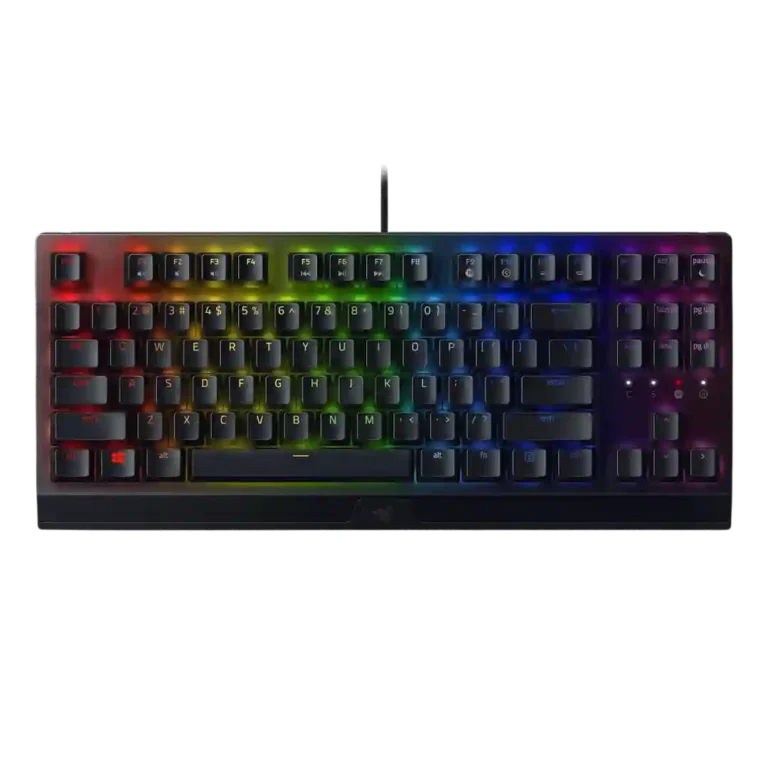
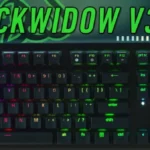
Razer BlackWidow V3 Review
Bottom Line
Choose the Razer BlackWidow V3 for sturdy wired gaming, responsive clicky typing, strong RGB customization, and handy volume/media controls. Skip it if you need quiet keys, wireless freedom, compact desk space, or a plush wrist rest.
Best for gamers and heavy typists who want a sturdy wired board with tactile clicky switches, customizable RGB, macros, and convenient volume/media controls. It also suits users who like a full-size layout and do not mind a louder typing sound.
Not for quiet shared rooms, wireless setups, or compact desks where a full-size board crowds mouse space. Comfort-focused buyers may also dislike the plastic wrist rest and users sensitive to software issues may find Synapse frustrating.
Review evidence frames the Razer BlackWidow V3 as a sturdy, responsive wired keyboard with a strong feel for gaming and typing. Its biggest strengths are build quality, fast key response, useful volume/media controls, and broad Synapse/Chroma customization. The tradeoff is that its personality depends heavily on preferences: Green switches can feel satisfyingly tactile and clicky, but several reviewers found them loud, pingy, or distracting. The full-size footprint and plastic wrist rest also reduce its appeal for tight desks or comfort-focused setups. RGB earns praise for vibrancy and flexibility, yet the Quartz version drew criticism for uneven shine-through and washed-out color. Overall, the evidence points to a capable board with real comfort, noise, and software caveats.
Compared in Reviews
Products reviewers directly compared with this model, grouped into quick takeaways.
Black Widow V3 Pro
- Better: connectivity options The standard BlackWidow V3 lacks the Pro model's broader wireless and wired connectivity choices.
Huntsman Mini
- Better: sensory typing experience The reviewer liked the BlackWidow V3 overall but preferred the Huntsman Mini for sensory feel.
Feature Scorecards
Summary
45 reviewed features- Very positive 4.5-5.0 33% 15 features
- Positive 3.5-4.4 40% 18 features
- Neutral 2.5-3.4 20% 9 features
- Negative 1.5-2.4 7% 3 features
- Very negative below 1.5 0% 0 features
Pros
-
Latency evidence was strongly positive, with one review calling it remarkably low and another praising the fast Yellow switch for rapid-fire key presses.
-
Durability was strongly praised, especially around the hard-wearing construction, robust product design, and tough keycaps.
-
Actuation consistency was praised through no-missed-input comments, especially during gaming and heavy key-bashing scenarios.
-
Gaming performance was broadly praised for responsive in-game behavior, reliable combos, and suitability for both MMO and shooter-style play.
-
Volume control was one of the best-liked extras, with several reviewers calling the roller useful, handy, convenient, or life-giving.
-
Onboard memory had limited but positive evidence, with up to five profiles described as convenient.
-
Build quality was a major strength across reviews, with repeated praise for the sturdy feel, aluminum top, rugged construction, and quality overall.
-
RGB customization was consistently praised through Razer Chroma and Synapse controls, with reviewers noting flexible profiles, custom effects, and game-integrated lighting.
-
Customization options were a recurring strength, covering key remapping, RGB, macros, Hypershift, and flexible Synapse controls despite software caveats.
-
Macro customization was well supported through Synapse, on-the-fly recording, Hypershift, and broad key assignment flexibility.
-
Portability evidence was positive, citing the lightweight full-size build and compact TKL packability.
-
Polling rate received limited but positive support, with the reviewer tying the fast thousand-hertz rate to responsive keypress behavior.
-
Size and form factor evidence came from TKL coverage, where the smaller layout was praised as compact.
-
Materials quality was generally positive thanks to the aluminum top, sturdy feel, and durable parts, with only some caveats around ABS keycaps elsewhere.
-
Key responsiveness was one of the clearest strengths, with reviewers reporting quick actuation, reliable in-game inputs, and no keypress problems in normal play.
-
Reviewers generally liked the switch feel, describing the Green switches as tactile, clicky, responsive, and fun, though some treated the sound as a tradeoff.
-
Media controls were mostly liked, with reviewers praising the roller/button convenience even when some preferred dedicated media keys.
-
Cable quality was mostly positive for the braided, durable, manageable cable, though one reviewer warned cable routing could kink it.
-
Frame rigidity was mostly praised for low flex and stability, though one review found it less rigid than some Filco and Ducky boards.
-
Key spacing had limited positive support, with one review crediting the standard shape and spacing for comfortable typing.
-
Typing comfort was mostly positive, with reviewers praising easy, enjoyable typing, but some slowed down or needed the wrist rest for longer sessions.
-
Typing feel was mostly positive, ranging from enthusiastic praise to decent performance, with some criticism when forceful typing caused sound or underpressing issues.
-
Value for money was generally positive for a sturdy, capable midrange board, but one TKL review argued the price faced stronger alternatives.
-
RGB lighting quality was divisive: many liked the vibrant Chroma glow, but Quartz lighting bleed, uneven shine-through, and toned-down brightness disappointed others.
-
Design aesthetics were highly subjective, with praise for the pink, black, and minimalist looks offset by Quartz cosmetic complaints.
-
Key stability was mixed: some evidence praised the switch/keycap stabilizing design, while another review noted wobble on larger keys.
-
Backlight brightness drew mixed but mostly favorable comments, with vibrant Chroma praise balanced against one reviewer finding the lights more toned down.
-
Keycap quality split reviewers: textured doubleshot ABS was often liked for grip and durability, but ABS material, uneven aesthetics, and cheap-feeling keys drew criticism.
-
Ergonomics were mixed: the wrist rest, feet, and angled setup helped comfort, but the full-size footprint made positioning difficult for some.
-
Reliability was mixed: some reviewers reported no performance issues or called it reliable, while one long-term TKL review reported missing profiles.
-
Switch choice was seen as useful because Green and Yellow options suit different preferences, but several reviewers wished the lineup offered broader switch variety.
-
Profile management was mixed: onboard/profile customization was convenient in positive reviews, but one long-term reviewer reported profiles going missing.
-
Layout options received limited support, mainly from the suggestion that some users would be better served by the TKL version.
Cons
-
Legend visibility was uneven; reviewers disliked missing or unlit identifiers, while one TKL reviewer praised improved foreign-key visibility.
-
Extra gaming features were mixed: one review praised the loaded feature set, while another criticized the lack of gaming keys and other extras.
-
Software quality was sharply split: many liked Synapse customization, while others disliked multiple apps, clunkiness, or bugs.
-
Compatibility was mixed: basic USB PC use was easy, but deeper customization was limited for Linux and macOS users.
-
Wrist rest quality was mixed to weak: some found it useful or comfortable, while others called it hard plastic, uncomfortable, or an afterthought.
-
Acoustics were highly preference-dependent: one reviewer enjoyed the clicky sound, while others criticized pinging and a cacophonous din.
-
Desk space efficiency was mixed to negative for the full-size model, with reviewers struggling for mouse room or noting the wrist rest consumed desk space.
-
Connectivity was a limitation because reviewers repeatedly noted that the standard V3 is wired-only and lacks wireless or Bluetooth.
-
Stabilizer quality had limited negative evidence, centered on a hollow spacebar thud during typing.
-
Noise level was the most consistent drawback, with multiple reviewers warning that Green switches are loud, pingy, or annoying in shared and quiet spaces.
-
Passthrough features were criticized because reviewers noted the absence of USB or audio passthrough.
-
Sound dampening appeared weak in the negative evidence, with pinging and hollow/cacophonous typing sounds standing out.
Compared With Category Average
Compared with other Gaming Keyboard, this product is above average in portability, volume control, below average in sound dampening, noise level, desk space efficiency.
Summary
8 compared features- Above average 0.4+ pts higher 25% 2 features
- Same as average within 0.3 pts 0% 0 features
- Below average 0.4+ pts lower 75% 6 features
| Attribute | This product | Category average | Difference |
|---|---|---|---|
| sound dampening | 1.9 | 4.1 | -2.2 |
| noise level | 2.3 | 3.9 | -1.6 |
| desk space efficiency | 2.7 | 4.1 | -1.4 |
| connectivity | 2.5 | 3.9 | -1.4 |
| acoustics | 2.8 | 4.1 | -1.3 |
| stabilizer quality | 2.5 | 3.8 | -1.3 |
| portability | 4.6 | 3.4 | +1.1 |
| volume control | 4.7 | 3.7 | +1.0 |
FAQ
Is the Razer BlackWidow V3 good for gaming?
Yes. Reviewers repeatedly described it as responsive in games, with no missed keypresses or messed-up sequences in tested play.
Are the Green switches loud?
Yes. Several reviewers liked the clicky feel, but noise was the most common drawback, with complaints about loud clicks, pinging, and shared-room annoyance.
How good is the build quality?
Build quality was one of the strongest areas. Reviewers praised the aluminum top, sturdy feel, durable keycaps, and low flex, though one review found it less rigid than some other enthusiast boards.
Is the wrist rest comfortable?
Opinions were mixed. Some reviewers found it supportive or useful, while others called it hard plastic, uncomfortable, or an afterthought compared with softer premium rests.
How is the RGB lighting?
RGB customization was praised through Chroma and Synapse, but lighting quality depended on version. The Quartz model drew criticism for uneven shine-through, pastel tinting, and washed-out color.
Does it have wireless or passthrough features?
The reviewed standard V3 is wired-only, and reviewers noted the absence of USB or audio passthrough. Wireless connectivity was treated as a reason to look at the Pro version instead.
Is Razer Synapse required?
Basic use is plug-and-play, but deeper RGB, macro, profile, and key remapping features depend on Synapse. Reviewers split between praising its flexibility and criticizing clunkiness or bugs.
Consider This Instead
If you want better sound dampening
Choose be quiet! Dark Mount. It scores 5.0 vs 1.9 for sound dampening, with a 4.0 overall score.
If you want better noise level
Choose ASUS ROG Falchion RX. It scores 4.9 vs 2.3 for noise level, with a 4.2 overall score.
If you want better stabilizer quality
Choose Lemokey P1 HE. It scores 5.0 vs 2.5 for stabilizer quality, with a 4.2 overall score.
If you want better connectivity
Choose Keychron Q6 HE. It scores 4.9 vs 2.5 for connectivity, with a 4.4 overall score.
Overall Top Gaming Keyboard Alternatives
Good if you want a premium 96% Hall Effect keyboard for work and gaming with excellent build, sound, and customization. Skip it if you need cheaper esports-first speed, 8,000Hz polling,...
Pros: cable quality, typing comfort
Cons: portability, switch options

Good if you want a premium full-size Hall Effect keyboard with smooth switches, quiet sound, and deep customization. Skip it if you need a portable, budget-friendly board or broad switch...
Pros: key stability, frame rigidity
Cons: portability, switch options

Good if you want a compact Hall Effect keyboard with smooth typing, strong gaming response, bright RGB, and good value. Skip it if you need polished software, quiet heavy presses,...
Pros: desk space efficiency, layout options
Cons: compatibility
Good if you want a premium, quiet TKL Hall Effect keyboard for typing and gaming. Skip it if price, portability, 8,000Hz polling, or broad switch choice matters most.
Pros: build quality, extra gaming features
Cons: switch options, hot-swappable switches