Compare Razer Joro vs Logitech G915 Lightspeed

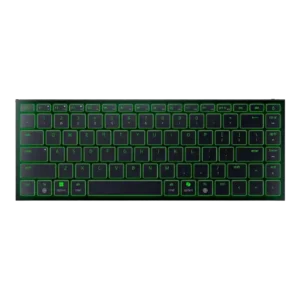
P1 Razer Joro
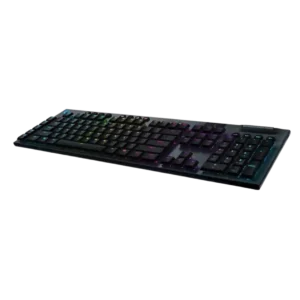
P2 Logitech G915 Lightspeed

Comparison Takeaways

Razer Joro

Where It Has the Edge

  • key stability is 4.6 vs 2.9. PCMag specifically found no wobble or mush in the keys, supporting a strong key-stability score.
  • cable quality is 3.9 vs 2.4. The included braided USB-C cable was generally appreciated as premium, though one reviewer noted practical limits from its...
  • legend visibility is 3.8 vs 2.8. Legend visibility was mostly positive thanks to readable fonts and illuminated legends, but one reviewer missed backlighting on...
  • noise level is 4.5 vs 3.6. Noise level was a strength, with reviewers describing the Joro as quiet, restrained, and suitable for offices, shared...

Logitech G915 Lightspeed

Where It Has the Edge

  • per-key lighting control is 5.0 vs 2.4. Per-key lighting control is praised when discussed, including fully programmable RGB and per-key color choices.
  • latency is 5.0 vs 2.8. Latency is a major strength, with reviewers repeatedly saying lag was imperceptible, nonexistent, or indistinguishable from wired use.
  • switch options is 4.6 vs 2.5. Reviewers appreciate having linear, tactile, and clicky options, with several noting the variants help match user preference.
  • wireless performance is 4.8 vs 2.9. Wireless performance is one of the clearest strengths, with many reviewers describing Lightspeed as wired-like, reliable, fast, and...
Average score
Product 1: Razer Joro
3.8
Product 2: Logitech G915 Lightspeed
4.2
acoustics
Product 1: Razer Joro
4.3

Reviewers who discussed sound found the Joro's scissor switches pleasant, leaning deeper and subtly satisfying rather than loud or clicky.

Product 2: Logitech G915 Lightspeed
5.0

One reviewer specifically praised the clicky sound, treating the key acoustics as a standout part of the typing experience.

actuation consistency
Product 1: Razer Joro
4.6

PCMag found the typing feel consistent across the whole board, supporting a strong actuation-consistency score.

Product 2: Logitech G915 Lightspeed
3.8

Evidence is split: one reviewer liked the clear, consistent clicky actuation, while another struggled to sense the exact registration point.

analog input support
Product 1: Razer Joro
2.6

GamesRadar framed the Joro as missing the fancier analog-system actuation features found elsewhere in Razer's lineup.

Product 2: Logitech G915 Lightspeed
No score yet
backlight brightness
Product 1: Razer Joro
4.2

GamesRadar found the RGB strong enough that half brightness still looked fantastic, though this was discussed alongside battery impact.

Product 2: Logitech G915 Lightspeed
4.8

Reviewers generally found the backlighting bright, with praise for vivid illumination even when running wirelessly.

battery life
Product 1: Razer Joro
3.5

Battery impressions were split: several reviewers praised all-day or weeklong use with modest lighting, while others criticized short runtime with RGB enabled.

Product 2: Logitech G915 Lightspeed
4.7

Battery life is one of the strongest points, repeatedly described as solid, commendable, impressive, exceptional, or long-lasting even with RGB enabled.

build quality
Product 1: Razer Joro
4.6

Build quality was one of the strongest themes, with reviewers repeatedly praising the rigid, sturdy construction despite the ultra-thin chassis.

Product 2: Logitech G915 Lightspeed
4.9

Reviewers strongly praised the premium, solid construction, frequently describing the keyboard as sturdy, durable, tank-like, or a real step up.

cable quality
Product 1: Razer Joro
3.9

The included braided USB-C cable was generally appreciated as premium, though one reviewer noted practical limits from its short USB-C-to-C design.

Product 2: Logitech G915 Lightspeed
2.4

Cable and charging feedback is mixed: the braided cable is praised, but multiple reviewers criticize the micro-USB charging port as cheap or outdated.

compatibility
Product 1: Razer Joro
4.5

Compatibility was a major strength, especially for users switching between Windows, macOS, mobile devices, and multiple paired systems.

Product 2: Logitech G915 Lightspeed
4.5

One reviewer positively framed the device-switching use case as helpful for smart TVs and other devices.

connectivity
Product 1: Razer Joro
4.0

Connectivity was praised for easy pairing and device switching, but Bluetooth-only wireless and dongle omissions created caveats.

Product 2: Logitech G915 Lightspeed
4.9

Reviewers consistently liked the mix of Lightspeed, Bluetooth, wired use, and fast device switching, with only minor caveats about Bluetooth latency.

customization options
Product 1: Razer Joro
4.0

Customization was often useful through Synapse, remapping, lighting, and profiles, though some reviewers found limits around remappable keys and software dependence.

Product 2: Logitech G915 Lightspeed
4.5

Customization is viewed positively, with reviewers highlighting many assignment, lighting, and software options.

design aesthetics
Product 1: Razer Joro
4.6

Design reactions were strongly positive, with reviewers calling the Joro stunning, clean, minimalist, gorgeous, and premium-looking.

Product 2: Logitech G915 Lightspeed
4.9

The design receives broad praise for looking sleek, mature, slim, attractive, and premium rather than overly gamer-styled.

desk space efficiency
Product 1: Razer Joro
4.5

Reviewers liked how the compact 75% layout preserved useful controls while saving space and staying productivity-friendly.

Product 2: Logitech G915 Lightspeed
4.3

Tenkeyless coverage highlights major mouse-space gains, while the full-size model is seen as less desk-friendly because of its length.

durability
Product 1: Razer Joro
4.5

One long-term tester found the Joro held up without visible wear after several weeks, supporting a positive durability score.

Product 2: Logitech G915 Lightspeed
4.8

Durability evidence is mostly strong, including rough household use, long-term daily use, and no major failures over time.

ergonomics
Product 1: Razer Joro
2.9

Ergonomics were mixed to negative overall: some liked the flat angle, but many criticized the lack of adjustable feet and fatigue over time.

Product 2: Logitech G915 Lightspeed
4.2

Ergonomics are mostly positive because of the low profile and adjustable feet, though one reviewer felt the keyboard needed tilt to feel right.

extra gaming features
Product 1: Razer Joro
4.1

Gaming extras such as Snap Tap, NKRO, and gaming-mode features were appreciated, although they did not fully overcome the keyboard's travel-first limits.

Product 2: Logitech G915 Lightspeed
4.3

Game mode and G-key functions are considered useful, especially for locking keys or mapping game/streaming actions.

frame rigidity
Product 1: Razer Joro
4.7

Frame rigidity was consistently praised, with multiple reviewers noting almost no flex or bending from the thin deck.

Product 2: Logitech G915 Lightspeed
4.6

The frame is generally praised for rigidity and low flex, though one long-term reviewer noticed a slight bend that did not affect use.

gaming performance
Product 1: Razer Joro
3.2

Gaming performance was context-dependent: reviewers found it acceptable or speedy for casual use, but weak for serious or PC-focused competitive gaming.

Product 2: Logitech G915 Lightspeed
4.4

Gaming evidence is positive overall, with reviewers calling it responsive and easy to use in games, though some saw little measurable stat improvement.

keycap quality
Product 1: Razer Joro
3.3

Keycap feedback was mixed: reviewers liked smooth, comfortable caps and etched legends, but several complained about smudges, fingerprints, or clammy feel.

Product 2: Logitech G915 Lightspeed
2.7

Keycap quality is the most consistent hardware concern, with complaints about marks, wear, wobble, thinness, small caps, and proprietary replacement issues.

key responsiveness
Product 1: Razer Joro
3.5

Responsiveness varied by use case, with some reviewers reporting quick input while others found the keys slow or less responsive than mechanical alternatives.

Product 2: Logitech G915 Lightspeed
4.8

Reviewers repeatedly describe the low-profile switches as zippy, responsive, fast, and comparable to wired responsiveness.

key spacing
Product 1: Razer Joro
3.6

Key spacing drew mixed reactions: some reviewers liked the spacing and full-size keys, while others found the compact layout cramped or hard to navigate.

Product 2: Logitech G915 Lightspeed
3.3

Key spacing is mixed: close keys helped one reviewer settle in, but another found them easier to hit accidentally.

key stability
Product 1: Razer Joro
4.6

PCMag specifically found no wobble or mush in the keys, supporting a strong key-stability score.

Product 2: Logitech G915 Lightspeed
2.9

Key stability is mixed-to-weak, with praise for stable typing in some reviews but complaints about rattle, wobble, and cheap-feeling keycaps in others.

latency
Product 1: Razer Joro
2.8

Latency was a key concern outside wired mode, with multiple reviewers calling out Bluetooth input delay or the lack of low-latency wireless support.

Product 2: Logitech G915 Lightspeed
5.0

Latency is a major strength, with reviewers repeatedly saying lag was imperceptible, nonexistent, or indistinguishable from wired use.

layout options
Product 1: Razer Joro
3.4

Layout opinions split sharply: some reviewers found the 75% layout efficient, while others disliked the small Shift, spacebar, or right-side key choices.

Product 2: Logitech G915 Lightspeed
3.8

Layout feedback is mixed: tenkeyless versions improve compactness, while some reviewers disliked the large full-size footprint.

legend visibility
Product 1: Razer Joro
3.8

Legend visibility was mostly positive thanks to readable fonts and illuminated legends, but one reviewer missed backlighting on secondary functions.

Product 2: Logitech G915 Lightspeed
2.8

Legend visibility is a weakness where mentioned, with complaints about small legends or secondary characters not shining through.

macro customization
Product 1: Razer Joro
3.8

Macro customization was useful where Synapse and onboard tools allowed it, but reviewers criticized the lack of on-the-fly macro recording and limited remap space.

Product 2: Logitech G915 Lightspeed
4.4

Macro support is widely praised through G keys, profile layers, software assignments, and on-the-fly recording, with some limits on TKL/F-key mapping.

materials quality
Product 1: Razer Joro
4.3

Materials quality was mostly strong thanks to the aluminum top plate, though one reviewer found the plastic base comparatively cheap.

Product 2: Logitech G915 Lightspeed
4.3

Materials are mostly praised for aluminum, brushed-metal, and premium feel, but one reviewer disliked the sharp frame edges.

media controls
Product 1: Razer Joro
3.3

Media controls worked through function layers and were reachable for some, but other reviewers found their placement awkward or annoying.

Product 2: Logitech G915 Lightspeed
4.2

Media controls are generally valued, though some reviewers criticize the rubber buttons as mushy, cheap, or inconsistent at the edges.

noise level
Product 1: Razer Joro
4.5

Noise level was a strength, with reviewers describing the Joro as quiet, restrained, and suitable for offices, shared spaces, or travel.

Product 2: Logitech G915 Lightspeed
3.6

Noise opinions depend on switch choice: clicky switches are quieter than some mechanical boards but still too loud for shared spaces in one review.

onboard memory
Product 1: Razer Joro
4.5

Macworld praised the ability to save function changes directly on the keyboard, supporting onboard memory usefulness.

Product 2: Logitech G915 Lightspeed
4.1

Onboard memory is useful for profiles, but implementation can feel counterintuitive or limited in software.

passthrough features
Product 1: Razer Joro
No score yet
Product 2: Logitech G915 Lightspeed
2.3

USB passthrough is a recurring absence, with reviewers noting or expecting it at this high price.

per-key lighting control
Product 1: Razer Joro
2.4

Per-key lighting control was a recurring limitation because reviewers noted single-zone RGB and no individual key effects.

Product 2: Logitech G915 Lightspeed
5.0

Per-key lighting control is praised when discussed, including fully programmable RGB and per-key color choices.

polling rate
Product 1: Razer Joro
4.0

A wired 1,000Hz mode was praised as a useful fallback when battery or wireless gaming performance mattered.

Product 2: Logitech G915 Lightspeed
5.0

Polling-rate evidence is positive, with 1ms/1,000Hz behavior tied directly to imperceptible lag and fast wireless performance.

portability
Product 1: Razer Joro
4.6

Portability was the strongest consensus point: reviewers repeatedly praised the thin, light, bag-friendly body for travel and mobile work.

Product 2: Logitech G915 Lightspeed
3.7

Portability is mixed: the TKL model and dongle storage help, while the full-size board is too long to carry easily.

profile management
Product 1: Razer Joro
4.1

Profile management was helpful through onboard profiles, although one reviewer still found broader customization flexibility limited.

Product 2: Logitech G915 Lightspeed
4.0

Profile switching is useful, but one reviewer found the onboard profile workflow counterintuitive.

rapid trigger support
Product 1: Razer Joro
4.0

PCWorld explicitly tied Snap Tap to rapid-trigger-style support, giving the Joro credit for that gaming feature.

Product 2: Logitech G915 Lightspeed
No score yet
reliability
Product 1: Razer Joro
4.1

Reliability was generally positive for device switching and daily use, with only isolated connection caveats.

Product 2: Logitech G915 Lightspeed
4.4

Reliability is strong in long-term evidence and TKL use, although one first-use wake issue created a negative first impression.

RGB customization
Product 1: Razer Joro
3.9

RGB customization was considered useful through Synapse and onboard controls, though it remained constrained by single-zone behavior.

Product 2: Logitech G915 Lightspeed
4.9

RGB customization is a major strength, with praise for extensive effects, per-key control, downloadable designs, and broad color options.

RGB lighting quality
Product 1: Razer Joro
4.3

RGB lighting quality was widely praised as vibrant, beautiful, bright, colorful, and unusually polished for this kind of travel keyboard.

Product 2: Logitech G915 Lightspeed
4.3

Lighting quality is generally praised as vivid and bright, though several reviews mention bleed, small legends, or less sharp illumination.

size and form factor
Product 1: Razer Joro
4.7

The slim, light form factor impressed reviewers, with hands-on comments emphasizing how thin and capable the keyboard felt.

Product 2: Logitech G915 Lightspeed
4.6

The thin form factor is heavily praised, but the full-size model is criticized by some for being very large.

software quality
Product 1: Razer Joro
3.9

Software quality was mixed: reviewers liked Synapse's growing Mac support and clearer layout, but some encountered availability or dependency frustrations.

Product 2: Logitech G915 Lightspeed
4.1

Software feedback is split: many find G Hub easy, refined, and powerful, while others call it complex, dreadful, or counterintuitive.

sound dampening
Product 1: Razer Joro
2.0

TechRadar specifically criticized the lack of dampening, saying the keys could feel harsh under heavier typing.

Product 2: Logitech G915 Lightspeed
No score yet
switch feel
Product 1: Razer Joro
4.1

Switch feel was divisive but often positive for scissor switches, with praise for crisp tactility offset by complaints of sluggishness from critics.

Product 2: Logitech G915 Lightspeed
4.4

Switch feel is mostly praised for low-profile speed, tactile/clicky feel, and typing enjoyment, with isolated complaints about uncanny or insufficient clickiness.

switch options
Product 1: Razer Joro
2.5

Switch options were a limitation because the Joro is not mechanical, which reviewers said may deter buyers who want that feel.

Product 2: Logitech G915 Lightspeed
4.6

Reviewers appreciate having linear, tactile, and clicky options, with several noting the variants help match user preference.

typing comfort
Product 1: Razer Joro
3.5

Typing comfort ranged from comfortable long writing sessions to fatigue and frustration, mostly depending on angle and layout tolerance.

Product 2: Logitech G915 Lightspeed
4.6

Typing comfort is a strong point thanks to the low profile, stable feel, and reduced wrist angle.

typing feel
Product 1: Razer Joro
4.1

Typing feel was generally pleasant for a slim scissor-switch keyboard, though not all reviewers found it satisfying versus mechanical alternatives.

Product 2: Logitech G915 Lightspeed
4.3

Typing feel is broadly positive and often called smooth, snappy, or enjoyable, though some reviewers needed adjustment or disliked the low-profile feel.

value for money
Product 1: Razer Joro
2.9

Value for money was one of the weakest areas, with many reviewers calling the Joro expensive unless portability is the buyer's top priority.

Product 2: Logitech G915 Lightspeed
3.4

Value is the main tradeoff: reviewers often admire the keyboard but repeatedly caution that the price is steep.

volume control
Product 1: Razer Joro
3.2

Volume control opinions split: Macworld liked one-hand Fn access, while a comparison reviewer disliked the volume placement.

Product 2: Logitech G915 Lightspeed
4.7

The volume wheel is a standout feature, widely praised for its feel and smoothness, with only minor complaints about delay or lack of tactility.

wireless performance
Product 1: Razer Joro
2.9

Wireless performance was mixed: Bluetooth was often stable for productivity, but sleep delays, input lag, and competitive-gaming limitations were repeated concerns.

Product 2: Logitech G915 Lightspeed
4.8

Wireless performance is one of the clearest strengths, with many reviewers describing Lightspeed as wired-like, reliable, fast, and lag-free.

wrist rest quality
Product 1: Razer Joro
No score yet
Product 2: Logitech G915 Lightspeed
3.1

Wrist-rest feedback is mixed: many reviewers dislike that none is included, while others say the low profile reduces the need for one.