If you want better key stability
Choose Razer BlackWidow V3 Mini HyperSpeed. It scores 4.7 vs 2.9 for key stability, with a 4.1 overall score.
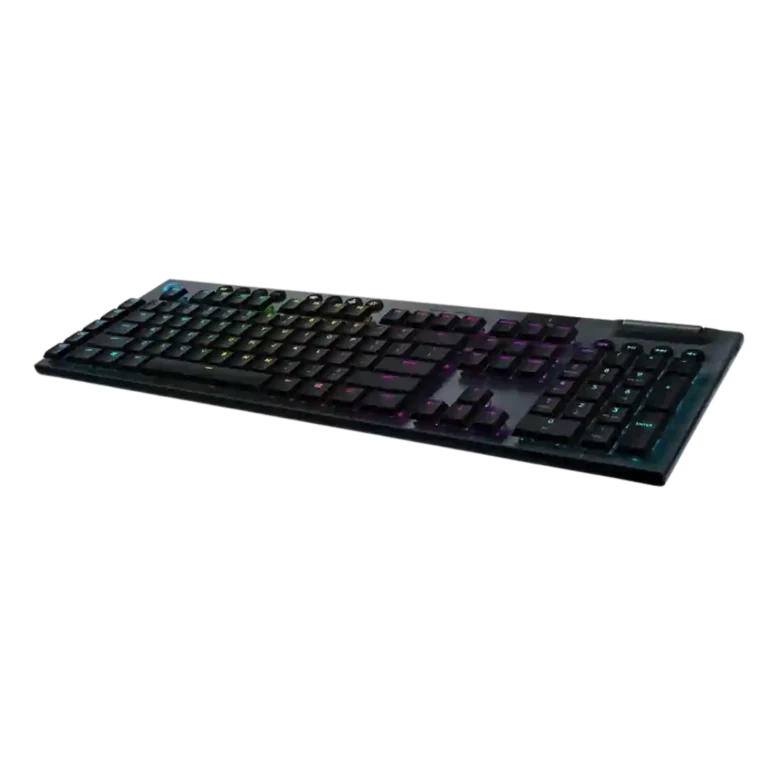
Choose the G915 if you want a premium low-profile wireless gaming keyboard with fast Lightspeed, strong battery life, rich RGB, and media controls. Skip it if the high price, no wrist rest, micro-USB, or keycap concerns bother you.
Best for gamers or desktop users who want a sleek low-profile wireless mechanical keyboard with near-wired responsiveness, strong RGB, long battery life, and dedicated media controls.
Not for buyers who want the lowest price, USB-C charging, included wrist support, USB passthrough, easy keycap replacement, or a quieter/shared-space keyboard.
The supplied reviews show the Logitech G915 as a premium low-profile wireless keyboard built around a clear tradeoff: it delivers sleek materials, fast Lightspeed performance, strong battery life, rich RGB, macro/profile tools, and standout media controls, but it asks a lot of money for those strengths. Reviewers consistently describe wireless latency as negligible or wired-like, and many praise the slim aluminum design and typing comfort. The main reservations are practical rather than performance-related: no included wrist rest, no USB passthrough, micro-USB charging complaints, mixed software reactions, and several concerns about keycap wear, wobble, or thinness. Overall, the evidence supports a polished high-end keyboard whose price and small hardware compromises matter most.
Compared with other Gaming Keyboards, this product is above average in switch options, connectivity, wireless performance, near average in value for money, software quality, below average in keycap quality, key stability, cable quality.
| Attribute | This product | Category average | Difference |
|---|---|---|---|
| keycap quality | 2.7 | 4.2 | -1.5 |
| switch options | 4.6 | 3.2 | +1.5 |
| key stability | 2.9 | 4.2 | -1.3 |
| cable quality | 2.4 | 3.7 | -1.3 |
| connectivity | 4.9 | 3.9 | +1.0 |
| wireless performance | 4.8 | 4.0 | +0.8 |
| battery life | 4.7 | 4.0 | +0.7 |
| polling rate | 5.0 | 3.9 | +1.1 |
Choose Razer BlackWidow V3 Mini HyperSpeed. It scores 4.7 vs 2.9 for key stability, with a 4.1 overall score.
Choose Logitech G515 Lightspeed. It scores 4.7 vs 4.3 for typing feel, with a 4.1 overall score.
Choose HyperX Alloy Rise. It scores 4.6 vs 2.7 for keycap quality, with a 4.0 overall score.
Choose Corsair K65 PRO Mini. It scores 4.8 vs 3.3 for key spacing, with a 4.2 overall score.
Products reviewers directly compared with this model, grouped into quick takeaways.
Reviewers overwhelmingly say no. Multiple reviews describe Lightspeed latency as imperceptible, wired-like, or having no noticeable lag.
Yes. Reviews repeatedly praise battery life, with several citing around 30 hours at full brightness and strong longer-term results depending on brightness settings.
Most reviewers like the low-profile typing feel, calling it smooth, responsive, or comfortable. A few note a learning curve or prefer standard-height mechanical switches.
The main drawbacks in the reviews are the high price, no included wrist rest, no USB passthrough, micro-USB charging complaints, and mixed keycap quality.
Reviewers generally praise the RGB for brightness, vivid color, and extensive customization. Some note light bleed or less sharp legends on certain keys.
Evidence is mixed. Several reviewers call G Hub easy, refined, or powerful, while others find it complex, dreadful, or counterintuitive for profiles and onboard memory.
These are a few of the reviews included in our analysis.



Good if you want a premium 96% Hall Effect keyboard for work and gaming with excellent build, sound, and customization. Skip it if you need cheaper esports-first speed, 8,000Hz polling,...
Pros: cable quality, typing comfort
Cons: portability, switch options

Good if you want a premium, quiet TKL Hall Effect keyboard for typing and gaming. Skip it if price, portability, 8,000Hz polling, or broad switch choice matters most.
Pros: build quality, extra gaming features
Cons: switch options, hot-swappable switches

Good if you want a premium full-size Hall Effect keyboard with smooth switches, quiet sound, and deep customization. Skip it if you need a portable, budget-friendly board or broad switch...
Pros: key stability, frame rigidity
Cons: portability, switch options

Good if you want esports speed, analog tuning, and deep customization. Skip it if typing comfort, quiet office use, or included extras matter more.
Pros: polling rate, RGB customization
Cons: key stability, typing comfort