When reviewers comment on sound, they describe a quiet, deeper, lightly thocky tone rather than a clicky or sharp one.
Reviews describe the K65 Plus as acoustically refined, with softer, rounder sound than typical gaming boards.
PCMag found the actuation feel consistent across the board, with crisp scissor-switch response rather than mushiness.
One review says the keys travel smoothly with little variance, supporting generally consistent actuation.
Brightness can be adjusted and is generally usable, but battery life drops sharply when the lighting is pushed high.
Backlighting is bright enough to stand out well around the keycaps, even though legends do not shine through.
Battery life is heavily mode-dependent: reviewers praise long endurance with lighting off or reduced, but multiple reviews say RGB dramatically cuts runtime.
Battery life is a clear strength, with multiple reviewers getting days to weeks depending on lighting use.
Build quality is a standout, with repeated praise for the premium finish, sturdy aluminum top plate, and minimal flex despite the thin chassis.
Build quality is repeatedly praised for sturdy construction, hefty feel, and a premium overall impression.
The included braided USB-C cable is consistently seen as a nice premium extra, though at least one review notes that it is short.
The included USB-C cable is described as braided, long enough for typical setups, and easy to disconnect.
Cross-platform support is one of the Joro's strongest points, with repeated praise for Windows/macOS use and Mac-friendly legends or layout support.
Compatibility is broad, with repeated support for Windows, Mac, and multiple console or mobile use cases.
Reviews consistently highlight easy tri-device Bluetooth pairing plus wired USB-C use, making switching between devices one of the board's most dependable strengths.
Connectivity is a major highlight thanks to wired, 2.4GHz, and Bluetooth modes plus easy multi-device switching.
Synapse adds meaningful remapping and feature control, but some reviewers note missing remap coverage or software dependence for advanced functions.
Customization is extensive, covering hot-swap hardware changes, remapping, lighting, and other programmable behaviors.
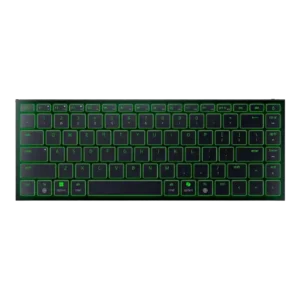
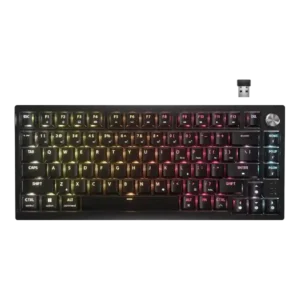
The compact 75% design keeps core controls while saving desk space, which reviewers repeatedly frame as a major benefit.
The 75% footprint noticeably frees desk space, especially for mouse movement and tighter workstations.
Reviewers report solid long-term sturdiness, with the slim chassis resisting flex and everyday travel stress well.
Durability impressions are strong, with sturdy construction, durable caps, and long switch lifespan claims noted.
Switch replacement is generally easy thanks to hot-swap support and included tools, though sockets can feel tight.
Ergonomics are the clearest weakness: the fixed low angle helps portability but repeatedly causes fatigue or discomfort for some users.
Ergonomics are mostly positive, especially at lower angles, but comfort can depend on setup and wrist support.
Gaming extras like Snap Tap, NKRO, and anti-ghosting are present, giving the Joro more gaming utility than most travel keyboards.
Gaming extras include full key rollover, anti-ghosting, and lockout shortcuts that help avoid accidental interruptions.
Structural rigidity is excellent, with multiple reviewers explicitly calling out the lack of flex even under pressure.
Reviewers describe the frame as rigid and low-flex, with enough heft to stay planted during use.
Gaming performance is acceptable for casual or secondary use, but reviewers regularly stop short of recommending it as a primary board for serious competitive play.
Gaming performance is strong overall, with fast input feel and good control, though one review found it less standout than rivals.
Hot-swap support is one of the keyboard’s headline features and is praised across multiple reviews.
Keycaps get mixed-positive feedback: legends and shine-through are appreciated, but some reviewers mention smoothness or smudge-prone surfaces.
Keycaps earn praise for material and feel, though some reviews note the single-shot, non-shine-through design as a compromise.
Responsiveness is decent overall, but reviewers disagree more here than elsewhere, with some calling it responsive and others saying the keys rebound too slowly.
Key response is consistently described as quick, clear, and dependable in both gaming and typing scenarios.
Key spacing is generally praised for preserving full-size arrows and usable spacing, though the compact layout still takes some adjustment.
The layout feels well spaced for a compact board, keeping keys usable without feeling overly cramped.
Where specifically discussed, the keys are described as wobble-free and stable rather than mushy or loose.
Key stability is good, with low switch wobble and sturdier large keys than many typical gaming keyboards.
Bluetooth latency is a recurring caveat: several reviews say it is fine for everyday use and casual play but noticeable in faster competitive gaming.
Latency is effectively a non-issue in use, with reviewers calling wired and wireless input lag-free or unnoticeable.
The 75% layout with function row and extra navigation is practical, though not every reviewer loves the specific key choices.
Layout flexibility is decent, with mention of ANSI/ISO availability and quick Windows or Mac layout switching.
Main legends are usually praised as crisp and durable, but some reviews note that secondary functions are harder to see because they are not backlit.
Legend visibility is acceptable in good light, but opaque caps make dark-room use noticeably harder.
Macro support exists and can be powerful, but some reviewers note that advanced macro-style features rely on Synapse being active.
Macro support is solid through iCUE, with reviewers noting macro recording, remapping, and other programmable actions.
Material quality is repeatedly described as premium for the category, especially the aluminum top and overall finish.
Material quality is good for the price, though several reviews still call out the plastic shell as a compromise.
Media controls are available through function layers rather than dedicated keys, which makes them useful but not especially elegant.
Media control coverage is good, led by the multifunction dial and secondary media shortcuts on the keyboard.
Noise levels are consistently low, making the Joro one of the quieter boards in its class and easy to use in shared spaces.
Noise levels are low for a mechanical board, with several reviewers calling the K65 Plus quiet or subdued.
The keyboard supports saving changes on the board itself, which helps retain profiles and custom behavior without constant software reliance.
Onboard memory is useful, with reviewers noting stored settings and space for multiple saved profiles.
Per-key lighting control is a clear limitation: multiple reviews explicitly describe the lighting as single-zone or one-color rather than individually addressable.
Per-key lighting control exists and can be programmed in software, though one review notes wireless limitations.
Wired mode's 1,000Hz polling is a meaningful plus for gaming-minded users, even if the wireless story is less impressive.
The 1,000Hz polling rate is viewed as fast enough for most use, but not cutting-edge for competitive buyers.
Portability is the Joro's defining strength, with nearly every reviewer praising how slim, light, and bag-friendly it is.
Portability is mixed: the compact footprint travels well, but the board’s weight makes it less ideal for constant carry.
Profile handling is solid, with reviewers noting multiple savable profiles and the ability to switch between them later.
Profile management is flexible, with multiple onboard profiles and software-based profile creation or switching.
Day-to-day reliability is generally good once connected, but sleep behavior and the occasional reconnect hiccup keep it from being flawless.
Reliability is strong in actual use, with reviewers reporting stable operation and dependable wireless behavior.
RGB customization is flexible enough for effects and color changes, especially through Synapse, but it is not as granular as Razer's full gaming boards.
RGB customization is broad, with many effects and presets available, though one review calls wireless customization limited.
The RGB itself is widely praised as bright, vibrant, and attractive, especially considering the keyboard's travel-focused design.
RGB lighting quality is generally praised for rich color and strong visibility around the keys.
The ultra-low-profile 75% form factor balances compactness with more usable keys than many travel boards.
The 75% form factor is widely praised for balancing compact size with useful navigation and function keys.
Synapse is usually seen as useful and capable, especially with Mac support added, but some reviews flag setup gaps or dependence for advanced features.
iCUE is generally considered capable and easy to use, though some functions remain more limited than enthusiasts may want.
Sound dampening is not a strength; at least one review specifically calls out a harsher landing and missing dampening.
Dual sound-dampening layers are repeatedly credited for the quieter, fuller sound signature.
When key wobble is discussed, reviewers describe the typing action as controlled and free of mush, suggesting solid stabilization for the format.
Stabilizers are better than past Corsair efforts, reducing wobble and rattle, though tuning is not flawless everywhere.
Switch feel gets mixed-positive marks: the scissor switches are often called crisp, tactile, or satisfying for the type, but they do not replace a good mechanical board.
Switch feel is a major strength, with reviewers calling the stock MLX Reds smooth, soft, and satisfying.
Reviews only discuss a single low-profile scissor-switch implementation, so switch variety appears limited.
Stock switch choice is limited because the keyboard ships only with linear MLX Reds unless you swap later.
Typing comfort is good for many users once acclimated, but comfort over very long sessions is less consistent because of the flat angle.
Typing comfort is a standout, with several reviewers calling the board comfortable even over long sessions.
Typing feel is one of the more successful parts of the Joro, with several reviews comparing it favorably to premium laptop keyboards or the Magic Keyboard.
Typing feel is widely praised for feeling premium, smooth, and enjoyable across work and play.
Value is the biggest sticking point: reviewers often like the design and portability but still argue the asking price is hard to justify.
Value is generally good for the feature set, though not every reviewer thinks it clearly beats cheaper alternatives.
Volume control exists on the function layer, but the lack of dedicated controls makes it less convenient than on larger boards.
Volume control is convenient through the top-right dial, which defaults to volume and mute behavior.
Wireless performance is good enough for productivity and casual use, with generally reliable Bluetooth pairing, but sleep wake delays and gaming limits show its ceiling.
Wireless performance is a clear strength, with stable, lag-free behavior reported across multiple reviews.
Wrist rest quality is the weakest area because reviewers repeatedly note that no wrist rest is included.