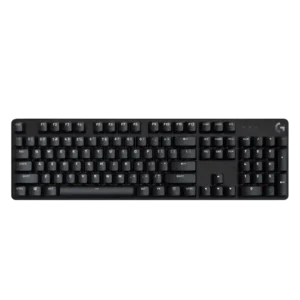
Sound impressions lean negative overall, with reviewers calling the keyboard unpleasant, scratchy, pingy, or only modestly refined.
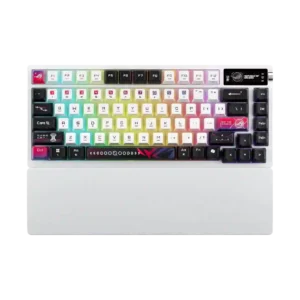
Reviews praise clean, satisfying acoustics, though some note a louder or less consistent spacebar and a brighter sound than enthusiast boards.
One review specifically found the tactile bump inconsistent from key to key, with some switches feeling lighter or heavier than others.
Reviewers describe the switches as even, smooth, and consistent through the press, supporting dependable key travel.
Reviews explicitly note the lack of hall-effect-style analog control, so analog-style input features are absent.
Reviewers consistently found the white backlight bright, with multiple brightness levels or intensity adjustment available.
Reviews call the lighting bright and easily adjustable, with especially strong perceived brightness from the translucent keycaps.
Multiple reviews highlight standout endurance, with long real-world use and strong wireless runtime even if RGB and OLED reduce the headline figure.
Across reviews, the board is described as solid, sturdy, and better built than many budget peers despite its stripped-down feature set.
The board is generally sturdy and well assembled, but some reviewers still say it falls short of feeling fully premium for the price.
The attached cable is repeatedly described as basic, non-detachable, and unbraided, which feels cheap for the price.
The included cable is consistently described as braided or sleeved, with solid accessory quality overall.
Multiple reviews specifically highlight the lack of Logitech G Hub compatibility, limiting ecosystem integration.
Reviews mention Mac support and good aftermarket keycap compatibility from the south-facing PCB.
Reviews describe a wired, non-detachable connection that works but offers little flexibility.
Tri-mode wired, Bluetooth, and 2.4GHz connectivity is a clear strength across reviews.
Reviewers consistently say customization is minimal, with little to no remapping, layout changes, or deeper tweaking available.
Reviews highlight easy customization via software, the OLED controls, and accessible internals or hot-swap design.
The compact footprint, slim bezel design, and TKL option leave more room on the desk, especially for mouse movement.
The 75% footprint is repeatedly described as compact and desk-friendly without feeling cramped.
PBT caps and sturdy metal-backed construction are repeatedly framed as long-lasting, heat- and wear-resistant design choices.
PBT caps and long-wear construction are positives, but one reviewer reports easy cosmetic scratching on the finish.
One reviewer notes switch replacement is not straightforward and would require tools or modification rather than simple user swapping.
Hot-swap access and included tools make switch changes straightforward.
Ergonomics are mixed: some reviewers liked the low-profile angle and adjustable feet, while another found the board uncomfortable without a wrist rest.
Wrist rest support and angle options help comfort, though the rest is not always attached magnetically.
The keyboard covers basic gaming needs with anti-ghosting and six-key rollover, but reviewers repeatedly say its feature set is minimal and misses staples like game mode.
Speed Tap and OLED-based system or media utilities add gaming-oriented extras beyond basic typing.
Reviews consistently report very little flex, giving the chassis a firm, rigid feel.
Despite mixed materials, reviews consistently describe the chassis as rigid, stable, and free of deck flex.
In games, the board generally keeps up and registers commands well, but several reviewers say it lacks the richer gaming-focused feature set expected at this price.
Gaming performance is strong for a traditional mechanical board, though the positioning is more mainstream or casual than cutting-edge esports.
Multiple reviews explicitly state the switches are not hot-swappable.
Reviews consistently confirm hot-swappability and easy swap support.
PBT keycaps are a clear strength, with reviewers praising their texture, durability, and better-than-expected material quality for the price.
Keycaps get consistent praise for material quality, finish, and non-slip or translucent design, though texture preferences vary.
Reviews that addressed responsiveness say inputs register quickly and feedback is fast enough for gaming.
Keys are described as snappy, responsive, and quick in both typing and gameplay.
Reviewers describe the spacing as comfortable overall, though one noted the keys feel a bit narrower than typical.
One review notes more space between keys and suggests it may reduce accidental presses, though some adjustment may be needed.
One reviewer found the spacebar stable with little wobble.
Stabilized keys and switch stems are described as stable with little wobble or rattle.
The few reviews that discussed response speed describe the board as nippy and fast enough for quick in-game inputs.
Wireless latency is described as low or effectively unnoticeable in use.
Availability in both full-size and TKL is a plus, but one reviewer criticized the TKL layout for omitting expected keys.
Reviews mention the 75% layout plus Mac mode and ISO or ANSI context, but not a wide range of physical layouts in the box.
Visibility is a weakness, with legends described as hard to see without the backlight and some function labels unlit.
Legends and secondary labels are generally easy to read and clearly printed.
Reviews consistently say macro creation is unavailable or effectively unsupported.
Macro assignment is supported and described as easy through software or onboard functions.
The brushed aluminum or aluminum-magnesium top plate is repeatedly described as premium-feeling and sturdy.
Materials are decent and functional, but repeated plastic-base comments keep them from feeling truly top-tier for the money.
Media access is present mainly through Fn shortcuts, but reviewers frequently note the lack of dedicated controls.
The OLED and knob controls for media and track handling are a recurring convenience feature.
Noise impressions vary from moderate to fairly loud, but the board is generally not positioned as especially quiet.
Noise is generally controlled and office-friendly, but several reviews call out a louder or thunkier spacebar and larger keys.
One review says settings revert to default because there is no built-in memory.
One review explicitly notes onboard memory for saving settings without leaving software open.
Multiple reviews call out the removal or absence of USB passthrough.
Reviewers say the lighting cannot be individually customized, even though the keys are backlit.
One review explicitly cites per-key RGB support.
One review explicitly warns not to expect especially high polling rates.
The standard 1000Hz polling rate is seen as sufficient for most users, but not class-leading without the optional booster.
The TKL version and relatively light build make the keyboard easy to carry and easier to fit into travel or event setups.
Compact size helps, but multiple reviewers also note the weight and desk-bound nature of the board.
One review specifically notes there is no way to create profiles.
Reviews mention active profiles, profile switching, and saved settings, suggesting solid basic profile handling.
Reviews explicitly say rapid trigger is not included, which limits the board versus hall-effect gaming options.
One reviewer praised the updated switches for avoiding the double-typing issue they associated with older keys.
Wireless use is repeatedly described as stable, smooth, and dropout-free in testing.
Reviewers repeatedly note white-only lighting and no RGB options, so personalization is essentially absent.
Reviews point to broad RGB control through onboard menus, software, and multiple presets or effects.
The white lighting is generally bright and clean-looking, with a few modes, but it remains limited for users who want richer effects.
The translucent keycaps produce vivid diffusion and a strong visual effect, though not everyone loves the styling.
Reviewers repeatedly call the board compact for its class, with slim proportions and both full-size and TKL options.
Reviews consistently frame it as a compact 75% board with a good balance of keys and space savings.
The dominant software story is negative: most reviews highlight no G Hub support or no companion software at all.
Gear Link or web control is praised, while Armoury Crate remains divisive due to bloat, crashes, or setup friction.
Sound control is mixed, with one review calling out ping while another praised the lack of echo or reverb.
Multi-layer foam and silicone dampening is repeatedly cited as a major contributor to the refined stock sound.
Stabilizer impressions are mixed but lean negative overall, with one review noting ticking and another noting only slight wobble on larger keys.
Stabilizers are usually praised as lubed, stable, and rattle-free, though spacebar tuning opinions still vary by review.
Switch feel is the product’s most divisive area, with many reviewers calling the switches mushy, stiff, clunky, or inconsistent, though a few found them smooth or acceptably light.
Switch feel is widely praised for smoothness, confidence, and refined stock feel.
One review explicitly criticizes the board for offering only brown switches.
Reviews confirm at least linear and clicky stock options, plus easy swapping for other MX-style switches.
Typing comfort is mixed; some reviewers found the board comfortable or fatigue-free, while others found it less comfortable than alternatives.
Long-form typing is repeatedly described as comfortable and pleasant.
Typing feel lands in the middle overall, with some reviewers enjoying the response and tactility but others describing dullness, mushiness, or friction.
The board’s typing feel is one of its biggest strengths, with springy, refined, custom-leaning feedback.
Value is mixed-to-negative overall: some reviewers appreciate the simple, sturdy package, but many argue the missing features and competition make the asking price hard to justify.
Nearly every value discussion is negative because the board is expensive relative to strong competitors.
Volume adjustment is available through Fn-layer shortcuts rather than dedicated hardware.
The knob and OLED setup gives quick access to volume adjustments and related controls.
Wireless performance is repeatedly called stable, fast, and dependable.
Reviews repeatedly note that there is no included wrist rest.
The included silicone or rubber wrist rest is frequently described as comfortable and useful.