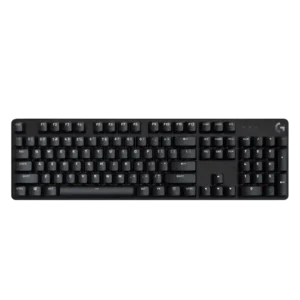
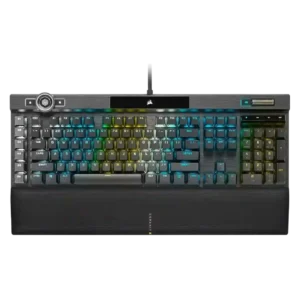
Compare Logitech G413 SE vs Corsair K100 RGB

P1 Logitech G413 SE
P2 Corsair K100 RGB

Comparison Takeaways

Logitech G413 SE

Where It Has the Edge

  • desk space efficiency is 4.7 vs 2.5. Desk space efficiency is a strength, especially for TKL users and reviewers who praised the extra mouse room...
  • size and form factor is 4.3 vs 2.3. Size and form factor are broadly praised, with reviewers emphasizing compactness, low wasted space, and lightweight designs.
  • portability is 3.8 vs 2.1. Portability is mixed: reviewers like the compact, light TKL body, but one reviewer dislikes the attached cable for...
  • key spacing is 4.5 vs 3.7. Key spacing receives limited positive evidence from one reviewer who found it comfortable for both typing and precision...

Corsair K100 RGB

Where It Has the Edge

  • onboard memory is 4.5 vs 1.0. Onboard memory is praised as unusually large or impressive, especially the ability to store many profiles and lighting...
  • macro customization is 4.6 vs 1.3. Macro customization is a major strength, with reviewers praising G keys, Stream Deck integration, on-the-fly macro recording, and...
  • per-key lighting control is 4.5 vs 1.3. Per-key lighting control is positively noted in reviews that appreciate the individual key lighting and access to the...
  • RGB customization is 4.8 vs 1.6. RGB customization is considered extensive, with praise for per-key control, many lighting zones, and deep reworking options, though...
Average score
Product 1: Logitech G413 SE
2.9
Product 2: Corsair K100 RGB
4.0
acoustics
Product 1: Logitech G413 SE
2.3

Acoustics are inconsistent: some reviewers dislike the dull thud or unpleasant sound, while another says the keyboard avoids annoying echo.

Product 2: Corsair K100 RGB
4.1

Acoustics are mixed: several reviewers like the smoother or more satisfying sound, while ProSettings complains about hollow, resonating, loud keys.

actuation consistency
Product 1: Logitech G413 SE
2.0

Actuation consistency is a concern in the Trusted Reviews transcript, which notes different keys feeling uneven in bump strength.

Product 2: Corsair K100 RGB
5.0

Actuation consistency is supported by IGN's report that there were no response or press issues during fast gaming use.

backlight brightness
Product 1: Logitech G413 SE
4.5

Backlight brightness is praised where discussed, with reviewers calling it bright, useful in the dark, or easy to see even in a sunlit room.

Product 2: Corsair K100 RGB
5.0

Backlight brightness is strongly praised where mentioned, especially by reviewers who call the lighting impressively bright.

build quality
Product 1: Logitech G413 SE
4.5

Build quality is consistently strong, with reviewers repeatedly praising the sturdy aluminum-topped construction and premium feel for the price.

Product 2: Corsair K100 RGB
4.4

Build quality is usually described as premium, sturdy, solid, or excellent, but one Tom's Hardware sample left concerns because of magnet and key issues.

built-in calculator
Product 1: Logitech G413 SE
4.0

The built-in calculator shortcut receives limited positive evidence as part of the useful Fn-layer shortcuts.

Product 2: Corsair K100 RGB
No score yet
cable quality
Product 1: Logitech G413 SE
1.9

Cable quality is generally weak, with reviewers criticizing the standard rubber, non-detachable, non-braided, or dangling cable.

Product 2: Corsair K100 RGB
3.0

Cable quality is mixed: reviewers call the cable sturdy, thick, and braided, but fixed and non-detachable design hurts convenience.

compatibility
Product 1: Logitech G413 SE
1.3

Compatibility is scored narrowly around G Hub support, where multiple reviewers call out the keyboard as incompatible or unsupported.

Product 2: Corsair K100 RGB
4.4

Compatibility receives positive evidence from iCue recognizing another Corsair device, suggesting useful ecosystem integration.

connectivity
Product 1: Logitech G413 SE
1.8

Connectivity is limited by the hard-wired, non-detachable cable, which reviewers disliked for desk setup flexibility.

Product 2: Corsair K100 RGB
3.8

Connectivity gets positive marks for USB passthrough as a handy extra, though the wired-only setup and thick cable remain contextual limitations.

customization options
Product 1: Logitech G413 SE
1.7

Customization options are broadly weak, with reviewers repeatedly saying there is little or nothing to customize beyond basic shortcuts or lighting presets.

Product 2: Corsair K100 RGB
4.3

Customization options are extremely broad across lighting, keys, macros, and wheel functions, but reviewers often warn that configuring them takes effort.

design aesthetics
Product 1: Logitech G413 SE
4.5

Design aesthetics are a strong point, with reviewers repeatedly praising the clean, black, professional, compact, or sexy appearance.

Product 2: Corsair K100 RGB
4.6

Design aesthetics are widely praised as premium, sleek, gorgeous, luxurious, or visually impressive, with the RGB-heavy look occasionally framed as busy.

desk space efficiency
Product 1: Logitech G413 SE
4.7

Desk space efficiency is a strength, especially for TKL users and reviewers who praised the extra mouse room or no-waste footprint.

Product 2: Corsair K100 RGB
2.5

Desk space efficiency is weak because multiple reviewers mention a massive footprint or the need to sacrifice room for the keyboard and wrist rest.

durability
Product 1: Logitech G413 SE
4.7

Durability evidence is strongly positive but concentrated in one review that emphasizes heat and wear resistance over time.

Product 2: Corsair K100 RGB
4.7

Durability evidence focuses mainly on PBT keycaps and materials that reviewers say resist wear or hold up better over time.

ease of switch replacement
Product 1: Logitech G413 SE
1.3

Ease of switch replacement is poor because reviewers say replacing switches requires tools, is not supported, or is a drawback.

Product 2: Corsair K100 RGB
No score yet
ergonomics
Product 1: Logitech G413 SE
3.9

Ergonomics are mixed to positive, with some praise for comfort and adjustable angles but lingering concern about wrist support.

Product 2: Corsair K100 RGB
4.2

Ergonomics are generally good due to comfort and wrist support, though some reviewers want a better wrist angle or note the large full-size layout.

extra gaming features
Product 1: Logitech G413 SE
2.0

Extra gaming features are one of the weakest areas, with repeated criticism of missing bells and whistles, although one review liked the anti-ghosting basics.

Product 2: Corsair K100 RGB
3.5

Extra gaming features are polarizing: reviewers praise the G keys and control wheel potential, but several call the wheel limited, janky, or not very useful in games.

frame rigidity
Product 1: Logitech G413 SE
4.6

Frame rigidity is a clear strength, with reviewers repeatedly noting little to no flex and solid construction.

Product 2: Corsair K100 RGB
5.0

Frame rigidity receives excellent marks from reviewers who report no frame flex or only minimal flex.

gaming performance
Product 1: Logitech G413 SE
3.4

Gaming performance is mixed to moderately positive: some reviewers say it keeps up and registers inputs well, while others criticize basic rollover and missing gaming features.

Product 2: Corsair K100 RGB
4.5

Gaming performance is widely praised as fast, smooth, and confidence-inspiring, with some reviewers reporting better responsiveness or a noticeable improvement in games.

hot-swappable switches
Product 1: Logitech G413 SE
1.3

Hot-swappable switch support is weak because reviewers point out the switches are not hot-swappable or cannot be swapped.

Product 2: Corsair K100 RGB
1.0

Hot-swappable switches score poorly because the one opinionated mention treats the lack of hot-swap support as a drawback.

keycap quality
Product 1: Logitech G413 SE
4.3

Keycap quality is one of the strongest areas, with repeated praise for PBT texture and durability, although some reviewers dislike the legends or lack of double-shot clarity.

Product 2: Corsair K100 RGB
4.4

The double-shot PBT keycaps are praised for feel, texture, clean looks, durability, and bright/crisp legends, though one review criticizes the included replacement caps as less durable.

key responsiveness
Product 1: Logitech G413 SE
4.3

Responsiveness is generally a bright spot, with reviewers saying the board kept up, felt nippy, gave quick feedback, or registered inputs accurately.

Product 2: Corsair K100 RGB
4.7

The keyboard is repeatedly praised for very fast, sensitive, and responsive inputs, with several reviewers describing immediate or lightning-fast key response.

key spacing
Product 1: Logitech G413 SE
4.5

Key spacing receives limited positive evidence from one reviewer who found it comfortable for both typing and precision gameplay.

Product 2: Corsair K100 RGB
3.7

Key spacing is mixed, with praise for standard bottom-row spacing but complaints that the left G keys can cause reaches or accidental presses.

key stability
Product 1: Logitech G413 SE
4.0

Key stability receives limited positive evidence from one reviewer who found only slight wobble and did not consider it worrying.

Product 2: Corsair K100 RGB
5.0

Key stability receives strong praise from reviewers who note almost no tilt, no rattle, and no flex or wobble in the keys.

latency
Product 1: Logitech G413 SE
4.1

Latency-related evidence is positive but limited, with reviewers describing the keyboard as keeping up and parsing commands quickly.

Product 2: Corsair K100 RGB
4.4

Latency impressions are mostly positive in real use, including reports of no lag or instant action, but some reviewers question whether the sub-millisecond gains are perceptible.

layout options
Product 1: Logitech G413 SE
3.4

Layout options are mixed: one reviewer criticizes the TKL layout omissions, while another praises the choice between full-size and TKL versions.

Product 2: Corsair K100 RGB
4.7

Layout options improve because reviewers appreciate the standard bottom row and easier compatibility with aftermarket keycap sets.

legend visibility
Product 1: Logitech G413 SE
2.6

Legend visibility is split: one reviewer found the legends nearly invisible without lighting, while others liked the clean font or noted dark-room limitations for secondary functions.

Product 2: Corsair K100 RGB
4.6

Legends are praised as sharp, clean, bright, and well illuminated, with reviewers appreciating the less gamer-heavy font and full legend visibility.

macro customization
Product 1: Logitech G413 SE
1.3

Macro customization is consistently weak because reviewers repeatedly mention the lack of macros, programming, or built-in macro controls.

Product 2: Corsair K100 RGB
4.6

Macro customization is a major strength, with reviewers praising G keys, Stream Deck integration, on-the-fly macro recording, and broad remapping possibilities.

materials quality
Product 1: Logitech G413 SE
3.0

Materials quality is mixed: one review praises PBT and aluminum, while another criticizes cheap-feeling materials despite those components.

Product 2: Corsair K100 RGB
4.7

Materials quality is praised for aluminum, premium feel, strong construction, and top-quality components.

media controls
Product 1: Logitech G413 SE
2.7

Media controls are mixed: some reviewers appreciate function-layer controls, while others criticize the lack of dedicated media keys.

Product 2: Corsair K100 RGB
4.0

Media controls are mostly praised for dedicated keys, a metal scroll wheel, and usable feedback, although some buttons feel odd or less satisfying.

noise level
Product 1: Logitech G413 SE
2.5

Noise level trends negative to mixed: several reviewers say the board is loud or clicky enough to disturb others, though one says it is not very loud.

Product 2: Corsair K100 RGB
3.0

Noise level is divided: some reviewers call the board loud or drastically louder than quieter keyboards, while others find the sound pleasant or less distracting.

onboard memory
Product 1: Logitech G413 SE
1.0

Onboard memory is criticized by one reviewer because lighting settings reset without built-in memory.

Product 2: Corsair K100 RGB
4.5

Onboard memory is praised as unusually large or impressive, especially the ability to store many profiles and lighting layers on the keyboard.

passthrough features
Product 1: Logitech G413 SE
1.6

Passthrough features are a repeated omission, with several reviewers criticizing the loss or lack of USB passthrough.

Product 2: Corsair K100 RGB
4.0

Passthrough features are generally appreciated as a useful luxury or handy extra, though cable routing is not universally ideal.

per-key lighting control
Product 1: Logitech G413 SE
1.3

Per-key lighting control is criticized because one review specifically says players cannot color important keys such as WASD.

Product 2: Corsair K100 RGB
4.5

Per-key lighting control is positively noted in reviews that appreciate the individual key lighting and access to the keyboard's 44 lighting zones.

polling rate
Product 1: Logitech G413 SE
No score yet
Product 2: Corsair K100 RGB
3.5

The 4,000Hz polling rate is seen as technically impressive and future-facing, yet many reviewers say the practical difference from 1,000Hz is subtle or hard to notice.

portability
Product 1: Logitech G413 SE
3.8

Portability is mixed: reviewers like the compact, light TKL body, but one reviewer dislikes the attached cable for packing.

Product 2: Corsair K100 RGB
2.1

Portability is poor because reviewers emphasize the K100's size, weight, full-size layout, and non-detachable cable as desk-bound traits.

profile management
Product 1: Logitech G413 SE
1.5

Profile management receives negative evidence from one reviewer who says there is no way to create profiles.

Product 2: Corsair K100 RGB
4.0

Profile management is capable but can be overwhelming; reviewers praise large onboard profile capacity while noting the profile system can become complex.

reliability
Product 1: Logitech G413 SE
4.5

Reliability has limited positive evidence from one reviewer who says the new keys avoid the double-typing issue.

Product 2: Corsair K100 RGB
3.8

Reliability is mixed: optical switches are praised for avoiding chatter and missed inputs, but one reviewer experienced keyboard freezing and shutoff.

RGB customization
Product 1: Logitech G413 SE
1.6

RGB customization is weak overall because reviewers repeatedly note the lack of RGB, configurable colors, or programmable lighting.

Product 2: Corsair K100 RGB
4.8

RGB customization is considered extensive, with praise for per-key control, many lighting zones, and deep reworking options, though software complexity can slow the process.

RGB lighting quality
Product 1: Logitech G413 SE
3.2

Lighting quality is mixed: reviewers often like the clean white lighting, but several criticize limited white-only modes, distracting patterns, or lack of richer lighting behavior.

Product 2: Corsair K100 RGB
4.6

RGB lighting quality is one of the most consistently praised areas, with reviewers calling it vibrant, bright, clear, excellent, and visually premium.

size and form factor
Product 1: Logitech G413 SE
4.3

Size and form factor are broadly praised, with reviewers emphasizing compactness, low wasted space, and lightweight designs.

Product 2: Corsair K100 RGB
2.3

Size and form factor are a limitation for reviewers who describe the K100 as large, full-size, and demanding of desk space.

software quality
Product 1: Logitech G413 SE
1.6

Software quality is a repeated weakness because the board lacks G Hub support or meaningful software-based customization.

Product 2: Corsair K100 RGB
3.1

Software quality is the most divisive area, combining deep iCue functionality with repeated complaints about clunkiness, confusing workflows, and tedious setup.

sound dampening
Product 1: Logitech G413 SE
4.3

Sound dampening receives positive limited evidence from reviewers who note little reverberation or no echoing from the chassis.

Product 2: Corsair K100 RGB
4.9

Sound dampening is praised most strongly by KitGuru, which finds the K100 noticeably more muted and less resonant than its predecessor.

stabilizer quality
Product 1: Logitech G413 SE
2.6

Stabilizer quality is split, with one reviewer complaining about ticking stabilizers and another saying the spacebar had no wobble.

Product 2: Corsair K100 RGB
4.3

Stabilizer quality is viewed as improved, with praise for better sound and less rattle, though one reviewer still found some wobble and rattling.

switch feel
Product 1: Logitech G413 SE
2.8

Switch feel is the most divisive core trait: several reviewers called the switches stiff, clunky, mushy, or terrible, while a smaller set found them smooth, tactile, or enjoyable.

Product 2: Corsair K100 RGB
4.6

Reviewers consistently describe the OPX or Speed linear switches as fast, smooth, and satisfying, though a few note the sensitivity takes adjustment and the feel is not for everyone.

switch options
Product 1: Logitech G413 SE
1.0

Switch options are very limited, with one reviewer criticizing the board for effectively offering only brown-style switches.

Product 2: Corsair K100 RGB
2.0

Switch choice is viewed as limited because reviewers mention OPX and Cherry MX Speed variants, while one reviewer explicitly disliked the lack of a tactile option.

typing comfort
Product 1: Logitech G413 SE
3.2

Typing comfort is highly split: some reviewers find the keyboard satisfying or comfortable, while others report fatigue, stiffness, or poor typing comfort.

Product 2: Corsair K100 RGB
3.3

Typing comfort is mixed: some find the K100 comfortable after adjustment, while others call the sensitive switches unforgiving or not for all typists.

typing feel
Product 1: Logitech G413 SE
2.7

Typing feel is mixed: positive reviews describe a satisfying, responsive feel, but several reviewers describe mushiness, friction, or dull feedback.

Product 2: Corsair K100 RGB
4.4

Typing feel is generally strong once acclimated, with praise for fewer typos and satisfying keys, though PCMag initially found the keys uncomfortable.

value for money
Product 1: Logitech G413 SE
2.9

Value for money is sharply split but leans negative overall: several reviewers say it is overpriced or hard to recommend, while others call it reasonable or affordable.

Product 2: Corsair K100 RGB
3.3

Value for money is highly conditional: reviewers like the premium feature set but repeatedly warn that the high price only makes sense if the extras are used.

volume control
Product 1: Logitech G413 SE
3.5

Volume control is mildly positive where mentioned, because reviewers note Fn-layer volume controls, but not dedicated hardware controls.

Product 2: Corsair K100 RGB
4.5

The volume wheel is a highlight, repeatedly praised for smoothness, premium feel, strong resistance, and better feel than some competitors.

wrist rest quality
Product 1: Logitech G413 SE
1.7

Wrist rest quality scores low because reviewers repeatedly describe the missing wrist rest as disappointing or uncomfortable.

Product 2: Corsair K100 RGB
4.6

The wrist rest is broadly praised as comfortable, cushioned, magnetic, and much improved over earlier Corsair rests, with only minor firmness or branding complaints.