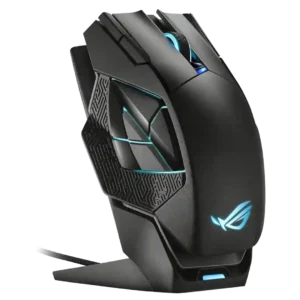

Compare ASUS ROG Spatha X vs Razer Basilisk V3 Pro 35K

P1 ASUS ROG Spatha X
P2 Razer Basilisk V3 Pro 35K

Comparison Takeaways

ASUS ROG Spatha X

Where It Has the Edge

  • handedness options is 4.0 vs 2.7. The Spatha X is described as a right-handed design.
  • value for money is 4.3 vs 3.5. Value is mixed-positive, with reviewers saying the high price is partly justified by the included features and extras.
  • connection stability is 5.0 vs 4.5. Wireless connectivity is described as flawless, with no dropouts in testing.
  • wireless performance is 5.0 vs 4.6. Wireless performance is a clear strength, with reviewers reporting smooth and dependable untethered use.

Razer Basilisk V3 Pro 35K

Where It Has the Edge

  • Bluetooth support is 5.0 vs 1.8. Bluetooth support is repeatedly confirmed and adds versatility for work, travel, and multi-device use.
  • cross-platform compatibility is 4.2 vs 1.5. Cross-platform compatibility is context-dependent: multi-device use is supported, but Linux support relies on community tools.
  • software stability is 4.7 vs 2.5. Software stability evidence is favorable where cited, with stable Synapse behavior and no software connectivity issues in two...
  • side button quality is 4.7 vs 2.5. Side buttons are usually described as easy to reach, tactile, crisp, and not overly easy to hit accidentally.
Average score
Product 1: ASUS ROG Spatha X
4.0
Product 2: Razer Basilisk V3 Pro 35K
4.5
2.4GHz connectivity
Product 1: ASUS ROG Spatha X
4.5

The mouse supports 2.4GHz wireless play, and reviews treat it as a standard part of the setup.

Product 2: Razer Basilisk V3 Pro 35K
4.9

2.4GHz connectivity is broadly supported through HyperSpeed and included dongles, often paired with Bluetooth and wired modes.

acceleration control
Product 1: ASUS ROG Spatha X
4.5

A review explicitly lists 50G acceleration among the Spatha X's key performance specs.

Product 2: Razer Basilisk V3 Pro 35K
4.9

Acceleration control evidence is positive, with reviewers noting high acceleration limits and no acceleration or malfunction issues.

Accuracy and tracking precision
Product 1: ASUS ROG Spatha X
4.5

Reviews describe the sensor as precise and accurate, with strong aim and control once set to the user's preferred sensitivity.

Product 2: Razer Basilisk V3 Pro 35K
4.7

Reviewers consistently found the mouse accurate and precise in play, with only one high-DPI jitter caveat.

balance and weight distribution
Product 1: ASUS ROG Spatha X
No score yet
Product 2: Razer Basilisk V3 Pro 35K
4.4

Balance is generally favorable, with reviewers citing centered balance, good distribution, and stability despite weight.

battery life
Product 1: ASUS ROG Spatha X
4.5

Battery life is described as strong, with up to 67 hours claimed when RGB is off and fast charging highlighted.

Product 2: Razer Basilisk V3 Pro 35K
4.5

Battery life is mostly a strength, with many 140-150 hour claims and good real-world endurance, though RGB and high polling reduce it.

Bluetooth support
Product 1: ASUS ROG Spatha X
1.8

Bluetooth is a notable omission, and reviewers explicitly wish it were included.

Product 2: Razer Basilisk V3 Pro 35K
5.0

Bluetooth support is repeatedly confirmed and adds versatility for work, travel, and multi-device use.

build quality
Product 1: ASUS ROG Spatha X
4.5

Build quality is consistently praised as sturdy and premium-feeling.

Product 2: Razer Basilisk V3 Pro 35K
4.8

Build quality is strong, with reviewers citing great workmanship, solid construction, and no creaking or rattling.

button customization
Product 1: ASUS ROG Spatha X
4.5

Armoury Crate repeatedly comes up as the way to remap buttons for both gaming and productivity tasks.

Product 2: Razer Basilisk V3 Pro 35K
4.9

Button customization is extensive, including remapping, Hypershift, secondary functions, and user-defined actions.

button responsiveness
Product 1: ASUS ROG Spatha X
4.0

Main button presses are described as having a noticeable, positive click when actuated.

Product 2: Razer Basilisk V3 Pro 35K
4.7

Button responsiveness is strong overall, with fast, clean, snappy, or minimal-travel clicks reported across many reviews.

cable flexibility
Product 1: ASUS ROG Spatha X
4.0

The included paracord-style cables are generally described as light and flexible, though one reviewer noted bunching.

Product 2: Razer Basilisk V3 Pro 35K
3.6

Cable flexibility is mixed: some reviews praise the lightweight SpeedFlex-style cable, while others call the included cable stiff or not lightweight.

charging convenience
Product 1: ASUS ROG Spatha X
4.8

The charging system is repeatedly praised for making top-ups quick and easy.

Product 2: Razer Basilisk V3 Pro 35K
4.6

Charging convenience is strong when using the optional dock or wireless charging puck, but the best experience usually costs extra.

claw grip comfort
Product 1: ASUS ROG Spatha X
3.5

One reviewer found claw grip workable, but clearly secondary to palm grip.

Product 2: Razer Basilisk V3 Pro 35K
4.0

Claw grip comfort is mixed; some reviewers found it usable or comfortable, while others said claw grip was awkward or less ideal.

click latency
Product 1: ASUS ROG Spatha X
No score yet
Product 2: Razer Basilisk V3 Pro 35K
4.8

Click latency evidence is positive, with low-latency claims, optical-switch responsiveness, and no debounce-related play issues.

click noise
Product 1: ASUS ROG Spatha X
No score yet
Product 2: Razer Basilisk V3 Pro 35K
3.9

Click noise is mixed: main clicks can be louder, while some reviewers praise quiet wheel or click behavior.

connection stability
Product 1: ASUS ROG Spatha X
5.0

Wireless connectivity is described as flawless, with no dropouts in testing.

Product 2: Razer Basilisk V3 Pro 35K
4.5

Connection stability is mostly positive, but not perfect; reviewers cite reliable operation while a few mention drops, scroll-wheel freezes, or power-cycling.

cross-platform compatibility
Product 1: ASUS ROG Spatha X
1.5

A Mac-focused review says core customization is Windows-only and does not work properly on Mac.

Product 2: Razer Basilisk V3 Pro 35K
4.2

Cross-platform compatibility is context-dependent: multi-device use is supported, but Linux support relies on community tools.

dock compatibility
Product 1: ASUS ROG Spatha X
4.8

The dock is central to the experience, acting as charger and receiver while seating the mouse easily.

Product 2: Razer Basilisk V3 Pro 35K
4.7

Dock compatibility is well supported, with repeated mentions of Mouse Dock Pro and related charging or high-polling features.

DPI range
Product 1: ASUS ROG Spatha X
5.0

Multiple reviews highlight the 19,000 DPI ceiling as one of the mouse's headline specs.

Product 2: Razer Basilisk V3 Pro 35K
4.9

The DPI range is extremely high, with repeated 35K references and fine DPI-step control, but reviewers often described such high settings as overkill.

durability over time
Product 1: ASUS ROG Spatha X
4.5

Easy switch replacement and service access are repeatedly described as advantages for long-term ownership.

Product 2: Razer Basilisk V3 Pro 35K
4.2

Durability over time has limited but positive evidence from long-term use comments.

ecosystem integration
Product 1: ASUS ROG Spatha X
4.5

RGB syncing with other ASUS or ROG gear is repeatedly mentioned as part of the appeal.

Product 2: Razer Basilisk V3 Pro 35K
4.5

Ecosystem integration is strong through Chroma, Razer multi-device dongles, and synchronized Razer hardware setups.

ergonomic design
Product 1: ASUS ROG Spatha X
3.9

Finger rests and sculpted supports help some users, but the overall ergonomics remain polarizing.

Product 2: Razer Basilisk V3 Pro 35K
4.7

Ergonomic design is one of the most consistently praised traits, especially the contoured right-handed shape and thumb rest.

fingertip grip comfort
Product 1: ASUS ROG Spatha X
1.5

Fingertip grip is explicitly described as a poor match for this mouse.

Product 2: Razer Basilisk V3 Pro 35K
3.5

Fingertip comfort is weaker and more hand-size dependent, with several reviewers saying the weight or shape makes fingertip use less comfortable.

firmware reliability
Product 1: ASUS ROG Spatha X
No score yet
Product 2: Razer Basilisk V3 Pro 35K
3.0

Firmware reliability evidence is limited and negative-leaning, focused on a convoluted dock pairing and update process.

FPS gaming suitability
Product 1: ASUS ROG Spatha X
2.3

FPS suitability is a weak point, with reviewers citing the weight and slower feel for twitch play.

Product 2: Razer Basilisk V3 Pro 35K
3.5

FPS suitability is mixed: the sensor is capable, but the weight makes it less ideal for competitive shooters and fast flicks.

glide smoothness
Product 1: ASUS ROG Spatha X
5.0

One reviewer reports very smooth glide with essentially no friction on a cloth mat.

Product 2: Razer Basilisk V3 Pro 35K
4.6

Glide smoothness is generally good on mouse pads, with buttery or smooth glide praise, though hard surfaces can be less ideal.

grip texture
Product 1: ASUS ROG Spatha X
4.3

Reviewers note patterned or rubberized grip areas that help support the fingers.

Product 2: Razer Basilisk V3 Pro 35K
4.7

Grip texture is a strength, with rubberized sides, textured surfaces, and secure thumb support frequently praised.

handedness options
Product 1: ASUS ROG Spatha X
4.0

The Spatha X is described as a right-handed design.

Product 2: Razer Basilisk V3 Pro 35K
2.7

Handedness options are limited because the mouse is repeatedly described as right-handed or unsuitable for left-handed users.

left and right click quality
Product 1: ASUS ROG Spatha X
4.5

Primary clicks are described as crisp, with little pre-travel and strong tactile feedback.

Product 2: Razer Basilisk V3 Pro 35K
4.2

Left and right click quality is mostly positive for speed and actuation, with one review calling the clicks somewhat squishy.

lift-off distance
Product 1: ASUS ROG Spatha X
4.0

Armoury Crate allows lift-off distance adjustment, with reviewers noting low and high options.

Product 2: Razer Basilisk V3 Pro 35K
4.8

Lift-off distance control is a strength, with adjustable or consistent lift-off behavior mentioned across software and sensor testing.

long-session comfort
Product 1: ASUS ROG Spatha X
3.0

Long-session comfort depends on fit: MMO sessions can work well, but the weight also causes fatigue for some users.

Product 2: Razer Basilisk V3 Pro 35K
4.7

Long-session comfort is strong, with reviewers praising reduced fatigue, easy long sessions, and wrist comfort.

macro support
Product 1: ASUS ROG Spatha X
4.5

Macro support is present through the software, which reviewers note can record and assign macros.

Product 2: Razer Basilisk V3 Pro 35K
4.9

Macro support is strong through Synapse, Hypershift, and software macro recording or full macro functionality.

materials quality
Product 1: ASUS ROG Spatha X
4.5

One review specifically highlights the sturdy plastic shell and shaped metal base plate.

Product 2: Razer Basilisk V3 Pro 35K
4.7

Materials quality is positive, especially the matte/textured plastics, rubber surfaces, and premium-feeling finishes.

MMO gaming suitability
Product 1: ASUS ROG Spatha X
4.4

MMO play is the clearest use case, thanks to the extra buttons and large-button-heavy design.

Product 2: Razer Basilisk V3 Pro 35K
4.3

MMO suitability is fairly good because extra buttons, Hypershift, and scroll-wheel inputs help, though it is not a dedicated MMO mouse.

MOBA gaming suitability
Product 1: ASUS ROG Spatha X
4.5

One reviewer explicitly groups the Spatha X with MMO and MOBA players.

Product 2: Razer Basilisk V3 Pro 35K
4.3

MOBA suitability is positive where mentioned, mainly because of extra programmable inputs and customization.

motion consistency
Product 1: ASUS ROG Spatha X
5.0

One reviewer reported no delay, jitter, or failed inputs during gameplay, pointing to stable motion behavior.

Product 2: Razer Basilisk V3 Pro 35K
4.8

Motion consistency is praised through perfect consistency, Motion Sync, and stable sensor behavior in fast and slow movements.

onboard memory
Product 1: ASUS ROG Spatha X
No score yet
Product 2: Razer Basilisk V3 Pro 35K
4.7

Onboard memory/profile evidence is solid, with several reviews citing up to five stored profiles or onboard profile storage.

palm grip comfort
Product 1: ASUS ROG Spatha X
4.5

Palm-grip users, especially with larger hands, are the clearest fit according to multiple reviews.

Product 2: Razer Basilisk V3 Pro 35K
4.6

Palm grip comfort is a major strength, with multiple reviewers calling it exceptionally comfortable or clearly palm-oriented.

polling rate
Product 1: ASUS ROG Spatha X
3.5

One review notes a 1,000 Hz polling rate, treating it as adequate but less impressive than some flagship expectations.

Product 2: Razer Basilisk V3 Pro 35K
4.5

Polling-rate support is strong, reaching high rates with optional accessories, while out-of-box rates are still considered sufficient by many reviewers.

portability
Product 1: ASUS ROG Spatha X
2.5

Portability is mixed: the pouch helps, but the mouse's size makes it awkward to travel with.

Product 2: Razer Basilisk V3 Pro 35K
4.6

Portability evidence is limited but positive, centered on Bluetooth and usefulness for laptop or multi-PC setups.

premium feel
Product 1: ASUS ROG Spatha X
4.8

Multiple reviews frame the Spatha X as a premium mouse with premium extras.

Product 2: Razer Basilisk V3 Pro 35K
4.7

Premium feel is strong, with reviewers describing it as high-end, luxurious, and a top-pick style product.

profile switching
Product 1: ASUS ROG Spatha X
4.0

A DPI or profile switch is mentioned, including lighting that indicates which profile is active.

Product 2: Razer Basilisk V3 Pro 35K
4.6

Profile switching is supported by bottom buttons, DPI/profile controls, and stored profiles on the mouse.

programmable buttons
Product 1: ASUS ROG Spatha X
4.5

The large number of remappable buttons is one of the Spatha X's main selling points across reviews.

Product 2: Razer Basilisk V3 Pro 35K
5.0

Programmable-button coverage is very strong, with reviews repeatedly citing 11 to 13 programmable controls.

RGB features
Product 1: ASUS ROG Spatha X
4.5

RGB is a major focus, with multiple lighting zones on the mouse and additional lighting on the dock.

Product 2: Razer Basilisk V3 Pro 35K
4.7

RGB features are widely praised for Chroma lighting, multiple zones, logo/wheel lighting, and underglow effects.

scroll wheel quality
Product 1: ASUS ROG Spatha X
4.5

One review specifically praises the scroll wheel's grippy texture and satisfying click feel.

Product 2: Razer Basilisk V3 Pro 35K
4.8

The HyperScroll wheel is one of the clearest strengths, praised for tactile/free-spin modes, Smart-Reel, 4-way behavior, and productivity value.

sensor performance
Product 1: ASUS ROG Spatha X
4.8

Sensor performance is a clear strength, with reviewers calling out excellent tracking and accurate response.

Product 2: Razer Basilisk V3 Pro 35K
4.7

Sensor performance was broadly praised as top-tier, flawless, or effectively faultless, though several reviewers said the upgrade is not always noticeable.

shape comfort
Product 1: ASUS ROG Spatha X
3.5

Shape comfort is mixed: some reviewers love the large frame, while others find it awkward or oversized.

Product 2: Razer Basilisk V3 Pro 35K
4.5

Shape comfort is broadly positive, especially for users who fit the Basilisk form, though some reviewers found the slimmer or grip-specific shape limiting.

side button quality
Product 1: ASUS ROG Spatha X
2.5

The side-button cluster is divisive: reviewers liked the idea but often found it cramped, awkward, or inconsistent.

Product 2: Razer Basilisk V3 Pro 35K
4.7

Side buttons are usually described as easy to reach, tactile, crisp, and not overly easy to hit accidentally.

software stability
Product 1: ASUS ROG Spatha X
2.5

One review reports finicky software behavior during setup and use.

Product 2: Razer Basilisk V3 Pro 35K
4.7

Software stability evidence is favorable where cited, with stable Synapse behavior and no software connectivity issues in two reviews.

software usability
Product 1: ASUS ROG Spatha X
4.3

Armoury Crate offers broad control, and positive reviews describe it as straightforward and easy to use.

Product 2: Razer Basilisk V3 Pro 35K
4.4

Software usability is feature-rich and powerful, but reviewers vary on whether Synapse feels intuitive or annoying.

surface compatibility
Product 1: ASUS ROG Spatha X
4.5

Software calibration options for different pads and custom surfaces are explicitly mentioned.

Product 2: Razer Basilisk V3 Pro 35K
4.6

Surface compatibility is strong, including soft, hard, hybrid, and glass-surface mentions, with some caveats about shiny or hard surfaces.

switch durability
Product 1: ASUS ROG Spatha X
4.5

Swappable switches and 70-million-click ratings are presented as meaningful durability advantages.

Product 2: Razer Basilisk V3 Pro 35K
4.9

Switch durability is well supported by repeated 90-million-click and optical-switch longevity mentions.

switch feel
Product 1: ASUS ROG Spatha X
4.5

Switch feel is generally positive, with reviewers describing the buttons as responsive, tactile, and accurate.

Product 2: Razer Basilisk V3 Pro 35K
4.6

Switch feel is generally tactile, clicky, and snappy, although one reviewer preferred the firmness of other Razer mice.

tilt gesture controls
Product 1: ASUS ROG Spatha X
No score yet
Product 2: Razer Basilisk V3 Pro 35K
4.8

Tilt controls are strongly supported by the four-way wheel and left/right horizontal inputs, which reviewers found useful for extra functions.

value for money
Product 1: ASUS ROG Spatha X
4.3

Value is mixed-positive, with reviewers saying the high price is partly justified by the included features and extras.

Product 2: Razer Basilisk V3 Pro 35K
3.5

Value for money is mixed to weak: the mouse is feature-rich, but many reviewers question its price or upgrade value versus older Basilisk models.

weight
Product 1: ASUS ROG Spatha X
1.9

The Spatha X is consistently described as very large and very heavy, which strongly shapes its appeal and drawbacks.

Product 2: Razer Basilisk V3 Pro 35K
3.1

Weight is the main tradeoff: reviewers repeatedly call it heavy or not ultralight, though some find it controlled rather than burdensome.

wireless latency
Product 1: ASUS ROG Spatha X
4.5

One reviewer specifically reported no delay during wireless gameplay.

Product 2: Razer Basilisk V3 Pro 35K
4.8

Wireless latency is praised as low or unnoticeable, especially over 2.4GHz HyperSpeed and optical-switch setups.

wireless performance
Product 1: ASUS ROG Spatha X
5.0

Wireless performance is a clear strength, with reviewers reporting smooth and dependable untethered use.

Product 2: Razer Basilisk V3 Pro 35K
4.6

Wireless performance is generally strong, with HyperSpeed, reliable 2.4GHz behavior, and smooth multi-device use; one review reported interference until relocating the dongle.