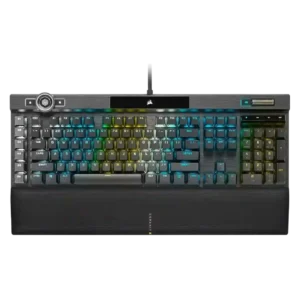
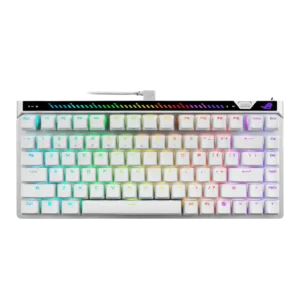
The few reviews that discuss sound describe the K100 as more solid and low-rattle than older Corsair boards, though not silent.
Reviews describe a controlled, mature sound that avoids the hollow, pingy character common on gaming boards, and one reviewer says it sounds better than expected.
One gaming-focused review says the board kept up even under rapid input, suggesting consistent key registration.
One review specifically calls out very consistent key response, supporting precise Hall-effect actuation behavior across the board.
Analog-style input is absent; one reviewer explicitly states that there is no analog mode here.
RGB brightness is described as extra bright, and the control wheel can adjust brightness directly.
RGB backlighting is described as bright and evenly lit in the reviews that mention brightness directly.
Reviews that address construction describe the K100 as sturdy, premium, and clearly flagship-grade.
Across reviews, the keyboard is repeatedly described as solid, premium, and well assembled, with strong fit and finish.
The cable is consistently described as thick and braided, but several reviews note that it is fixed and bulky.
One review says the included L-shaped cable works but looks awkward in a typical desk setup.
One review explicitly confirms support for PC, Mac, and Xbox One.
The web-based setup is praised for working across different computers, giving the board good multi-system flexibility.
The K100 is presented as a wired dual-USB keyboard, favoring stable desktop use over flexibility.
Connectivity is stable and fast over a wired connection, but several reviewers criticize the lack of any wireless option.
Multiple reviews emphasize deep remapping, lighting, macro, and control-wheel customization, even if setup can take effort.
Customization is a major strength, with reviewers praising easy tuning for actuation, rapid trigger, mappings, and other settings.
Reviews describe the K100 as large and desk-hungry, especially once the wrist rest is attached.
The 75% layout is repeatedly framed as compact while still preserving important keys, which helps desk efficiency.
The OPX version is repeatedly framed as long-lasting, backed by durable PBT caps and very high switch lifespan claims.
Durability looks strong from the available evidence, with wear-resistant keycaps and wear-free magnetic switch operation highlighted.
The switches are explicitly described as non-hot-swappable, so replacement flexibility is poor.
Switch swapping is supported, but reviewers note that compatible magnetic options are limited, which reduces modding freedom.
One review highlights the board angle and wrist support as helping create a more comfortable typing posture.
General comfort is good, but the rear touchbar gets mixed ergonomic feedback because some reviewers find it awkward to reach.
Macro keys, the control wheel, profile switching, Windows lock, and Stream Deck support are recurring standout extras.
The board offers a rich competitive feature set, including rapid trigger, SOCD-style features, on-board controls, and fast tuning tools.
Reviews repeatedly mention minimal flex and a sturdy frame.
Rigidity is a clear strength, with reviewers describing the chassis as solid and free from flex.
Gaming performance is broadly praised for fast, dependable input, though several reviewers say the 4000Hz advantage is subtle in practice.
Gaming performance is one of the clearest positives, with reviewers praising fast movement, precise control, and very responsive feel.
At least one review directly states the switches are not hot-swappable, making this a weak point.
Hot-swap support is present, but the practical upside is reduced by limited magnetic switch compatibility.
Double-shot PBT caps are praised across reviews for feel, durability, and improved aftermarket compatibility.
Keycaps are consistently praised for their feel and quality, with multiple reviews highlighting PBT caps and solid finishing.
Reviews consistently describe the board as very fast and responsive to input.
Input response is described as immediate and controlled, giving the keys a very quick feel in play.
One review specifically praises the keys for having almost no tilt, helping presses feel more controlled.
Key stability is strong in the reviews, with minimal wobble and solid larger-key behavior called out directly.
The strongest gaming review reports effectively no lag in use.
Wired performance is described as latency-free, matching the product’s competitive focus.
Reviews praise the move to a standard bottom row, which broadens keycap compatibility.
The 75% layout is widely praised for balancing compact size with useful extras like arrows, F-keys, and a small nav cluster.
Reviewers call out the cleaner font and bright, crisp legends as improvements.
Legend styling is divisive: reviewers note clean alignment and shine-through support, but several dislike the aggressive ROG font.
Dedicated G-keys, Elgato support, and broad remapping options make macro control one of the K100’s strengths.
Macro and advanced mapping support are available through Gear Link, including macros and more advanced remap functions.
Brushed or anodized aluminum and other premium-feeling materials are highlighted repeatedly.
Materials are generally well regarded, especially the metal top construction, though some reviewers still note mixed-material tradeoffs at this price.
Dedicated media buttons and rollers are seen as useful, polished, and in some cases highly configurable.
Media control is well covered through the touch area and physical controls, though some users find the touchbar less intuitive than the wheel.
Noise is mixed to negative overall: some reviews call the board loud, while others say it sounds better than past Corsair boards.
Noise control is a strength, with reviewers describing restrained acoustics and reduced ping or hollowness.
Onboard storage is repeatedly praised for holding many profiles or lighting layers.
USB passthrough is regularly described as a convenient extra.
Per-key lighting control is explicitly supported and treated as a premium feature.
The 4000Hz polling rate is a headline feature, but reviews split between future-proof enthusiasm and skepticism about real-world gains.
Polling rate support is a headline feature, with multiple reviews calling out the 8K capability.
The K100’s weight and full-size build make it a poor choice for portable use.
Portability is helped by the included carrying case, which reviewers call out as a useful travel extra.
Large onboard profile storage and easy profile switching are mentioned often.
Profiles can be stored in the cloud, giving the board practical profile management across multiple systems.
Rapid Trigger support is heavily praised and positioned as one of the keyboard’s standout competitive features.
Reliability is mixed because a few reviews report hardware or crash issues even though others praise the hardware overall.
Reliability looks strong from the available evidence, with wear-free switch design and stable in-game performance both highlighted.
Lighting customization is deep and flexible, though some reviews find the setup process clunky.
RGB customization is well supported, with reviewers noting flexible lighting controls through both software and on-board inputs.
RGB presentation is one of the board’s clearest strengths, with vivid per-key and edge lighting praised often.
Lighting quality is generally praised, with reviewers calling the RGB well integrated, bright, and evenly lit.
This is a large full-size flagship board; some reviews like its streamlined look, but it remains sizable.
Reviewers repeatedly present the form factor as a sweet spot, offering compact dimensions without giving up everyday usability.
iCUE and related software offer lots of control, but many reviews call the experience clunky, unintuitive, or overly complex.
Gear Link is consistently viewed as a strong point: it is lighter, faster, and easier to live with than older Armoury Crate workflows.
A few reviews say the K100 sounds more muted or damped than earlier Corsair boards, though this is not universal.
Internal dampening is a recurring positive, with multiple reviews pointing to layered foam and reduced resonance.
Reviews that mention stabilizers say Corsair improved them noticeably versus older boards.
Stabilizers are praised for low rattle and a solid feel on larger keys.
OPX and Speed switches are usually praised for speed and smoothness, but several reviewers note the feel is very sensitive or taste-dependent.
Switch feel is widely praised for being smooth and controlled, though some reviewers find the feel lighter or less engaging than other HE options.
Reviews confirm OPX and Cherry MX Speed variants are available.
ROG offers multiple compatible magnetic switch options, but reviewers still describe the overall ecosystem as limited.
Reviews note good wrist support and low-fatigue typing once users adjust to the switches.
Typing comfort is strong overall, with reviewers saying long sessions stay comfortable and low-fatigue once settings are dialed in.
Typing feel is generally positive and quick, though some reviewers found the shallow actuation unforgiving at first.
Typing feel is generally described as controlled, easy, and satisfying rather than harsh or sloppy.
Value is the main tradeoff: many reviewers like the features, but several question the premium price.
Value is the biggest tradeoff: several reviewers like the board but still question the price against cheaper rivals.
The volume wheel or roller is widely praised for feel and usefulness.
Volume adjustment is easy to access through the touch controls and related physical inputs.
Wireless performance is effectively absent because the board is wired-only and reviewers repeatedly call out the missing wireless option.
The magnetic cushioned wrist rest is one of the most consistently praised parts of the keyboard.
One reviewer specifically criticizes the lack of any included wrist rest at this price.