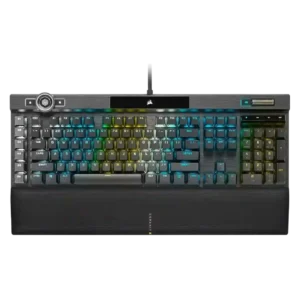
The few reviews that discuss sound describe the K100 as more solid and low-rattle than older Corsair boards, though not silent.
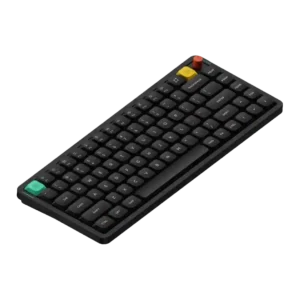
Across reviews, the Air75 V3 is described as cleaner, less hollow, and more refined than earlier low-profile boards, with notably pleasing stock sound.
One gaming-focused review says the board kept up even under rapid input, suggesting consistent key registration.
RGB brightness is described as extra bright, and the control wheel can adjust brightness directly.
Brightness can be adjusted in software or shortcuts, but at least one review reports that brightness looks uneven across rows.
Battery life is one of the product’s strongest themes, with very high claims and mostly positive real-world impressions, even if one reviewer measured less than the headline figure.
Reviews that address construction describe the K100 as sturdy, premium, and clearly flagship-grade.
Build quality is consistently praised, with the aluminum-top and ABS-bottom construction feeling solid and premium in use.
The cable is consistently described as thick and braided, but several reviews note that it is fixed and bulky.
Only one review comments directly on the included cable, calling it decent overall but not especially premium.
One review explicitly confirms support for PC, Mac, and Xbox One.
Compatibility is a standout strength, especially for Mac users, while Windows and even iPad use are also described positively.
The K100 is presented as a wired dual-USB keyboard, favoring stable desktop use over flexibility.
Tri-mode connectivity is widely praised for being flexible and easy to manage, with clear switches and convenient dongle storage.
Multiple reviews emphasize deep remapping, lighting, macro, and control-wheel customization, even if setup can take effort.
Customization is broad, spanning remaps, knob actions, layers, lighting, and app-specific functions, which gives the board flexibility beyond stock use.
Reviews describe the K100 as large and desk-hungry, especially once the wrist rest is attached.
Its compact footprint is repeatedly framed as a strength for crowded desks, workstation setups, and mobile use.
The OPX version is repeatedly framed as long-lasting, backed by durable PBT caps and very high switch lifespan claims.
Durability impressions are favorable thanks to wear-resistant PBT caps, engraved labels, and generally robust construction.
The switches are explicitly described as non-hot-swappable, so replacement flexibility is poor.
At least one review explicitly notes that switch changes are easy and do not require soldering, making experimentation accessible.
One review highlights the board angle and wrist support as helping create a more comfortable typing posture.
Low-profile geometry, sculpted caps, and practical feet contribute to a more comfortable and fatigue-friendly experience than many bulkier keyboards.
Macro keys, the control wheel, profile switching, Windows lock, and Stream Deck support are recurring standout extras.
The board includes extra gaming-oriented functions such as SOCD-style features, but reviews still treat them as bonuses rather than the core reason to buy it.
Reviews repeatedly mention minimal flex and a sturdy frame.
The chassis is described as sturdy with minimal flex, giving the board a firmer and more confident feel than its slim profile suggests.
Gaming performance is broadly praised for fast, dependable input, though several reviewers say the 4000Hz advantage is subtle in practice.
Gaming performance is viewed as competent for casual or secondary gaming, but most reviews still position the board as productivity-first.
At least one review directly states the switches are not hot-swappable, making this a weak point.
Hot-swap support is a well-documented feature and a consistent selling point across the review set.
Double-shot PBT caps are praised across reviews for feel, durability, and improved aftermarket compatibility.
The included double-shot PBT keycaps are regularly described as durable, solid-feeling, and appropriate for the premium target.
Reviews consistently describe the board as very fast and responsive to input.
The reviewed typing response feels fast and accurate, with one review explicitly calling out strong speed and confidence while typing.
One review notes that the spacing differs slightly from standard mechanical boards, creating a brief adjustment period before comfort returns.
One review specifically praises the keys for having almost no tilt, helping presses feel more controlled.
One long-term review specifically notes low rattle on stabilized keys, suggesting stable key behavior in day-to-day use.
The strongest gaming review reports effectively no lag in use.
Latency is treated as low enough for responsive wired or dongle use, but the board is still framed as casual-gaming friendly rather than esports-first.
Reviews praise the move to a standard bottom row, which broadens keycap compatibility.
ISO and JIS availability stand out as meaningful layout additions that broaden the board’s appeal beyond standard ANSI buyers.
Reviewers call out the cleaner font and bright, crisp legends as improvements.
Backlighting is present, but one review says the stock caps do not let light shine through the legends well, which can hurt night visibility.
Dedicated G-keys, Elgato support, and broad remapping options make macro control one of the K100’s strengths.
Macro support is clearly present and repeatedly mentioned as part of the board’s practical everyday customization set.
Brushed or anodized aluminum and other premium-feeling materials are highlighted repeatedly.
Reviewers like the material mix of aluminum and ABS, finding it premium enough for the price while keeping the board practical for a low-profile design.
Dedicated media buttons and rollers are seen as useful, polished, and in some cases highly configurable.
Media controls are easy to access through knob functions or software remapping, which adds day-to-day convenience.
Noise is mixed to negative overall: some reviews call the board loud, while others say it sounds better than past Corsair boards.
Noise level depends heavily on switch choice; the silent option is genuinely quiet, but the board still retains recognizable mechanical character with other switches.
Onboard storage is repeatedly praised for holding many profiles or lighting layers.
USB passthrough is regularly described as a convenient extra.
Per-key lighting control is explicitly supported and treated as a premium feature.
Reviews explicitly call out the lack of per-key RGB programming, so lighting control is broad but not granular.
The 4000Hz polling rate is a headline feature, but reviews split between future-proof enthusiasm and skepticism about real-world gains.
Multiple reviews cite 1000Hz wired and 2.4GHz polling, with lower Bluetooth polling, which aligns with its work-first but gaming-capable positioning.
The K100’s weight and full-size build make it a poor choice for portable use.
Portability remains a clear strength thanks to the compact low-profile build, though several reviews note the V3 is heavier than some earlier or rival options.
Large onboard profile storage and easy profile switching are mentioned often.
Reliability is mixed because a few reviews report hardware or crash issues even though others praise the hardware overall.
Reliability feedback is mostly positive overall, but a handful of reviewers mention software quirks, connection hiccups, or mode oddities.
Lighting customization is deep and flexible, though some reviews find the setup process clunky.
Lighting customization is a recurring positive, with reviews noting easy adjustment of main effects and side-light behavior through software.
RGB presentation is one of the board’s clearest strengths, with vivid per-key and edge lighting praised often.
RGB lighting is generally well-liked for brightness, effects, or appearance, though one review noticed uneven perceived brightness across rows.
This is a large full-size flagship board; some reviews like its streamlined look, but it remains sizable.
The 75% low-profile form factor keeps the board compact and practical while still covering the keys most reviewers expect to use daily.
iCUE and related software offer lots of control, but many reviews call the experience clunky, unintuitive, or overly complex.
Software quality is mostly viewed positively for ease of use and capability, though some reviews still mention missing polish or early recognition issues.
A few reviews say the K100 sounds more muted or damped than earlier Corsair boards, though this is not universal.
Gasket mounting and internal foam are repeatedly credited with reducing hollowness and harshness, materially improving how the board sounds and feels.
Reviews that mention stabilizers say Corsair improved them noticeably versus older boards.
Stabilizers are usually described as solid and low-rattle, especially on major keys, though at least one review stops short of calling them class-leading.
OPX and Speed switches are usually praised for speed and smoothness, but several reviewers note the feel is very sensitive or taste-dependent.
Reviewers consistently praise the switch feel as smooth, tactile or well-traveled depending on switch choice, giving the board a more satisfying feel than many low-profile peers.
Reviews confirm OPX and Cherry MX Speed variants are available.
Switch choice covers linear, tactile, and silent options, but multiple reviews still call the overall selection limited compared with some expectations or prior models.
Reviews note good wrist support and low-fatigue typing once users adjust to the switches.
Long-session comfort is a recurring positive, with reviewers highlighting cushioned feel, comfortable profiles, and usable typing angles.
Typing feel is generally positive and quick, though some reviewers found the shallow actuation unforgiving at first.
Typing feel is a major strength, with reviews repeatedly calling it premium, cushioned, refined, and more pleasant than previous Air models.
Value is the main tradeoff: many reviewers like the features, but several question the premium price.
Reviewers generally feel the feature set justifies the price, but several also note that it sits above some competing low-profile options.
The volume wheel or roller is widely praised for feel and usefulness.
Volume control works out of the box and is widely mentioned, though some reviewers criticize the knob’s wobble rather than the function itself.
Wireless performance is generally useful and fast enough, but a few reviews report isolated Bluetooth or dongle quirks that keep it from feeling flawless.
The magnetic cushioned wrist rest is one of the most consistently praised parts of the keyboard.