Compare Corsair K70 Core vs MonsGeek M1 V5 HE

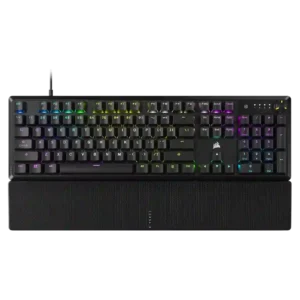
P1 Corsair K70 Core
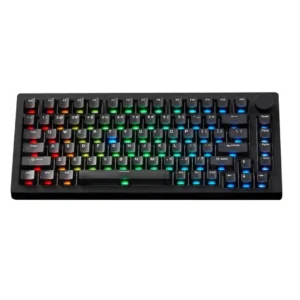
P2 MonsGeek M1 V5 HE

Comparison Takeaways

Corsair K70 Core

Where It Has the Edge

  • portability is 3.1 vs 2.5. Portability is mixed. Some reviewers found the weight manageable, but the full-size wired design is still not especially...
  • key spacing is 4.0 vs 3.4. The one direct spacing comment is positive, noting a conventional layout with spaced-out function keys.
  • ergonomics is 4.0 vs 3.6. The single direct ergonomics comment is positive about the easy, reliable magnetic wrist-rest attachment.
  • noise level is 4.4 vs 4.0. Noise level is consistently described as low for a gaming keyboard, with reviewers repeatedly calling it quiet or...

MonsGeek M1 V5 HE

Where It Has the Edge

  • ease of switch replacement is 4.7 vs 1.0. Reviewers found the board easy to open or modify, especially because of the ball-catch/rapid-disassembly design, with several reviews...
  • hot-swappable switches is 4.7 vs 1.0. Hot-swap support is widely supported in the reviews, including replaceable switches, 3-pin/5-pin support, magnetic and mechanical switch compatibility,...
  • switch options is 4.8 vs 1.9. Switch flexibility is a standout strength, especially in TMR versions that can mix magnetic and mechanical switches and...
  • desk space efficiency is 4.2 vs 2.2. The compact 75% layout gives the board a smaller footprint than full-size designs, while the heavy chassis keeps...
Average score
Product 1: Corsair K70 Core
3.7
Product 2: MonsGeek M1 V5 HE
4.4
acoustics
Product 1: Corsair K70 Core
4.0

Acoustics are usually described favorably as subdued, efficient, deep, or satisfying rather than pingy, but one strongly negative review disliked the sound.

Product 2: MonsGeek M1 V5 HE
4.5

Reviewers generally liked the board's sound, describing it as pleasant, muted, clean, silent, or impressive, though one review found the stock sound somewhat pingy and hollow.

actuation consistency
Product 1: Corsair K70 Core
No score yet
Product 2: MonsGeek M1 V5 HE
4.5

Magnetic/TMR actuation was mostly described as predictable and controlled, with little accidental input in normal use; one reviewer only triggered accidental clicks at very sensitive test settings.

backlight brightness
Product 1: Corsair K70 Core
4.3

Backlighting is described as bright and adjustable, with controls for brightness in hardware and software.

Product 2: MonsGeek M1 V5 HE
4.0

Lighting brightness was praised in some variants for strong vibrancy and diffusion, but one TMR review called the lighting not very bright and a weak point.

battery life
Product 1: Corsair K70 Core
No score yet
Product 2: MonsGeek M1 V5 HE
4.7

Battery feedback was consistently strong, with reviewers citing 8,000 mAh capacity, long wireless use, and claims or experiences ranging from many hours to weeks between charges.

build quality
Product 1: Corsair K70 Core
3.9

Build quality is generally rated well for the price, especially rigidity and overall feel, though one review considered the construction a clear step down.

Product 2: MonsGeek M1 V5 HE
4.7

The reviews repeatedly describe the keyboard as premium, heavy, aluminum, solid, and well built, with only minor concerns about a loose-feeling shell or rapid-disassembly sensitivity in some units.

cable quality
Product 1: Corsair K70 Core
2.0

Cable quality is one of the most repeated drawbacks. The fixed cable is often described as rubber, non-detachable, or cheap-feeling.

Product 2: MonsGeek M1 V5 HE
3.6

Cable feedback was mixed: some reviews mention a spiral/coiled or nice-feeling USB cable, while others note non-braided, non-coiled, thick-fit, or not very durable cable issues.

compatibility
Product 1: Corsair K70 Core
4.5

Compatibility is a strength in the reviews that discuss it, with support noted for Windows, Mac, consoles, or specific PlayStation/Xbox use.

Product 2: MonsGeek M1 V5 HE
4.7

Compatibility is broad across devices, layouts, platforms, and switch types, including multi-device Bluetooth, Windows/Mac/Linux software access, and mechanical or magnetic switch support in TMR-focused reviews.

connectivity
Product 1: Corsair K70 Core
3.8

Connectivity is wired-only. Reviews treat that as stable and low-lag, but it also limits flexibility compared with wireless boards.

Product 2: MonsGeek M1 V5 HE
4.6

Connectivity is a clear strength, with repeated support for USB-C, 2.4 GHz wireless, and Bluetooth, although Bluetooth polling and some wake or dongle details vary by review.

customization options
Product 1: Corsair K70 Core
4.4

Customization options are broad, especially through iCUE, with key remapping, dial changes, lighting, assignments, and other controls repeatedly highlighted.

Product 2: MonsGeek M1 V5 HE
4.7

Customization is one of the strongest themes: reviewers cite included accessories, VIA/web software, rapid disassembly, switch/keycap changes, lighting, remapping, and internal modding access.

desk space efficiency
Product 1: Corsair K70 Core
2.2

Desk efficiency is a weakness of the full-size design. Reviews note that it occupies a lot of room rather than conserving desk space.

Product 2: MonsGeek M1 V5 HE
4.2

The compact 75% layout gives the board a smaller footprint than full-size designs, while the heavy chassis keeps it stationary rather than easy to move around.

durability
Product 1: Corsair K70 Core
4.2

The limited durability evidence is positive overall, with one review explicitly expecting the keyboard to last a long time.

Product 2: MonsGeek M1 V5 HE
4.5

Durability evidence centers on the aluminum case, PBT keycaps, built-to-last comments, and the ability to open, clean, maintain, and replace parts over time.

ease of switch replacement
Product 1: Corsair K70 Core
1.0

Ease of switch replacement is poor because the switches are not meant to be easily swapped or replaced by the user.

Product 2: MonsGeek M1 V5 HE
4.7

Reviewers found the board easy to open or modify, especially because of the ball-catch/rapid-disassembly design, with several reviews highlighting fast access compared with screw-heavy boards.

ergonomics
Product 1: Corsair K70 Core
4.0

The single direct ergonomics comment is positive about the easy, reliable magnetic wrist-rest attachment.

Product 2: MonsGeek M1 V5 HE
3.6

Ergonomics are mixed: reviewers liked the slanted or comfortable typing feel, but several disliked hidden mode switches, fixed typing angles, no adjustable feet, and occasionally awkward layout or cable access.

extra gaming features
Product 1: Corsair K70 Core
4.3

Extra gaming features are solid rather than flashy, with anti-ghosting, N-key rollover, Win lock, and similar basics supported in the reviews.

Product 2: MonsGeek M1 V5 HE
4.8

Gaming extras are extensive in the TMR/HE reviews, including Rapid Trigger, SOCD or snap key, DKS, mod-tap, toggle keys, and other advanced magnetic-keyboard features.

frame rigidity
Product 1: Corsair K70 Core
4.2

Frame rigidity is a strong point for most reviewers, who describe low flex, good resistance to bending, or a sturdy feel.

Product 2: MonsGeek M1 V5 HE
4.4

The aluminum frame is generally described as stable, heavy, tank-like, or desk-planted, though a few reviews note loose shell feel, uneven flex, or case-opening sensitivity.

gaming performance
Product 1: Corsair K70 Core
4.5

Gaming performance is consistently positive, with reviewers describing the board as impressive, responsive, and easy to game on.

Product 2: MonsGeek M1 V5 HE
4.6

Gaming performance is strong overall, with reviewers citing responsive actuation, no meaningful performance limits, high polling, low latency, and fast magnetic-switch features.

hot-swappable switches
Product 1: Corsair K70 Core
1.0

Hot-swap support is clearly absent. Multiple reviews explicitly say the switches are not hot-swappable.

Product 2: MonsGeek M1 V5 HE
4.7

Hot-swap support is widely supported in the reviews, including replaceable switches, 3-pin/5-pin support, magnetic and mechanical switch compatibility, and easy switch experimentation.

keycap quality
Product 1: Corsair K70 Core
3.3

The ABS keycaps are generally seen as usable and reasonably grippy, but they are not treated as a premium highlight and one review was strongly negative about them.

Product 2: MonsGeek M1 V5 HE
4.3

Keycap quality is generally positive, with PBT, double-shot, shine-through, frosted, and OEM-profile options praised, although some reviewers found certain caps too smooth, dull, or hollow-sounding.

key responsiveness
Product 1: Corsair K70 Core
3.7

Most reviews describe the keyboard as responsive, speedy, sharp, or snappy in use, though one outlier review reported chatter and extra keypresses.

Product 2: MonsGeek M1 V5 HE
4.6

Responsiveness is a major strength in TMR/HE coverage, with reviewers citing low actuation settings, rapid key presses, quick registration, and responsive wired and wireless use; one VIA review noted plug-in lag.

key spacing
Product 1: Corsair K70 Core
4.0

The one direct spacing comment is positive, noting a conventional layout with spaced-out function keys.

Product 2: MonsGeek M1 V5 HE
3.4

The only direct spacing/layout criticism came from the ISO sample, where the reviewer struggled with the small Shift key and chunky Enter key.

key stability
Product 1: Corsair K70 Core
4.3

Key stability is good in the reviews that address it, with little wobble noted on the switches and keys feeling firmly seated.

Product 2: MonsGeek M1 V5 HE
4.6

Key stability is praised across several reviews, with minimal wobble, stable stems, and stable keycaps or stabilizers noted repeatedly.

latency
Product 1: Corsair K70 Core
4.0

The one direct latency comment says latency and speed are solid overall for this wired board.

Product 2: MonsGeek M1 V5 HE
4.7

Latency evidence is positive, with reviews citing low millisecond results, acceptable latency, no lag, and gaming-focused speed and precision.

layout options
Product 1: Corsair K70 Core
4.2

Layout availability is only lightly covered, but one review notes multiple regional layouts and languages are offered.

Product 2: MonsGeek M1 V5 HE
4.3

Layout support is positive overall, with 75% layout, ISO availability, layer remapping, and needed keys praised; one ISO sample had small-key layout complaints.

legend visibility
Product 1: Corsair K70 Core
4.0

Legend visibility is mostly good thanks to shine-through legends, though some reviewers noticed uneven lighting or weaker visibility in certain conditions.

Product 2: MonsGeek M1 V5 HE
4.1

Legend visibility varies by variant: reviewers found backlit or printed legends readable in some versions, while another praised segmented keycap labeling for easier visual spotting.

macro customization
Product 1: Corsair K70 Core
4.5

Macro customization is a clear strength, with multiple reviews noting macro recording, app launching, remaps, and extensive assignment options.

Product 2: MonsGeek M1 V5 HE
4.6

Macro support is consistently supported through VIA or web software, with reviewers citing macro creation, recording, remapping, and multi-action gaming functions.

materials quality
Product 1: Corsair K70 Core
3.6

Materials are clearly budget-conscious: reviewers note aluminum up top or internally, but also plenty of plastic in the case and keycaps.

Product 2: MonsGeek M1 V5 HE
4.7

Materials quality is a standout strength, with repeated evidence for aluminum construction, premium weight, PBT keycaps, and high-quality materials.

media controls
Product 1: Corsair K70 Core
3.1

Media controls are present, but feedback is mixed because some functions rely on the dial, button, or function row instead of a fuller dedicated cluster.

Product 2: MonsGeek M1 V5 HE
4.4

The knob appears across many reviews as a major media/control feature, and several reviewers note that it can be reprogrammed, though one found its default usefulness limited.

noise level
Product 1: Corsair K70 Core
4.4

Noise level is consistently described as low for a gaming keyboard, with reviewers repeatedly calling it quiet or less annoying to others nearby.

Product 2: MonsGeek M1 V5 HE
4.0

Noise depends heavily on switch and build choice: some reviewers found the board louder or pingier, while others described it as quieter, muted, deep, or very silent.

onboard memory
Product 1: Corsair K70 Core
4.0

Onboard memory is well supported across reviews, usually with up to five profiles mentioned, though one review cited fewer stored profiles.

Product 2: MonsGeek M1 V5 HE
4.0

Onboard memory is directly supported in VIA/TMR coverage, with settings saved on the keyboard; one review noted no onboard storage for the 2.4 GHz dongle.

passthrough features
Product 1: Corsair K70 Core
1.5

Passthrough features are effectively absent; reviewers explicitly note the lack of a USB hub or passthrough port.

Product 2: MonsGeek M1 V5 HE
No score yet
per-key lighting control
Product 1: Corsair K70 Core
4.8

The provided reviews directly support per-key RGB lighting, though this point is only explicitly stated in one review.

Product 2: MonsGeek M1 V5 HE
4.4

Lighting control is strongly supported through VIA/web software, per-key RGB references, south-facing LEDs, and per-key or software-level lighting adjustments.

polling rate
Product 1: Corsair K70 Core
3.9

Polling is widely described as a standard 1,000Hz. Reviewers generally found that sufficient, but not a standout high-end spec.

Product 2: MonsGeek M1 V5 HE
4.6

Polling-rate support is a strong gaming point in TMR/HE reviews, with multiple mentions of 8K wired/wireless polling and lower Bluetooth polling on VIA models.

portability
Product 1: Corsair K70 Core
3.1

Portability is mixed. Some reviewers found the weight manageable, but the full-size wired design is still not especially bag-friendly.

Product 2: MonsGeek M1 V5 HE
2.5

Portability is weak because reviewers repeatedly describe the keyboard as extremely heavy, around 1.75-1.8 kg or over 4 lb, and poor for travel.

profile management
Product 1: Corsair K70 Core
3.8

Profile management is functional but not perfect: onboard and software profiles are supported, yet one review says they must be managed separately.

Product 2: MonsGeek M1 V5 HE
4.6

Profile support appears in the web/software coverage, including quick profile switching, downloadable/shared profiles, created profiles, and onboard-stored settings.

rapid trigger support
Product 1: Corsair K70 Core
No score yet
Product 2: MonsGeek M1 V5 HE
4.7

Rapid Trigger is strongly supported in TMR/HE reviews, with fine-grained 0.01 mm adjustments and repeated gaming-oriented praise.

reliability
Product 1: Corsair K70 Core
2.5

Reliability evidence is split: one reviewer reported serious chatter issues, while another specifically said the board caused no issues in testing.

Product 2: MonsGeek M1 V5 HE
3.5

Reliability is mixed because one reviewer reported random volume ghost inputs and another said the rapid-disassembly case could open when moved, even though normal desk use was fine.

RGB customization
Product 1: Corsair K70 Core
4.6

iCUE-based RGB customization is widely praised, with effects, murals, and fine-grained color control giving the keyboard strong lighting flexibility.

Product 2: MonsGeek M1 V5 HE
4.5

RGB customization is broadly available through VIA/web software, onboard shortcuts, preset effects, custom effects, profile lighting, and RGB programming.

RGB lighting quality
Product 1: Corsair K70 Core
4.4

RGB lighting quality is a recurring strength, with bright, crisp, or uniform lighting called out across several reviews.

Product 2: MonsGeek M1 V5 HE
4.2

RGB quality is mixed by variant: many reviewers praised clean, vibrant, bright, flicker-free lighting, while others disliked dull lighting, blocked light, or charging-indicator behavior.

size and form factor
Product 1: Corsair K70 Core
4.0

The K70 Core is consistently described as a full-size board, with no smaller default form factor discussed in the main reviews used here.

Product 2: MonsGeek M1 V5 HE
4.4

The keyboard is consistently described as a compact or exploded 75% board with a knob, balancing desktop efficiency with a heavy premium chassis.

software quality
Product 1: Corsair K70 Core
3.9

Software quality is generally seen as good to very good, especially for breadth of control, but several reviews mention a learning curve or profile-management awkwardness.

Product 2: MonsGeek M1 V5 HE
4.3

Software is capable but uneven: VIA/web tools offer broad remapping and customization, while reviewers also mention UI quirks, bugs, setup friction, and 2.4 GHz customization limits.

sound dampening
Product 1: Corsair K70 Core
4.5

Sound dampening is one of the clearest strengths. Multiple reviews mention foam layers and reduced ping or resonance.

Product 2: MonsGeek M1 V5 HE
4.5

Sound dampening is well supported by foam, silicone, gaskets, and spacebar treatment, reducing resonance, ping, and hollow spacebar sound in several reviews.

stabilizer quality
Product 1: Corsair K70 Core
3.7

Stabilizer feedback is mostly positive, with low rattle or ticking reported, though one reviewer still wanted more lube refinement.

Product 2: MonsGeek M1 V5 HE
4.5

Stabilizer feedback is positive overall, with lubed stabilizers, minimal wobble, no excessive rattle, and rattle-free stock behavior noted across reviews.

switch feel
Product 1: Corsair K70 Core
4.5

Reviews consistently praise the MLX Red switches for smoothness and comfort, often calling them buttery or superb, though one review found them unusually stiff and poor.

Product 2: MonsGeek M1 V5 HE
4.5

Switch feel is broadly praised as smooth, responsive, satisfying, stable, creamy, or quiet depending on the installed switches and variant.

switch options
Product 1: Corsair K70 Core
1.9

Switch choice is limited: the K70 Core is repeatedly described as shipping only with red linear switches, with no alternate switch options noted.

Product 2: MonsGeek M1 V5 HE
4.8

Switch flexibility is a standout strength, especially in TMR versions that can mix magnetic and mechanical switches and support multiple 3-pin/5-pin options.

typing comfort
Product 1: Corsair K70 Core
4.6

Typing comfort is a major strength, especially for longer sessions, with several reviews highlighting how easy and pleasant it is to type on.

Product 2: MonsGeek M1 V5 HE
4.5

Typing comfort is generally positive, with reviewers using it as a daily keyboard or calling it plug-and-play, though comfort depends on layout and typing-angle preferences.

typing feel
Product 1: Corsair K70 Core
4.8

Typing feel is one of the strongest recurring positives. Multiple reviews call it excellent, pleasant, or class-leading for the price.

Product 2: MonsGeek M1 V5 HE
4.5

Typing feel is generally strong, with reviewers describing smooth, soft, cushioned, satisfying, and impressive feel, though foam removal or personal switch preference can change the experience.

value for money
Product 1: Corsair K70 Core
4.5

Value for money is one of the strongest themes. Many reviews say the keyboard delivers excellent typing and feature value around the $100 mark.

Product 2: MonsGeek M1 V5 HE
4.5

Value is consistently positive at the cited prices, especially for buyers who value aluminum construction, wireless, customization, and gaming features; one review warned non-modders may pay for unused features.

volume control
Product 1: Corsair K70 Core
4.1

Volume control is a consistent feature highlight, with the dial commonly praised for handling volume even when other dial functions divide opinion.

Product 2: MonsGeek M1 V5 HE
4.4

Volume control is a common knob use case, with several reviews noting default volume control or reprogrammable knob behavior.

wireless performance
Product 1: Corsair K70 Core
No score yet
Product 2: MonsGeek M1 V5 HE
4.4

Wireless performance is mostly positive, with stable dongle/Bluetooth use, no lag, low-latency claims, and efficient wireless behavior; Bluetooth wake or minor connection issues appear in some reviews.

wrist rest quality
Product 1: Corsair K70 Core
3.0

Wrist-rest quality is mixed to poor overall. Some reviewers liked the magnetic attachment or found it usable, but rough texture and comfort complaints were common.

Product 2: MonsGeek M1 V5 HE
No score yet