MonsGeek M1 V5 HE Review
Bottom Line
Choose the MonsGeek M1 V5 HE if you want a premium-feeling aluminum 75% board with fast gaming response and deep switch/modding flexibility. Skip it if hidden switches, software quirks, or a heavy desktop-only build will annoy you.
Best for gamers and keyboard enthusiasts who want a heavy aluminum 75% board with fast magnetic-switch features, strong battery life, and deep modding flexibility.
Not for frequent travelers, users who want a lightweight plug-and-forget keyboard, or anyone likely to be annoyed by hidden switches, software quirks, or variant-specific RGB compromises.
The reviews paint the M1 V5 HE as a premium, enthusiast-friendly 75% keyboard with a heavy aluminum case, strong switch flexibility, rapid trigger support, and broadly praised sound and typing feel. Gaming performance is a major strength: reviewers repeatedly cite quick actuation, high polling rates, low latency, and responsive wireless behavior. Its biggest tradeoff is refinement rather than capability. Several reviewers mention hidden mode switches, software quirks, cable or RGB annoyances, and the weight makes it a poor travel keyboard. Overall, it looks strongest for a stationary desk setup where customization, battery life, and magnetic/mechanical switch experimentation matter more than portability or plug-and-forget simplicity.
Scored Features
Pros
-
Switch flexibility is a standout strength, especially in TMR versions that can mix magnetic and mechanical switches and support multiple 3-pin/5-pin options.
-
Gaming extras are extensive in the TMR/HE reviews, including Rapid Trigger, SOCD or snap key, DKS, mod-tap, toggle keys, and other advanced magnetic-keyboard features.
-
Rapid Trigger is strongly supported in TMR/HE reviews, with fine-grained 0.01 mm adjustments and repeated gaming-oriented praise.
-
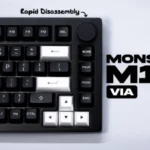
Reviewers found the board easy to open or modify, especially because of the ball-catch/rapid-disassembly design, with several reviews highlighting fast access compared with screw-heavy boards.
-
Battery feedback was consistently strong, with reviewers citing 8,000 mAh capacity, long wireless use, and claims or experiences ranging from many hours to weeks between charges.
-
Hot-swap support is widely supported in the reviews, including replaceable switches, 3-pin/5-pin support, magnetic and mechanical switch compatibility, and easy switch experimentation.
-
Compatibility is broad across devices, layouts, platforms, and switch types, including multi-device Bluetooth, Windows/Mac/Linux software access, and mechanical or magnetic switch support in TMR-focused reviews.
-
Latency evidence is positive, with reviews citing low millisecond results, acceptable latency, no lag, and gaming-focused speed and precision.
-
Customization is one of the strongest themes: reviewers cite included accessories, VIA/web software, rapid disassembly, switch/keycap changes, lighting, remapping, and internal modding access.
-
Materials quality is a standout strength, with repeated evidence for aluminum construction, premium weight, PBT keycaps, and high-quality materials.
-
The reviews repeatedly describe the keyboard as premium, heavy, aluminum, solid, and well built, with only minor concerns about a loose-feeling shell or rapid-disassembly sensitivity in some units.
-
Gaming performance is strong overall, with reviewers citing responsive actuation, no meaningful performance limits, high polling, low latency, and fast magnetic-switch features.
-
Key stability is praised across several reviews, with minimal wobble, stable stems, and stable keycaps or stabilizers noted repeatedly.
-
Connectivity is a clear strength, with repeated support for USB-C, 2.4 GHz wireless, and Bluetooth, although Bluetooth polling and some wake or dongle details vary by review.
-
Macro support is consistently supported through VIA or web software, with reviewers citing macro creation, recording, remapping, and multi-action gaming functions.
-
Responsiveness is a major strength in TMR/HE coverage, with reviewers citing low actuation settings, rapid key presses, quick registration, and responsive wired and wireless use; one VIA review noted plug-in lag.
-
Polling-rate support is a strong gaming point in TMR/HE reviews, with multiple mentions of 8K wired/wireless polling and lower Bluetooth polling on VIA models.
-
Profile support appears in the web/software coverage, including quick profile switching, downloadable/shared profiles, created profiles, and onboard-stored settings.
-
Stabilizer feedback is positive overall, with lubed stabilizers, minimal wobble, no excessive rattle, and rattle-free stock behavior noted across reviews.
-
Reviewers generally liked the board's sound, describing it as pleasant, muted, clean, silent, or impressive, though one review found the stock sound somewhat pingy and hollow.
-
Durability evidence centers on the aluminum case, PBT keycaps, built-to-last comments, and the ability to open, clean, maintain, and replace parts over time.
-
Sound dampening is well supported by foam, silicone, gaskets, and spacebar treatment, reducing resonance, ping, and hollow spacebar sound in several reviews.
-
RGB customization is broadly available through VIA/web software, onboard shortcuts, preset effects, custom effects, profile lighting, and RGB programming.
-
Typing feel is generally strong, with reviewers describing smooth, soft, cushioned, satisfying, and impressive feel, though foam removal or personal switch preference can change the experience.
-
Value is consistently positive at the cited prices, especially for buyers who value aluminum construction, wireless, customization, and gaming features; one review warned non-modders may pay for unused features.
-
Magnetic/TMR actuation was mostly described as predictable and controlled, with little accidental input in normal use; one reviewer only triggered accidental clicks at very sensitive test settings.
-
Typing comfort is generally positive, with reviewers using it as a daily keyboard or calling it plug-and-play, though comfort depends on layout and typing-angle preferences.
-
Switch feel is broadly praised as smooth, responsive, satisfying, stable, creamy, or quiet depending on the installed switches and variant.
-
Lighting control is strongly supported through VIA/web software, per-key RGB references, south-facing LEDs, and per-key or software-level lighting adjustments.
-
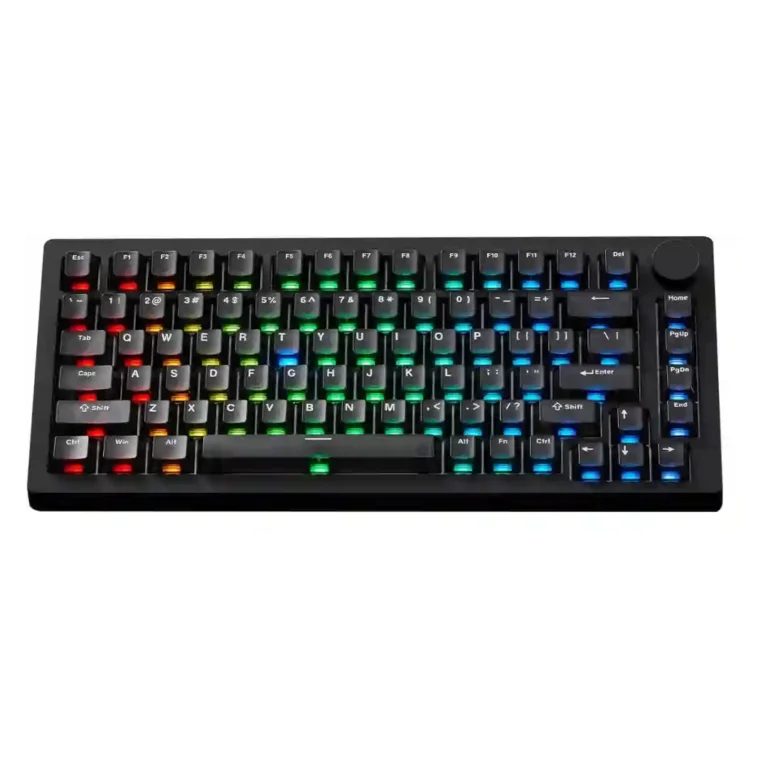
The keyboard is consistently described as a compact or exploded 75% board with a knob, balancing desktop efficiency with a heavy premium chassis.
-
The knob appears across many reviews as a major media/control feature, and several reviewers note that it can be reprogrammed, though one found its default usefulness limited.
-
The aluminum frame is generally described as stable, heavy, tank-like, or desk-planted, though a few reviews note loose shell feel, uneven flex, or case-opening sensitivity.
-
Volume control is a common knob use case, with several reviews noting default volume control or reprogrammable knob behavior.
-
Wireless performance is mostly positive, with stable dongle/Bluetooth use, no lag, low-latency claims, and efficient wireless behavior; Bluetooth wake or minor connection issues appear in some reviews.
-
Software is capable but uneven: VIA/web tools offer broad remapping and customization, while reviewers also mention UI quirks, bugs, setup friction, and 2.4 GHz customization limits.
-
Layout support is positive overall, with 75% layout, ISO availability, layer remapping, and needed keys praised; one ISO sample had small-key layout complaints.
-
Keycap quality is generally positive, with PBT, double-shot, shine-through, frosted, and OEM-profile options praised, although some reviewers found certain caps too smooth, dull, or hollow-sounding.
-
The compact 75% layout gives the board a smaller footprint than full-size designs, while the heavy chassis keeps it stationary rather than easy to move around.
-
RGB quality is mixed by variant: many reviewers praised clean, vibrant, bright, flicker-free lighting, while others disliked dull lighting, blocked light, or charging-indicator behavior.
-
Legend visibility varies by variant: reviewers found backlit or printed legends readable in some versions, while another praised segmented keycap labeling for easier visual spotting.
-
Noise depends heavily on switch and build choice: some reviewers found the board louder or pingier, while others described it as quieter, muted, deep, or very silent.
-
Lighting brightness was praised in some variants for strong vibrancy and diffusion, but one TMR review called the lighting not very bright and a weak point.
-
Onboard memory is directly supported in VIA/TMR coverage, with settings saved on the keyboard; one review noted no onboard storage for the 2.4 GHz dongle.
-
Ergonomics are mixed: reviewers liked the slanted or comfortable typing feel, but several disliked hidden mode switches, fixed typing angles, no adjustable feet, and occasionally awkward layout or cable access.
-
Cable feedback was mixed: some reviews mention a spiral/coiled or nice-feeling USB cable, while others note non-braided, non-coiled, thick-fit, or not very durable cable issues.
-
Reliability is mixed because one reviewer reported random volume ghost inputs and another said the rapid-disassembly case could open when moved, even though normal desk use was fine.
Cons
-
The only direct spacing/layout criticism came from the ISO sample, where the reviewer struggled with the small Shift key and chunky Enter key.
-
Portability is weak because reviewers repeatedly describe the keyboard as extremely heavy, around 1.75-1.8 kg or over 4 lb, and poor for travel.
Compared With Category Average
Compared with other Gaming Keyboard, this product is above average in hot-swappable switches, ease of switch replacement, switch options, below average in portability.
| Attribute | This product | Category average | Difference |
|---|---|---|---|
| hot-swappable switches | 4.7 | 3.3 | +1.4 |
| ease of switch replacement | 4.7 | 3.5 | +1.3 |
| switch options | 4.8 | 3.5 | +1.3 |
| value for money | 4.5 | 3.5 | +0.9 |
| rapid trigger support | 4.7 | 3.8 | +1.0 |
| portability | 2.5 | 3.4 | -0.9 |
| connectivity | 4.6 | 4.0 | +0.6 |
| software quality | 4.3 | 3.8 | +0.5 |
FAQ
Is the MonsGeek M1 V5 HE good for gaming?
Yes. The reviews repeatedly point to responsive actuation, rapid trigger support, high polling rates, low latency, and strong gaming-focused features.
Is it a good keyboard for modding?
Yes. Reviewers often praised the rapid-disassembly design, hot-swappable switch support, included accessories, and broad customization through VIA or web software.
How is the battery life?
Battery life is one of the strongest points. Reviews cite an 8,000 mAh battery and long wireless use, though RGB lighting can reduce runtime.
What are the main downsides?
Common caveats include hidden mode switches, occasional software quirks, RGB or charging-indicator annoyances, heavy weight, and isolated reliability concerns in a few reviews.
Is it easy to travel with?
No. Several reviewers emphasized the heavy aluminum case, with weights around 1.75-1.8 kg or over 4 lb, making it better for a fixed desk setup.
Expert Reviews We Analyzed
Video Reviews
Article Reviews
Consider This Instead
If you want better portability
Choose ASUS ROG Falchion Ace 75 HE. It scores 4.7 vs 2.5 for portability, with a 4.2 overall score.
If you want better cable quality
Choose Keychron Q3 HE. It scores 4.6 vs 3.6 for cable quality, with a 4.5 overall score.
If you want better RGB lighting quality
Choose Alienware Pro Wireless Gaming Keyboard. It scores 4.9 vs 4.2 for RGB lighting quality, with a 4.3 overall score.
If you want better media controls
Choose Corsair K100 RGB. It scores 5.0 vs 4.4 for media controls, with a 4.2 overall score.
Overall Top Gaming Keyboard Alternatives
Choose the Q3 HE for premium build, smooth Hall Effect typing, and flexible connectivity. Skip it if you want broader switch compatibility or better value.
Pros: rapid trigger support, build quality
Cons: portability, switch options
Best for premium build, flexible Hall Effect controls, and strong wireless versatility. Skip it if you want a lighter board, broader switch choice, or better value.
Pros: frame rigidity, customization options
Cons: portability, switch options
Good if you want a full-size premium Hall Effect keyboard with smooth typing and strong gaming tools. Skip it if you need easy portability or wider magnetic switch compatibility.
Pros: key responsiveness, key stability
Cons: portability, switch options
Choose the GMMK 2 for smooth typing, bright RGB, and rare hot-swap flexibility at this price. Skip it if you want wireless features, analog controls, or more polished software.
Pros: frame rigidity, durability
Cons: actuation consistency