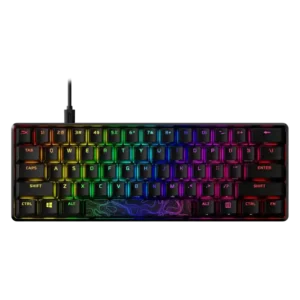
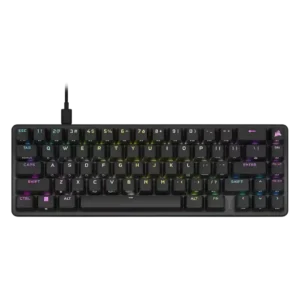
Sound impressions were mixed but generally acceptable: reviewers described satisfying thock or solid clack in some versions, while others noted louder mechanical noise, hollow tones, or stabilizer-related clatter.
Most reviews praise the sound as pleasing and better controlled than typical gaming boards, even if it is not framed as full enthusiast-level acoustics.
Testing and reviewer impressions consistently pointed to reliable key registration, with anti-ghosting, N-key rollover, and repeatable switch behavior supporting fast input without conflicts.
One review specifically describes the actuation as consistently super responsive.
Brightness was a standout strength, with multiple reviewers calling the RGB very bright, vivid, or adjustable across levels, though some noted color quirks with whites or red-tinted stems.
Brightness is adjustable and generally strong enough for visibility, though one review notes some visual blur and less-than-perfect punch.
Build quality was the most consistently praised area, with reviewers repeatedly describing the keyboard as premium, tank-like, sturdy, solid, and unusually well built for its price class.
Reviews consistently describe the chassis and overall construction as premium, sturdy, and well finished.
The detachable USB-C cable was widely appreciated for convenience and portability, but cable impressions were mixed because several reviewers found it stiff, rigid, or limited by recessed port fit.
The detachable braided USB-C cable is broadly seen as a plus, with standard, non-proprietary connectivity.
Compatibility evidence covered consoles and operating systems, with reviewers noting support for PlayStation, Xbox, PC, and in one case major desktop operating systems, while software support remained more Windows-focused.
Reviewers mention support for PC, Mac, PlayStation, Xbox, and general console use.
The keyboard is consistently treated as a wired USB-C model with a detachable cable, which reviewers liked for travel, cleaning, and setup flexibility, despite no wireless mode.
The wired USB-C connection is mostly reliable and low-latency, though one reviewer hit disconnects at 8000Hz on older hardware.
Customization was described as broad in lighting and key behavior, but not universally frictionless; reviewers praised available options while noting software and design decisions could limit the experience.
iCUE and onboard controls give the board deep control over lighting, key assignments, macros, and performance settings.
Compact full-size, TKL, 60%, and 65% variants were repeatedly praised for preserving mouse room and improving desk layout, especially for gaming setups with large mouse movement.
The compact 65% footprint repeatedly earns praise for freeing up desk room while staying gaming-friendly.
Durability was supported by the 80 million keypress switch rating and repeated comments that the aluminum construction should hold up well through heavy or long sessions.
Durable PBT caps and long switch-life claims support strong longevity expectations.
Switch replacement was not a strength: one review mentioned visible or replaceable switches, but another noted desoldering would be needed, making practical replacement inconvenient.
Switch access is possible with a puller, but the replacement experience is not especially open or tool-inclusive.
Ergonomics were mostly positive because reviewers liked the multi-angle feet and stable tilt positions, though several comfort concerns remained around missing wrist rests or compact layouts.
Tilt feet and compact sizing help, but several reviews still wanted more height adjustment or a wrist rest.
Gaming extras centered on Game Mode, Windows-key disabling, anti-accidental key behavior, and shortcut-based controls rather than dedicated premium gaming buttons.
Helpful extras include function-layer lighting hints and mouse controls alongside gaming-focused shortcuts.
Frame rigidity was a major strength, with reviewers repeatedly noting minimal flex, rock-solid stability, aluminum construction, and little movement during use.
Multiple reviews note minimal flex and a notably solid frame.
Gaming performance was consistently strong, with reviewers describing responsive switches, low-latency behavior, strong anti-ghosting/N-key rollover support, and comfortable use in fast-paced games.
Fast OPX switches, short travel, and gaming-focused tuning make performance a clear strength.
Hot-swap support was not meaningfully present in the evidence; the clearest review evidence described the board as missing hot-swappable switches.
Reviews explicitly note that the K65 Pro Mini lacks true hot-swap support.
Keycap quality varied sharply by model: later 60%/65% versions earned praise for PBT keycaps, while full-size/Core reviews often criticized ABS caps, oil pickup, shine, or average quality.
The textured double-shot PBT keycaps are widely praised for grip, feel, and durability.
Key responsiveness was a repeated strength, with reviewers describing fast, responsive, smooth, low-delay, and confidence-inspiring key presses for gaming and typing.
Inputs are repeatedly described as fast, direct, and highly responsive.
Key spacing evidence was mixed by size: compact 60% layouts felt tight to one reviewer, while a 65% review found the keys did not feel cramped.
One review highlights the full-sized keys and ample spacing as unusually comfortable for a compact board.
Key stability was generally good, with reviewers mentioning little wobble, stable key feel, and enough keycap grip to keep fingers controlled.
Larger keys are generally described as controlled and stable, with only minor wobble mentioned.
Latency evidence was favorable, including measured low latency, no noticeable lag, and one review calling input latency very low for fast-paced play.
One review specifically highlights very quick input processing and transfer.
Layout flexibility was strong across the product family, with evidence for full-size, TKL, 65%, and 60% options plus standard layouts or retained navigation keys depending on model.
Legend visibility was generally good because shine-through legends and side-printed functions were visible, though one review noted some hotkey legends were not illuminated.
Sub-legends and function hints are easy to read, with Fn-layer lighting further improving clarity.
Macro support was consistently available through NGENUITY or key remapping, with reviewers noting programmable keys, macro creation, and reassignment options.
Macros are widely supported through iCUE and, in some cases, hardware-only recording.
Materials quality was one of the strongest areas, with repeated references to aluminum cases, premium shells, and solid construction across sizes.
Aluminum and PBT materials are consistently described as premium and pleasing.
Media controls were present mostly through Function-key shortcuts, but reviewers commonly missed dedicated media keys or a physical volume wheel.
Media commands are available through the function layer across several reviews.
Noise level depended on switch and chassis: some reviewers found the board quieter or inoffensive, while others noted mechanical clack, annoying noise, or louder keys.
The board is generally described as pleasant and quieter than older Corsair designs, though not silent or universally low-noise.
Onboard memory usually allowed up to three profiles or presets, but reviewers were split between appreciating the portability and criticizing sync limits or the low profile count.
Onboard storage and profile capacity are a major strength, with up to 50 profiles repeatedly cited.
USB passthrough was a weakness: reviewers explicitly noted the lack or removal of USB pass-through or charging compared with other boards.
Per-key lighting control was well supported, with several reviews describing individual-key RGB adjustment, per-key customization, and individually lit keys.
Reviews note thorough per-key or zone-based lighting control.
Polling-rate evidence was positive but limited, with testing and specs pointing to 1000 Hz behavior suitable for gaming response.
The 8000Hz polling option is a headline feature, even if some reviewers found limited real-world benefit.
Portability was a repeated strength for compact variants and detachable-cable designs, with reviewers mentioning travel, LAN use, backpacks, and easy transport.
The compact body and detachable cable make it easy to move or travel with.
Profile management was mixed: several reviews liked onboard profile switching, but others described sync failures, limited onboard slots, or confusing preset behavior.
Profile handling is robust, with many onboard slots and easy switching or saving.
Reliability evidence was positive but limited, supported by one long-term two-year usage review and references to reliable switches.
One review reports stable performance with no dropouts or inconsistent response.
RGB customization was widely available through presets, effects, layering, colors, and software, but reviewers often criticized limited effects, awkward layers, or software friction.
RGB effects are broad and highly customizable both in software and onboard.
RGB lighting quality was highly praised overall, with reviewers describing bright, vivid, saturated, gorgeous lighting, though a few noted color-mixing imperfections.
Lighting quality is usually described as vibrant and crisp, though not every reviewer loved the stock presentation.
Size and form factor were major strengths, with reviewers praising compact full-size, TKL, 60%, and 65% versions depending on desk-space and productivity needs.
The 65% layout is consistently praised for balancing compactness with arrow keys and useful navigation.
Software quality was the most consistent weakness, with reviewers citing sync issues, Windows Store friction, limited effects, unintuitive controls, installation problems, or basic functionality.
iCUE offers strong functionality, but reviewer sentiment is mixed because of clunkiness, complexity, and one pre-launch crash issue.
Sound dampening evidence was mixed: some reviewers liked the lack of ping, while others noted no foam or only modest case-ping control.
Most reviewers noticed the foam and dampening layers improving sound versus older Corsair boards.
Stabilizer quality was inconsistent, ranging from mostly good or acceptable to squeaky, rattly, or under-lubed depending on the reviewed model.
Stabilizers are decent but not exceptional, with some rattle and mushiness still called out.
Switch feel was widely praised, especially HyperX Red and Aqua switches, with reviewers describing smooth travel, satisfying feel, and balanced gaming/typing response.
The OPX switches are usually described as smooth, quick, and satisfying, with a few comments about sensitivity.
Switch options were good across the family with Red, Aqua, and Blue variants mentioned, though availability varied by size and some compact versions were more limited.
One review flags the proprietary OPX focus as limiting for buyers who want broader switch choice.
Typing comfort was mixed: reviewers liked the feel and angles, but compact layouts, low actuation, and missing wrist rests created adjustment or soreness issues for some users.
Typing comfort is mixed: some found the switches comfortable, while others reported accidental presses or more mistakes.
Typing feel was generally positive, with reviewers praising smooth, satisfying, or comfortable key action, although some preferred tactile or Cherry-style alternatives.
Typing feel is widely liked for its smoothness, sound, and textured caps.
Value was broadly positive, with reviewers often calling the board fair, competitive, or unusually premium for its price, while still noting software and feature tradeoffs.
Reviewers usually like the board, but many still call the pricing high for a wired mini keyboard.
Volume control was a recurring limitation on the full-size models because reviewers missed a dedicated dial or wheel, though shortcut-based volume control was available.
Volume adjustment is available through the function layer.
Wireless performance was effectively absent: the reviewed models were wired-only, and reviewers explicitly noted no wireless mode or multi-device wireless use.
Wrist-rest support was weak because the board generally did not include one; reviewers mentioned optional separate wrist rests or recommended buying one for comfort.
No wrist rest is included, and several reviewers saw that as a downside.