If you want better compatibility
Choose Corsair K70 Core. It scores 5.0 vs 3.0 for compatibility, with a 3.8 overall score.
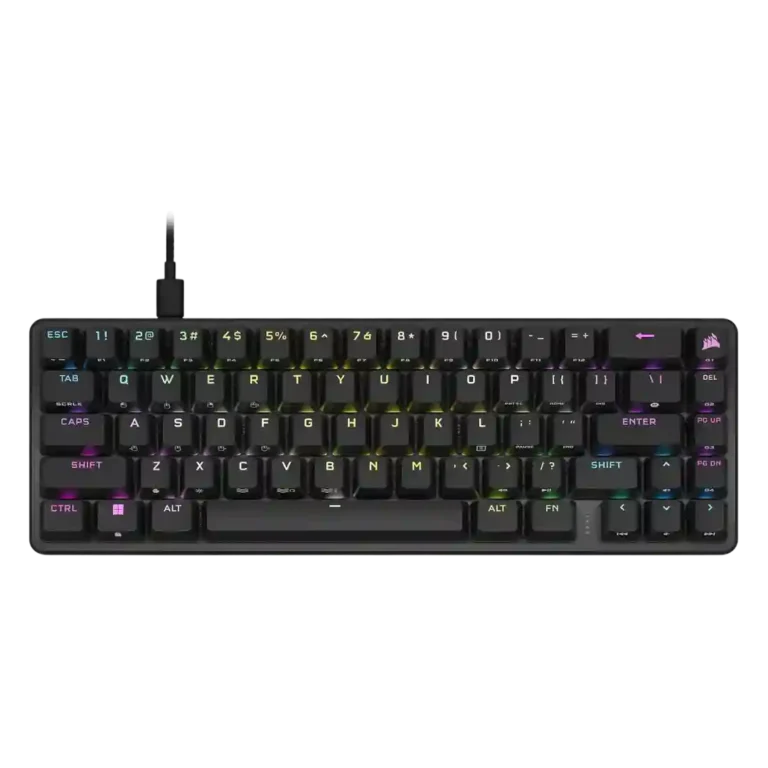
Choose the Corsair K65 Pro Mini for a compact wired board with fast OPX switches, sturdy build, strong layout, and pleasing sound. Skip it if you need wireless, broad switch choice, a wrist rest, or a bargain price.
Best for gamers who want a compact wired 65% board with fast optical switches, strong build quality, good desk-space efficiency, and unusually pleasant acoustics for a mainstream gaming keyboard.
Not for buyers who prioritize wireless use, broad switch choice, hot-swap freedom, a bundled wrist rest, or the lowest possible price in a compact keyboard.
The review consensus paints the Corsair K65 Pro Mini as a speed-focused 65% keyboard that gets the fundamentals right. Reviewers repeatedly praised its OPX optical switches, solid aluminum-topped build, helpful arrow/navigation layout, PBT keycaps, and unusually pleasant acoustics for a mainstream gaming board. Its compact footprint improves desk space while retaining enough shortcuts, profiles, macros, and lighting controls to stay practical. The tradeoff is that its speed-first design is not universally comfortable: several reviewers found the 8,000Hz polling hard to notice or even problematic, the sensitive switches could trigger accidental inputs, and the stabilizers were only decent. iCUE ranged from easy and powerful to crash-prone or cumbersome, and the price drew pushback because there is no wireless mode, passthrough, broad switch choice, or included wrist rest.
Compared with other Gaming Keyboards, this product is above average in volume control, media controls, portability, near average in sound dampening, switch feel, below average in wireless performance, wrist rest quality, hot-swappable switches.
| Attribute | This product | Category average | Difference |
|---|---|---|---|
| wireless performance | 2.0 | 4.1 | -2.1 |
| volume control | 5.0 | 3.8 | +1.2 |
| wrist rest quality | 2.3 | 3.3 | -1.0 |
| media controls | 4.7 | 3.7 | +0.9 |
| hot-swappable switches | 2.6 | 3.5 | -0.9 |
| portability | 4.4 | 3.4 | +0.9 |
| stabilizer quality | 3.1 | 3.9 | -0.8 |
| acoustics | 4.8 | 4.1 | +0.8 |
Choose Corsair K70 Core. It scores 5.0 vs 3.0 for compatibility, with a 3.8 overall score.
Choose Logitech G515 Lightspeed. It scores 4.8 vs 2.0 for wireless performance, with a 4.1 overall score.
Choose Glorious GMMK 2. It scores 4.7 vs 2.6 for hot-swappable switches, with a 4.3 overall score.
Choose Corsair K70 PRO. It scores 4.8 vs 3.3 for reliability, with a 4.0 overall score.
Products reviewers directly compared with this model, grouped into quick takeaways.
Yes. Reviewers consistently praised its fast OPX optical switches, responsive actuation, low-latency wired setup, and compact 65% footprint for gaming.
Typing feel was usually praised as smooth and satisfying, but the very sensitive switches caused mistakes for some reviewers. Several also wanted better feet adjustment or an included wrist rest.
Most reviewers liked the acoustics and sound dampening, saying the keyboard sounded pleasant, rich, or quieter than previous Corsair boards. The main caveat was stabilizer rattle, especially around the spacebar.
Not for every basic function. Reviewers liked that many shortcuts, profiles, macros, and lighting controls can live on the keyboard, but opinions on iCUE ranged from clean and useful to clunky or unstable.
No. Reviewers repeatedly described it as wired-only, and several treated the lack of wireless as a key limitation at the price.
It can be worth it for buyers who want a mainstream compact wired optical keyboard with strong build, sound, and layout. Reviewers questioned the value for shoppers who need wireless, hot-swap flexibility, or a lower price.
These are a few of the reviews included in our analysis.


Good if you want a premium 96% Hall Effect keyboard for work and gaming with excellent build, sound, and customization. Skip it if you need cheaper esports-first speed, 8,000Hz polling,...
Pros: cable quality, typing comfort
Cons: portability, switch options

Good if you want a premium, quiet TKL Hall Effect keyboard for typing and gaming. Skip it if price, portability, 8,000Hz polling, or broad switch choice matters most.
Pros: build quality, extra gaming features
Cons: switch options, hot-swappable switches

Good if you want a premium full-size Hall Effect keyboard with smooth switches, quiet sound, and deep customization. Skip it if you need a portable, budget-friendly board or broad switch...
Pros: key stability, frame rigidity
Cons: portability, switch options

Good if you want esports speed, analog tuning, and deep customization. Skip it if typing comfort, quiet office use, or included extras matter more.
Pros: polling rate, RGB customization
Cons: key stability, typing comfort