Average score
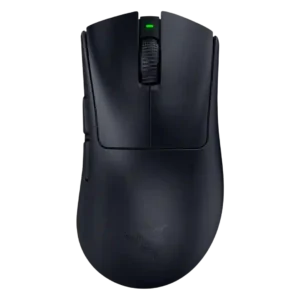
Razer DeathAdder V4 Pro
4.2
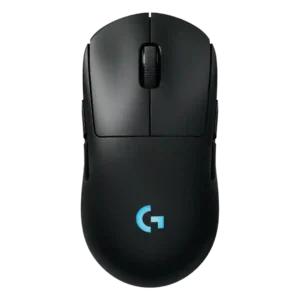
Logitech G Pro 2 Lightspeed
3.8
handedness options
Razer DeathAdder V4 Pro
2.0
Handedness was a clear limitation because reviewers noted the mouse is strictly right-handed.
Logitech G Pro 2 Lightspeed
4.7
Handedness options are one of the strongest points, with repeated praise for the ambidextrous shape and swappable side buttons.
dock compatibility
Razer DeathAdder V4 Pro
2.0
Dock compatibility was a downside where reviewers wanted charging or docking support and noted it was absent.
Logitech G Pro 2 Lightspeed
4.6
Dock or Power Play compatibility was praised as a solid way to use the mouse without battery worry.
polling rate
Razer DeathAdder V4 Pro
4.3
8,000Hz polling was viewed as cutting-edge and useful for esports, but several reviewers said many casual players may barely notice it and it hurts battery life.
Logitech G Pro 2 Lightspeed
2.4
Polling rate drew criticism: reviewers said the 1000 Hz limit trails newer high-polling competitors and feels odd for the price.
balance and weight distribution
Razer DeathAdder V4 Pro
4.8
Balance and weight distribution were praised where reviewers said the mouse felt well balanced and easy to control despite its size.
Logitech G Pro 2 Lightspeed
3.2
Weight balance is similarly split, with praise for balanced feel in one review and criticism that skates plus weight made it feel heavier.
programmable buttons
Razer DeathAdder V4 Pro
2.5
Programmable-button feedback was mixed because the mouse is intentionally minimal and lacks the extra physical buttons some users expect.
Logitech G Pro 2 Lightspeed
4.0
Programmable buttons are useful for flexible layouts, with one reviewer implying the richer button configuration is worth keeping.
premium feel
Razer DeathAdder V4 Pro
4.8
Premium feel was praised when reviewers focused on the smoother coating and refined construction.
Logitech G Pro 2 Lightspeed
3.5
Premium feel is mixed: the mouse can feel like a premium, solid product, but some reviewers found it uninventive or disappointing for the price.
RGB features
Razer DeathAdder V4 Pro
2.5
RGB feedback was mostly negative or conditional because the mouse lacks lighting, which disappointed reviewers who like RGB aesthetics.
Logitech G Pro 2 Lightspeed
3.6
RGB opinions are mixed: some liked the lighting, while others found the logo placement wasted under the hand.
left and right click quality
Razer DeathAdder V4 Pro
4.3
Left and right click quality was mostly positive for crisp, responsive clicks, with some caveats around hollow sound.
Logitech G Pro 2 Lightspeed
3.2
Main click quality is mixed because one reviewer liked the heavy tactile feel but criticized right-click ping.
glide smoothness
Razer DeathAdder V4 Pro
4.6
Glide smoothness was heavily praised, with reviewers describing liquid, effortless, or very smooth movement across pads and surfaces.
Logitech G Pro 2 Lightspeed
3.5
Glide is sharply mixed: several reviewers found it smooth or very good, while comparison reviewers said the skates felt slow or draggy.
software usability
Razer DeathAdder V4 Pro
4.3
Software usability was mixed-to-positive: Synapse offers deep control and helpful explanations, but bloat, external tools, and confusing descriptions hurt it.
Logitech G Pro 2 Lightspeed
3.2
Software usability is mixed: G Hub offers useful controls, but reviewers complained about forced software, quirks, and a desire for a better setup experience.
weight
Razer DeathAdder V4 Pro
4.6
The low 56-57g weight was praised across reviews as light, nimble, and especially good for competitive play.
Logitech G Pro 2 Lightspeed
3.6
Weight is divisive: several reviewers found 80 g light or deliberate, while comparison-focused reviewers felt it was noticeably heavy.
FPS gaming suitability
Razer DeathAdder V4 Pro
4.9
FPS gaming suitability was extremely strong, with reviewers praising CS2, Fortnite, Valorant-style precision, and esports-focused responsiveness.
Logitech G Pro 2 Lightspeed
4.0
FPS suitability is mixed but generally capable: some reviewers praised twitch-shooter performance, while others preferred lighter alternatives for FPS.
grip texture
Razer DeathAdder V4 Pro
4.8
Grip texture was praised for secure control without abrasion, though some reviewers relied on included grip tape or noted surface marks.
Logitech G Pro 2 Lightspeed
3.9
Grip texture feedback is modestly positive, with reviewers calling the coating fine and the matte finish appealing.
Bluetooth support
Razer DeathAdder V4 Pro
2.4
Bluetooth support was a recurring limitation; some reviewers did not mind, but others called the omission disappointing for versatility.
Logitech G Pro 2 Lightspeed
1.5
Bluetooth support is a weakness because a reviewer explicitly felt Bluetooth should be included at this price.
Accuracy and tracking precision
Razer DeathAdder V4 Pro
5.0
Reviewers consistently praised the mouse's accurate 1:1 tracking, with aim, flicks, and fine movement described as precise and trustworthy.
Logitech G Pro 2 Lightspeed
4.2
Reviewers mostly found tracking accurate and dependable, with strong praise for the HERO 2 sensor, though one comparison-focused review felt less accurate in play.
build quality
Razer DeathAdder V4 Pro
4.7
Build quality was widely praised for rigidity, lack of creaking, and a solid shell despite low weight.
Logitech G Pro 2 Lightspeed
3.9
Build quality is mostly solid but not flawless, with praise for secure buttons alongside wobble and click-ping concerns.
sensor performance
Razer DeathAdder V4 Pro
5.0
The Focus Pro 45K sensor drew very strong praise for smoothness, precision, and faultless tracking, though several reviewers noted its headline DPI is overkill.
Logitech G Pro 2 Lightspeed
4.3
Sensor feedback is broadly positive: reviewers called it excellent, upgraded, reliable, or even laughably good, while one felt the real-world difference was not massive.
value for money
Razer DeathAdder V4 Pro
3.2
Value was sharply context-dependent: reviewers often justified the price for esports users but warned casual buyers or V3 owners may find cheaper options smarter.
Logitech G Pro 2 Lightspeed
2.4
Value for money is the most repeated concern, with reviewers often saying the upgrade is not compelling or costs too much versus alternatives.
charging convenience
Razer DeathAdder V4 Pro
4.0
Charging convenience was positive where reviewers noted cable charging was easy and the mouse could continue working while plugged in.
Logitech G Pro 2 Lightspeed
4.6
Charging convenience is strong thanks to fast charging impressions, USB-C, and Power Play/constant-power convenience.
palm grip comfort
Razer DeathAdder V4 Pro
4.1
Palm-grip comfort was generally strong, though one reviewer with large hands found scroll-wheel reach awkward in full palm grip.
Logitech G Pro 2 Lightspeed
4.7
Palm grip comfort received direct praise from a reviewer whose hand position fit the mouse well.
DPI range
Razer DeathAdder V4 Pro
5.0
The extreme DPI ceiling was valued by reviewers who cared about surgical tuning and peak sensor headroom.
Logitech G Pro 2 Lightspeed
4.5
The DPI range is treated as a strength because reviewers noted a wide sensitivity range and unusually high sensor ceiling.
cable flexibility
Razer DeathAdder V4 Pro
3.8
Cable feedback was mixed: reviewers liked the braided included cable, but some found it stiff or not ideal for wired play.
Logitech G Pro 2 Lightspeed
3.3
Cable impressions are mixed: one reviewer liked the long charging cable, while another wanted a lighter cable for wired play.
click noise
Razer DeathAdder V4 Pro
2.4
Click noise was the most common tactile complaint, with many reviewers describing the main clicks as loud, hollow, pingy, or annoying.
Logitech G Pro 2 Lightspeed
2.9
Click noise is mixed to negative: one reviewer said clickiness could annoy some, and another criticized audible right-click ping.
software stability
Razer DeathAdder V4 Pro
2.3
Software stability was mixed-to-negative where reviewers encountered recognition issues or heavy resource use.
Logitech G Pro 2 Lightspeed
2.8
Software stability is split, from a severe boot-loading problem in one review to reliable core adjustments in another.
wireless performance
Razer DeathAdder V4 Pro
5.0
Wireless performance received very strong praise for speed, reliability, and flagship-class signal quality.
Logitech G Pro 2 Lightspeed
4.5
Wireless performance was praised as solid and reliable in gaming and productivity use.
button responsiveness
Razer DeathAdder V4 Pro
4.9
Button responsiveness was consistently strong, with reviewers reporting snappy clicks, instant registration, and responsive side buttons.
Logitech G Pro 2 Lightspeed
4.4
Button responsiveness is a clear strength, with reviewers praising satisfying, immediate, tactile button action.
motion consistency
Razer DeathAdder V4 Pro
5.0
Motion consistency was praised for sleek, smooth swipes and a cursor feel that tracked hand motion cleanly.
Logitech G Pro 2 Lightspeed
4.6
Motion felt smooth and consistent across reviews, including snappy gameplay and consistent testing performance.
side button quality
Razer DeathAdder V4 Pro
4.7
Side buttons were widely praised for better spacing, tactile response, and easier identification in fast gameplay.
Logitech G Pro 2 Lightspeed
4.2
Side button quality is mostly strong thanks to low wobble and good feel, with one reviewer noting more travel than the Superlight 2.
portability
Razer DeathAdder V4 Pro
2.1
Portability was one of the clearest weaknesses because the larger dongle and lack of Bluetooth make travel and laptop use less convenient.
Logitech G Pro 2 Lightspeed
2.5
Portability is limited by the lack of Bluetooth, making travel-style use less convenient in the cited review.
profile switching
Razer DeathAdder V4 Pro
2.9
Profile and DPI switching divided reviewers: some liked the underside placement, while others found it annoying or tedious during use.
Logitech G Pro 2 Lightspeed
2.5
Profile or DPI switching is hurt by the bottom-mounted button, which reviewers found inconvenient for quick changes.
click latency
Razer DeathAdder V4 Pro
5.0
Click latency evidence was strongly positive where reviewers described instant registration and no lag in button inputs.
Logitech G Pro 2 Lightspeed
4.6
Click latency impressions are positive, with the Lightforce switches described as quick and clicky.
shape comfort
Razer DeathAdder V4 Pro
4.7
Shape comfort was one of the strongest areas, with many reviewers praising the familiar ergonomic DeathAdder shape and in-hand comfort.
Logitech G Pro 2 Lightspeed
4.3
Shape comfort is mostly praised as familiar, smooth, and comfortable, especially for users who already like the Pro shape.
ergonomic design
Razer DeathAdder V4 Pro
4.9
Ergonomic design drew strong praise for comfort, palm support, and competitive-friendly shaping.
Logitech G Pro 2 Lightspeed
4.6
Ergonomics are strong for many hands, with reviewers praising the hand fit and shape across grip styles.
MMO gaming suitability
Razer DeathAdder V4 Pro
2.0
MMO suitability was weak because the minimal button layout makes it a poor fit for MMO players who need many commands.
Logitech G Pro 2 Lightspeed
2.3
MMO suitability is weak because one reviewer said it is not the best choice for super-involved MMOs.
claw grip comfort
Razer DeathAdder V4 Pro
4.1
Claw-grip comfort was generally positive but more context-dependent than palm grip because the larger ergonomic shape does not suit everyone equally.
Logitech G Pro 2 Lightspeed
4.4
Claw grip comfort is supported by one reviewer who said the shape works for claw grip and broad grip preferences.
connection stability
Razer DeathAdder V4 Pro
4.7
Connection stability was strongly praised through no-drop testing, stable dongle behavior, and reliable transmission.
Logitech G Pro 2 Lightspeed
4.5
Connection stability feedback is positive, with one reviewer saying the wireless connection usually works without hiccups.
battery life
Razer DeathAdder V4 Pro
4.6
Battery life was a major strength at 1,000Hz, with repeated praise for long endurance, while 8,000Hz drain was the main caveat.
Logitech G Pro 2 Lightspeed
4.5
Battery life is a major strength, repeatedly praised as good, improved, long-lasting, or exceptional.
long-session comfort
Razer DeathAdder V4 Pro
4.8
Long-session comfort was praised for extended play and fatigue management.
Logitech G Pro 2 Lightspeed
4.6
Long-session comfort is supported by praise for the larger frame reducing cramping.
switch feel
Razer DeathAdder V4 Pro
4.2
Switch feel was generally praised for crispness, tactility, and speed, but some reviewers disliked hollow or loud acoustics.
Logitech G Pro 2 Lightspeed
4.1
Switch feel is generally praised as satisfying, light, tactile, or strong, though one reviewer said it lacked the Superlight 2's tactility.
scroll wheel quality
Razer DeathAdder V4 Pro
4.5
The optical scroll wheel was one of the most praised upgrades, with reviewers calling it precise, durable, tactile, and a clear improvement over prior wheels.
Logitech G Pro 2 Lightspeed
4.6
The scroll wheel is consistently praised, ranging from good and issue-free to absolutely fantastic.
button customization
Razer DeathAdder V4 Pro
4.5
Button customization was praised through Synapse and Hypershift options, especially for users willing to configure the mouse.
Logitech G Pro 2 Lightspeed
4.4
Button customization is a major advantage, with reviewers praising the easy magnetic swaps, remapping flexibility, and G Hub input options.
wireless latency
Razer DeathAdder V4 Pro
4.6
Wireless latency was praised as extremely low or fast, though a few reviewers said real-world differences are difficult to perceive.
Logitech G Pro 2 Lightspeed
4.6
Wireless latency was praised in testing, with no noticeable stutter or latency reported.
materials quality
Razer DeathAdder V4 Pro
3.0
Materials quality was mixed, combining praise for soft matte recycled plastic with complaints about oil marks or less-premium impressions.
Logitech G Pro 2 Lightspeed
3.0
Materials quality is middling in the limited evidence, with one reviewer saying the shell felt dense but not as good as alternatives.
acceleration control
Razer DeathAdder V4 Pro
4.4
Dynamic sensitivity and acceleration-style controls were often praised as powerful or useful, although some reviewers found them hard to explain or practice-dependent.
Logitech G Pro 2 LightspeedNo score yet
durability over time
Razer DeathAdder V4 Pro
4.3
Durability over time was cautiously positive where reviewers cited optical-wheel longevity and internals unlikely to fail prematurely.
Logitech G Pro 2 LightspeedNo score yet
fingertip grip comfort
Razer DeathAdder V4 Pro
3.4
Fingertip comfort was mixed: some reviewers said it worked, while others found the large body limiting or intrusive.
Logitech G Pro 2 LightspeedNo score yet
firmware reliability
Razer DeathAdder V4 Pro
2.3
Firmware reliability drew concern when reviewers hit update hoops or a low-battery indicator bug.
Logitech G Pro 2 LightspeedNo score yet
lift-off distance
Razer DeathAdder V4 Pro
4.7
Lift-off and landing controls were praised when tied to precise surface calibration and stable control.
Logitech G Pro 2 LightspeedNo score yet
macro support
Razer DeathAdder V4 Pro
4.5
Macro support received positive evidence where reviewers found assigning downloadable or preset macros straightforward.
Logitech G Pro 2 LightspeedNo score yet
onboard memory
Razer DeathAdder V4 Pro
2.0
Onboard memory drew a negative review because one reviewer found the single profile disappointing for the price.
Logitech G Pro 2 LightspeedNo score yet
surface compatibility
Razer DeathAdder V4 Pro
5.0
Surface compatibility was praised where reviewers tested multiple surfaces and reported clean tracking.
Logitech G Pro 2 LightspeedNo score yet