- Compared: price and performance difference Boardzy argues the cheaper G Pro Wireless may perform similarly because both top out at the same polling rate.
- Cheaper: price and value PC Gamer says the older G Pro Wireless is much cheaper and the better buy in that deal context.
- Older model: sensor and battery improvements The G Pro 2 improves sensor and battery life but feels very similar to the older Pro.
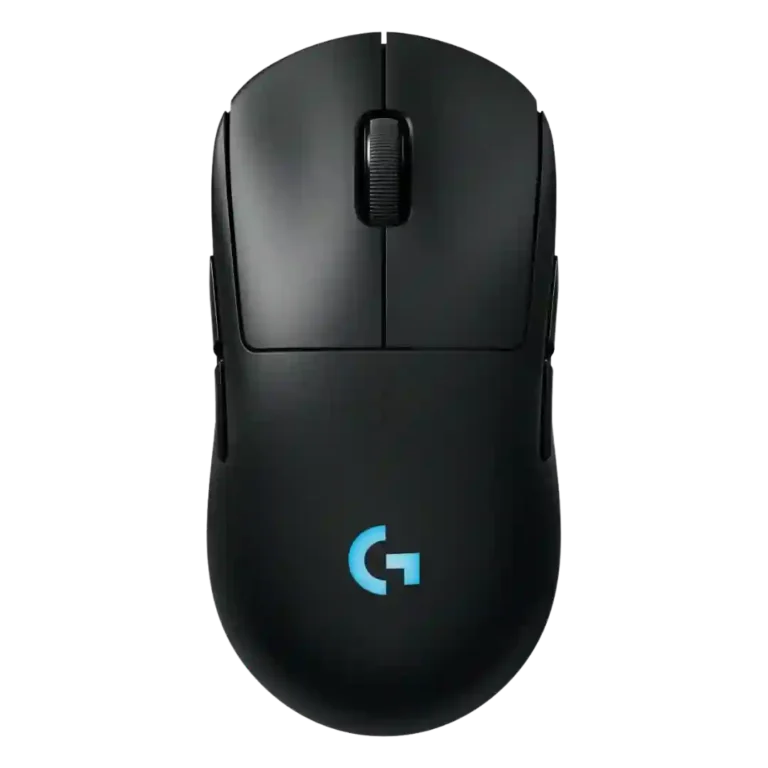
Logitech G Pro 2 Lightspeed Review
Bottom Line
Choose the Logitech G Pro 2 Lightspeed for HERO 2 tracking, ambidextrous side buttons, and long battery life. Skip it if you want ultralight weight, higher stock polling, Bluetooth, or the best value versus older Pro models.
Best for players who want a familiar symmetrical Logitech shape, strong wireless tracking, long battery life, and real left-handed or ambidextrous button flexibility. It especially suits palm-grip users and gamers who value configurable side buttons more than ultralight weight.
Not for buyers who want the lightest FPS mouse, higher stock polling, Bluetooth, or a major redesign. It is also a weak fit for MMO players who need many dedicated thumb buttons.
The Logitech G Pro 2 Lightspeed lands as a reliable but conservative refresh. Reviewers repeatedly praise its HERO 2 sensor, accurate tracking, ambidextrous magnetic side buttons, familiar symmetrical shape, and battery life that reaches roughly 60 hours with RGB or about 95 without it. The tradeoff is that the mouse feels more evolutionary than exciting: it remains around 80 grams, ships with 1000Hz polling on the standard receiver, and several reviewers question whether the upgrades justify the price when the older Pro Wireless or G Pro X Superlight 2 can be cheaper or more compelling. G Hub also divides reviewers, with useful customization offset by stability complaints in one review.
Compared in Reviews
Products reviewers directly compared with this model, grouped into quick takeaways.
- Better: skates, weight, clicks, and polling Consumer Tech Review strongly prefers the Superlight 2 because of lighter weight, better skates, better clicks, and higher stock polling.
- Compared: weight and esports feel Dexerto contrasts the Pro 2’s 80 g balance with the Superlight 2’s ultralight emphasis.
- Similar: ambidextrous side-button design PC Gamer says the Corsair M75 uses a similar ambidextrous side-button approach.
Feature Scorecards
Pros
-
Handedness is one of the strongest areas, with repeated praise for true ambidextrous use and swappable side-button layouts.
-
DPI range is consistently a major spec advantage, with several reviewers citing the HERO 2 range up to 44,000 DPI after updates or in final specs.
-
Reviewers consistently describe very high acceleration specifications and no smoothing or acceleration behavior, though one review frames those specs as more than most players need.
-
Button responsiveness is praised where reviewed, especially for the LIGHTFORCE switches and side buttons.
-
Wireless latency is strong where tested, with no noticeable latency reported and low-latency wireless play mentioned.
-
Programmable-button coverage is strong, with multiple reviews noting four-to-eight configurable buttons depending on side-button setup.
-
Dock or charging-mat compatibility is supported through Logitech Power Play puck and mat support.
-
Charging convenience is strong thanks to USB-C, fast top-ups, and Power Play compatibility in supported setups.
-
Button customization is a standout thanks to swappable magnetic side buttons, remapping, and G Hub assignment options.
-
Scroll wheel quality is generally good, with reviewers praising the ratcheted feel and tactile wheel response.
-
Sensor performance is a major strength, repeatedly praised for HERO 2 accuracy and high-end specs, even when value is questioned.
-
Review evidence confirms the included dongle-based 2.4GHz wireless connection, with no repeated complaints about the radio link itself.
-
Palm grip comfort is directly praised, with the hump and length fitting the reviewer’s palm-grip hand position well.
-
Premium feel is positive but not unanimous; one reviewer calls it a premium mouse while others frame it as familiar rather than exciting.
-
Side-button quality is a highlight thanks to magnetic removable buttons, low wiggle, good positioning, and ambidextrous flexibility.
-
Battery life is a clear strength, repeatedly described around 60 hours with lighting and up to roughly 95 hours without it.
-
Wireless performance is generally reliable, especially through Lightspeed dongle or Power Play use, with no recurring connection complaints.
-
Click latency and response feel are strong, with multiple reviewers describing quick, immediate, responsive clicks.
-
Connection stability is generally positive, with reviewers calling performance reliable and noting no major in-game hiccups.
-
Long-session comfort is positive where discussed, especially for bigger hands and palm grip, with reduced cramping versus smaller mice.
-
Switch feel is broadly positive, with LIGHTFORCE clicks described as satisfying, light, crisp, immediate, or tactile.
-
Ergonomics are broadly praised for comfort and ambidextrous usability, with the main caveat that smaller hands may prefer another shape.
-
Onboard memory is directly noted in one review and treated as a carried-over feature from the prior model.
-
Most reviewers found tracking precise and accurate in games, while one comparison-heavy video felt less accurate because of the heavier feel and skates.
-
Motion consistency is mostly strong, with smooth tracking, no stutter, and no smoothing mentioned, though one reviewer felt the weight and skates made motion sluggish.
-
Shape comfort is mostly positive for users who like the familiar symmetrical Pro shape, though one reviewer wanted lighter weight for that shape.
-
Ecosystem integration is supported through G Hub, LightSync, RGB syncing, and Power Play use with other Logitech gear.
-
FPS suitability is mostly strong because reviewers praised Counter-Strike-style tracking and esports use, but one FPS-focused reviewer preferred lighter Superlight models.
-
Claw grip evidence is limited but positive, with reviewers saying the shape suits most grip styles and can be used in claw grip.
-
Macro support is supported through G Hub assignment options, though it is not a main focus of the reviews.
-
Materials quality is mostly positive, supported by the smooth matte finish, well-done magnetic attachments, and solid construction comments.
-
Grip texture and coating receive light but positive coverage, mainly around the smooth matte finish and acceptable coating.
-
Main click quality is good overall, but not flawless: reviewers praise crispness and tactility while noting reduced tactility versus Superlight 2 or right-click ping.
-
Surface compatibility evidence is limited to strong performance on Logitech’s Power Play/charging pad rather than many surfaces.
-
Portability is moderate, helped by dongle storage and bag-friendly use, but limited by the absence of Bluetooth.
-
Profile switching is supported through per-game DPI settings and multi-stage DPI profiles in G Hub, although the bottom DPI button is less convenient.
-
Glide opinions are split: several reviewers found it smooth or very good, while one video disliked the slower-feeling stock skates.
-
RGB is present but minimal, usually limited to the Logitech G logo and often recommended off for battery life.
-
Weight is divisive at about 80 grams: light enough for some, deliberate for others, but heavy compared with ultralight esports mice.
-
Software usability is mixed to positive: G Hub provides deep customization, but some reviewers dislike needing it or prefer web-based setup.
-
Weight balance is context-dependent: one review praised the balanced simple design, another found the 80 g weight deliberate, and one felt the skates and weight hurt balance.
-
Build quality is mostly solid, with praise for button fit and general quality, but one reviewer noted some side-to-side wobble.
-
Cable impressions are mixed: one reviewer liked the long or rubberized cable, while another wished Logitech included a lighter cable for wired play.
Cons
-
Click noise is mixed: reviewers liked the crisp click feedback, but some noted clickiness or right-click ping could bother sensitive users.
-
Value is the most debated category: reviewers like the mouse itself but often question the price versus the older Pro Wireless or Superlight 2.
-
Software stability is mixed: one review had repeated G Hub loading failures, while another found core adjustments reliable.
-
Polling rate is a repeated limitation: the standard receiver is described as 1000Hz while competitors or Logitech alternatives reach higher rates.
-
MMO suitability is weak because the mouse lacks the many thumb buttons expected for more involved MMO play.
-
Bluetooth support is a weakness because one reviewer explicitly notes that Bluetooth is absent at this price point.
Compared With Category Average
Compared with other Gaming Mouse, this product is above average in handedness options, dock compatibility, RGB features, below average in Bluetooth support, polling rate, MMO gaming suitability.
| Attribute | This product | Category average | Difference |
|---|---|---|---|
| Bluetooth support | 1.0 | 3.3 | -2.3 |
| handedness options | 4.8 | 2.7 | +2.1 |
| polling rate | 3.0 | 4.2 | -1.3 |
| dock compatibility | 4.6 | 3.3 | +1.2 |
| MMO gaming suitability | 2.2 | 3.4 | -1.2 |
| value for money | 3.1 | 3.8 | -0.7 |
| RGB features | 3.8 | 3.1 | +0.7 |
| side button quality | 4.5 | 3.8 | +0.7 |
FAQ
Is the Logitech G Pro 2 Lightspeed good for FPS gaming?
Yes, most reviewers found its tracking accurate, smooth, and suitable for competitive shooters. The main caveat is that some FPS-focused players may prefer a lighter Superlight model.
How long does the battery last?
Reviewers repeatedly cite about 60 hours with RGB lighting and around 95 hours with lighting off. Several reviews treat battery life as one of the main improvements over the older Pro model.
Is it good for left-handed users?
Yes. The symmetrical shape and swappable magnetic side buttons make it one of the stronger high-end options for left-handed players.
Does it support Bluetooth?
No. One reviewer specifically calls out the lack of Bluetooth, so wireless use centers on the Lightspeed dongle or Logitech Power Play setup.
Is the Logitech G Pro 2 Lightspeed worth upgrading to from the older Pro Wireless?
Only for users who want the newer HERO 2 sensor, USB-C, optical switches, or better battery life while keeping the same shape. Multiple reviewers say it is not a must-upgrade if the older Pro Wireless still works well.
How does it compare with the G Pro X Superlight 2?
The Pro 2 offers ambidextrous side buttons and RGB, but the Superlight 2 is repeatedly favored by reviewers who prioritize lower weight, faster-feeling glide, and higher stock polling.
Consider This Instead
If you want better Bluetooth support
Choose Razer Basilisk V3 Pro 35K. It scores 5.0 vs 1.0 for Bluetooth support, with a 4.5 overall score.
If you want better MMO gaming suitability
Choose ASUS ROG Gladius III Wired. It scores 4.8 vs 2.2 for MMO gaming suitability, with a 4.2 overall score.
If you want better polling rate
Choose ASUS ROG Harpe II Ace. It scores 5.0 vs 3.0 for polling rate, with a 4.4 overall score.
If you want better value for money
Choose Glorious Model O Eternal. It scores 4.8 vs 3.1 for value for money, with a 3.8 overall score.
Overall Top Gaming Mouse Alternatives
Best for a 47g, high-performance 8K wireless mouse with excellent shape, skates, clicks, and web controls. Skip it if stiff side buttons, shorter high-polling battery life, or app/cable quirks would...
Pros: Accuracy and tracking precision, sensor performance
Cons: cable flexibility
Choose it if you want a comfortable, feature-rich wireless mouse for mixed gaming and productivity. Skip it if you need ultralight FPS speed, left-handed support, or better value than discounted...
Pros: programmable buttons, Bluetooth support
Cons: handedness options, firmware reliability
Good if you want an ultra-light esports mouse with 8K wireless, precise tracking, and web setup. Skip it if you need MMO buttons, onboard memory, large-hand palm support, or the...
Pros: polling rate, click latency
Cons: onboard memory, tilt gesture controls
Good if you want ergonomic wireless gaming with hot-swappable batteries and strong tuning. Skip it if price, dock clutter, or short 8K battery life matters most.
Pros: switch durability, DPI range
Cons: grip texture, portability