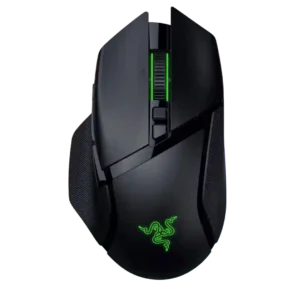
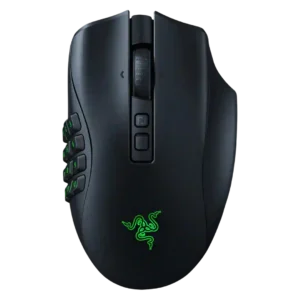
Compare Razer Basilisk V3 Pro 35K vs Razer Naga V2 Pro

P1 Razer Basilisk V3 Pro 35K
P2 Razer Naga V2 Pro

Comparison Takeaways

Razer Basilisk V3 Pro 35K

Where It Has the Edge

  • software stability is 4.7 vs 2.7. Software stability evidence is favorable where cited, with stable Synapse behavior and no software connectivity issues in two...
  • RGB features is 4.7 vs 3.6. RGB features are widely praised for Chroma lighting, multiple zones, logo/wheel lighting, and underglow effects.
  • Bluetooth support is 5.0 vs 4.2. Bluetooth support is repeatedly confirmed and adds versatility for work, travel, and multi-device use.
  • dock compatibility is 4.7 vs 4.0. Dock compatibility is well supported, with repeated mentions of Mouse Dock Pro and related charging or high-polling features.

Razer Naga V2 Pro

Where It Has the Edge

  • cable flexibility is 4.3 vs 3.6. Cable evidence is positive where discussed, with reviewers praising the Speedflex, woven, soft, or flexible charging/play cable.
  • fingertip grip comfort is 4.0 vs 3.5. Fingertip grip support is mentioned directly in video reviews, though the large, heavy shell limits confidence.
  • glide smoothness is 5.0 vs 4.6. Glide smoothness is positive where tested, especially with PTFE feet and smooth movement across mouse mats.
  • MMO gaming suitability is 4.7 vs 4.3. MMO suitability is one of the product's strongest attributes, driven by the 12-button side plate and keybind/macro flexibility.
Average score
Product 1: Razer Basilisk V3 Pro 35K
4.5
Product 2: Razer Naga V2 Pro
4.3
2.4GHz connectivity
Product 1: Razer Basilisk V3 Pro 35K
4.9

2.4GHz connectivity is broadly supported through HyperSpeed and included dongles, often paired with Bluetooth and wired modes.

Product 2: Razer Naga V2 Pro
4.9

Reviewers found the 2.4GHz dongle or HyperSpeed connection central to the mouse's gaming-ready wireless setup.

acceleration control
Product 1: Razer Basilisk V3 Pro 35K
4.9

Acceleration control evidence is positive, with reviewers noting high acceleration limits and no acceleration or malfunction issues.

Product 2: Razer Naga V2 Pro
No score yet
Accuracy and tracking precision
Product 1: Razer Basilisk V3 Pro 35K
4.7

Reviewers consistently found the mouse accurate and precise in play, with only one high-DPI jitter caveat.

Product 2: Razer Naga V2 Pro
4.9

Tracking precision is consistently praised, with reviewers calling the sensor accurate, precise, flawless, or responsive.

balance and weight distribution
Product 1: Razer Basilisk V3 Pro 35K
4.4

Balance is generally favorable, with reviewers citing centered balance, good distribution, and stability despite weight.

Product 2: Razer Naga V2 Pro
No score yet
battery life
Product 1: Razer Basilisk V3 Pro 35K
4.5

Battery life is mostly a strength, with many 140-150 hour claims and good real-world endurance, though RGB and high polling reduce it.

Product 2: Razer Naga V2 Pro
4.5

Battery life is generally strong, often lasting days or longer, though RGB use can shorten runtime.

Bluetooth support
Product 1: Razer Basilisk V3 Pro 35K
5.0

Bluetooth support is repeatedly confirmed and adds versatility for work, travel, and multi-device use.

Product 2: Razer Naga V2 Pro
4.2

Bluetooth is widely noted as available, but some reviewers preferred 2.4GHz for gaming and reported Bluetooth as less responsive.

build quality
Product 1: Razer Basilisk V3 Pro 35K
4.8

Build quality is strong, with reviewers citing great workmanship, solid construction, and no creaking or rattling.

Product 2: Razer Naga V2 Pro
4.6

Build quality is described as sturdy, solid, premium, and well assembled, including firm swappable panels.

button customization
Product 1: Razer Basilisk V3 Pro 35K
4.9

Button customization is extensive, including remapping, Hypershift, secondary functions, and user-defined actions.

Product 2: Razer Naga V2 Pro
5.0

The interchangeable two-, six-, and 12-button side plates are one of the product's most consistently praised features.

button responsiveness
Product 1: Razer Basilisk V3 Pro 35K
4.7

Button responsiveness is strong overall, with fast, clean, snappy, or minimal-travel clicks reported across many reviews.

Product 2: Razer Naga V2 Pro
4.6

Buttons are generally described as tactile, responsive, easy to press, and satisfying, including side-panel buttons.

cable flexibility
Product 1: Razer Basilisk V3 Pro 35K
3.6

Cable flexibility is mixed: some reviews praise the lightweight SpeedFlex-style cable, while others call the included cable stiff or not lightweight.

Product 2: Razer Naga V2 Pro
4.3

Cable evidence is positive where discussed, with reviewers praising the Speedflex, woven, soft, or flexible charging/play cable.

charging convenience
Product 1: Razer Basilisk V3 Pro 35K
4.6

Charging convenience is strong when using the optional dock or wireless charging puck, but the best experience usually costs extra.

Product 2: Razer Naga V2 Pro
4.2

Charging is convenient via USB-C play-and-charge and optional dock support, though one reviewer disliked unplugging the cable and others disliked dock cost.

claw grip comfort
Product 1: Razer Basilisk V3 Pro 35K
4.0

Claw grip comfort is mixed; some reviewers found it usable or comfortable, while others said claw grip was awkward or less ideal.

Product 2: Razer Naga V2 Pro
4.0

Claw grip support is positive mainly for larger hands or certain panels, but it is less broadly supported than palm grip.

click latency
Product 1: Razer Basilisk V3 Pro 35K
4.8

Click latency evidence is positive, with low-latency claims, optical-switch responsiveness, and no debounce-related play issues.

Product 2: Razer Naga V2 Pro
5.0

Click latency evidence is excellent where measured, with reviewers reporting no noticeable delay.

click noise
Product 1: Razer Basilisk V3 Pro 35K
3.9

Click noise is mixed: main clicks can be louder, while some reviewers praise quiet wheel or click behavior.

Product 2: Razer Naga V2 Pro
No score yet
connection stability
Product 1: Razer Basilisk V3 Pro 35K
4.5

Connection stability is mostly positive, but not perfect; reviewers cite reliable operation while a few mention drops, scroll-wheel freezes, or power-cycling.

Product 2: Razer Naga V2 Pro
4.5

Connection stability is strong on 2.4GHz or wired modes, while Bluetooth wake or responsiveness issues lower the overall confidence.

cross-platform compatibility
Product 1: Razer Basilisk V3 Pro 35K
4.2

Cross-platform compatibility is context-dependent: multi-device use is supported, but Linux support relies on community tools.

Product 2: Razer Naga V2 Pro
3.5

Cross-platform evidence is limited and mixed: one review says broad platform use, while another notes Synapse is Windows-only.

dock compatibility
Product 1: Razer Basilisk V3 Pro 35K
4.7

Dock compatibility is well supported, with repeated mentions of Mouse Dock Pro and related charging or high-polling features.

Product 2: Razer Naga V2 Pro
4.0

Dock compatibility is well documented, but the dock or charging puck is usually optional and costs extra.

DPI range
Product 1: Razer Basilisk V3 Pro 35K
4.9

The DPI range is extremely high, with repeated 35K references and fine DPI-step control, but reviewers often described such high settings as overkill.

Product 2: Razer Naga V2 Pro
4.9

DPI range is a strength, with many reviews citing the 30,000 DPI Focus Pro sensor or detailed DPI stage control.

durability over time
Product 1: Razer Basilisk V3 Pro 35K
4.2

Durability over time has limited but positive evidence from long-term use comments.

Product 2: Razer Naga V2 Pro
3.8

Durability evidence is mostly positive through build quality and switch ratings, but one reviewer's first unit had scroll and battery issues.

ecosystem integration
Product 1: Razer Basilisk V3 Pro 35K
4.5

Ecosystem integration is strong through Chroma, Razer multi-device dongles, and synchronized Razer hardware setups.

Product 2: Razer Naga V2 Pro
4.0

Razer ecosystem integration appears through Synapse, Chroma RGB, dock support, and multi-device/software syncing.

ergonomic design
Product 1: Razer Basilisk V3 Pro 35K
4.7

Ergonomic design is one of the most consistently praised traits, especially the contoured right-handed shape and thumb rest.

Product 2: Razer Naga V2 Pro
4.5

Ergonomic design is praised for right-handed palm comfort, ring-finger support, and long-session usability despite weight.

fingertip grip comfort
Product 1: Razer Basilisk V3 Pro 35K
3.5

Fingertip comfort is weaker and more hand-size dependent, with several reviewers saying the weight or shape makes fingertip use less comfortable.

Product 2: Razer Naga V2 Pro
4.0

Fingertip grip support is mentioned directly in video reviews, though the large, heavy shell limits confidence.

firmware reliability
Product 1: Razer Basilisk V3 Pro 35K
3.0

Firmware reliability evidence is limited and negative-leaning, focused on a convoluted dock pairing and update process.

Product 2: Razer Naga V2 Pro
No score yet
FPS gaming suitability
Product 1: Razer Basilisk V3 Pro 35K
3.5

FPS suitability is mixed: the sensor is capable, but the weight makes it less ideal for competitive shooters and fast flicks.

Product 2: Razer Naga V2 Pro
3.3

FPS suitability is mixed: the sensor and responsiveness are strong, but most reviewers warn the heavy body is not ideal for competitive shooters.

glide smoothness
Product 1: Razer Basilisk V3 Pro 35K
4.6

Glide smoothness is generally good on mouse pads, with buttery or smooth glide praise, though hard surfaces can be less ideal.

Product 2: Razer Naga V2 Pro
5.0

Glide smoothness is positive where tested, especially with PTFE feet and smooth movement across mouse mats.

grip texture
Product 1: Razer Basilisk V3 Pro 35K
4.7

Grip texture is a strength, with rubberized sides, textured surfaces, and secure thumb support frequently praised.

Product 2: Razer Naga V2 Pro
4.4

Grip texture is generally positive thanks to rubberized or textured side areas and grip panels.

handedness options
Product 1: Razer Basilisk V3 Pro 35K
2.7

Handedness options are limited because the mouse is repeatedly described as right-handed or unsuitable for left-handed users.

Product 2: Razer Naga V2 Pro
2.4

Handedness is a limitation because reviews repeatedly describe the mouse as right-handed only.

left and right click quality
Product 1: Razer Basilisk V3 Pro 35K
4.2

Left and right click quality is mostly positive for speed and actuation, with one review calling the clicks somewhat squishy.

Product 2: Razer Naga V2 Pro
4.5

Main click quality is positive, with reviewers describing satisfying tactile left/right clicks and good optical switch feel.

lift-off distance
Product 1: Razer Basilisk V3 Pro 35K
4.8

Lift-off distance control is a strength, with adjustable or consistent lift-off behavior mentioned across software and sensor testing.

Product 2: Razer Naga V2 Pro
4.3

Lift-off distance is supported as a customizable Synapse setting, not as a heavily tested performance issue.

long-session comfort
Product 1: Razer Basilisk V3 Pro 35K
4.7

Long-session comfort is strong, with reviewers praising reduced fatigue, easy long sessions, and wrist comfort.

Product 2: Razer Naga V2 Pro
4.7

Long-session comfort is positive for palm or medium-to-large hands, though weight can cause caveats for some users.

macro support
Product 1: Razer Basilisk V3 Pro 35K
4.9

Macro support is strong through Synapse, Hypershift, and software macro recording or full macro functionality.

Product 2: Razer Naga V2 Pro
4.8

Macro support is a major strength, especially for MMO keybinds, Hypershift layers, and productivity shortcuts.

materials quality
Product 1: Razer Basilisk V3 Pro 35K
4.7

Materials quality is positive, especially the matte/textured plastics, rubber surfaces, and premium-feeling finishes.

Product 2: Razer Naga V2 Pro
4.3

Materials are generally viewed as premium or solid matte plastic with rubberized or silicone grip areas.

MMO gaming suitability
Product 1: Razer Basilisk V3 Pro 35K
4.3

MMO suitability is fairly good because extra buttons, Hypershift, and scroll-wheel inputs help, though it is not a dedicated MMO mouse.

Product 2: Razer Naga V2 Pro
4.7

MMO suitability is one of the product's strongest attributes, driven by the 12-button side plate and keybind/macro flexibility.

MOBA gaming suitability
Product 1: Razer Basilisk V3 Pro 35K
4.3

MOBA suitability is positive where mentioned, mainly because of extra programmable inputs and customization.

Product 2: Razer Naga V2 Pro
4.6

MOBA suitability is strong with the six-button plate, though evidence is less dominant than for MMOs.

motion consistency
Product 1: Razer Basilisk V3 Pro 35K
4.8

Motion consistency is praised through perfect consistency, Motion Sync, and stable sensor behavior in fast and slow movements.

Product 2: Razer Naga V2 Pro
4.8

Motion consistency is strong where tested, with smooth, accurate, lag-free movement.

onboard memory
Product 1: Razer Basilisk V3 Pro 35K
4.7

Onboard memory/profile evidence is solid, with several reviews citing up to five stored profiles or onboard profile storage.

Product 2: Razer Naga V2 Pro
5.0

Onboard memory is a strength, with five local profiles or direct profile storage cited in several reviews.

palm grip comfort
Product 1: Razer Basilisk V3 Pro 35K
4.6

Palm grip comfort is a major strength, with multiple reviewers calling it exceptionally comfortable or clearly palm-oriented.

Product 2: Razer Naga V2 Pro
4.5

Palm grip comfort is consistently stronger than claw or fingertip support because of the large ergonomic shell.

polling rate
Product 1: Razer Basilisk V3 Pro 35K
4.5

Polling-rate support is strong, reaching high rates with optional accessories, while out-of-box rates are still considered sufficient by many reviewers.

Product 2: Razer Naga V2 Pro
4.1

Polling rate is commonly capped at 1,000Hz, which most reviewers find adequate, with some noting optional or disputed HyperPolling paths.

portability
Product 1: Razer Basilisk V3 Pro 35K
4.6

Portability evidence is limited but positive, centered on Bluetooth and usefulness for laptop or multi-PC setups.

Product 2: Razer Naga V2 Pro
4.2

Portability benefits from dongle storage and occasional bag/on-the-go use, but the mouse is not tiny or lightweight.

premium feel
Product 1: Razer Basilisk V3 Pro 35K
4.7

Premium feel is strong, with reviewers describing it as high-end, luxurious, and a top-pick style product.

Product 2: Razer Naga V2 Pro
4.6

Premium feel is supported by solid materials, substantial construction, advanced features, and premium positioning.

profile switching
Product 1: Razer Basilisk V3 Pro 35K
4.6

Profile switching is supported by bottom buttons, DPI/profile controls, and stored profiles on the mouse.

Product 2: Razer Naga V2 Pro
4.1

Profile switching is useful and flexible, but some reviewers found it confusing or unreliable in software.

programmable buttons
Product 1: Razer Basilisk V3 Pro 35K
5.0

Programmable-button coverage is very strong, with reviews repeatedly citing 11 to 13 programmable controls.

Product 2: Razer Naga V2 Pro
4.8

Programmable buttons are a defining strength, with up to 19, 20, or 22 inputs depending on how reviewers count them.

RGB features
Product 1: Razer Basilisk V3 Pro 35K
4.7

RGB features are widely praised for Chroma lighting, multiple zones, logo/wheel lighting, and underglow effects.

Product 2: Razer Naga V2 Pro
3.6

RGB is useful but limited, usually to the logo and 12-button side plate, and it can reduce battery life or show software quirks.

scroll wheel quality
Product 1: Razer Basilisk V3 Pro 35K
4.8

The HyperScroll wheel is one of the clearest strengths, praised for tactile/free-spin modes, Smart-Reel, 4-way behavior, and productivity value.

Product 2: Razer Naga V2 Pro
4.6

Scroll wheel quality is a major highlight due to the customizable HyperScroll Pro wheel, even though some preset modes or software behavior drew criticism.

sensor performance
Product 1: Razer Basilisk V3 Pro 35K
4.7

Sensor performance was broadly praised as top-tier, flawless, or effectively faultless, though several reviewers said the upgrade is not always noticeable.

Product 2: Razer Naga V2 Pro
5.0

Sensor performance is widely praised through the Focus Pro 30K sensor, accurate tracking, and responsive feel.

shape comfort
Product 1: Razer Basilisk V3 Pro 35K
4.5

Shape comfort is broadly positive, especially for users who fit the Basilisk form, though some reviewers found the slimmer or grip-specific shape limiting.

Product 2: Razer Naga V2 Pro
4.8

Shape comfort is generally positive for medium-to-large right hands, palm grip, and the Naga body shape.

side button quality
Product 1: Razer Basilisk V3 Pro 35K
4.7

Side buttons are usually described as easy to reach, tactile, crisp, and not overly easy to hit accidentally.

Product 2: Razer Naga V2 Pro
4.8

Side button quality is strong thanks to secure magnetic plates, tactile button feel, and low accidental-press concerns.

software stability
Product 1: Razer Basilisk V3 Pro 35K
4.7

Software stability evidence is favorable where cited, with stable Synapse behavior and no software connectivity issues in two reviews.

Product 2: Razer Naga V2 Pro
2.7

Software stability is mixed to weak: several reviewers were fine, but recurring Synapse, RGB, and profile bugs appear.

software usability
Product 1: Razer Basilisk V3 Pro 35K
4.4

Software usability is feature-rich and powerful, but reviewers vary on whether Synapse feels intuitive or annoying.

Product 2: Razer Naga V2 Pro
3.9

Software usability is powerful and often intuitive, but the depth of options and occasional clunkiness make it less simple.

surface compatibility
Product 1: Razer Basilisk V3 Pro 35K
4.6

Surface compatibility is strong, including soft, hard, hybrid, and glass-surface mentions, with some caveats about shiny or hard surfaces.

Product 2: Razer Naga V2 Pro
4.8

Surface compatibility is lightly but positively supported through desk, mousepad, and tracking/glide comments.

switch durability
Product 1: Razer Basilisk V3 Pro 35K
4.9

Switch durability is well supported by repeated 90-million-click and optical-switch longevity mentions.

Product 2: Razer Naga V2 Pro
5.0

Switch durability is strong on paper because multiple reviews cite Gen-3 optical switches rated for 90 million clicks.

switch feel
Product 1: Razer Basilisk V3 Pro 35K
4.6

Switch feel is generally tactile, clicky, and snappy, although one reviewer preferred the firmness of other Razer mice.

Product 2: Razer Naga V2 Pro
4.6

Switch feel is positive, with tactile, crisp, responsive, and satisfying click descriptions.

tilt gesture controls
Product 1: Razer Basilisk V3 Pro 35K
4.8

Tilt controls are strongly supported by the four-way wheel and left/right horizontal inputs, which reviewers found useful for extra functions.

Product 2: Razer Naga V2 Pro
4.3

Tilt controls are present and programmable through left/right scroll-wheel tilt clicks.

value for money
Product 1: Razer Basilisk V3 Pro 35K
3.5

Value for money is mixed to weak: the mouse is feature-rich, but many reviewers question its price or upgrade value versus older Basilisk models.

Product 2: Razer Naga V2 Pro
3.2

Value is mixed: reviewers like the feature set but repeatedly call the mouse expensive or overkill for users who will not use its extras.

weight
Product 1: Razer Basilisk V3 Pro 35K
3.1

Weight is the main tradeoff: reviewers repeatedly call it heavy or not ultralight, though some find it controlled rather than burdensome.

Product 2: Razer Naga V2 Pro
2.6

Weight is the most consistent physical caveat, with reviewers repeatedly noting the 134g-class body is heavy for FPS or lightweight preferences.

wireless latency
Product 1: Razer Basilisk V3 Pro 35K
4.8

Wireless latency is praised as low or unnoticeable, especially over 2.4GHz HyperSpeed and optical-switch setups.

Product 2: Razer Naga V2 Pro
4.9

Wireless latency is excellent where discussed, with reviewers comparing it favorably to wired use and reporting reliable inputs.

wireless performance
Product 1: Razer Basilisk V3 Pro 35K
4.6

Wireless performance is generally strong, with HyperSpeed, reliable 2.4GHz behavior, and smooth multi-device use; one review reported interference until relocating the dongle.

Product 2: Razer Naga V2 Pro
4.9

Wireless performance is generally excellent on 2.4GHz/HyperSpeed and wired modes, with Bluetooth treated as a lower-priority option.