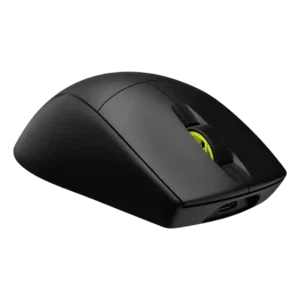
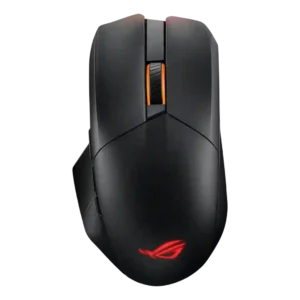
Average score
Corsair M75 AIR Wireless
3.8
FPS gaming suitability
Corsair M75 AIR Wireless
4.6
FPS gaming suitability is one of the strongest conclusions, with reviewers repeatedly calling it fast, precise, and well-suited for competitive shooters.
ASUS ROG Chakram X
1.5
FPS suitability was weak overall because competitive misclick concerns and lightweight-performance alternatives were raised.
weight
Corsair M75 AIR Wireless
4.7
Weight is one of the strongest attributes, with broad praise for the 60g feel and only isolated criticism that it is not the very lightest.
ASUS ROG Chakram X
2.6
Weight was one of the main compromises: reviewers often called it heavy, though one found the added mass acceptable for its features.
profile switching
Corsair M75 AIR Wireless
2.2
Profile switching is the clearest repeated weakness, driven by the missing hardware DPI/profile switch and dependence on software.
ASUS ROG Chakram X
4.3
Profile switching was praised for making it easy to move between games or setups.
premium feel
Corsair M75 AIR Wireless
2.8
Premium feel is split: one review says it feels premium, but several call the plastic shell cheap for the price.
ASUS ROG Chakram X
4.9
Premium feel was a consistent positive, with reviewers describing the mouse as dreamlike, above the competition, or premium.
side button quality
Corsair M75 AIR Wireless
3.9
Side button quality is mixed-positive: placement is often praised, but reviewers also complain about low-key, recessed, flush, or slippery buttons.
ASUS ROG Chakram X
1.9
Side buttons were a repeated weakness, criticized for being tiny, awkward, too far apart, or easy to hit accidentally.
click latency
Corsair M75 AIR Wireless
5.0
Click latency evidence is excellent, with reviewers repeatedly describing instant, unnoticeable, or near-wired response.
ASUS ROG Chakram X
3.0
Click response felt fast, but one reviewer found the light actuation too trigger-happy.
fingertip grip comfort
Corsair M75 AIR Wireless
5.0
Fingertip grip comfort has limited but very positive support from reviewers who found it ideal or comfortable.
ASUS ROG Chakram X
3.0
Fingertip comfort was mixed, with one reviewer saying the right side lacked grip while another found the shape could aid fingertip aimers.
programmable buttons
Corsair M75 AIR Wireless
2.4
Programmable-button evidence is mostly negative because reviewers repeatedly find the button count too sparse for the price.
ASUS ROG Chakram X
4.3
Programmable controls were valued for remapping, extra commands, and game-specific actions.
materials quality
Corsair M75 AIR Wireless
3.0
Materials quality is mixed, ranging from convincing workmanship to complaints about cheap plastic and flex.
ASUS ROG Chakram X
4.5
Materials felt premium to reviewers, especially the matte or plastic finish and hand feel.
durability over time
Corsair M75 AIR Wireless
5.0
Durability over time has limited positive support from the 100M-click optical switch expectation.
ASUS ROG Chakram X
3.5
Durability over time was mixed because switch longevity was praised, while joystick usefulness over time was doubted.
left and right click quality
Corsair M75 AIR Wireless
3.2
Left and right click quality is mixed, ranging from spacious and crisp to accidental actuation, pre-travel, or mushy implementation.
ASUS ROG Chakram X
2.0
Left and right clicks were divisive: some liked the tactile feel, while others reported accidental activation or heavier clicks.
wireless latency
Corsair M75 AIR Wireless
5.0
Wireless latency is consistently praised, with reviewers describing near-zero, no-lag, or wired-like responsiveness.
ASUS ROG Chakram X
3.8
Wireless latency was mixed by mode: 2.4GHz was usable or strong, while slower-paced caveats appeared in one review.
long-session comfort
Corsair M75 AIR Wireless
4.6
Long-session comfort is positive where discussed, with reviewers noting all-day comfort, no wrist aggravation, or work-and-play suitability.
ASUS ROG Chakram X
3.5
Long-session comfort was mixed, with praise for support and balance but complaints about fatigue or hand pain in specific uses.
macro support
Corsair M75 AIR Wireless
3.5
Macro support has limited evidence; one reviewer notes macros can be set up, but the small button layout limits practical use.
ASUS ROG Chakram X
4.5
Macro support was treated as important for getting full use from the mouse.
button customization
Corsair M75 AIR Wireless
3.5
Button customization is mixed: software remapping is useful, but reviewers criticize limits and reliance on iCUE.
ASUS ROG Chakram X
4.3
Button customization was a major strength, with extensive remapping and joystick mode flexibility, despite software caveats.
ecosystem integration
Corsair M75 AIR Wireless
3.8
Ecosystem integration is modestly positive for users already invested in iCUE or Corsair wireless devices.
ASUS ROG Chakram X
4.5
ROG ecosystem integration was praised for syncing the mouse with an ASUS desktop setup.
MMO gaming suitability
Corsair M75 AIR Wireless
2.0
MMO gaming suitability is weak in the available evidence because the sparse button layout is called a poor fit for button-heavy genres.
ASUS ROG Chakram X
2.8
MMO suitability was mixed: situational bindings helped in one MMO-style game, but misclick concerns remained a serious caveat.
button responsiveness
Corsair M75 AIR Wireless
3.6
Button responsiveness is split: some reviewers call the buttons quick and tactile, while others report false clicks or mushy post-travel.
ASUS ROG Chakram X
4.3
Core button response was generally praised as responsive, fast, and well weighted.
click noise
Corsair M75 AIR Wireless
3.3
Click noise is mixed, ranging from quiet or acceptable to noisy buttons and louder scrolling.
ASUS ROG Chakram X
4.0
Click noise was liked in the one review that addressed it, with a dampened sound profile.
cross-platform compatibility
Corsair M75 AIR Wireless
5.0
Cross-platform compatibility has limited but strong support from one review praising Windows and macOS usefulness.
ASUS ROG Chakram X
4.3
Cross-platform or multi-device use was praised for switching between systems and productivity devices.
shape comfort
Corsair M75 AIR Wireless
4.0
Shape comfort is mostly positive across hand sizes and grip styles, though a few reviewers find it cramped or unremarkable.
ASUS ROG Chakram X
3.4
Shape comfort varied by hand size: some found general use comfortable, while larger or smaller hands exposed fit issues.
battery life
Corsair M75 AIR Wireless
3.8
Battery life is adequate to good but not class-leading, with praise for long enough use and criticism around 34-hour wireless estimates.
ASUS ROG Chakram X
4.4
Battery life was a standout strength, with repeated praise for long runtime, though RGB use reduced endurance in one review.
software usability
Corsair M75 AIR Wireless
3.4
Software usability is mixed: iCUE is praised as easier or straightforward by some and criticized as annoying or required by others.
ASUS ROG Chakram X
2.8
Software usability was highly polarized, from easy and user-friendly to frustrating, slow, or deeply disliked.
firmware reliability
Corsair M75 AIR Wireless
1.5
Firmware reliability has one negative supporting review focused on needing the included cable for setup and firmware-related pairing.
ASUS ROG Chakram X
2.0
Firmware reliability had a negative mention because setup forced a firmware update and restart.
switch feel
Corsair M75 AIR Wireless
4.3
Switch feel trends positive, with reviewers liking the crisp, thocky, or satisfying optical-click feel, though not every click implementation is perfect.
ASUS ROG Chakram X
3.8
Switch feel was mostly liked for tactile or satisfying feedback, though one review found the lighter switches too sensitive.
claw grip comfort
Corsair M75 AIR Wireless
3.9
Claw grip comfort is context-dependent, ranging from highly natural to too long or finicky for some hands.
ASUS ROG Chakram X
4.3
Claw grip support was positive in the reviews that addressed it, especially for medium to large hands.
polling rate
Corsair M75 AIR Wireless
3.7
Polling-rate impressions are mixed: several reviewers like or verify the 2,000Hz option, while others say it is hard to notice or failed their tests.
ASUS ROG Chakram X
4.0
Wired 8,000Hz polling impressed several reviewers, but others found the difference noticeable only modestly or hard to feel.
2.4GHz connectivity
Corsair M75 AIR Wireless
4.1
2.4GHz connectivity is usually praised for fast, stable, low-latency use, though one review had setup trouble.
ASUS ROG Chakram X
3.9
2.4GHz connectivity was regarded as versatile and generally usable, though one reviewer found its polling-rate drop only adequate for slower games.
palm grip comfort
Corsair M75 AIR Wireless
4.3
Palm grip comfort is positive overall, especially for users whose hands match the raised hump and curvature.
ASUS ROG Chakram X
4.0
Palm grip support was mostly positive, especially for smaller or larger palm-grip users depending on the reviewer.
handedness options
Corsair M75 AIR Wireless
2.0
Handedness options are a weakness because reviewers repeatedly say the side-button layout makes it poor for left-handed use.
ASUS ROG Chakram X
1.8
Handedness was a clear limitation because reviewers noted the mouse favors right-handed users and can be uncomfortable for lefties.
motion consistency
Corsair M75 AIR Wireless
4.8
Motion consistency is praised in the few reviews that discuss it, especially for lag-free movement and stable skate placement.
ASUS ROG Chakram X
4.5
Motion control was praised in-game, with reviewers noting smooth tracking and responsive movement.
portability
Corsair M75 AIR Wireless
4.0
Portability is modestly positive due to dongle storage and multi-device convenience.
ASUS ROG Chakram X
4.3
Portability was supported by the pouch and versatile connection options.
switch durability
Corsair M75 AIR Wireless
4.5
Switch durability gets positive but limited support from reviewers who value optical switches and long click-life expectations.
ASUS ROG Chakram X
4.3
Switch longevity was viewed positively because reviewers highlighted the high click rating and lasting stock switches.
Accuracy and tracking precision
Corsair M75 AIR Wireless
4.8
Accuracy evidence is strongly positive, with reviewers describing precise tracking, better in-game control, and pinpoint responses across competitive use.
ASUS ROG Chakram X
4.6
Tracking accuracy drew strong praise, with reviewers reporting precise aim, useful accuracy tools, and good in-game outcomes.
RGB features
Corsair M75 AIR Wireless
4.0
RGB evidence depends on preference: some reviewers like the no-RGB minimalism and battery benefit, while one says the design needed lighting.
ASUS ROG Chakram X
3.8
RGB was generally liked for execution, visibility, and dark-room usefulness, though one video review disliked the blurred rear logo effect.
glide smoothness
Corsair M75 AIR Wireless
4.3
Glide smoothness is a major strength in most reviews, although a few criticize the stock skates as slow or only okay.
ASUS ROG Chakram X
4.5
Glide smoothness was one of the most consistent positives, with reviewers praising PTFE feet and slick, smooth motion.
charging convenience
Corsair M75 AIR Wireless
4.2
Charging convenience is generally positive, helped by USB-C, around-75-minute recharge comments, and usable wired operation.
ASUS ROG Chakram X
4.0
Charging convenience was mostly praised for quick charging, Qi support, and accessible charging, with one caveat about keeping USB-C nearby.
DPI range
Corsair M75 AIR Wireless
4.2
The DPI range is viewed as generous and precise, though reviewers often pair that praise with frustration over hardware DPI switching.
ASUS ROG Chakram X
4.3
The DPI range was viewed as very broad and highly adjustable, though one review considered the top end overkill for most players.
scroll wheel quality
Corsair M75 AIR Wireless
4.0
Scroll wheel quality is generally acceptable to good, with praise for feel and resistance but some complaints about noise or looseness.
ASUS ROG Chakram X
4.2
The scroll wheel received steady praise for grip, smoothness, tactile steps, and satisfying operation.
Bluetooth support
Corsair M75 AIR Wireless
3.5
Bluetooth support is mixed: reviewers appreciate the option for productivity and multi-device use, but some dislike Bluetooth latency or mode switching.
ASUS ROG Chakram X
3.7
Bluetooth was useful for productivity and multiple devices but not treated as a serious gaming mode.
cable flexibility
Corsair M75 AIR Wireless
3.3
Cable flexibility is mixed; one review criticizes stiffness, while others find the cord usable or decent.
ASUS ROG Chakram X
3.5
Cable feel was mixed: one reviewer praised flexibility, while another found the paracord stiffer than expected.
grip texture
Corsair M75 AIR Wireless
3.8
Grip texture is mixed-positive: many praise the matte or grippy surface, while others find it slippery, coarse, or lacking grip tape.
ASUS ROG Chakram X
3.7
Grip texture was mostly helpful, with praise for textured areas, though one review found the hold still not fully confident.
value for money
Corsair M75 AIR Wireless
2.9
Value for money is highly disputed and leans negative because many reviewers think the price is high for the sparse feature set.
ASUS ROG Chakram X
3.1
Value was mixed: some saw the feature set as worth it, while others found the high price hard to justify given flaws.
ergonomic design
Corsair M75 AIR Wireless
4.4
Ergonomic design is praised for its symmetry, tapering, and broadly usable form despite the minimalist design.
ASUS ROG Chakram X
4.3
Ergonomics were generally praised, especially for right-handed and larger-hand use.
sensor performance
Corsair M75 AIR Wireless
4.7
Sensor performance is consistently praised for fast, precise, responsive movement, with only minor dissent tied to the broader mouse implementation rather than the sensor itself.
ASUS ROG Chakram X
4.6
The AimPoint sensor was consistently described as fast, precise, and gaming-capable.
wireless performance
Corsair M75 AIR Wireless
4.6
Wireless performance is generally strong, with reviewers reporting expected, responsive, or interruption-free wireless use.
ASUS ROG Chakram X
4.5
Wireless performance was praised when connected through the higher-performance wireless modes, especially for aiming and speed.
build quality
Corsair M75 AIR Wireless
4.1
Build quality is divided, with several reviewers calling it solid and others criticizing rattles, plastic feel, or robustness.
ASUS ROG Chakram X
4.2
Build quality was viewed positively, with reviewers describing the construction as sturdy, proper, or solid.
balance and weight distribution
Corsair M75 AIR Wireless
4.5
Weight balance has limited but positive support from one reviewer who says balance felt great in-game.
ASUS ROG Chakram X
4.5
Weight balance was praised more than raw weight, with reviewers noting a planted, stable, or well-balanced feel.
surface compatibility
Corsair M75 AIR Wireless
4.0
Surface compatibility is positive overall through smooth movement and calibration, with one caveat about metal surfaces.
ASUS ROG Chakram X
4.0
Surface calibration was praised in one review as a useful way to tune performance for a mouse pad.
weight tuning
Corsair M75 AIR Wireless
2.0
Weight tuning is criticized in limited evidence because the mouse does not offer adjustable weights.
ASUS ROG Chakram X
2.0
Lack of interchangeable weights was noted as a missed opportunity by a reviewer who otherwise liked the mouse.
analog joystick usability
Corsair M75 AIR WirelessNo score yet
ASUS ROG Chakram X
2.8
Reviewers were sharply split: some praised the side joystick as useful and customizable, while many found it awkward, stiff, poorly placed, or not worthwhile for gaming.
connection stability
Corsair M75 AIR Wireless
3.7
Connection stability is mixed: several reviewers report stable connections, while a few describe setup or wireless-operation trouble.
ASUS ROG Chakram XNo score yet
lift-off distance
Corsair M75 AIR Wireless
3.7
Lift-off distance earns modestly positive evidence because reviewers value iCUE adjustment and calibration, though it is not a major focus.
ASUS ROG Chakram XNo score yet
MOBA gaming suitability
Corsair M75 AIR Wireless
2.0
MOBA gaming suitability is weak in the available evidence because one review says MOBA players usually benefit from more buttons.
ASUS ROG Chakram XNo score yet
onboard memory
Corsair M75 AIR Wireless
3.8
Onboard memory is useful but limited, with reviewers liking saved hardware settings while noting only one profile in one review.
ASUS ROG Chakram XNo score yet
skate durability
Corsair M75 AIR Wireless
1.8
Skate durability is weak, with reviewers reporting scratches or poor stock skate quality.
ASUS ROG Chakram XNo score yet
software stability
Corsair M75 AIR WirelessNo score yet
ASUS ROG Chakram X
1.2
Software stability was a major concern in negative reviews, including failed settings access, endless loading, and background CPU use.