- Alternative: sensor, aesthetics, and price GeekaWhat calls Logitech the closest capability match but says it has nicer features and costs more.
- More expensive: premium ultralight pricing PCGamesN says the M75 Air is slightly cheaper than the Logitech G Pro X Superlight 2.
- Compared: ultralight FPS competition Digital Trends sees it as a strong Superlight competitor but not an easy recommendation at launch price.
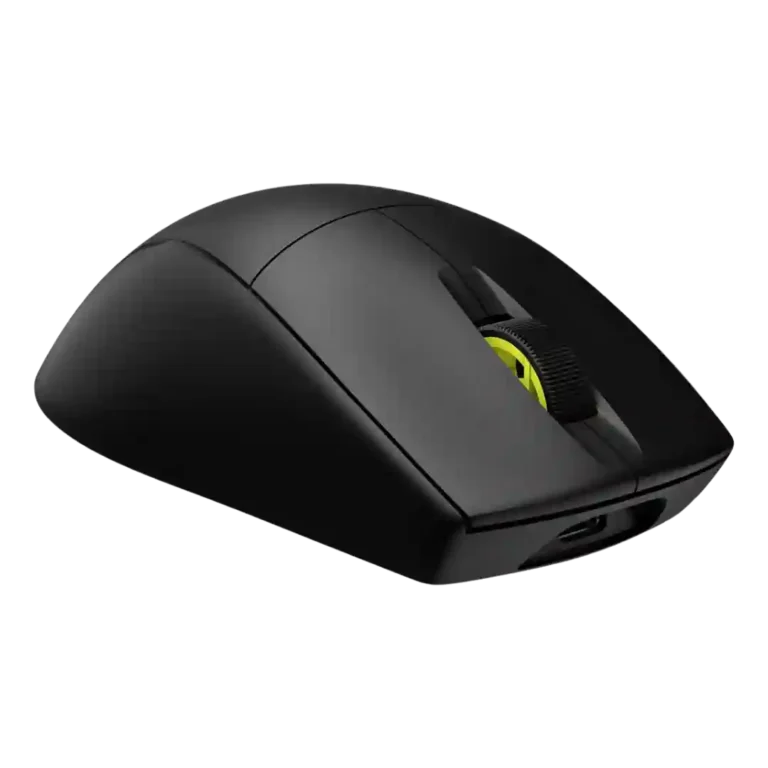
Corsair M75 AIR Wireless Review
Bottom Line
Choose the Corsair M75 Air Wireless for a 60g, precise, low-latency FPS mouse. Skip it if you want lots of buttons, easy DPI switching, richer features, or stronger value.
Best for right-handed FPS and esports players who prioritize low weight, precise tracking, low-latency wireless, and a clean no-frills shape over extra controls.
Not ideal for MMO/RPG players, left-handed users, RGB fans, or anyone who regularly changes DPI on the fly or wants the most features for the money.
Reviewers largely treat the Corsair M75 Air Wireless as a focused esports mouse rather than a feature-rich all-rounder. Its strongest evidence centers on the 60g body, accurate Marksman sensor, smooth glide, and low-latency 2.4GHz wireless performance, all of which make it feel quick and controlled in FPS play. The tradeoff is deliberate minimalism: no RGB, few buttons, no convenient physical DPI switch, and limited onboard/profile flexibility. Build and value are more divisive, with some reviewers calling it solid and premium while others find the plastic shell, stock skates, software reliance, or launch pricing hard to justify.
Compared in Reviews
Products reviewers directly compared with this model, grouped into quick takeaways.
- More expensive: price and FPS value PCWorld notes the M75 Air undercuts a premium FPS competitor while keeping strong speed and precision.
Alienware AW720M
- Cheaper: price and ambidextrous design TechRadar says the Corsair costs more than Alienware's model and misses easy ambidextrous button support.
Feature Scorecards
Pros
-
Wireless latency is generally praised as low or near-zero, especially over 2.4GHz/Slipstream rather than Bluetooth.
-
Click latency is rated highly across reviews, with optical switches, Quickstrike, and wireless latency repeatedly described as effectively instant.
-
Weight is the product’s defining strength, with nearly every reviewer emphasizing the 60g ultralight Air design.
-
Long-session comfort is generally positive, helped by low weight and a comfortable shape that several reviewers used for extended periods.
-
Tracking accuracy is one of the strongest themes, with reviewers praising precise aiming, stable sensor behavior, and dependable target control.
-
FPS suitability is one of the strongest attributes, with reviewers repeatedly positioning the M75 Air as a competitive FPS/esports mouse.
-
Wireless performance is usually positive, with stable low-latency gaming experiences once setup is complete.
-
Motion consistency is strong across positive reviews, with smooth sensor behavior, no wobble, and reliable stopping/control repeatedly noted.
-
Sensor performance is consistently strong, with the Marksman sensor repeatedly described as fast, precise, and high-spec.
-
Switch durability is strong on paper thanks to optical switches and 100M-click ratings, with multiple reviews citing reliability benefits.
-
The mouse is repeatedly credited with 50G acceleration handling and fast motion control, supporting rapid competitive flicks rather than deep acceleration customization.
-
Compatibility evidence is positive where mentioned, including Windows/macOS support and the ability to connect to computers or consoles.
-
Fingertip grip receives positive support, especially from reviewers who found the light, symmetrical body easy to control.
-
Bluetooth is widely present and useful for productivity or multi-device use, while reviewers generally prefer 2.4GHz for gaming latency.
-
Palm grip comfort is generally good, especially for hands that suit the high back and taller shell.
-
Ergonomics are generally positive for a minimalist FPS-focused shape, though the right-handed side-button layout limits symmetry in practice.
-
DPI range is a clear strength, with many reviews citing the 26,000 DPI ceiling and fine 1-DPI adjustment, even while criticizing the missing DPI button.
-
Button responsiveness is generally a strength, with optical switches and Quickstrike feedback described as fast and immediate.
-
Reviewers consistently describe 2.4GHz Slipstream/dongle use as the primary gaming mode, usually fast and stable, though setup can require software or dongle management.
-
Glide is broadly praised as smooth and low-friction, but a few reviewers criticized stock skates as slow or not durable.
-
Portability is helped by the dongle storage compartment and compact wireless setup.
-
Durability evidence is mostly positive for the optical switches and cable/connectors, though body and skate durability receive more mixed treatment elsewhere.
-
Shape comfort is broadly positive but size- and grip-dependent, with several reviewers liking the fuller symmetrical body and others noting fit caveats.
-
Lift-off distance is configurable in iCUE and surface calibration tools, though it is not a central review focus.
-
Macro support exists through iCUE key assignments, but the limited number of buttons reduces its practical depth.
-
Switch feel is generally crisp or satisfying, though some reviewers noted pre-travel or uneven click feel.
-
Corsair ecosystem integration is useful for iCUE users and some reviewers noted dongle consolidation or multipoint support across Corsair devices.
-
Surface compatibility is helped by calibration and good pad performance, but metal surfaces and some stock-skate experiences caused caveats.
-
Charging is mostly convenient thanks to USB-C and roughly 75-minute full charges, but one setup experience criticized the need for the included cable for firmware/dongle pairing.
-
Polling rate evidence is sharply mixed: many cite or verify 2,000Hz, while some reviewers failed to achieve it or considered it effectively 1,000Hz.
-
Only limited evidence addresses balance directly; one reviewer liked the in-game weight balance while another noted front heaviness when cabled.
-
Connection stability is generally good once configured, though a few reviewers criticized mode switching or initial wireless setup.
-
Battery life is useful but divisive: Bluetooth can reach around 100 hours, while 2.4GHz figures around 30-45 hours are adequate for some and disappointing for others.
-
Build quality is mixed: several reviewers found the shell solid and flex-free, while others thought the lightweight plastic felt cheap or had quality concerns.
-
Grip texture is mixed: many liked the matte or textured coating, while some found the plastic slippery or lacking grip.
-
Side button quality is mixed: placement is often praised, but some reviewers wanted more protrusion or less slick/recessed buttons.
-
Software usability is polarized: iCUE can be powerful and easy for some, but others found it intrusive or frustrating.
-
Click noise is mixed, ranging from quiet or acceptable to louder/noisier than expected depending on reviewer and use.
-
Onboard memory is present but limited, with one-profile or profile-saving comments suggesting basic but not expansive support.
-
Claw grip comfort depends on hand size and preference, with some reviewers finding it natural and others finding the shape too long or finicky.
-
Scroll wheel quality is mixed, with praise for tactile feel and resistance balanced by complaints about scratchiness or louder scrolling.
-
Materials quality splits reviewers: some praise solid construction, while others criticize the fully plastic lightweight shell as less robust or premium.
-
Button remapping and iCUE customization are supported, but several reviewers disliked relying on software because the mouse lacks a physical DPI control.
-
MOBA suitability is mixed: one reviewer found it performed well in MOBA play, while another noted MOBA players often prefer more buttons.
Cons
-
Main click quality is mixed: many liked the responsiveness and spacious feel, while some reported accidental actuation or mushy/flexy click panels.
-
Cable feedback is limited and mixed: one reviewer found it stiff, while others found charging or wired use acceptable.
-
Value for money is the most mixed theme: performance can justify the price for esports users, but many reviewers felt cheaper or fuller-featured rivals were better buys.
-
Premium feel divides reviewers: some call it solid or premium despite plastic, while others say the lightweight shell feels surprisingly cheap.
-
Programmable button support is basic: the mouse has a small set of remappable buttons, enough for FPS but sparse for feature-heavy users.
-
Profile switching is a notable weakness because DPI/profile changes often require iCUE or app-triggered profiles rather than an easy hardware switch.
-
Handedness is a weakness for the M75 Air because the symmetrical shape still uses left-side buttons, making it primarily right-handed; one regular M75 review differs.
-
RGB features are intentionally minimal or absent, which saves weight and battery but disappoints users who want lighting.
-
MMO suitability is weak because reviewers consistently frame the mouse as minimalist and lacking the extra buttons MMO players often need.
-
Firmware reliability has limited but negative evidence, mostly around setup friction and needing the included cable for a firmware/dongle process.
-
Skate durability is a concern where tested over time, with scratches appearing quickly and some complaints about stock skate quality.
-
Weight tuning is essentially absent; reviewers note the mouse cannot have its weight changed.
Compared With Category Average
Compared with other Gaming Mouse, this product is above average in Bluetooth support, below average in skate durability, profile switching, weight tuning.
| Attribute | This product | Category average | Difference |
|---|---|---|---|
| Bluetooth support | 4.5 | 3.2 | +1.3 |
| skate durability | 2.3 | 3.6 | -1.3 |
| profile switching | 2.9 | 4.1 | -1.2 |
| weight tuning | 1.2 | 2.6 | -1.4 |
| programmable buttons | 3.0 | 4.2 | -1.2 |
| button customization | 3.6 | 4.3 | -0.8 |
| MMO gaming suitability | 2.4 | 3.4 | -1.0 |
| premium feel | 3.2 | 4.1 | -0.9 |
FAQ
Is the Corsair M75 Air Wireless good for FPS games?
Yes. Reviewers repeatedly describe it as fast, precise, and well-suited to FPS or esports use because of its low weight, strong sensor, and responsive wireless performance.
Does it have a DPI button?
The M75 Air is repeatedly criticized for lacking a convenient physical DPI switch. DPI changes generally require iCUE, profiles, or reassigned controls.
How light is the M75 Air Wireless?
Most M75 Air reviews describe it as around 60 grams, making weight one of its clearest strengths and a major reason it feels quick in competitive games.
Is the battery life good?
Battery life is acceptable but not universally praised. Reviews cite much longer Bluetooth runtime, while 2.4GHz gaming use is usually around 30 to 45 hours depending on settings and reviewer experience.
Is it comfortable for all grip styles?
Comfort is grip- and hand-size-dependent. Several reviewers liked it for palm, fingertip, or general use, while claw grip reactions were more mixed.
Does it work well wirelessly?
Yes, most reviewers found 2.4GHz wireless low-latency and stable once configured. A few reviews noted setup friction or mode-switching confusion.
Is it worth the price?
Value is mixed. Reviewers who prioritize esports performance are more favorable, while others point to cheaper or fuller-featured rivals as better buys.
Consider This Instead
If you want better handedness options
Choose Logitech G Pro 2 Lightspeed. It scores 4.8 vs 2.5 for handedness options, with a 4.1 overall score.
If you want better MMO gaming suitability
Choose ASUS ROG Gladius III Wired. It scores 4.8 vs 2.4 for MMO gaming suitability, with a 4.2 overall score.
If you want better RGB features
Choose Razer Cobra Pro. It scores 4.6 vs 2.5 for RGB features, with a 4.0 overall score.
If you want better value for money
Choose Glorious Model O Eternal. It scores 4.8 vs 3.2 for value for money, with a 3.8 overall score.
Overall Top Gaming Mouse Alternatives
Best for a 47g, high-performance 8K wireless mouse with excellent shape, skates, clicks, and web controls. Skip it if stiff side buttons, shorter high-polling battery life, or app/cable quirks would...
Pros: Accuracy and tracking precision, sensor performance
Cons: cable flexibility
Choose it if you want a comfortable, feature-rich wireless mouse for mixed gaming and productivity. Skip it if you need ultralight FPS speed, left-handed support, or better value than discounted...
Pros: programmable buttons, Bluetooth support
Cons: handedness options, firmware reliability
Good if you want an ultra-light esports mouse with 8K wireless, precise tracking, and web setup. Skip it if you need MMO buttons, onboard memory, large-hand palm support, or the...
Pros: polling rate, click latency
Cons: onboard memory, tilt gesture controls
Good if you want ergonomic wireless gaming with hot-swappable batteries and strong tuning. Skip it if price, dock clutter, or short 8K battery life matters most.
Pros: switch durability, DPI range
Cons: grip texture, portability