
Reviews consistently describe two wireless paths: Lightspeed through a USB receiver or dongle and Bluetooth. Lightspeed is framed as the performance-first option.
The mouse supports 2.4GHz wireless play, and reviews treat it as a standard part of the setup.
Acceleration evidence is limited but positive where discussed: reviewers cite the Hero sensor's 40G acceleration support and zero smoothing, filtering, or acceleration claims.
A review explicitly lists 50G acceleration among the Spatha X's key performance specs.
Tracking and aim precision are strong themes across reviews, with the mouse described as accurate, precise, quick, and dependable in games and productivity.
Reviews describe the sensor as precise and accurate, with strong aim and control once set to the user's preferred sensitivity.
Balance is mixed. Reviews that focus on weight distribution often find the AA battery makes the mouse rear-heavy or concentrated toward the center-rear.
Battery life is a major strength. Reviews repeatedly cite about 300 hours over Lightspeed or AA power and up to 600 hours over Bluetooth, with PowerPlay removing normal battery worries.
Battery life is described as strong, with up to 67 hours claimed when RGB is off and fast charging highlighted.
Bluetooth support is broadly confirmed and useful. Reviewers use it for laptops, work devices, travel, and quick switching alongside Lightspeed.
Bluetooth is a notable omission, and reviewers explicitly wish it were included.
Build quality is generally positive, with reviewers calling it sturdy, well-built, secure, and resistant to flex. The design is simple rather than flashy.
Build quality is consistently praised as sturdy and premium-feeling.
Button customization is well supported through Logitech G Hub, with remapping, assignments, sensitivity profiles, and customizable controls noted across reviews.
Armoury Crate repeatedly comes up as the way to remap buttons for both gaming and productivity tasks.
Button responsiveness is strong overall. Primary clicks are repeatedly described as responsive, fast, snappy, and easy to actuate, though some secondary inputs are less praised.
Main button presses are described as having a noticeable, positive click when actuated.
The included paracord-style cables are generally described as light and flexible, though one reviewer noted bunching.
Charging convenience depends heavily on PowerPlay. With PowerPlay it offers cable-free, battery-free use, but reviews note the accessory cost and lack of USB-C charging.
The charging system is repeatedly praised for making top-ups quick and easy.
Claw grip comfort is mixed but often positive. Several reviewers liked the claw-oriented shape, while one found the flatter button profile less ideal for claw grip.
One reviewer found claw grip workable, but clearly secondary to palm grip.
Click latency evidence is narrow but favorable where discussed. Reviewers connect Lightspeed, optical-only behavior, and quick reporting with lower latency.
Click-noise evidence is limited. One review explicitly says the clicks are a little loud, so this area is not a quiet-mouse strength.
Connection stability is generally good. Reviews report strong wireless behavior, no hiccups, no lag, and reliable dongle or Bluetooth operation.
Wireless connectivity is described as flawless, with no dropouts in testing.
Cross-platform evidence is positive where tested, including Windows, macOS or G Hub, Chrome OS, Android, iPad, work laptops, and dual-device use.
A Mac-focused review says core customization is Windows-only and does not work properly on Mac.
Debounce customization is weak. TechRadar explicitly notes the absence of debounce-time adjustments along with other advanced tuning options.
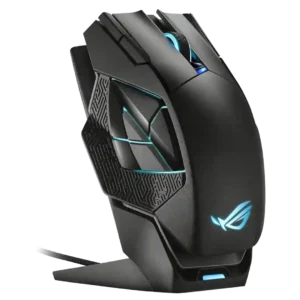
The dock is central to the experience, acting as charger and receiver while seating the mouse easily.
The DPI range is strong, with multiple reviews citing 100 to 25,600 DPI, 25,600 max DPI, or flexible sensitivity presets.
Multiple reviews highlight the 19,000 DPI ceiling as one of the mouse's headline specs.
Durability-over-time evidence is limited. The clearest long-use evidence is sturdy construction and skate condition after weeks, while one reviewer notes true long-term durability could not be tested.
Easy switch replacement and service access are repeatedly described as advantages for long-term ownership.
Logitech ecosystem integration is a meaningful strength through G Hub profiles, Lightspeed devices, and especially PowerPlay compatibility.
RGB syncing with other ASUS or ROG gear is repeatedly mentioned as part of the appeal.
Ergonomics are generally good for mainstream use, though not universally ideal. Reviewers praise comfort and stability while also noting flatter sides or missing curves.
Finger rests and sculpted supports help some users, but the overall ergonomics remain polarizing.
Fingertip comfort is discussed mainly in video reviews and is mostly acceptable, with the smaller shape and control position working better for some users than others.
Fingertip grip is explicitly described as a poor match for this mouse.
Firmware reliability is mixed but functional. Some reviewers report easy updates, while one notes firmware updates require the Lightspeed receiver and can block customization until completed.
FPS suitability is strong for casual and mainstream competitive use. Reviews cite good performance in shooters, though the 1K polling rate and weight limit top-tier esports appeal.
FPS suitability is a weak point, with reviewers citing the weight and slower feel for twitch play.
Glide is mostly positive, with reviewers praising smooth movement, low resistance, PTFE pads, and good desk or mousepad performance. A few criticize skate thinness or feel.
One reviewer reports very smooth glide with essentially no friction on a cloth mat.
Grip texture is mixed. Included grip tape helps, but several reviewers find the smooth or grainy shell less premium or less secure without it.
Reviewers note patterned or rubberized grip areas that help support the fingers.
Handedness is mixed. The symmetrical body allows left- or right-hand holding, but side-button placement clearly favors right-handed use.
The Spatha X is described as a right-handed design.
Left and right click quality is a clear strength. Reviewers praise the primary clicks as responsive, satisfying, light, tactile, and confidence-inspiring.
Primary clicks are described as crisp, with little pre-travel and strong tactile feedback.
Armoury Crate allows lift-off distance adjustment, with reviewers noting low and high options.
Long-session comfort is mixed. Several reviews describe hours of comfortable use, while heavier battery setups and low-DPI play can cause fatigue for some.
Long-session comfort depends on fit: MMO sessions can work well, but the weight also causes fatigue for some users.
Macro support is present through G Hub, with reviewers noting macro creation, recording, and remapping options.
Macro support is present through the software, which reviewers note can record and assign macros.
Materials quality is generally serviceable rather than luxurious. Reviewers describe a sturdy plastic shell and useful material choices, but not a premium finish.
One review specifically highlights the sturdy plastic shell and shaped metal base plate.
MMO suitability is weak. The six-button layout and limited extra controls are called insufficient for MMORPG-style needs.
MMO play is the clearest use case, thanks to the extra buttons and large-button-heavy design.
MOBA suitability is mixed. Reviewers successfully used it in DOTA 2 and League of Legends, but also note it could use more side buttons.
One reviewer explicitly groups the Spatha X with MMO and MOBA players.
Motion consistency is strong where tested, with reviewers noting quick swipes, accurate response, and consistent tracking.
One reviewer reported no delay, jitter, or failed inputs during gameplay, pointing to stable motion behavior.
Onboard memory is well supported. Reviews note up to five custom profiles and onboard memory mode for carrying settings to systems without G Hub.
Palm grip comfort is generally acceptable but size-dependent. Some reviewers praise improved palm support, while large-hand users may find it a little small.
Palm-grip users, especially with larger hands, are the clearest fit according to multiple reviews.
Polling rate is adequate but not cutting edge. Reviews cite 1,000Hz or 1K as standard, while noting the absence of higher-end 4K or 8K options.
One review notes a 1,000 Hz polling rate, treating it as adequate but less impressive than some flagship expectations.
Portability is useful but imperfect. Dongle storage, AA power, Bluetooth, and travel use are praised, though one reviewer was blocked from G Hub customization after leaving the receiver behind.
Portability is mixed: the pouch helps, but the mouse's size makes it awkward to travel with.
Premium feel is mixed. Some reviewers describe premium or Pro-like impressions, while others say the mouse feels basic or not high-profile.
Multiple reviews frame the Spatha X as a premium mouse with premium extras.
Profile switching is a clear strength, with reviews citing five sensitivity profiles, DPI presets, top-button switching, and profile storage.
A DPI or profile switch is mentioned, including lighting that indicates which profile is active.
Programmable buttons are supported, but limited by the six-button layout. Reviewers confirm remapping and assignable functions.
The large number of remappable buttons is one of the Spatha X's main selling points across reviews.
RGB is essentially absent. Reviewers repeatedly mention no RGB or minimal indicator lighting, sometimes as a minor complaint and sometimes as a battery-life benefit.
RGB is a major focus, with multiple lighting zones on the mouse and additional lighting on the dock.
Scroll wheel quality is mixed. Reviewers like the tactile or notched feel, but several criticize stiffness, no free-scroll mode, or a heavy middle click.
One review specifically praises the scroll wheel's grippy texture and satisfying click feel.
Sensor performance is consistently positive. Reviews cite the Hero 25K sensor as precise, reliable, accurate, and strong for gaming and productivity.
Sensor performance is a clear strength, with reviewers calling out excellent tracking and accurate response.
Shape comfort is broadly good but not universal. Many find the mouse comfortable and safe, while others call it generic, smaller, or less suited to some grips.
Shape comfort is mixed: some reviewers love the large frame, while others find it awkward or oversized.
Side button quality is generally good but not perfect. Reviews praise size, placement, and responsiveness, while some call them softer, just OK, or awkward for left-handed use.
The side-button cluster is divisive: reviewers liked the idea but often found it cramped, awkward, or inconsistent.
Skate durability evidence is mixed and limited. One reviewer saw no scratches after weeks, while others criticize thin skates or lack of replacement options.
Software stability evidence is limited but positive where stated. TechRadar says the software works in the mouse's favor.
One review reports finicky software behavior during setup and use.
Software usability is generally positive. G Hub is described as useful, simple, usable, well-rounded, and strong for profiles, DPI, and remapping.
Armoury Crate offers broad control, and positive reviews describe it as straightforward and easy to use.
Surface compatibility is mixed. One review praises use on different surfaces, while another recommends padded surfaces because the skates are thin.
Software calibration options for different pads and custom surfaces are explicitly mentioned.
Switch durability evidence centers on optical and hybrid behavior. Reviewers report no double-click or creaking issues and describe optical-only mode as reducing mechanical-switch risks.
Swappable switches and 70-million-click ratings are presented as meaningful durability advantages.
Switch feel is a strong positive. Reviews describe the switches as crisp, clicky, smooth, tactile, light, and satisfying.
Switch feel is generally positive, with reviewers describing the buttons as responsive, tactile, and accurate.
Value for money is the most divided area. Positive reviews praise price-to-performance, while critical reviews say it only makes sense with PowerPlay or lacks standout value.
Value is mixed-positive, with reviewers saying the high price is partly justified by the included features and extras.
Weight is highly dependent on setup. Around 86g with AA is viewed as acceptable by some and heavy by others, while 68g with PowerPlay is praised.
The Spatha X is consistently described as very large and very heavy, which strongly shapes its appeal and drawbacks.
Weight tuning is a major differentiator. Reviews repeatedly note dropping to about 68g through PowerPlay or reducing weight with battery changes or mods.
Wireless latency is generally strong. Reviews associate Lightspeed and dongle use with low latency, quick response, and no noticeable delay.
One reviewer specifically reported no delay during wireless gameplay.
Wireless performance is one of the stronger areas, with reviewers citing reliable Lightspeed operation, no trouble in gaming, quick response, and stable connections.
Wireless performance is a clear strength, with reviewers reporting smooth and dependable untethered use.