2.4GHz connectivity
P1
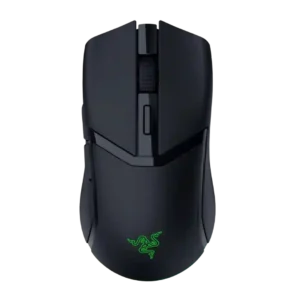
Product 1: Razer Cobra HyperSpeed
4.7
Reviewers repeatedly confirm 2.4GHz or HyperSpeed wireless support, usually treating it as the preferred mode for gaming and fast switching.
P2
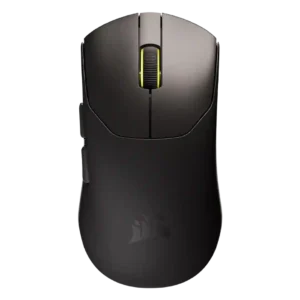
Product 2: Corsair Sabre V2 Pro
4.0
Reviewers confirmed 2.4GHz dongle wireless support; the connection works, but the receiver design is less convenient for travel.
acceleration control
P1
Product 1: Razer Cobra HyperSpeed
4.0
Acceleration evidence is specification-based: reviews cite 500 IPS and 40G, which is solid for this mid-range sensor but below Razer flagships.
P2
Product 2: Corsair Sabre V2 Pro
4.5
Acceleration capability is strong at 50G, discussed as part of the sensor specification rather than a rich user-tunable control.
Accuracy and tracking precision
P1
Product 1: Razer Cobra HyperSpeed
4.4
Tracking is described as precise, accurate, and consistent, with only specification-focused caveats against higher-end sensors.
P2
Product 2: Corsair Sabre V2 Pro
4.6
Accuracy and tracking are repeatedly praised, especially for flicks, slow tracking, and micro-adjustments in shooters.
balance and weight distribution
P1
Product 1: Razer Cobra HyperSpeed
3.9
Balance is mostly praised, though one reviewer felt the mass sat toward the rear and made the mouse feel odd.
P2Product 2: Corsair Sabre V2 Pro
No score yetbattery life
P1
Product 1: Razer Cobra HyperSpeed
4.7
Battery life is a strong point, with repeated 110-hour HyperSpeed and 170-hour Bluetooth claims plus positive real-use impressions.
P2
Product 2: Corsair Sabre V2 Pro
2.8
Battery life is usable at 1kHz but repeatedly described as compromised, much worse at 8kHz, and sometimes below claims.
Bluetooth support
P1
Product 1: Razer Cobra HyperSpeed
4.7
Bluetooth support is consistently confirmed and valued for work, travel, and switching between computers.
P2
Product 2: Corsair Sabre V2 Pro
1.2
Bluetooth is consistently absent; reviewers treat that as an intentional weight-saving tradeoff and a portability limitation.
build quality
P1
Product 1: Razer Cobra HyperSpeed
4.4
Build quality is generally strong, with reviewers calling it durable, well-built, solid, and premium despite a few texture or creak caveats.
P2
Product 2: Corsair Sabre V2 Pro
4.0
Build quality ranges from surprisingly rigid to visibly flimsy depending on pressure tests, with many normal-use reports still positive.
button customization
P1
Product 1: Razer Cobra HyperSpeed
4.5
Button customization is a clear strength through Synapse remapping, command assignment, AI-button reassignment, and profile-level controls.
P2
Product 2: Corsair Sabre V2 Pro
4.0
Button remapping and DPI/key settings are available through Web Hub, though the five-button layout limits assignment flexibility.
button responsiveness
P1
Product 1: Razer Cobra HyperSpeed
4.5
Button responsiveness is praised across reviews, especially the fast, clean, tactile optical switch implementation.
P2
Product 2: Corsair Sabre V2 Pro
3.8
Main button response is mostly acceptable to good, but several reviewers note mushiness or softer travel.
cable flexibility
P1Product 1: Razer Cobra HyperSpeed
No score yet
P2
Product 2: Corsair Sabre V2 Pro
2.2
The included cable and cable-style dongle setup draw criticism for stiffness, weight, tugging, or desk clutter.
charging convenience
P1
Product 1: Razer Cobra HyperSpeed
4.4
Charging convenience is mixed: optional dock and HyperFlux support can be excellent, but several reviewers disliked that accessories cost extra.
P2
Product 2: Corsair Sabre V2 Pro
3.8
Charging is acceptable for lighter use, but frequent charging and the stiff cable make it less convenient for heavy sessions.
claw grip comfort
P1
Product 1: Razer Cobra HyperSpeed
4.2
Claw grip comfort is supported by shape comments and broad grip compatibility, though one competitive reviewer considered it a heavier small claw option.
P2
Product 2: Corsair Sabre V2 Pro
3.5
Claw comfort works for some small and medium hands, but larger-hand users may be forced into clawing the mouse.
click latency
P1
Product 1: Razer Cobra HyperSpeed
4.7
Click latency is treated as very low, with optical switches, barely noticeable latency, and zero-debounce behavior repeatedly cited.
P2
Product 2: Corsair Sabre V2 Pro
1.8
Click latency is the biggest technical dispute, with measurement-focused reviewers flagging high debounce-related latency.
click noise
P1
Product 1: Razer Cobra HyperSpeed
2.6
Click noise is the clearest recurring complaint, with many reviewers describing the switches as loud, hollow, pingy, or noisy.
P2
Product 2: Corsair Sabre V2 Pro
3.8
Click noise is generally controlled or crisp rather than harsh, with one reviewer specifically praising the muted sound.
connection stability
P1
Product 1: Razer Cobra HyperSpeed
4.6
Connection stability is strong, with reviewers reporting immediate recognition, reliable wireless, and no stuttering or disconnections.
P2
Product 2: Corsair Sabre V2 Pro
3.8
Wireless and connection stability are generally good, though one technical review reports missed polls at high wireless polling rates.
cross-platform compatibility
P1
Product 1: Razer Cobra HyperSpeed
4.7
Cross-platform use is supported by explicit switching between MacBook and gaming PC setups.
P2
Product 2: Corsair Sabre V2 Pro
2.3
Cross-platform support is limited by Windows-only firmware updating and Chromium/WebHID requirements.
dock compatibility
P1
Product 1: Razer Cobra HyperSpeed
4.5
Dock compatibility is well supported through references to Mouse Dock Pro, HyperFlux, wireless charging pucks, and charging docks.
P2Product 2: Corsair Sabre V2 Pro
No score yetDPI range
P1
Product 1: Razer Cobra HyperSpeed
4.1
DPI range is consistently presented as 26,000 DPI, enough for most users but below top Razer sensors.
P2
Product 2: Corsair Sabre V2 Pro
4.4
DPI range is high at 33K with fine adjustment, viewed as competitive even if not always class-leading.
durability over time
P1
Product 1: Razer Cobra HyperSpeed
4.3
Durability evidence centers on 100-million-click optical switches and a simple build expected to last under normal use.
P2
Product 2: Corsair Sabre V2 Pro
2.8
Durability impressions are mixed: clean/wear resistance and switch ratings are good, but the thin shell raises concerns.
ecosystem integration
P1
Product 1: Razer Cobra HyperSpeed
4.5
Ecosystem integration is strong for Razer users, including HyperPolling, Synapse, HyperFlux, dock support, and keyboard pairing through the dongle.
P2
Product 2: Corsair Sabre V2 Pro
1.8
Ecosystem integration is weak because the mouse uses Web Hub rather than iCUE and can conflict with other Corsair setups.
ergonomic design
P1
Product 1: Razer Cobra HyperSpeed
4.3
Ergonomic design is broadly positive, especially for compact handling, thumb comfort, and smaller to medium hands.
P2
Product 2: Corsair Sabre V2 Pro
4.1
Ergonomics are broadly comfortable for work and play, especially for users who like a small, safe symmetrical form.
fingertip grip comfort
P1
Product 1: Razer Cobra HyperSpeed
4.2
Fingertip grip comfort is generally positive, with one reviewer calling it excellent and another preferring the older Viper Mini shape.
P2
Product 2: Corsair Sabre V2 Pro
4.0
Fingertip grip is specifically supported for larger hands and for users who prefer small-to-medium mice.
FPS gaming suitability
P1
Product 1: Razer Cobra HyperSpeed
4.1
FPS suitability is generally good for everyday shooters and games, though competitive-focused reviewers wanted lighter or higher-spec alternatives.
P2
Product 2: Corsair Sabre V2 Pro
4.6
FPS suitability is the clearest strength, with repeated praise for fast-paced and competitive shooter use.
glide smoothness
P1
Product 1: Razer Cobra HyperSpeed
4.2
Glide is mostly smooth, with praise for skates and HyperFlux surface movement, while one reviewer found the stock skates controlled on some pads.
P2
Product 2: Corsair Sabre V2 Pro
4.2
Glide is smooth overall, especially with included larger skates, but UPE feet can feel slower or rougher than PTFE/glass-pad options.
grip texture
P1
Product 1: Razer Cobra HyperSpeed
3.9
Grip texture is mixed but mostly acceptable, with stable matte or textured surfaces offset by the loss of Cobra Pro rubberized sides.
P2
Product 2: Corsair Sabre V2 Pro
3.8
Grip is mostly good from the matte/textured surface or tape, though some reviewers find the raw plastic slippery or dust-prone.
handedness options
P1
Product 1: Razer Cobra HyperSpeed
3.5
Handedness support is limited: one review calls the shape ambidextrous but notes that side buttons still favor right-handed users.
P2
Product 2: Corsair Sabre V2 Pro
2.5
Handedness options appear limited: reviewers describe a symmetrical shell, but the side buttons are on the left.
left and right click quality
P1
Product 1: Razer Cobra HyperSpeed
4.1
Left and right click quality is mostly solid and tactile, though sound quality divides reviewers.
P2
Product 2: Corsair Sabre V2 Pro
3.6
Left/right click quality is decent to strong, with easy spam-clicking in some reviews and mushier or less crisp feel in others.
lift-off distance
P1
Product 1: Razer Cobra HyperSpeed
4.4
Lift-off distance support appears in Synapse calibration options, with reviewers noting adjustable high and low settings.
P2
Product 2: Corsair Sabre V2 Pro
1.8
Lift-off distance customization is missing, which matters to reviewers who expected more flagship-level sensor settings.
long-session comfort
P1
Product 1: Razer Cobra HyperSpeed
4.5
Long-session comfort is positive, supported by reviewers using it for long gaming, full workdays, and larger hands without discomfort.
P2
Product 2: Corsair Sabre V2 Pro
4.8
Long-session comfort is strong because the low weight reduces wrist tension and fatigue.
macro support
P1
Product 1: Razer Cobra HyperSpeed
4.5
Macro support is available through Synapse, including button remapping and custom macros across the mouse's controls.
P2
Product 2: Corsair Sabre V2 Pro
4.1
Macro support exists in Web Hub despite the mouse's limited number of buttons.
materials quality
P1
Product 1: Razer Cobra HyperSpeed
4.1
Materials quality is generally premium, with matte coatings and textured plastic praised more than glossy accents or removed rubber sides.
P2
Product 2: Corsair Sabre V2 Pro
4.5
Materials are generally praised by technical reviewers, though other reviewers describe raw plastic or compromised rigidity.
motion consistency
P1
Product 1: Razer Cobra HyperSpeed
4.5
Motion consistency is praised through predictable twitch reactions and accurate handling of both fast and slow movements.
P2
Product 2: Corsair Sabre V2 Pro
4.5
Motion consistency and tracking are strong overall, with no sensor issues noted despite some high-polling caveats.
onboard memory
P1
Product 1: Razer Cobra HyperSpeed
4.5
Onboard memory is supported by five on-board profiles and physical profile switching references.
P2
Product 2: Corsair Sabre V2 Pro
2.5
Onboard memory is limited, especially the single-profile limitation noted across software reviews.
palm grip comfort
P1
Product 1: Razer Cobra HyperSpeed
3.6
Palm grip comfort is usable but less certain; reviews support all common grips, while large-hand palm users may find the mouse small.
P2
Product 2: Corsair Sabre V2 Pro
4.2
Palm comfort is surprisingly good for some reviewers, including larger hands, though fit depends on hand size.
polling rate
P1
Product 1: Razer Cobra HyperSpeed
3.8
Polling rate is the most conditional performance feature: 1,000Hz is standard, while 8,000Hz requires extra Razer accessories.
P2
Product 2: Corsair Sabre V2 Pro
4.3
Polling rate is a standout spec at up to true 8K, though high polling drains battery and can show some instability.
portability
P1
Product 1: Razer Cobra HyperSpeed
4.4
Portability is helped by the compact lightweight shell, travel-rig suitability, and dongle storage.
P2
Product 2: Corsair Sabre V2 Pro
2.2
Portability is mixed: the 36g body is easy to carry, but lack of Bluetooth and the cable-style receiver hurt travel use.
premium feel
P1
Product 1: Razer Cobra HyperSpeed
4.4
Premium feel is broadly positive, tied to refined aesthetics, premium coatings, and Razer-like build quality.
P2
Product 2: Corsair Sabre V2 Pro
3.2
Premium feel is divisive: some call it premium and sturdy, while others say raw plastic, flimsy, or less substantial.
profile switching
P1
Product 1: Razer Cobra HyperSpeed
4.3
Profile switching is supported through underside profile buttons and Synapse-created profile swapping.
P2
Product 2: Corsair Sabre V2 Pro
2.1
Profile switching is weak because there is no dedicated DPI/profile button and only limited onboard profile support.
programmable buttons
P1
Product 1: Razer Cobra HyperSpeed
4.5
Programmable controls are a clear feature, with reviewers citing six to nine programmable or customizable controls depending on framing.
P2
Product 2: Corsair Sabre V2 Pro
2.2
Programmable-button capacity is minimal: the five-button layout suits FPS play but not feature-heavy use.
RGB features
P1
Product 1: Razer Cobra HyperSpeed
3.9
RGB is present and stylish but scaled back, with some reviewers liking the underglow and others finding it limited or dull.
P2
Product 2: Corsair Sabre V2 Pro
1.5
RGB is essentially absent except for small indicator lighting, an intentional weight-saving tradeoff.
scroll wheel quality
P1
Product 1: Razer Cobra HyperSpeed
4.5
Scroll wheel quality is a major strength, with the optical wheel praised for precision, defined steps, and reduced ghost or reverse inputs.
P2
Product 2: Corsair Sabre V2 Pro
3.9
Scroll wheel quality is mostly good or acceptable, with notes ranging from smooth/rasterized to stiff or noisy.
sensor performance
P1
Product 1: Razer Cobra HyperSpeed
4.2
Sensor performance is strong for most gaming, centered on the Focus X 26K sensor, but not positioned as flagship esports hardware.
P2
Product 2: Corsair Sabre V2 Pro
4.5
Sensor performance is consistently praised as precise, snappy, consistent, and competitive.
shape comfort
P1
Product 1: Razer Cobra HyperSpeed
4.3
Shape comfort is a major positive for many reviewers, especially the compact Cobra/Viper Mini-like shell, though large hands may disagree.
P2
Product 2: Corsair Sabre V2 Pro
4.2
Shape comfort is a safe symmetrical strength, though not universally ideal for large hands or comfort-groove preferences.
side button quality
P1
Product 1: Razer Cobra HyperSpeed
4.0
Side button quality is mostly positive, with praise for placement and firmness, but one reviewer found the implementation loud and cheap-feeling.
P2
Product 2: Corsair Sabre V2 Pro
2.7
Side button quality is one of the weaker physical areas, with repeated notes of post-travel, mushiness, or travel into the shell.
software stability
P1
Product 1: Razer Cobra HyperSpeed
3.3
Software stability receives a caveat: Synapse is useful and intuitive, but one review specifically calls it finicky at times.
P2
Product 2: Corsair Sabre V2 Pro
3.5
Software stability is acceptable when Web Hub works, but server dependence creates a reliability caveat.
software usability
P1
Product 1: Razer Cobra HyperSpeed
4.3
Software usability is mostly positive, with Synapse described as intuitive, clearly laid out, and useful for customization.
P2
Product 2: Corsair Sabre V2 Pro
3.2
Software usability is split: simple, web-based, and lightweight, but sparse, online-dependent, and sometimes awkward with iCUE.
surface compatibility
P1
Product 1: Razer Cobra HyperSpeed
4.8
Surface compatibility is strongly supported by one review that tested the mouse across mouse wheel, glass, wood, and plastic surfaces.
P2
Product 2: Corsair Sabre V2 Pro
3.5
Surface compatibility is usable across surfaces, but reviewers preferred cloth pads and found glass rougher.
switch durability
P1
Product 1: Razer Cobra HyperSpeed
4.7
Switch durability is a strength, with several reviews citing Razer's 100-million-click Gen-4 optical switches.
P2
Product 2: Corsair Sabre V2 Pro
4.2
Switch durability is promising from 100M mechanical switch ratings, though optical alternatives may last longer.
switch feel
P1
Product 1: Razer Cobra HyperSpeed
4.3
Switch feel is generally satisfying, crisp, and tactile, though the same switches create a recurring noise complaint.
P2
Product 2: Corsair Sabre V2 Pro
4.2
Switch feel is generally positive for the main switches but not uniformly crisp.
value for money
P1
Product 1: Razer Cobra HyperSpeed
3.9
Value is mixed: many call it a good $100 mid-range option, while others argue the price is high once accessories or rival specs are considered.
P2
Product 2: Corsair Sabre V2 Pro
3.7
Value is split: many find $100 competitive for the weight and specs, while latency-focused reviewers prefer alternatives.
weight
P1
Product 1: Razer Cobra HyperSpeed
4.3
Weight is widely discussed and mostly positive at roughly 60–62g, lighter than the Cobra Pro but not ultralight by every reviewer’s standard.
P2
Product 2: Corsair Sabre V2 Pro
5.0
Weight is the standout advantage, with reviewers repeatedly emphasizing the 36g shell as exceptionally light and defining.
wireless latency
P1
Product 1: Razer Cobra HyperSpeed
4.2
Wireless latency is generally strong for normal gaming, especially over 2.4GHz, though some reviewers note higher polling is not included by default.
P2
Product 2: Corsair Sabre V2 Pro
3.9
Wireless latency is mixed: tracking latency can be solid, but click-latency measurements raise concerns for esports claims.
wireless performance
P1
Product 1: Razer Cobra HyperSpeed
4.5
Wireless performance is broadly positive thanks to tri-mode connectivity, reliable 2.4GHz behavior, and strong battery life.
P2
Product 2: Corsair Sabre V2 Pro
4.4
Wireless performance is generally reliable with no stuttering and solid gaming/task performance.