- Worse: weight IGN used the HyperX mouse to show how extreme the Sabre's 36g weight feels by comparison.
Corsair Sabre V2 Pro Review
Bottom Line
Choose it for a 36g, fast, accurate FPS mouse with a comfortable safe shape. Skip it if you need Bluetooth, rich onboard controls, long battery life, low click latency, or a premium-feeling shell.
Best for competitive FPS players who want the lightest-feeling full-shell mouse possible, with accurate tracking, fast movement, and minimal extra buttons. It also suits users who set one DPI/profile and rarely change settings mid-game.
Not for users who need Bluetooth, lots of programmable buttons, rich iCUE integration, travel-friendly dongles, or long battery life at high polling. It is also risky for buyers who prioritize low measured click latency or a premium rigid shell.
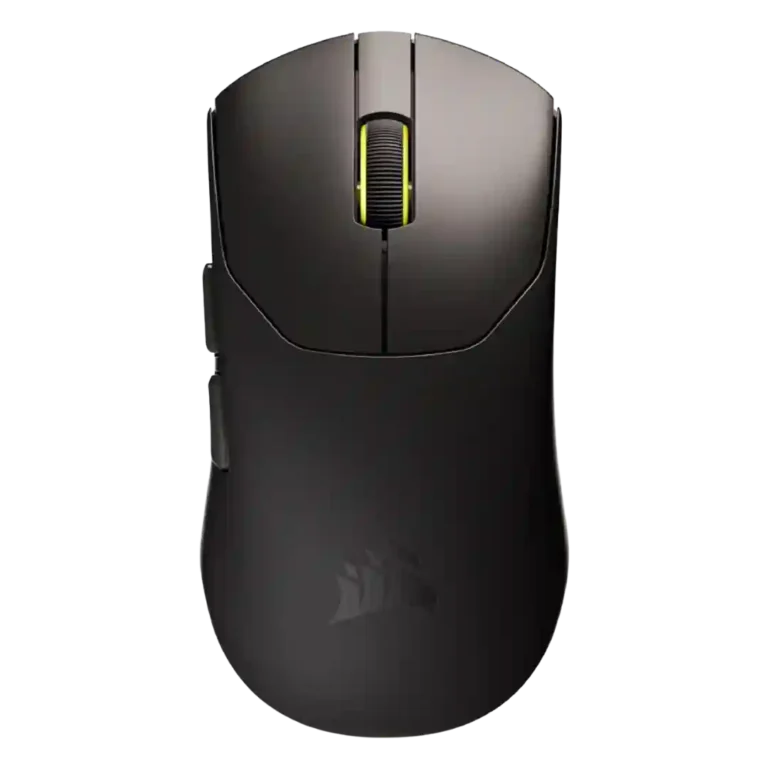
The Corsair Sabre V2 Pro is built around one unusually clear promise: extreme lightness for competitive play. Reviewers consistently praise its 36g weight, precise sensor, smooth glide, safe shape, and strong FPS performance. The tradeoff is that Corsair stripped away conveniences that broader-use mice often provide. Bluetooth is missing, profile and DPI switching are limited, battery life drops hard at 8K polling, and Web Hub is simple but sometimes awkward or online-dependent. Build quality also divides reviewers, with several finding it sturdy in normal use while others call the shell flimsy or less premium. The most serious caveat is measured click latency from fixed debounce behavior, which makes the mouse less universally convincing for high-end esports use.
Compared in Reviews
Products reviewers directly compared with this model, grouped into quick takeaways.
- More expensive: price for lightweight wireless design PC Gamer framed the Sabre as cheaper than the Logitech G Pro X Superlight 2 while being much lighter.
- Better: comfort and software features The reviewer preferred the Razer because of comfort and dynamic sensitivity features missing from the Sabre.
Feature Scorecards
Pros
-
Weight is the standout advantage, with reviewers repeatedly emphasizing the 36g shell as exceptionally light and defining.
-
Long-session comfort is strong because the low weight reduces wrist tension and fatigue.
-
Accuracy and tracking are repeatedly praised, especially for flicks, slow tracking, and micro-adjustments in shooters.
-
FPS suitability is the clearest strength, with repeated praise for fast-paced and competitive shooter use.
-
Sensor performance is consistently praised as precise, snappy, consistent, and competitive.
-
Motion consistency and tracking are strong overall, with no sensor issues noted despite some high-polling caveats.
-
Materials are generally praised by technical reviewers, though other reviewers describe raw plastic or compromised rigidity.
-
Acceleration capability is strong at 50G, discussed as part of the sensor specification rather than a rich user-tunable control.
-
DPI range is high at 33K with fine adjustment, viewed as competitive even if not always class-leading.
-
Wireless performance is generally reliable with no stuttering and solid gaming/task performance.
-
Polling rate is a standout spec at up to true 8K, though high polling drains battery and can show some instability.
-
Glide is smooth overall, especially with included larger skates, but UPE feet can feel slower or rougher than PTFE/glass-pad options.
-
Palm comfort is surprisingly good for some reviewers, including larger hands, though fit depends on hand size.
-
Shape comfort is a safe symmetrical strength, though not universally ideal for large hands or comfort-groove preferences.
-
Switch durability is promising from 100M mechanical switch ratings, though optical alternatives may last longer.
-
Switch feel is generally positive for the main switches but not uniformly crisp.
-
Macro support exists in Web Hub despite the mouse's limited number of buttons.
-
Ergonomics are broadly comfortable for work and play, especially for users who like a small, safe symmetrical form.
-
Button remapping and DPI/key settings are available through Web Hub, though the five-button layout limits assignment flexibility.
-
Reviewers confirmed 2.4GHz dongle wireless support; the connection works, but the receiver design is less convenient for travel.
-
Fingertip grip is specifically supported for larger hands and for users who prefer small-to-medium mice.
-
Skate durability is helped by UPE material and included replacements, but the material trades some glide speed for wear resistance.
-
Build quality ranges from surprisingly rigid to visibly flimsy depending on pressure tests, with many normal-use reports still positive.
-
Wireless latency is mixed: tracking latency can be solid, but click-latency measurements raise concerns for esports claims.
-
Scroll wheel quality is mostly good or acceptable, with notes ranging from smooth/rasterized to stiff or noisy.
-
Charging is acceptable for lighter use, but frequent charging and the stiff cable make it less convenient for heavy sessions.
-
Wireless and connection stability are generally good, though one technical review reports missed polls at high wireless polling rates.
-
Grip is mostly good from the matte/textured surface or tape, though some reviewers find the raw plastic slippery or dust-prone.
-
Main button response is mostly acceptable to good, but several reviewers note mushiness or softer travel.
-
Click noise is generally controlled or crisp rather than harsh, with one reviewer specifically praising the muted sound.
-
Value is split: many find $100 competitive for the weight and specs, while latency-focused reviewers prefer alternatives.
-
Left/right click quality is decent to strong, with easy spam-clicking in some reviews and mushier or less crisp feel in others.
-
Claw comfort works for some small and medium hands, but larger-hand users may be forced into clawing the mouse.
-
Software stability is acceptable when Web Hub works, but server dependence creates a reliability caveat.
-
Surface compatibility is usable across surfaces, but reviewers preferred cloth pads and found glass rougher.
Cons
-
Premium feel is divisive: some call it premium and sturdy, while others say raw plastic, flimsy, or less substantial.
-
Software usability is split: simple, web-based, and lightweight, but sparse, online-dependent, and sometimes awkward with iCUE.
-
Battery life is usable at 1kHz but repeatedly described as compromised, much worse at 8kHz, and sometimes below claims.
-
Durability impressions are mixed: clean/wear resistance and switch ratings are good, but the thin shell raises concerns.
-
Side button quality is one of the weaker physical areas, with repeated notes of post-travel, mushiness, or travel into the shell.
-
Onboard memory is limited, especially the single-profile limitation noted across software reviews.
-
Handedness options appear limited: reviewers describe a symmetrical shell, but the side buttons are on the left.
-
Cross-platform support is limited by Windows-only firmware updating and Chromium/WebHID requirements.
-
Portability is mixed: the 36g body is easy to carry, but lack of Bluetooth and the cable-style receiver hurt travel use.
-
The included cable and cable-style dongle setup draw criticism for stiffness, weight, tugging, or desk clutter.
-
Programmable-button capacity is minimal: the five-button layout suits FPS play but not feature-heavy use.
-
Profile switching is weak because there is no dedicated DPI/profile button and only limited onboard profile support.
-
MMO suitability is poor because the mouse lacks the many programmable buttons needed for complex inputs.
-
MOBA suitability is limited for the same reason: few buttons and minimal on-device controls.
-
Ecosystem integration is weak because the mouse uses Web Hub rather than iCUE and can conflict with other Corsair setups.
-
Click latency is the biggest technical dispute, with measurement-focused reviewers flagging high debounce-related latency.
-
Lift-off distance customization is missing, which matters to reviewers who expected more flagship-level sensor settings.
-
RGB is essentially absent except for small indicator lighting, an intentional weight-saving tradeoff.
-
Bluetooth is consistently absent; reviewers treat that as an intentional weight-saving tradeoff and a portability limitation.
-
Debounce adjustment is missing or not publicly exposed, leaving concerns about the fixed 8ms debounce behavior.
Compared With Category Average
Compared with other Gaming Mouse, this product is below average in click latency, debounce customization, ecosystem integration.
| Attribute | This product | Category average | Difference |
|---|---|---|---|
| click latency | 1.8 | 4.5 | -2.7 |
| debounce customization | 1.2 | 3.7 | -2.5 |
| ecosystem integration | 1.8 | 4.2 | -2.4 |
| lift-off distance | 1.8 | 4.1 | -2.3 |
| Bluetooth support | 1.2 | 3.3 | -2.1 |
| profile switching | 2.1 | 4.1 | -2.0 |
| programmable buttons | 2.2 | 4.2 | -2.0 |
| MOBA gaming suitability | 2.0 | 3.9 | -1.9 |
FAQ
Is the Corsair Sabre V2 Pro good for FPS games?
Yes. Reviewers repeatedly describe it as fast, accurate, and well suited to competitive shooters because of its 36g weight, responsive movement, high polling support, and precise sensor.
Does it have Bluetooth?
No. Reviews consistently note that wireless use is through the included 2.4GHz dongle, with Bluetooth omitted as part of the weight-saving design.
How is the battery life?
Battery life is mixed. Several reviews say 1kHz use is workable, but 8K polling dramatically reduces runtime and some reviewers found real-world battery life below Corsair's claims.
Can you customize buttons and macros?
Yes, but within limits. Web Hub supports remapping, DPI settings, polling rate changes, and macros, but the mouse only has five buttons and limited onboard profile support.
Is the build quality sturdy?
Normal-use impressions are often positive, with several reviewers finding the shell surprisingly rigid for 36g. However, other reviews report flex, a less premium plastic feel, or durability concerns under pressure.
What are the biggest downsides?
The main downsides are no Bluetooth, no dedicated DPI/profile button, limited software depth, weaker battery at high polling, side-button travel, stiff cable complaints, and click-latency concerns from fixed debounce.
Consider This Instead
If you want better Bluetooth support
Choose Razer Cobra HyperSpeed. It scores 4.7 vs 1.2 for Bluetooth support, with a 4.2 overall score.
If you want better debounce customization
Choose Glorious Model D3. It scores 4.9 vs 1.2 for debounce customization, with a 4.4 overall score.
If you want better click latency
Choose LAMZU Maya X. It scores 5.0 vs 1.8 for click latency, with a 4.5 overall score.
If you want better RGB features
Choose Razer Cobra Pro. It scores 4.6 vs 1.5 for RGB features, with a 4.0 overall score.
Overall Top Gaming Mouse Alternatives
Best for a 47g, high-performance 8K wireless mouse with excellent shape, skates, clicks, and web controls. Skip it if stiff side buttons, shorter high-polling battery life, or app/cable quirks would...
Pros: Accuracy and tracking precision, sensor performance
Cons: cable flexibility
Choose it if you want a comfortable, feature-rich wireless mouse for mixed gaming and productivity. Skip it if you need ultralight FPS speed, left-handed support, or better value than discounted...
Pros: programmable buttons, Bluetooth support
Cons: handedness options, firmware reliability
Good if you want an ultra-light esports mouse with 8K wireless, precise tracking, and web setup. Skip it if you need MMO buttons, onboard memory, large-hand palm support, or the...
Pros: polling rate, click latency
Cons: onboard memory, tilt gesture controls
Good if you want ergonomic wireless gaming with hot-swappable batteries and strong tuning. Skip it if price, dock clutter, or short 8K battery life matters most.
Pros: switch durability, DPI range
Cons: grip texture, portability