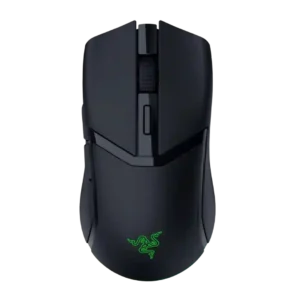
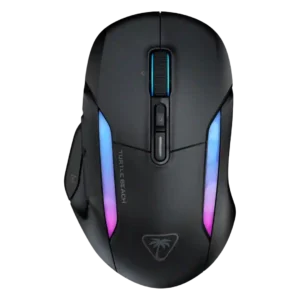
Compare Razer Cobra HyperSpeed vs Turtle Beach Kone II Air

P1 Razer Cobra HyperSpeed
P2 Turtle Beach Kone II Air

Comparison Takeaways

Razer Cobra HyperSpeed

Where It Has the Edge

  • dock compatibility is 4.5 vs 1.5. Dock compatibility is well supported through references to Mouse Dock Pro, HyperFlux, wireless charging pucks, and charging docks.
  • cross-platform compatibility is 4.7 vs 3.3. Cross-platform use is supported by explicit switching between MacBook and gaming PC setups.
  • weight is 4.3 vs 3.1. Weight is widely discussed and mostly positive at roughly 60–62g, lighter than the Cobra Pro but not ultralight...
  • FPS gaming suitability is 4.1 vs 3.2. FPS suitability is generally good for everyday shooters and games, though competitive-focused reviewers wanted lighter or higher-spec alternatives.

Turtle Beach Kone II Air

Where It Has the Edge

  • palm grip comfort is 4.8 vs 3.6. Palm grip comfort was one of the strongest fit areas, repeatedly tied to the broad ergonomic body and...
  • software stability is 4.5 vs 3.3. Software stability was positive in limited evidence, with one reviewer reporting no crashes and another only a small...
  • click noise is 3.6 vs 2.6. Click noise is mixed: some liked the distinct clickiness, while others described hollow or loud clicks.
  • left and right click quality is 5.0 vs 4.1. One video review specifically praised the main left and right buttons as excellent and balanced.
Average score
Product 1: Razer Cobra HyperSpeed
4.2
Product 2: Turtle Beach Kone II Air
4.3
2.4GHz connectivity
Product 1: Razer Cobra HyperSpeed
4.7

Reviewers repeatedly confirm 2.4GHz or HyperSpeed wireless support, usually treating it as the preferred mode for gaming and fast switching.

Product 2: Turtle Beach Kone II Air
4.8

2.4GHz connectivity was repeatedly identified as the main low-latency gaming connection and was generally praised.

acceleration control
Product 1: Razer Cobra HyperSpeed
4.0

Acceleration evidence is specification-based: reviews cite 500 IPS and 40G, which is solid for this mid-range sensor but below Razer flagships.

Product 2: Turtle Beach Kone II Air
4.5

Acceleration capability is supported by specs citing 50g acceleration and 650 IPS tracking, but reviews did not deeply evaluate acceleration tuning.

Accuracy and tracking precision
Product 1: Razer Cobra HyperSpeed
4.4

Tracking is described as precise, accurate, and consistent, with only specification-focused caveats against higher-end sensors.

Product 2: Turtle Beach Kone II Air
4.6

Reviewers generally found tracking precise and smooth, with repeated praise for pinpoint control, though one review noted minor jitter in very slow pixel-level movement.

AI Prompt Master
Product 1: Razer Cobra HyperSpeed
3.2

AI Prompt Master is widely noticed, but reactions range from mildly useful for productivity to unnecessary for gaming.

Product 2: Turtle Beach Kone II Air
No score yet
balance and weight distribution
Product 1: Razer Cobra HyperSpeed
3.9

Balance is mostly praised, though one reviewer felt the mass sat toward the rear and made the mouse feel odd.

Product 2: Turtle Beach Kone II Air
4.0

Weight balance was mixed-to-good, with praise for even distribution and improved balance, but one review felt the rear-heavy weighting hurt lifting.

battery life
Product 1: Razer Cobra HyperSpeed
4.7

Battery life is a strong point, with repeated 110-hour HyperSpeed and 170-hour Bluetooth claims plus positive real-use impressions.

Product 2: Turtle Beach Kone II Air
4.7

Battery life was the strongest technical consensus, with every review mentioning long life, commonly around 130 hours on 2.4GHz and up to 350 hours on Bluetooth.

Bluetooth support
Product 1: Razer Cobra HyperSpeed
4.7

Bluetooth support is consistently confirmed and valued for work, travel, and switching between computers.

Product 2: Turtle Beach Kone II Air
4.7

Bluetooth support is well covered and consistently positive, mainly as a power-efficient or multi-device option rather than the best competitive mode.

build quality
Product 1: Razer Cobra HyperSpeed
4.4

Build quality is generally strong, with reviewers calling it durable, well-built, solid, and premium despite a few texture or creak caveats.

Product 2: Turtle Beach Kone II Air
4.6

Build quality was usually strong, with reviewers noting sturdy construction, little flex, and a solid feel.

button customization
Product 1: Razer Cobra HyperSpeed
4.5

Button customization is a clear strength through Synapse remapping, command assignment, AI-button reassignment, and profile-level controls.

Product 2: Turtle Beach Kone II Air
4.6

Button remapping and Easy-Shift customization were widely praised, especially for secondary commands and productivity or game-specific layouts.

button responsiveness
Product 1: Razer Cobra HyperSpeed
4.5

Button responsiveness is praised across reviews, especially the fast, clean, tactile optical switch implementation.

Product 2: Turtle Beach Kone II Air
4.4

Buttons were consistently described as responsive, crisp, purposeful, or quick, with very few complaints about actuation.

cable flexibility
Product 1: Razer Cobra HyperSpeed
No score yet
Product 2: Turtle Beach Kone II Air
4.4

Cable flexibility was praised across reviews, with the braided or PhantomFlex cable described as soft, flexible, and low-drag.

charging convenience
Product 1: Razer Cobra HyperSpeed
4.4

Charging convenience is mixed: optional dock and HyperFlux support can be excellent, but several reviewers disliked that accessories cost extra.

Product 2: Turtle Beach Kone II Air
4.3

Charging convenience was positive thanks to USB-C wired charging and a flexible cable, with reviewers noting it can keep working while plugged in.

claw grip comfort
Product 1: Razer Cobra HyperSpeed
4.2

Claw grip comfort is supported by shape comments and broad grip compatibility, though one competitive reviewer considered it a heavier small claw option.

Product 2: Turtle Beach Kone II Air
4.3

Claw grip was supported by several reviewers, but it was less universally ideal than palm grip because of the mouse’s size.

click latency
Product 1: Razer Cobra HyperSpeed
4.7

Click latency is treated as very low, with optical switches, barely noticeable latency, and zero-debounce behavior repeatedly cited.

Product 2: Turtle Beach Kone II Air
4.5

One review directly tied the pre-tensioned switches to low response times, supporting strong click-latency performance.

click noise
Product 1: Razer Cobra HyperSpeed
2.6

Click noise is the clearest recurring complaint, with many reviewers describing the switches as loud, hollow, pingy, or noisy.

Product 2: Turtle Beach Kone II Air
3.6

Click noise is mixed: some liked the distinct clickiness, while others described hollow or loud clicks.

connection stability
Product 1: Razer Cobra HyperSpeed
4.6

Connection stability is strong, with reviewers reporting immediate recognition, reliable wireless, and no stuttering or disconnections.

Product 2: Turtle Beach Kone II Air
4.8

Connection stability was strong in the two reviews that directly tested it, with no connection or input-delay issues and reliable device switching.

cross-platform compatibility
Product 1: Razer Cobra HyperSpeed
4.7

Cross-platform use is supported by explicit switching between MacBook and gaming PC setups.

Product 2: Turtle Beach Kone II Air
3.3

Cross-platform compatibility is mixed: driverless/basic use is possible, but full customization is Windows-focused and not available on macOS.

debounce customization
Product 1: Razer Cobra HyperSpeed
No score yet
Product 2: Turtle Beach Kone II Air
4.3

Debounce customization is clearly present in Swarm II, and reviewers appreciated the ability to adjust debounce alongside other advanced settings.

dock compatibility
Product 1: Razer Cobra HyperSpeed
4.5

Dock compatibility is well supported through references to Mouse Dock Pro, HyperFlux, wireless charging pucks, and charging docks.

Product 2: Turtle Beach Kone II Air
1.5

Dock support is weak because one review noted Turtle Beach removed the previous charging dock approach.

DPI range
Product 1: Razer Cobra HyperSpeed
4.1

DPI range is consistently presented as 26,000 DPI, enough for most users but below top Razer sensors.

Product 2: Turtle Beach Kone II Air
4.5

Multiple reviews confirmed the 26K maximum DPI and treated the DPI range as broad enough for gaming and productivity preferences.

durability over time
Product 1: Razer Cobra HyperSpeed
4.3

Durability evidence centers on 100-million-click optical switches and a simple build expected to last under normal use.

Product 2: Turtle Beach Kone II Air
4.5

Durability over time is supported by sturdy month-long use and wheel reliability compared with prior Kone models, but long-term evidence remains limited.

ecosystem integration
Product 1: Razer Cobra HyperSpeed
4.5

Ecosystem integration is strong for Razer users, including HyperPolling, Synapse, HyperFlux, dock support, and keyboard pairing through the dongle.

Product 2: Turtle Beach Kone II Air
4.0

Ecosystem integration is positive through Swarm II and ROCCAT/Turtle Beach lighting or device coordination, though evidence is limited.

ergonomic design
Product 1: Razer Cobra HyperSpeed
4.3

Ergonomic design is broadly positive, especially for compact handling, thumb comfort, and smaller to medium hands.

Product 2: Turtle Beach Kone II Air
4.8

Ergonomic design was the clearest consensus strength, with reviewers repeatedly praising the comfort-first large shape.

fingertip grip comfort
Product 1: Razer Cobra HyperSpeed
4.2

Fingertip grip comfort is generally positive, with one reviewer calling it excellent and another preferring the older Viper Mini shape.

Product 2: Turtle Beach Kone II Air
4.2

Fingertip grip received limited but positive support for larger hands, while the large shell makes it less broadly suitable.

firmware reliability
Product 1: Razer Cobra HyperSpeed
No score yet
Product 2: Turtle Beach Kone II Air
3.8

Firmware and driver reliability received limited evidence: PCMag noted driver updates, while one video flagged potentially fixable lighting choppiness.

FPS gaming suitability
Product 1: Razer Cobra HyperSpeed
4.1

FPS suitability is generally good for everyday shooters and games, though competitive-focused reviewers wanted lighter or higher-spec alternatives.

Product 2: Turtle Beach Kone II Air
3.2

FPS suitability is mixed: several reviewers found shooters playable, but the weight, size, polling ceiling, or latency kept it from being an ideal competitive FPS mouse.

glide smoothness
Product 1: Razer Cobra HyperSpeed
4.2

Glide is mostly smooth, with praise for skates and HyperFlux surface movement, while one reviewer found the stock skates controlled on some pads.

Product 2: Turtle Beach Kone II Air
4.7

Glide smoothness was strong, with PTFE feet repeatedly described as smooth, fluid, or friction-free.

grip texture
Product 1: Razer Cobra HyperSpeed
3.9

Grip texture is mixed but mostly acceptable, with stable matte or textured surfaces offset by the loss of Cobra Pro rubberized sides.

Product 2: Turtle Beach Kone II Air
3.8

Grip texture was mixed: some liked the smooth coating or included tape, while others found the sides slippery or insufficiently grippy.

handedness options
Product 1: Razer Cobra HyperSpeed
3.5

Handedness support is limited: one review calls the shape ambidextrous but notes that side buttons still favor right-handed users.

Product 2: Turtle Beach Kone II Air
No score yet
left and right click quality
Product 1: Razer Cobra HyperSpeed
4.1

Left and right click quality is mostly solid and tactile, though sound quality divides reviewers.

Product 2: Turtle Beach Kone II Air
5.0

One video review specifically praised the main left and right buttons as excellent and balanced.

lift-off distance
Product 1: Razer Cobra HyperSpeed
4.4

Lift-off distance support appears in Synapse calibration options, with reviewers noting adjustable high and low settings.

Product 2: Turtle Beach Kone II Air
4.0

Lift-off adjustment is present through Swarm II or sensor controls, though one review disliked that it is labeled as DCU calibration rather than plainly as lift-off distance.

long-session comfort
Product 1: Razer Cobra HyperSpeed
4.5

Long-session comfort is positive, supported by reviewers using it for long gaming, full workdays, and larger hands without discomfort.

Product 2: Turtle Beach Kone II Air
4.5

Long-session comfort is strong for large hands, with reviews describing hours of use without strain, although one video reviewer felt fatigue after a while.

macro support
Product 1: Razer Cobra HyperSpeed
4.5

Macro support is available through Synapse, including button remapping and custom macros across the mouse's controls.

Product 2: Turtle Beach Kone II Air
4.5

Macro support is well covered in Swarm II, with reviewers citing macro recording, built-in macros, MMORPG setups, and custom macro creation.

materials quality
Product 1: Razer Cobra HyperSpeed
4.1

Materials quality is generally premium, with matte coatings and textured plastic praised more than glossy accents or removed rubber sides.

Product 2: Turtle Beach Kone II Air
4.0

Material quality was generally positive for the matte finish, though one review felt the plastic had a harder, less premium vibe.

MMO gaming suitability
Product 1: Razer Cobra HyperSpeed
No score yet
Product 2: Turtle Beach Kone II Air
4.8

MMO suitability is strong where covered, mainly because Easy-Shift and many programmable commands suit ability-heavy games.

motion consistency
Product 1: Razer Cobra HyperSpeed
4.5

Motion consistency is praised through predictable twitch reactions and accurate handling of both fast and slow movements.

Product 2: Turtle Beach Kone II Air
4.0

Motion consistency was mostly positive through motion sync and smooth micro-movement comments, but Trusted Reviews reported minor tracking jitter.

onboard memory
Product 1: Razer Cobra HyperSpeed
4.5

Onboard memory is supported by five on-board profiles and physical profile switching references.

Product 2: Turtle Beach Kone II Air
5.0

Onboard memory was consistently strong where mentioned, with up to five profiles stored on the mouse.

palm grip comfort
Product 1: Razer Cobra HyperSpeed
3.6

Palm grip comfort is usable but less certain; reviews support all common grips, while large-hand palm users may find the mouse small.

Product 2: Turtle Beach Kone II Air
4.8

Palm grip comfort was one of the strongest fit areas, repeatedly tied to the broad ergonomic body and large-hand design.

polling rate
Product 1: Razer Cobra HyperSpeed
3.8

Polling rate is the most conditional performance feature: 1,000Hz is standard, while 8,000Hz requires extra Razer accessories.

Product 2: Turtle Beach Kone II Air
3.6

The 1000Hz polling rate is functional and adjustable, but several reviewers treated the lack of higher 4K or 8K polling as a limitation.

portability
Product 1: Razer Cobra HyperSpeed
4.4

Portability is helped by the compact lightweight shell, travel-rig suitability, and dongle storage.

Product 2: Turtle Beach Kone II Air
4.3

Portability is helped by Bluetooth, dongle storage, and onboard profiles, though one reviewer worried the open dongle slot could lead to loss.

premium feel
Product 1: Razer Cobra HyperSpeed
4.4

Premium feel is broadly positive, tied to refined aesthetics, premium coatings, and Razer-like build quality.

Product 2: Turtle Beach Kone II Air
4.0

Premium feel is generally good thanks to the chassis, packaging, and feature set, but one review preferred the older Kone XP Air feel.

profile switching
Product 1: Razer Cobra HyperSpeed
4.3

Profile switching is supported through underside profile buttons and Synapse-created profile swapping.

Product 2: Turtle Beach Kone II Air
4.8

Profile switching was praised for work/play use, game switching, and five onboard profiles.

programmable buttons
Product 1: Razer Cobra HyperSpeed
4.5

Programmable controls are a clear feature, with reviewers citing six to nine programmable or customizable controls depending on framing.

Product 2: Turtle Beach Kone II Air
4.8

Programmable controls were a standout feature, with reviews repeatedly citing seven buttons, 21 commands, or 23 Easy-Shift functions.

RGB features
Product 1: Razer Cobra HyperSpeed
3.9

RGB is present and stylish but scaled back, with some reviewers liking the underglow and others finding it limited or dull.

Product 2: Turtle Beach Kone II Air
4.2

RGB was generally viewed positively as tasteful, bright, customizable, and attractive, though one video review noticed choppy wireless lighting transitions.

scroll wheel quality
Product 1: Razer Cobra HyperSpeed
4.5

Scroll wheel quality is a major strength, with the optical wheel praised for precision, defined steps, and reduced ghost or reverse inputs.

Product 2: Turtle Beach Kone II Air
4.5

The scroll wheel was a major strength across reviews, especially its 4D tilt, tactile/free-spin modes, and productivity usefulness, despite isolated comments about loudness or play.

sensor performance
Product 1: Razer Cobra HyperSpeed
4.2

Sensor performance is strong for most gaming, centered on the Focus X 26K sensor, but not positioned as flagship esports hardware.

Product 2: Turtle Beach Kone II Air
4.4

The Owl-Eye 26K sensor was usually described as strong or accurate, but a few reviewers framed it as good rather than class-leading.

shape comfort
Product 1: Razer Cobra HyperSpeed
4.3

Shape comfort is a major positive for many reviewers, especially the compact Cobra/Viper Mini-like shell, though large hands may disagree.

Product 2: Turtle Beach Kone II Air
4.4

Shape comfort was a core strength for medium and large hands, though reviewers with smaller or medium hands sometimes found the mouse too large.

side button quality
Product 1: Razer Cobra HyperSpeed
4.0

Side button quality is mostly positive, with praise for placement and firmness, but one reviewer found the implementation loud and cheap-feeling.

Product 2: Turtle Beach Kone II Air
4.3

Side buttons were usually praised for placement and feel, though one reviewer found some Easy-Shift combinations awkward to reach.

software stability
Product 1: Razer Cobra HyperSpeed
3.3

Software stability receives a caveat: Synapse is useful and intuitive, but one review specifically calls it finicky at times.

Product 2: Turtle Beach Kone II Air
4.5

Software stability was positive in limited evidence, with one reviewer reporting no crashes and another only a small easily fixed blip.

software usability
Product 1: Razer Cobra HyperSpeed
4.3

Software usability is mostly positive, with Synapse described as intuitive, clearly laid out, and useful for customization.

Product 2: Turtle Beach Kone II Air
4.4

Swarm II software was widely liked for a cleaner interface and deep settings, though one review said it still has room for improvement.

surface compatibility
Product 1: Razer Cobra HyperSpeed
4.8

Surface compatibility is strongly supported by one review that tested the mouse across mouse wheel, glass, wood, and plastic surfaces.

Product 2: Turtle Beach Kone II Air
4.7

Surface compatibility was positive where tested, with reviews citing smooth tracking or gliding on cloth, hard surfaces, and even a couch.

switch durability
Product 1: Razer Cobra HyperSpeed
4.7

Switch durability is a strength, with several reviews citing Razer's 100-million-click Gen-4 optical switches.

Product 2: Turtle Beach Kone II Air
4.7

Switch durability was strongly supported by repeated 100-million-click references and optical-switch comments.

switch feel
Product 1: Razer Cobra HyperSpeed
4.3

Switch feel is generally satisfying, crisp, and tactile, though the same switches create a recurring noise complaint.

Product 2: Turtle Beach Kone II Air
4.2

Switch feel was broadly positive, with tactile or light feedback praised, although a few reviewers found the clicks softer, heavier, or less crisp than rivals.

tilt gesture controls
Product 1: Razer Cobra HyperSpeed
No score yet
Product 2: Turtle Beach Kone II Air
4.5

Tilt controls are supported through the 4D scroll wheel, with reviews noting side clicks or left/right tilt functions.

value for money
Product 1: Razer Cobra HyperSpeed
3.9

Value is mixed: many call it a good $100 mid-range option, while others argue the price is high once accessories or rival specs are considered.

Product 2: Turtle Beach Kone II Air
3.9

Value is divisive, with some reviewers calling it reasonable or worth the money and others saying it feels pricey or out of range.

weight
Product 1: Razer Cobra HyperSpeed
4.3

Weight is widely discussed and mostly positive at roughly 60–62g, lighter than the Cobra Pro but not ultralight by every reviewer’s standard.

Product 2: Turtle Beach Kone II Air
3.1

Weight drew the most consistent caveat: several reviewers called the 110g body heavy, while others said the mass felt balanced or acceptable for the large shape.

wireless latency
Product 1: Razer Cobra HyperSpeed
4.2

Wireless latency is generally strong for normal gaming, especially over 2.4GHz, though some reviewers note higher polling is not included by default.

Product 2: Turtle Beach Kone II Air
4.3

Wireless latency was usually praised through low-latency 2.4GHz and NVIDIA Reflex support, but PC Gamer measured noticeable latency inconsistency.

wireless performance
Product 1: Razer Cobra HyperSpeed
4.5

Wireless performance is broadly positive thanks to tri-mode connectivity, reliable 2.4GHz behavior, and strong battery life.

Product 2: Turtle Beach Kone II Air
4.8

Wireless performance was broadly strong, with positive reports on 2.4GHz use, Bluetooth switching, and no perceived wireless drop-offs in most reviews.