If you want better polling rate
Choose MSI Versa 300 Wireless 8K. It scores 4.7 vs 2.5 for polling rate, with a 4.4 overall score.
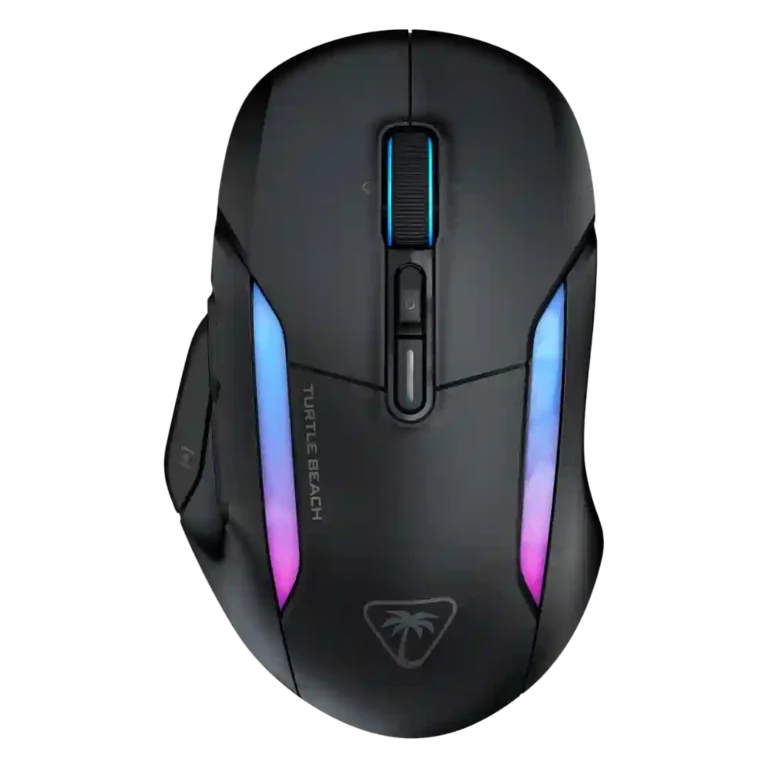
Choose the Turtle Beach Kone II Air if you want a large, ergonomic wireless mouse with long battery life and deep customization. Skip it if you have small hands, prioritize ultralight FPS speed, or want the lowest price.
Best for medium-to-large hand users who want a comfort-first wireless mouse with long battery life, stable 2.4GHz performance, and lots of programmable controls. It also suits productivity, RPG, and MMO-style workflows that benefit from Easy-Shift and profiles.
Not for small-hand users, ultralight mouse fans, or competitive FPS players who prioritize the lowest weight and highest polling-rate performance. It is also less ideal for buyers who want the cheapest wireless gaming mouse.
The Turtle Beach Kone II Air earns its best marks as a comfort-first wireless gaming mouse for medium-to-large hands. Across reviews, ergonomics, long battery life, stable 2.4GHz connectivity, glide, build quality, and SWARM II customization drew repeated praise. The tradeoff is that its large 110g body is not universally comfortable and can feel slow or awkward for smaller hands and competitive FPS play. Reviewers also split on value: some called it reasonably priced or worth the investment, while others felt the sensor ceiling, 1000Hz polling, and cheaper rivals made the full price harder to justify.
Compared with other Gaming Mice, this product is above average in software stability, tilt gesture controls, debounce customization, near average in long-session comfort, button customization, below average in motion consistency, polling rate, weight.
| Attribute | This product | Category average | Difference |
|---|---|---|---|
| software stability | 5.0 | 2.9 | +2.1 |
| motion consistency | 3.0 | 4.5 | -1.5 |
| tilt gesture controls | 4.5 | 3.0 | +1.5 |
| polling rate | 2.5 | 3.9 | -1.4 |
| weight | 3.1 | 4.1 | -1.0 |
| debounce customization | 4.8 | 3.6 | +1.2 |
| cross-platform compatibility | 2.8 | 3.9 | -1.1 |
| MMO gaming suitability | 4.6 | 3.5 | +1.1 |
Choose MSI Versa 300 Wireless 8K. It scores 4.7 vs 2.5 for polling rate, with a 4.4 overall score.
Choose Razer Basilisk Mobile. It scores 4.7 vs 4.2 for switch feel, with a 4.1 overall score.
Choose Logitech G502 X Plus. It scores 5.0 vs 3.0 for motion consistency, with a 3.9 overall score.
Choose ASUS ROG Harpe Ace Mini. It scores 4.7 vs 3.1 for weight, with a 4.2 overall score.
Products reviewers directly compared with this model, grouped into quick takeaways.
Yes. Reviewers repeatedly described it as a large, ergonomic mouse that suits medium-to-large hands especially well.
Weight is the biggest split. Some reviewers liked the planted, balanced feel, while others found the 110g body heavy and less versatile for fast play.
Battery life was one of the strongest themes. Most reviewers praised week-long or longer use, though one review measured less than the advertised 130 hours on wireless.
It can handle shooters, and some reviewers enjoyed it in FPS testing. Competitive FPS players may prefer lighter, higher-polling mice because several reviews flagged size, weight, or latency limits.
Reviewers generally liked SWARM II, calling it clean, intuitive, and much improved. The main limitation is that full customization was described as Windows-only.
Value opinions were mixed. Some reviewers called it reasonably priced for its comfort, battery, and customization, while others felt it was pricey or best considered on sale.
These are a few of the reviews included in our analysis.


Choose the ROG Harpe II Ace for ultralight FPS play, precise tracking, smooth glide, and web-based tuning. Skip it if you need palm-grip support, MMO buttons, onboard profiles, or long...
Pros: acceleration control, wireless latency
Cons: onboard memory, MMO gaming suitability

Choose it if you want a premium MMO/productivity mouse with 12 adjustable side buttons, strong battery life, and Stream Deck integration. Skip it if you need an ultralight FPS mouse,...
Pros: click latency, macro support
Cons: firmware reliability, tilt gesture controls

Best for ultra-light, competition-focused speed, precise tracking, stable wireless, and long battery life. Skip it if you need quieter clicks, left-handed support, Bluetooth, more buttons, or better value for casual...
Pros: balance and weight distribution, build quality
Cons: dock compatibility, Bluetooth support

Best for precise wireless tracking, smooth glide, strong battery life, and unusually good 8K value. Skip it if you need polished software, quiet snappy clicks, true left-handed controls, or gentle...
Pros: Accuracy and tracking precision, click latency
Cons: software stability, profile switching