Average score
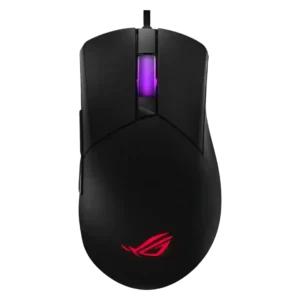
ASUS ROG Gladius III Wired
4.2
software stability
ASUS ROG Gladius III Wired
5.0
Software stability was praised in the Gear Link review for running quickly and reliably.
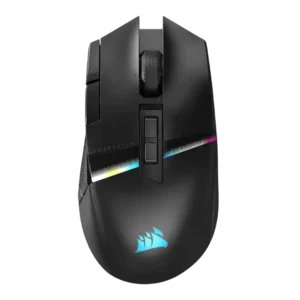
Corsair Darkstar RGB
1.8
Software stability is a concern, with reviews citing detection trouble, iCUE working only intermittently, and a random DPI-drop bug.
cable flexibility
ASUS ROG Gladius III Wired
4.2
Cable impressions were positive overall, especially the flexible, lightweight paracord, though one review noted occasional tangling.
Corsair Darkstar RGB
1.9
Cable flexibility is a repeated weakness: several reviewers criticize the included cable as stiff or not paracord-style.
value for money
ASUS ROG Gladius III Wired
4.6
Value for money was repeatedly praised through reasonable pricing, affordability, strong feature set, and getting a lot for the money.
Corsair Darkstar RGB
3.3
Value is mixed: reviewers admire the features and innovation, but many question or criticize the high price.
side button quality
ASUS ROG Gladius III Wired
3.9
Side button quality was context-dependent, with praise for tactile feedback and convenient placement but a left-hand usability complaint.
Corsair Darkstar RGB
2.7
Side button quality is the most divisive control issue: reviewers like the concept, but many complain that some buttons are hard to reach, unintuitive, or hit-or-miss.
software usability
ASUS ROG Gladius III Wired
4.0
Software usability was mostly positive for helpful diagrams and Gear Link convenience, but some reviewers found Armoury Crate less slick or mixed.
Corsair Darkstar RGB
2.9
Software usability is sharply split: PCMag and one YouTube review find it navigable, while several others call iCUE confusing, unintuitive, or a slog.
scroll wheel quality
ASUS ROG Gladius III Wired
3.5
Scroll wheel feedback was mixed, combining praise for detents and tactile stability with complaints about wobble or squeaking.
Corsair Darkstar RGB
2.5
Scroll wheel feedback is mixed-to-negative because multiple reviewers found it stiff or hard to press despite tactile steps.
handedness options
ASUS ROG Gladius III Wired
2.5
Handedness evidence was negative where a reviewer found the side buttons hard to hit with the left hand.
Corsair Darkstar RGB
1.5
Handedness is a clear limitation: the mouse is framed as unsuitable for left-handed gamers.
left and right click quality
ASUS ROG Gladius III Wired
3.7
Main click quality was mixed: some reviews praised crisp, quiet clicks, while others reported tightness or main-button wobble.
Corsair Darkstar RGB
4.6
Left and right click quality is a clear strength, with multiple reviews calling the main clicks wonderful, snappy, responsive, and tactile.
fingertip grip comfort
ASUS ROG Gladius III Wired
4.0
Fingertip grip comfort was acceptable to positive, ranging from possible to no-problem depending on hand size and review context.
Corsair Darkstar RGB
3.1
Fingertip comfort is mixed: one reviewer could transition easily, while another found fingertip use uncomfortable and nearly unusable.
RGB features
ASUS ROG Gladius III Wired
4.2
RGB was generally praised as stylish, subtle, bright, and configurable, though the Core review described a more limited two-zone setup.
Corsair Darkstar RGB
3.3
RGB opinions are mixed: some reviewers like the slick, versatile lighting, while others find key zones hidden, subtle, or battery-draining.
MMO gaming suitability
ASUS ROG Gladius III Wired
5.0
MMO suitability was strongly praised in the Gear Link review because SpeedShift was described as perfect for MMO players.
Corsair Darkstar RGB
4.2
MMO suitability is broadly positive because of the buttons, customization, and comfort, but the learning curve and side-button layout hold it back for some reviewers.
materials quality
ASUS ROG Gladius III Wired
3.9
Materials were mostly solid, but evidence was mixed by oil-prone shiny plastic and praise for sturdy or grippy hard plastic construction.
Corsair Darkstar RGB
4.7
Materials quality is praised through comments about premium-feeling surfaces, high-quality construction, and loved materials.
Bluetooth support
ASUS ROG Gladius III Wired
4.0
Bluetooth support was scored from a review that praised the breadth of the connectivity options including Bluetooth.
Corsair Darkstar RGB
3.3
Bluetooth support is useful for travel, secondary devices, and pairing flexibility, but reviewers warn it is too high-latency for gaming.
polling rate
ASUS ROG Gladius III Wired
3.5
Polling evidence was split: one review found average performance with jitter, while another did not notice significant inconsistencies.
Corsair Darkstar RGB
4.2
The 2,000Hz polling capability is praised as high-spec and useful for competitive play, though one reviewer felt the latency difference would often be hard to notice.
long-session comfort
ASUS ROG Gladius III Wired
4.2
Long-session comfort was positive, with reviewers describing comfort after hours, fatigue-free gaming, and planted extended swipes.
Corsair Darkstar RGB
4.8
Long-session comfort is strongly positive in the review that focused on endurance, calling it exceedingly comfortable over longer periods.
sensor performance
ASUS ROG Gladius III Wired
4.1
Sensor sentiment was mostly positive, ranging from steady and lag-free to more than sufficient or flawless, with one wired review noting lower sensor performance.
Corsair Darkstar RGB
4.7
The Marksman sensor is one of the strongest points: reviews call it impressive, accurate, spot-on, and competitive with top-tier gaming mouse sensors.
click noise
ASUS ROG Gladius III Wired
3.8
Click noise was mixed, with quiet main clicks in one review but squeaking called out in another.
Corsair Darkstar RGB
4.3
Click noise is generally favorable, with reviewers describing the switches as quiet or not overly noisy while keeping tactile feel.
balance and weight distribution
ASUS ROG Gladius III Wired
4.0
Weight distribution was praised in one wired review for being biased around the middle, helping swipes feel easier.
Corsair Darkstar RGB
4.6
Weight distribution is praised where discussed, with reviewers noting balanced feel and well-distributed mass.
2.4GHz connectivity
ASUS ROG Gladius III Wired
4.0
2.4GHz connectivity was scored from the review that tied the dongle setup to better reception and reliability.
Corsair Darkstar RGB
4.6
2.4GHz Slipstream is a strength, with reviewers praising its solid, low-latency connection and high polling capability.
palm grip comfort
ASUS ROG Gladius III Wired
4.3
Palm grip comfort was generally positive, with reviewers saying the mouse suited palm users or caused no problems for palm and fingertip users.
Corsair Darkstar RGB
3.8
Palm grip comfort is split by hand size: larger-hand palm users settled in well, while a smaller-hand palm user found the shape unwieldy.
durability over time
ASUS ROG Gladius III Wired
4.5
Durability over time was praised through hot-swappable repairability, longer useful life, and long-term value language.
Corsair Darkstar RGB
4.0
Durability over time has limited evidence, but one review expects the promised switches and rock-solid build to last for years.
onboard memory
ASUS ROG Gladius III Wired
5.0
Onboard memory was praised because configured settings could carry to another PC without needing the software again.
Corsair Darkstar RGB
4.5
Onboard memory earns praise because configured profiles and lighting can run without keeping iCUE open.
Accuracy and tracking precision
ASUS ROG Gladius III Wired
4.1
Tracking was usually described as steady, accurate, or perfect in games, though one wired test observed jitter during repetitive flicks.
Corsair Darkstar RGB
4.6
Reviewers consistently describe tracking as accurate, precise, smooth, and responsive across surfaces and games, with one heavier-body caveat handled under weight.
connection stability
ASUS ROG Gladius III Wired
4.0
Connection stability was supported by praise for better reception and reliability in the review discussing dongle placement.
Corsair Darkstar RGB
4.5
Connection stability is generally positive in play, with no issues reported in one review and low-latency wireless modes praised in another.
profile switching
ASUS ROG Gladius III Wired
4.0
Profile switching was supported by positive on-the-fly profile-switching evidence from the Gear Link review.
Corsair Darkstar RGB
4.5
Profile switching is useful once configured, with reviewers highlighting game-specific modes and on-the-fly profile changes.
shape comfort
ASUS ROG Gladius III Wired
3.8
Shape comfort depended heavily on hand size and preference, with praise for the signature ergonomic shape but complaints that it was chunky or not ideal for wider hands.
Corsair Darkstar RGB
4.2
Shape comfort is mostly positive, especially for medium-to-large hands, but one smaller-hand reviewer found it unwieldy.
claw grip comfort
ASUS ROG Gladius III Wired
3.8
Claw grip comfort was mostly positive but more qualified, with one review saying claw use worked only to a certain extent.
Corsair Darkstar RGB
4.2
Claw grip comfort has limited but positive evidence, with one reviewer saying claw use felt pretty good.
click latency
ASUS ROG Gladius III Wired
4.8
Click and wired latency impressions were very strong, with reviewers repeatedly describing instant registration or no meaningful lag.
Corsair Darkstar RGB
4.5
Direct click-response comments are positive, with reviewers describing the primary inputs as instant and right to the point.
glide smoothness
ASUS ROG Gladius III Wired
4.7
Glide smoothness was one of the strongest areas, with multiple reviews praising smooth, effortless, sublime, or unobstructed movement.
Corsair Darkstar RGB
4.4
Glide smoothness is mostly excellent thanks to large PTFE feet, though one reviewer found edge drag when leaning the mouse.
weight
ASUS ROG Gladius III Wired
3.8
Weight opinions were mixed: some reviewers liked the lighter feel, while others still found it heavy versus ultralight or FPS-focused mice.
Corsair Darkstar RGB
4.1
The Darkstar is heavier than esports-first mice but generally praised for being lighter than rival MMO mice and agile enough for quick movement.
switch feel
ASUS ROG Gladius III Wired
4.9
Switch feel was one of the strongest themes, with reviewers praising tactile, crisp, clicky, snappy, and customizable switch behavior.
Corsair Darkstar RGB
4.6
Switch feel is widely liked, with reviewers describing the clicks as wonderful, crisp, quiet, snappy, smooth, and cushiony.
FPS gaming suitability
ASUS ROG Gladius III Wired
3.8
FPS suitability was mixed: reviewers praised gaming capability and arm aiming but noted weight, shape adjustment, or missing DPI clutch caveats.
Corsair Darkstar RGB
4.1
FPS suitability is better than expected for an MMO mouse, with reviewers saying it handles shooters and flicks well, though not like ultralight FPS-first mice.
cross-platform compatibility
ASUS ROG Gladius III Wired
4.5
Cross-platform compatibility was scored from the review saying settings work on another PC without needing software.
Corsair Darkstar RGB
4.2
Cross-platform compatibility has limited but positive evidence, with one review calling the mouse versatile across Windows, Mac, and most OS setups.
ecosystem integration
ASUS ROG Gladius III Wired
4.5
Ecosystem integration was positive where the mouse was described as an excellent entry point into the ROG ecosystem.
Corsair Darkstar RGB
4.2
Ecosystem integration has limited but positive support, mainly around syncing multiple devices to one dongle.
switch durability
ASUS ROG Gladius III Wired
4.5
Switch durability scored well because reviewers valued improved switches, easy replacement, and the ability to extend the mouse’s useful life.
Corsair Darkstar RGB
4.2
Switch durability evidence is limited to optical-switch impressions, but one review says the actuation should last longer.
build quality
ASUS ROG Gladius III Wired
4.4
Build quality was a consistent strength, with reviewers praising sturdy, monolithic construction, lack of creaks, and solid assembly.
Corsair Darkstar RGB
4.7
Build quality is a major strength, with reviewers calling the mouse high-quality, rock-solid, extremely well built, and free of creaking.
ergonomic design
ASUS ROG Gladius III Wired
4.1
Ergonomics were often praised for comfort and shape, though one review emphasized that the chunky shape is not for everyone.
Corsair Darkstar RGB
4.3
Ergonomic design is generally praised for comfort, maneuverability, and right-handed control, though it is not universally the most ergonomic mouse.
button customization
ASUS ROG Gladius III Wired
4.6
Button customization was a major strength across reviews, especially hot-swappable switches, second-layer inputs, and broad button reassignment.
Corsair Darkstar RGB
4.4
Customization is one of the strongest themes, with reviewers praising deep button, DPI, RGB, gesture, and profile control despite software friction.
grip texture
ASUS ROG Gladius III Wired
4.5
Grip texture was consistently praised where reviewed, with grippy matte panels and side patterns that actually helped control.
Corsair Darkstar RGB
4.4
Grip texture is consistently liked, with rubberized or textured sides described as helpful, firm, grippy, and comfortable.
premium feel
ASUS ROG Gladius III Wired
4.3
Premium feel was generally positive, with praise for quality ROG branding, standout looks, and an aesthetically pleasing design.
Corsair Darkstar RGB
4.5
Premium feel is a consistent strength, supported by praise for its premium look, feel, materials, and build.
motion consistency
ASUS ROG Gladius III Wired
4.1
Motion consistency was generally praised for no lag, stutter, velocity drops, or unwanted movement, though one review saw jitter at flick peaks.
Corsair Darkstar RGB
4.2
Motion consistency evidence is limited but positive, with testing noting little to no noticeable jitter in the reviewed settings.
button responsiveness
ASUS ROG Gladius III Wired
4.6
Button responsiveness was a clear strength, with reviews praising instant registration, precise clicks, tactile response, and easy activation.
Corsair Darkstar RGB
4.5
Button responsiveness is mostly strong: clicks are described as instant, smooth, snappy, and responsive across several reviews.
DPI range
ASUS ROG Gladius III Wired
4.5
Reviewers praised the high DPI ceiling and sensitivity, saying it made movement easier across screens and placed the mouse among very sensitive options.
Corsair Darkstar RGB
4.5
The 26,000 DPI ceiling is treated as more than enough for most users, with praise for sensitivity and fine adjustment.
programmable buttons
ASUS ROG Gladius III Wired
4.4
Programmable controls were praised through remapping, SpeedShift, macro-related options, and customizable side buttons.
Corsair Darkstar RGB
4.4
The large programmable-button set is a major selling point, especially for assigning skills, abilities, potions, and other inputs.
macro support
ASUS ROG Gladius III Wired
4.2
Macro support received positive evidence where reviewers described helpful macro assignment or macro recording within the software feature set.
Corsair Darkstar RGB
4.2
Macro support is viewed as useful for gaming and productivity, especially when mapped to creative tools, inventory management, or key presses.
wireless performance
ASUS ROG Gladius III Wired
4.5
Wireless performance was praised in the review that discussed tri-mode connectivity as outstanding with more options than needed.
Corsair Darkstar RGB
4.5
Wireless performance is broadly strong, with reviewers praising Slipstream responsiveness and wired-like behavior while noting some hardware omissions.
lift-off distance
ASUS ROG Gladius III Wired
4.5
Lift-off distance control was praised as a software luxury because it could reduce the effect of lifting during play.
Corsair Darkstar RGB
4.5
Lift-off behavior is praised where tested, especially the improved control and instant cut-off during repositioning.
battery life
ASUS ROG Gladius III WiredNo score yet
Corsair Darkstar RGB
2.2
Battery life is the most repeated complaint, especially with RGB enabled, where reviews call endurance disappointing or far from exceptional.
charging convenience
ASUS ROG Gladius III WiredNo score yet
Corsair Darkstar RGB
2.5
Charging convenience is mixed: USB-C access can be easy, but the stiff cable and missing dongle extender make wired charging less pleasant.
MOBA gaming suitability
ASUS ROG Gladius III WiredNo score yet
Corsair Darkstar RGB
4.5
MOBA suitability is also strong, with reviewers calling the Darkstar natural or versatile for MOBAs and related skill-heavy games.
portability
ASUS ROG Gladius III WiredNo score yet
Corsair Darkstar RGB
4.1
Portability is supported by Bluetooth, multi-device flexibility, and versatile connection behavior, though it is not a major review theme.
skate durability
ASUS ROG Gladius III Wired
4.0
Skate durability was supported by positive evidence around included replacement skates and accessories helping keep the mouse in better shape.
Corsair Darkstar RGBNo score yet
surface compatibility
ASUS ROG Gladius III WiredNo score yet
Corsair Darkstar RGB
4.7
Surface compatibility is strong, with reviewers reporting excellent tracking across surfaces and improved feel after calibration.
tilt gesture controls
ASUS ROG Gladius III WiredNo score yet
Corsair Darkstar RGB
4.0
Tilt gestures are a standout but divisive feature: several reviewers love or rely on them, while others report sensitivity, calibration, or reliability issues.
wireless latency
ASUS ROG Gladius III WiredNo score yet
Corsair Darkstar RGB
4.6
Wireless latency is praised on 2.4GHz, with reviewers reporting low-latency play and no practical latency issues.