Average score
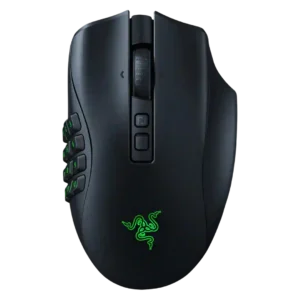
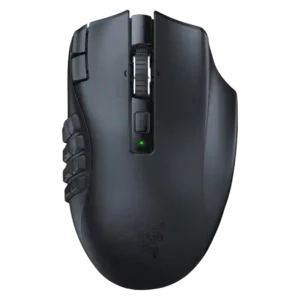
Razer Naga V2 HyperSpeed
3.9
cable flexibility
Razer Naga V2 Pro
4.5
Cable quality was praised where discussed, especially the soft, smooth charging cable and the included woven cable.
Razer Naga V2 HyperSpeed
1.5
Cable flexibility was a weak point because one reviewer specifically criticized the lack of a cable connection option.
fingertip grip comfort
Razer Naga V2 Pro
4.0
Fingertip grip was mentioned as usable, but support was limited and less central than palm or claw grip.
Razer Naga V2 HyperSpeed
1.5
Fingertip grip was a poor match because the weight and thumb grid make that grip style impractical.
charging convenience
Razer Naga V2 Pro
4.1
Charging was mostly convenient, especially through the flexible cable or optional dock, though one user disliked unplugging the cable and others questioned dock value.
Razer Naga V2 HyperSpeed
2.3
Charging convenience was mixed to negative: battery swapping can be useful mid-session, but several reviewers disliked the lack of charging.
software stability
Razer Naga V2 Pro
2.4
Software stability was a notable concern, with reports of Synapse bugs, profile problems, and lighting glitches.
Razer Naga V2 HyperSpeed
4.0
Software stability had limited but positive evidence, with Synapse described as much improved from its older overburdened state.
materials quality
Razer Naga V2 Pro
4.5
Materials were generally viewed positively, with matte plastic and textured surfaces described as good-feeling and premium enough.
Razer Naga V2 HyperSpeed
3.3
Materials quality was mixed: one detailed review praised rigidity, while another felt the plastic construction was obvious.
polling rate
Razer Naga V2 Pro
3.9
The 1,000Hz polling rate was usually seen as enough for most users, though lack of higher polling disappointed some.
Razer Naga V2 HyperSpeed
5.0
Measured polling was excellent, with stable 1000Hz operation and minimal jitter in the detailed latency test.
left and right click quality
Razer Naga V2 Pro
4.5
Main click quality was praised as satisfying, with a good amount of give.
Razer Naga V2 HyperSpeed
3.5
Main click quality was split: one review praised crisp tactile feedback while another felt the MX Master clicks and plastic felt better.
surface compatibility
Razer Naga V2 Pro
5.0
Surface compatibility was praised in the reviews that tested it, with tracking and glide working well across desks or mouse mats.
Razer Naga V2 HyperSpeed
4.0
Surface compatibility was good overall, especially on tempered glass, though one review noticed minor jitter on frosted glass.
glide smoothness
Razer Naga V2 Pro
4.8
Glide was praised as smooth, with quality PTFE feet helping the heavy mouse move cleanly across mouse mats.
Razer Naga V2 HyperSpeed
4.0
Glide was positive overall after break-in, with smooth PTFE performance across common pad surfaces.
ergonomic design
Razer Naga V2 Pro
4.7
Ergonomics were widely praised, especially for medium-to-large right-handed users and long MMO sessions.
Razer Naga V2 HyperSpeed
3.9
Ergonomics were generally strong for right-handed palm users, but one reviewer disliked how the side buttons force a specific grip.
macro support
Razer Naga V2 Pro
5.0
Macro support was praised as easy and useful, especially for MMOs and complex workflows.
Razer Naga V2 HyperSpeed
4.3
Macro support was strong for MMO use and general commands, but one reviewer found the macro sequence tools limited versus a Stream Deck.
claw grip comfort
Razer Naga V2 Pro
3.8
Claw grip comfort was acceptable for some users, though the 12-button side plate could make claw grip harder.
Razer Naga V2 HyperSpeed
3.0
Claw grip was usable but compromised, requiring thumb extension and feeling less natural than palm grip.
shape comfort
Razer Naga V2 Pro
4.4
Shape comfort was broadly positive, though the bulky body works better for larger hands and MMO-style use than ultralight FPS play.
Razer Naga V2 HyperSpeed
3.8
Shape comfort was positive in one review but only average in another, with comfort depending on grip style and surface.
DPI range
Razer Naga V2 Pro
4.7
The high DPI range and DPI configuration options were praised as part of the mouse's high-performance sensor package.
Razer Naga V2 HyperSpeed
4.0
The DPI ceiling was seen as enormous and useful headroom, though one reviewer also called that much DPI unnecessary for real use.
software usability
Razer Naga V2 Pro
4.2
Software usability was powerful and often easy for basic setup, but the depth of options could feel overwhelming or clunky.
Razer Naga V2 HyperSpeed
3.6
Software usability was mostly positive for remapping and customization, but deeper macro workflows and generic keybind setup felt limited to some reviewers.
Bluetooth support
Razer Naga V2 Pro
2.7
Bluetooth was viewed as useful for battery life or fallback use, but several reviewers warned it felt slower or worse than 2.4GHz for gaming.
Razer Naga V2 HyperSpeed
3.3
Bluetooth support was useful for flexibility and battery life, but reviewers warned that it is laggier than 2.4GHz for gaming.
side button quality
Razer Naga V2 Pro
4.5
Side button quality was usually praised for tactile feel and secure panels, though the dense 12-button layout challenged some users.
Razer Naga V2 HyperSpeed
4.0
Side button quality was mixed but mostly positive: several reviewers liked reach, tactility, and click feel, while one found the grid hard to learn.
build quality
Razer Naga V2 Pro
5.0
Build quality was consistently described as sturdy, solid, premium, and reassuring despite the modular side-plate design.
Razer Naga V2 HyperSpeed
4.5
Build quality was consistently positive, ranging from industry-leading praise to solid shell rigidity and a positive owner impression.
motion consistency
Razer Naga V2 Pro
5.0
Motion consistency was praised, with reviewers describing the sensor and movement as smooth, consistent, and accurate.
Razer Naga V2 HyperSpeed
4.5
Motion consistency was praised after surface calibration removed tracking inconsistency on a textured pad.
RGB features
Razer Naga V2 Pro
3.2
RGB reactions were mixed: some liked the lighting and Chroma control, while others disliked limited zones or battery waste.
Razer Naga V2 HyperSpeed
2.8
RGB evidence was conflicting: one test praised visible lighting, while another reviewer was disappointed that their unit lacked RGB lighting.
programmable buttons
Razer Naga V2 Pro
4.9
Programmable buttons were a core strength, with reviewers praising the sheer number and flexibility of assignable controls.
Razer Naga V2 HyperSpeed
4.5
Programmable button density was repeatedly praised across reviews, especially the 12-button grid and the broader 19-button layout.
MOBA gaming suitability
Razer Naga V2 Pro
4.9
MOBA suitability was also positive, especially when using the six-button panel for accessible extra commands.
Razer Naga V2 HyperSpeed
4.5
MOBA suitability was positive but narrower, supported mainly by the detailed review’s League of Legends and MMO/MOBA macro-control testing.
weight
Razer Naga V2 Pro
2.9
Weight was the most repeated drawback, with many reviewers calling the mouse heavy or less ideal for fast FPS movement.
Razer Naga V2 HyperSpeed
3.3
Weight was the clearest tradeoff: reviewers accepted the mass for stability, but repeatedly noted that it is not light and can cause fatigue.
2.4GHz connectivity
Razer Naga V2 Pro
5.0
Reviewers found the 2.4GHz HyperSpeed connection essentially wired-like, with strong responsiveness and no meaningful connection complaints.
Razer Naga V2 HyperSpeed
4.6
2.4GHz connectivity was highly rated for easy setup, fast connection, stable polling, and near-wired latency.
tilt gesture controls
Razer Naga V2 Pro
4.7
Tilt controls were positively received as useful extra inputs, especially for spreadsheet navigation or in-game shortcuts.
Razer Naga V2 HyperSpeed
5.0
Tilt controls were praised as quick, easy, comfortable shortcuts on the scroll wheel.
scroll wheel quality
Razer Naga V2 Pro
4.4
The HyperScroll Pro wheel drew frequent praise for deep customization, though some reviewers found presets stiff or overkill.
Razer Naga V2 HyperSpeed
4.7
The scroll wheel was a consistent strength, with praise for tactile detents, free-scroll usefulness, tilt actions, and overall functionality.
FPS gaming suitability
Razer Naga V2 Pro
3.3
FPS suitability was the most mixed gaming use case: performance was strong, but the heavy body hurt fast-flick shooter appeal.
Razer Naga V2 HyperSpeed
3.0
FPS suitability was mixed to poor overall: one review found DOOM easy enough, but detailed testing warned the weight hurts rapid flicks.
wireless performance
Razer Naga V2 Pro
4.9
Wireless performance was consistently strong over 2.4GHz, with reviewers describing it as seamless, reliable, and hiccup-free.
Razer Naga V2 HyperSpeed
4.7
Wireless performance was a standout, with reviewers favoring HyperSpeed and praising its speed, reliability, and general connectivity.
grip texture
Razer Naga V2 Pro
4.3
Grip texture was praised for improving control and comfort, particularly on the right side and two-/six-button plates.
Razer Naga V2 HyperSpeed
4.5
Grip texture was praised for keeping the thumb and hand secure during rapid side-button use.
long-session comfort
Razer Naga V2 Pro
4.5
Long-session comfort was generally strong, with reviewers noting comfortable grip and use over extended play or work.
Razer Naga V2 HyperSpeed
4.3
Long-session comfort was positive for palm-grip MMO or productivity use, though the broader weight evidence limits that comfort for fast genres.
palm grip comfort
Razer Naga V2 Pro
4.5
Palm grip comfort was strong for reviewers who use that grip, though the mouse favors larger or average hands.
Razer Naga V2 HyperSpeed
4.8
Palm grip comfort was one of the strongest ergonomic matches, especially for users whose hands fit the raised shell and thumb grid.
premium feel
Razer Naga V2 Pro
4.8
The mouse was often described as premium or substantial, with a solid feel matching its high-end positioning.
Razer Naga V2 HyperSpeed
4.5
Premium feel was positive in the detailed and owner reviews, especially because the mouse felt refined and more premium than cheaper alternatives.
wireless latency
Razer Naga V2 Pro
5.0
Wireless latency was praised as effectively wired-like, with reviewers reporting no lag or very low latency.
Razer Naga V2 HyperSpeed
4.8
Wireless latency was strongly positive over 2.4GHz, described as practically lag-free and imperceptible during gameplay.
switch durability
Razer Naga V2 Pro
4.8
Switch durability inspired confidence, with reviewers citing long-rated optical switches and peace of mind.
Razer Naga V2 HyperSpeed
4.5
Switch durability evidence was positive but short-term, focused on optical switches avoiding older double-click issues.
button customization
Razer Naga V2 Pro
4.7
Customization was one of the clearest strengths, with swappable plates and extensive button options praised across nearly every review.
Razer Naga V2 HyperSpeed
4.5
Button customization was a major strength, with reviewers mapping many commands, although one productivity-focused review found deeper sequences limited.
switch feel
Razer Naga V2 Pro
4.6
Switch feel was praised as crisp, tactile, responsive, and satisfying.
Razer Naga V2 HyperSpeed
4.5
Switch feel was generally positive, with crisp tactile feedback in testing and another reviewer saying Razer felt better to click.
button responsiveness
Razer Naga V2 Pro
4.9
Button response was rated highly, with clicks described as tactile, responsive, satisfying, and free of noticeable delay.
Razer Naga V2 HyperSpeed
5.0
Main button response was rated highly thanks to fast optical switch response and zero debounce delay.
value for money
Razer Naga V2 Pro
3.3
Value was mixed: reviewers praised the feature set but repeatedly noted the high price and overkill factor.
Razer Naga V2 HyperSpeed
3.4
Value was mixed: MMO-focused reviewers found the feature set worth it, while others objected to the price or brand premium.
battery life
Razer Naga V2 Pro
4.6
Battery life was broadly praised, especially with RGB reduced or disabled, though one reviewer saw faster drain with lighting on.
Razer Naga V2 HyperSpeed
4.5
Battery life was praised as long, with measured HyperSpeed runtime near the claim and Bluetooth runtime described as very long.
Accuracy and tracking precision
Razer Naga V2 Pro
4.9
Tracking accuracy was repeatedly praised as precise, flawless, or consistently smooth across gaming and desktop use.
Razer Naga V2 HyperSpeed
5.0
Review testing praised precise 1:1 tracking, especially consistent cursor placement without microstutter during ground-targeted MMO actions.
MMO gaming suitability
Razer Naga V2 Pro
4.7
MMO suitability was the strongest consensus area, with reviewers repeatedly calling it a top or indispensable MMO mouse.
Razer Naga V2 HyperSpeed
4.8
MMO suitability was the strongest consensus point, with multiple reviewers calling it powerful, great, or one of the best in the MMO niche.
portability
Razer Naga V2 Pro
4.2
Portability benefited from dongle storage and usable travel workflows, despite the mouse not being especially lightweight.
Razer Naga V2 HyperSpeed
4.2
Portability was helped by mobile use, a magnetic dongle compartment, and a magnetized cover that reviewers liked.
connection stability
Razer Naga V2 Pro
5.0
Connection stability was praised for lag-free, dropout-free wireless performance during games.
Razer Naga V2 HyperSpeed
5.0
Connection stability was excellent in the two reviews that discussed it, with no disconnections or stutters reported.
click latency
Razer Naga V2 Pro
5.0
Click latency drew strong praise, with reviewers reporting no noticeable delay in button registration.
Razer Naga V2 HyperSpeed
5.0
Click latency was judged effectively imperceptible in play, with the wireless result landing extremely close to a wired comparison.
sensor performance
Razer Naga V2 Pro
5.0
Sensor performance was consistently praised, with the Focus Pro sensor described as excellent, accurate, and responsive.
Razer Naga V2 HyperSpeed
5.0
The sensor was described as flawless in the strongest test review, with the Focus Pro 30K treated as a standout performance point.
balance and weight distribution
Razer Naga V2 ProNo score yet
Razer Naga V2 HyperSpeed
4.3
Balance was viewed positively because the weight felt controlled and stable rather than random or poorly distributed.
click noise
Razer Naga V2 ProNo score yet
Razer Naga V2 HyperSpeed
3.0
Click noise was middle-of-the-road, with the reviewer saying it was neither very quiet nor especially loud.
cross-platform compatibility
Razer Naga V2 Pro
3.5
Platform support was mixed: connectivity options widened device use, but Synapse being Windows-only limited full customization.
Razer Naga V2 HyperSpeedNo score yet
dock compatibility
Razer Naga V2 Pro
3.8
Dock support was useful and convenient for some reviewers, but others noted it added cost or was unnecessary if the cable worked well.
Razer Naga V2 HyperSpeedNo score yet
durability over time
Razer Naga V2 Pro
4.0
Durability evidence was positive but limited, centered on confidence from sturdy build quality and long-lasting switches.
Razer Naga V2 HyperSpeedNo score yet
ecosystem integration
Razer Naga V2 Pro
4.0
Ecosystem integration was useful for users already in Razer's Chroma/Synapse setup, especially RGB syncing.
Razer Naga V2 HyperSpeedNo score yet
handedness options
Razer Naga V2 ProNo score yet
Razer Naga V2 HyperSpeed
1.0
Handedness options were poor because the shape prevents ambidextrous use and left-handed MMO users were called out as unsupported.
onboard memory
Razer Naga V2 Pro
5.0
Onboard memory was praised as a major convenience because profiles can live on the mouse without constant Synapse use.
Razer Naga V2 HyperSpeedNo score yet
profile switching
Razer Naga V2 Pro
3.8
Profile switching was powerful when it worked, but one user had unstable automatic switching and awkward manual access.
Razer Naga V2 HyperSpeedNo score yet