Razer Naga V2 HyperSpeed Review
Bottom Line
Choose it for MMO macro control, stable wireless, and long battery life. Skip it if you need a light ambidextrous mouse or built-in USB charging.
Best for right-handed MMO or MOBA players who want many programmable buttons, dependable 2.4GHz wireless, and long battery life. It also suits productivity users who want mouse-based shortcuts.
Not for left-handed users, fingertip-grip players, or FPS-first buyers who prioritize low weight and fast flick control. It is also a poor fit if you want USB-C charging instead of replaceable AA batteries.
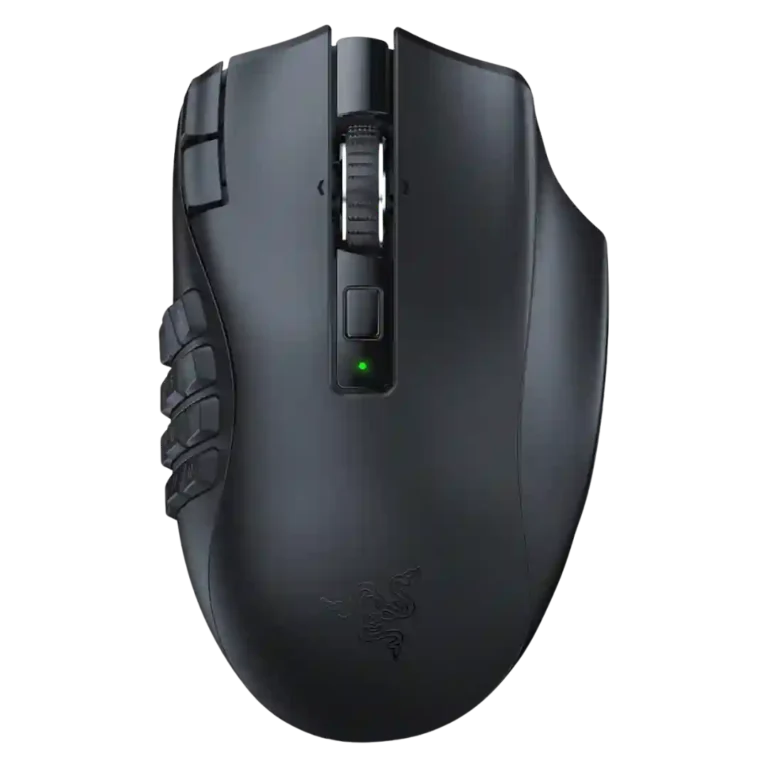
The Razer Naga V2 HyperSpeed comes across as a focused MMO mouse rather than a general-purpose wireless gaming mouse. Across the reviews, its biggest strengths are the dense programmable button layout, dependable 2.4GHz wireless performance, strong Focus Pro sensor evidence, and long AA battery life. The tradeoff is clear: the same thumb grid and battery-powered body that make it useful for macros also make it heavy, right-handed, and less natural for FPS or fingertip users. It is most convincing for players who will actually use the side buttons and Synapse remapping; buyers who only need a few shortcuts may find cheaper, lighter, or rechargeable mice more practical.
What Reviewers Agree On
The strongest agreement across the uploaded reviews is that the Razer Naga V2 HyperSpeed is built around button density and wireless MMO control. Reviewers repeatedly point to the 12-button side grid, 19 programmable buttons overall, and Razer Synapse remapping as the main reason to consider it. The detailed testing review adds the strongest performance evidence, describing reliable Focus Pro 30K tracking, 1000Hz 2.4GHz polling, low wireless latency, and stable connection behavior. Other reviews echo the practical side of that experience by calling the 2.4GHz mode fast, easy to connect, and close to wired in feel.
Comfort and fit are more conditional. The mouse is consistently framed as a right-handed, palm-oriented MMO shape with a large body and thumb grid. That shape can feel stable and comfortable for long MMO or productivity sessions, especially for users who want many shortcuts under the thumb. At the same time, reviewers call out the weight, the limited left-handed appeal, and the learning curve of navigating so many side buttons. One review warns that rougher surfaces can force a specific grip to avoid accidental side-button presses, while the detailed test says fingertip grip is impractical and claw grip users may notice fatigue.
The biggest buying tradeoff is convenience versus control. Battery life receives strong marks, with reviews citing long runtimes in both HyperSpeed and Bluetooth modes, but several also dislike the AA battery approach because there is no USB charging or wired fallback. Value is similarly mixed: the mouse looks compelling for serious MMO and MOBA players who need macro density, but it is harder to justify for casual users, FPS-first players, or anyone expecting a lightweight rechargeable mouse with broad grip flexibility.
Scored Features
Pros
-
Programmable button density is a defining strength, with reviewers consistently citing 12 side buttons or many programmable buttons overall.
-
Sensor performance is supported by references to the Focus Pro 30K optical sensor in multiple reviews.
-
Wireless performance is positive in the remaining evidence, with reviewers noting strong connectivity and practically no perceived lag in HyperSpeed mode.
-
Wireless latency is supported by one reviewer who says HyperSpeed feels practically wired with no noticeable lag.
-
Connection stability is described positively, with one reviewer saying the mouse stayed connected throughout a house and another showing quick Bluetooth setup.
-
Scroll wheel quality is a recurring positive thanks to tilt inputs, tactile and free-spin modes, and easy customization across multiple reviews.
-
MMO suitability is the product’s clearest strength, with reviews consistently presenting it as an MMO mouse built around high button density and macro use.
-
Long-session comfort remains positive in one review, which says the mouse is good for long periods of use.
-
Macro support is a major strength, with reviewers repeatedly connecting the 12-button grid and software customization to macros, commands, and MMO or productivity control.
-
Battery life is treated as a strength overall, with reviewers citing up to 250 hours over HyperSpeed and up to 400 hours over Bluetooth, though convenience depends on AA batteries.
-
The mouse is repeatedly described as supporting a 2.4GHz dongle or HyperSpeed wireless mode, with reviewers noting simple setup and useful wireless connectivity.
-
Button customization is one of the clearest recurring positives, with reviewers repeatedly noting that buttons can be customized, remapped, or assigned keybinds and commands.
-
Premium feel is mixed-positive: some reviewers say it looks or feels premium, while the plastic build and AA battery design limit the luxury impression.
-
Switch feel is positive overall, with reviewers describing mechanical switches, tactile feel, and better-feeling clicks than cheaper third-party mice.
-
The remaining support is positive from one review, which says the mouse keeps its weight evenly distributed while sliding.
-
Build quality trends positive, with reviewers praising Razer construction and premium feel, though plastic construction and feature omissions temper the impression.
-
DPI and sensitivity options are well supported, with reviews citing up to 30,000 DPI, tracking-speed adjustment, and multiple sensitivity stages in software.
-
Bluetooth is confirmed as an available secondary wireless mode, with reviewers contrasting it against Razer's faster HyperSpeed connection and emphasizing its longer battery-life role.
-
Software stability is only directly covered by one review, which says Synapse has improved and is no longer an over-encumbered mess.
-
Side button quality is broadly positive for MMO use, with reviewers noting easy reach, shaped or tactile reference points, and clicky buttons, though accidental presses and learning curve are concerns.
-
Palm grip comfort is supported by reviewers who describe the mouse as palm-fitting and designed around a palm-oriented ergonomic hold.
-
Portability is supported by the included pouch, onboard dongle storage, and the idea that the same mouse setup can be used while traveling.
-
Polling rate support is supported by one review citing selectable 125, 500, or 1000Hz operation.
-
Ergonomics are generally strong for right-handed MMO or productivity use, especially palm-oriented holds, but some users may need to adapt their thumb placement around the side buttons.
-
Software usability is mostly positive for remapping and keybinds, but one reviewer finds macro sequence options limited compared with a Stream Deck.
-
Shape comfort is generally best for palm-oriented use, though one productivity-focused review says the thumb grid can restrict grip freedom.
-
Profile or sensitivity-stage switching is supported by one review through software sensitivity stages and mouse-wheel remapping.
-
Button responsiveness is supported by reviewers who found the side buttons easy to press, easier or harder depending on placement, and clicky in a positive way.
-
FPS suitability is only partly supported: one review says DOOM was easy enough, but the same review frames the macro keys as mostly nonsensical for that type of game.
-
Grip support is mixed but useful, with one review praising the grainy texture and another warning that thumb placement can feel constrained on rougher surfaces.
-
Click noise receives a middle score because one reviewer says it is neither especially quiet nor especially loud.
Cons
-
Materials quality is mixed because the mouse is repeatedly described as plastic, with some reviewers still finding it grippy or acceptable and one comparing it less favorably to a higher-end productivity mouse.
-
Value is mixed: reviewers like the MMO-focused feature set and Razer build quality, but several also call out the high price or cheaper mice with more features.
-
Weight is a notable drawback in the remaining evidence, with one review describing the mouse as not light.
-
Main click quality is mixed in the remaining evidence, with one reviewer comparing the clicks unfavorably to the MX Master.
-
Surface compatibility is mixed in the remaining evidence because one reviewer says rougher surfaces can force awkward thumb placement or accidental presses.
-
Charging convenience is a drawback because reviewers emphasize the double-A battery design, lack of USB charging, and need to replace or recharge separate batteries.
-
Handedness is a drawback in the remaining evidence because the mouse is identified as right-handed only.
-
RGB is mostly a limitation in the remaining supported reviews, which state that this HyperSpeed version has no RGB lighting.
FAQ
Is the Razer Naga V2 HyperSpeed worth buying?
It is worth buying if you will use the 12-button side grid, macros, and stable 2.4GHz wireless mode. It is harder to justify if you only need a few shortcuts or prefer a lighter rechargeable mouse.
Who is the Razer Naga V2 HyperSpeed best for?
It is best for right-handed MMO and MOBA players who use many abilities, hotkeys, or macros. It can also work for productivity users who want lots of thumb-accessible shortcuts.
What is the main drawback of the Razer Naga V2 HyperSpeed?
The main drawback is the heavy, right-handed AA-battery design. Reviews also point to the lack of USB charging and a learning curve for the side-button grid.
Is the Razer Naga V2 HyperSpeed good for FPS games?
It can work because the sensor and wireless performance are strong, but the reviews do not frame it as an FPS-first mouse. The weight and thumb grid make it less suitable for fast flicks than ultralight FPS mice.
How good is the battery life?
Battery life is one of its better-supported strengths. The uploaded reviews cite about 250 hours in HyperSpeed mode and up to around 400 hours in Bluetooth, depending on the source and usage.
Does it support Bluetooth and 2.4GHz wireless?
Yes. Reviews consistently confirm both Bluetooth and 2.4GHz wireless support, with 2.4GHz treated as the better option for gaming performance and Bluetooth as the battery-friendly mode.
Does the Razer Naga V2 HyperSpeed have RGB lighting?
The uploaded transcripts conflict on this point: most sources say this model has no RGB, while one detailed review describes RGB lighting zones. Because of that conflict, the safer buyer takeaway is not to treat RGB as a reliable selling point from these reviews.
Video Reviews
Article Reviews
Best Gaming Mouse Alternatives
Choose the Model D3 for flexible wireless gaming, comfort, and precise control. Skip it if the high price or shorter high-polling battery life matters more.
Pros: Accuracy and tracking precision, switch durability, FPS gaming suitability, charging convenience, sensor performance, click latency, wireless latency
Cons: none
Choose the Harpe II Ace for ultralight FPS control, 8K wireless, and easy web setup. Skip it if you need many buttons or steady long battery life in...
Pros: polling rate, weight, wireless performance, DPI range, switch durability, sensor performance, motion consistency
Cons: onboard memory, MMO gaming suitability, software stability, profile switching
Choose the Razer Basilisk V3 Pro 35K for ergonomic comfort, precise tracking, and feature-rich wireless control. Skip it if you want an ultralight FPS mouse or better value...
Pros: motion consistency, sensor performance, DPI range, build quality, macro support, click latency, acceleration control
Cons: handedness options, value for money, weight, fingertip grip comfort
Choose it for precise tracking, comfortable right-handed shape, and swappable switches. Skip it if you need ultralight weight, left-handed ergonomics, or cleaner software value.
Pros: click latency, durability over time, wireless latency, switch durability, Accuracy and tracking precision, 2.4GHz connectivity, sensor performance
Cons: software stability, handedness options, firmware reliability