Compare Razer Naga V2 HyperSpeed vs Glorious Model D3
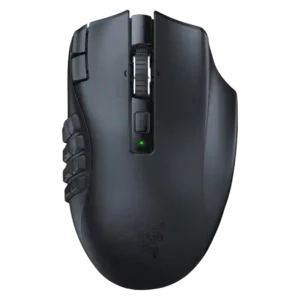

The mouse is repeatedly described as supporting a 2.4GHz dongle or HyperSpeed wireless mode, with reviewers noting simple setup and useful wireless connectivity.
Review evidence consistently confirms 2.4 GHz wireless use through the receiver or dongle, with rated battery figures and high polling support tied to that mode.
The only direct acceleration evidence is the specification table listing 50G max acceleration; no review gives hands-on acceleration-control testing.
Reviewers repeatedly describe the D3 as precise, accurate, and responsive in play, with only one review noting minor wireless tracking consistency fluctuation under certain conditions.
The remaining support is positive from one review, which says the mouse keeps its weight evenly distributed while sliding.
Balance feedback is mixed: one review barely noticed the battery's effect, while another felt extra rear weight and said the mouse was not perfectly balanced.
Battery life is treated as a strength overall, with reviewers citing up to 250 hours over HyperSpeed and up to 400 hours over Bluetooth, though convenience depends on AA batteries.
Battery feedback centers on the swappable system. Rated figures are high, but some testing found much shorter runtime at high polling rates or with full features enabled.
Bluetooth is confirmed as an available secondary wireless mode, with reviewers contrasting it against Razer's faster HyperSpeed connection and emphasizing its longer battery-life role.
Bluetooth is clearly supported across the review set and is associated with multi-device or tri-mode use, though reviewers generally emphasize 2.4 GHz for gaming.
Build quality trends positive, with reviewers praising Razer construction and premium feel, though plastic construction and feature omissions temper the impression.
Build quality is mostly positive, with high-quality finish and solid construction noted, though one hands-on force test found some side flex on the Model D shape.
Button customization is one of the clearest recurring positives, with reviewers repeatedly noting that buttons can be customized, remapped, or assigned keybinds and commands.
Customization is a clear strength: reviewers mention assignable mouse buttons, a customizable dock button, DPI controls, key binding, and reprogrammable controls.
Button responsiveness is supported by reviewers who found the side buttons easy to press, easier or harder depending on placement, and clicky in a positive way.
Button responsiveness is positive overall, with direct response, quiet clicks, and no in-game issue from minor physical give reported.
Charging convenience is a drawback because reviewers emphasize the double-A battery design, lack of USB charging, and need to replace or recharge separate batteries.
Charging convenience is a major theme. Reviewers highlight swappable batteries, a charging base, Guardian battery fallback, and quick battery changes without cable dependence.
Claw grip evidence is positive but limited. Reviews mention suitability for claw users and one practical comfort impression, while the D3 is more often discussed as an ergonomic palm-friendly shape.
Latency impressions are strong. Reviews describe ultra-low latency, no lag, no delays, and no detectable responsiveness difference between wired and wireless use.
Click noise receives a middle score because one reviewer says it is neither especially quiet nor especially loud.
Click noise is mixed: one reviewer found the mouse very quiet, while another said the optical switches were not particularly quiet.
Connection stability is described positively, with one reviewer saying the mouse stayed connected throughout a house and another showing quick Bluetooth setup.
Connection stability is a strength. Reviewers report no dropouts, no disconnections during battery swaps, and uninterrupted fallback behavior, with one firmware-related battery switching caveat.
Compatibility is broad at the connection level through 2.4 GHz, Bluetooth, and wired modes, but one review notes the software itself is currently Windows-only.
Debounce customization is directly supported in software, with reviewers noting debounce time or bounce-time settings alongside other performance controls.
The dock is central to the product experience. It charges batteries, hosts the receiver, shows status, and adds controls, although one reviewer saw the extra PC connection as a downside.
DPI and sensitivity options are well supported, with reviews citing up to 30,000 DPI, tracking-speed adjustment, and multiple sensitivity stages in software.
DPI support is strong, with up to 30,000 DPI, fine adjustment increments, dock or mouse controls, and software-configurable levels.
Durability evidence comes mainly from optical switches rated for 130 million clicks and reviewers noting solid construction, not from long-term ownership testing.
The mouse, Guardian battery, dock, receiver, and Glorious Core software are presented as a cohesive ecosystem with status lights, battery management, button control, and saved settings.
Ergonomics are generally strong for right-handed MMO or productivity use, especially palm-oriented holds, but some users may need to adapt their thumb placement around the side buttons.
Ergonomic feedback is mostly positive for the D3, especially for right-handed comfort, although one reviewer disliked the RGB gap enough to avoid using the D3.
Fingertip-grip evidence is positive but narrower, with reviews naming fingertip suitability and comfort alongside palm and claw grip support.
Firmware reliability is mixed: updates are supported, but one review reports battery-switching issues that Glorious was working to fix through firmware.
FPS suitability is only partly supported: one review says DOOM was easy enough, but the same review frames the macro keys as mostly nonsensical for that type of game.
FPS suitability is supported by fast, precise aiming, low latency, lightweight handling, and explicit praise for fast FPS games and gaming performance.
Glide smoothness is consistently praised through PTFE feet, low-friction movement, easy movement on mats, and smooth movement without scratching.
Grip support is mixed but useful, with one review praising the grainy texture and another warning that thumb placement can feel constrained on rougher surfaces.
Grip texture is mixed. One review likes the matte smooth plastic, while another says it lacks added grip tape and does not use a soft-touch coating.
Handedness is a drawback in the remaining evidence because the mouse is identified as right-handed only.
Handedness evidence shows the D3 is right-handed and ergonomic; the broader O3 sibling offers more symmetrical/both-hand appeal, not the D3 itself.
Main click quality is mixed in the remaining evidence, with one reviewer comparing the clicks unfavorably to the MX Master.
Main click quality is generally positive, with consistent left/right clicks, robust main buttons, and quiet pleasant clicks mentioned.
Lift-off distance is a supported software setting and can be adjusted in several reported configurations.
Long-session comfort remains positive in one review, which says the mouse is good for long periods of use.
Long-session comfort is one of the D3's strengths, with reviewers citing longer-session comfort, reduced fatigue, and top ergonomic comfort.
Macro support is a major strength, with reviewers repeatedly connecting the 12-button grid and software customization to macros, commands, and MMO or productivity control.
Macro support is directly supported through the customizable base button, which one review says can execute macros.
Materials quality is mixed because the mouse is repeatedly described as plastic, with some reviewers still finding it grippy or acceptable and one comparing it less favorably to a higher-end productivity mouse.
Materials quality is generally favorable, with matte smooth plastic and exceptional quality language, though one reviewer describes a standard plastic feel rather than premium coating.
MMO suitability is the product’s clearest strength, with reviews consistently presenting it as an MMO mouse built around high button density and macro use.
Motion consistency is mostly strong, with consistent inputs and responsiveness noted, but one review reports slightly fluctuating tracking consistency under certain conditions.
Profile support is clear, with three programmable profiles and settings that can be saved or used for different games.
Palm grip comfort is supported by reviewers who describe the mouse as palm-fitting and designed around a palm-oriented ergonomic hold.
Palm grip support is directly mentioned in one review's grip coverage and reinforced by the ergonomic comfort descriptions.
Polling rate support is supported by one review citing selectable 125, 500, or 1000Hz operation.
Polling-rate support is a major feature, with 8,000 Hz wireless polling repeatedly mentioned; battery drain at 8K is the main caveat for buyers.
Portability is supported by the included pouch, onboard dongle storage, and the idea that the same mouse setup can be used while traveling.
Portability evidence is limited. One reviewer sees travel plus Bluetooth as a possible use case, but the dock and extra connection reduce simplicity.
Premium feel is mixed-positive: some reviewers say it looks or feels premium, while the plastic build and AA battery design limit the luxury impression.
Premium feel is positive overall, driven by high-quality finish, distinctive dock/battery system, and enthusiast positioning, though price remains high.
Profile or sensitivity-stage switching is supported by one review through software sensitivity stages and mouse-wheel remapping.
Profile switching and sensitivity switching are supported through software profiles, dock or mouse controls, and quick loading for different games or preferences.
Programmable button density is a defining strength, with reviewers consistently citing 12 side buttons or many programmable buttons overall.
Programmable button coverage is strong, with assignable mouse buttons, key binding, reprogrammable buttons, and dock-button customization.
RGB is mostly a limitation in the remaining supported reviews, which state that this HyperSpeed version has no RGB lighting.
RGB is supported and configurable, but reviews are mixed: it is discreet and feature-rich, while some reviewers dislike reduced RGB elements or blotchy/inaccurate colors.
Scroll wheel quality is a recurring positive thanks to tilt inputs, tactile and free-spin modes, and easy customization across multiple reviews.
Scroll-wheel feedback is mixed. Some reviewers praise its feel and defined steps, while others want lower resistance, more precision, or more tactile feedback.
Sensor performance is supported by references to the Focus Pro 30K optical sensor in multiple reviews.
Sensor performance is strong across reviews, with a 30K DPI BAMF sensor, high precision, accurate tracking, and responsive gaming performance.
Shape comfort is generally best for palm-oriented use, though one productivity-focused review says the thumb grid can restrict grip freedom.
Shape comfort is mostly positive for the ergonomic D3, but one reviewer strongly disliked the cut-through gap in the palm area.
Side button quality is broadly positive for MMO use, with reviewers noting easy reach, shaped or tactile reference points, and clicky buttons, though accidental presses and learning curve are concerns.
Side-button quality is mostly positive for accessibility and comfort, though one reviewer wanted the D3 side buttons to be larger and easier to distinguish.
Software stability is only directly covered by one review, which says Synapse has improved and is no longer an over-encumbered mess.
Software usability is mostly positive for remapping and keybinds, but one reviewer finds macro sequence options limited compared with a Stream Deck.
Software usability is a strength. Reviewers call Glorious Core cleaner, intuitive, simple, and useful for DPI, polling, lighting, profiles, and button controls.
Surface compatibility is mixed in the remaining evidence because one reviewer says rougher surfaces can force awkward thumb placement or accidental presses.
Surface compatibility is positive, with smooth movement reported across mouse pads, desk mats, and a wide variety of desk surfaces.
Switch durability is strongly supported by the repeated 130-million-click optical-switch rating.
Switch feel is positive overall, with reviewers describing mechanical switches, tactile feel, and better-feeling clicks than cheaper third-party mice.
Switch feel is mostly positive, with direct response, decent optical-switch quality, and quiet clicks in one review, though noise impressions vary.
Value is mixed: reviewers like the MMO-focused feature set and Razer build quality, but several also call out the high price or cheaper mice with more features.
Value is split. Several reviewers recommend the mouse or say it lives up to its price, while others emphasize that the battery system must matter to justify the high cost.
Weight is a notable drawback in the remaining evidence, with one review describing the mouse as not light.
Weight is generally a strength. The D3 is repeatedly described around 69 g and lightweight, though one reviewer did not consider it incredibly light.
Wireless latency is supported by one reviewer who says HyperSpeed feels practically wired with no noticeable lag.
Wireless latency is rated highly in practical impressions, with no lag, no delay, and no detectable wired-versus-wireless responsiveness gap.
Wireless performance is positive in the remaining evidence, with reviewers noting strong connectivity and practically no perceived lag in HyperSpeed mode.
Wireless performance is a core strength, especially uninterrupted use and stable gaming, with minor caveats around battery runtime and isolated tracking consistency comments.