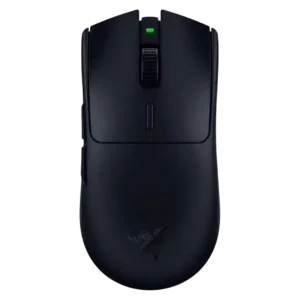
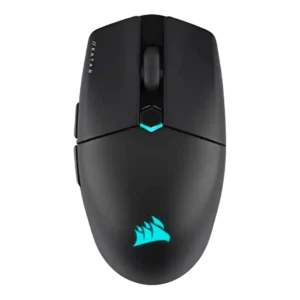
Compare Razer Viper V3 HyperSpeed vs Corsair Katar Elite Wireless

P1 Razer Viper V3 HyperSpeed
P2 Corsair Katar Elite Wireless

Comparison Takeaways

Razer Viper V3 HyperSpeed

Where It Has the Edge

  • palm grip comfort is 4.1 vs 2.5. Palm grip comfort improved over older Vipers for many reviewers, but remains hand-size and style dependent.
  • scroll wheel quality is 4.3 vs 2.9. Scroll wheel quality is consistently positive, described as tactile, defined, responsive, or smooth with usable steps.
  • premium feel is 3.9 vs 2.6. Premium feel is mixed: the mouse has premium sensor, coating, and controls, but the AA system and occasional...
  • materials quality is 4.4 vs 3.1. Materials quality is praised mainly through the smooth-touch, luxurious, grippy finish.

Corsair Katar Elite Wireless

Where It Has the Edge

  • Bluetooth support is 4.1 vs 1.0. Bluetooth support is useful for travel, laptops, tablets, and battery saving, but reviewers recommend 2.4GHz for gaming performance.
  • RGB features is 3.6 vs 1.0. RGB is present and customizable but generally modest, often described as minimal, logo-focused, or not very useful during...
  • charging convenience is 4.2 vs 2.1. Charging convenience is good thanks to USB-C, wired play while charging, and a rechargeable battery, though some reviewers...
  • software stability is 4.6 vs 3.2. Only one review directly addressed software stability, but it reported harmonious iCUE behavior without lag, bugs, or crashes.
Average score
Product 1: Razer Viper V3 HyperSpeed
3.9
Product 2: Corsair Katar Elite Wireless
3.9
2.4GHz connectivity
Product 1: Razer Viper V3 HyperSpeed
4.2

Reviewers describe wireless use through the included 2.4GHz USB dongle only, with no wired or Bluetooth fallback.

Product 2: Corsair Katar Elite Wireless
4.3

2.4GHz Slipstream connectivity is the main gaming connection and is consistently associated with stable, low-latency performance.

acceleration control
Product 1: Razer Viper V3 HyperSpeed
5.0

The Focus Pro sensor is repeatedly cited with 70G acceleration handling, supporting high-end tracking specifications.

Product 2: Corsair Katar Elite Wireless
4.4

Acceleration specs are repeatedly cited at 50G, reinforcing that the sensor has plenty of headroom for fast movements.

Accuracy and tracking precision
Product 1: Razer Viper V3 HyperSpeed
4.7

Reviewers consistently report accurate tracking and precise screen representation, with only some grip or sensor-position preferences affecting aim.

Product 2: Corsair Katar Elite Wireless
4.4

Reviewers repeatedly describe the sensor and tracking as precise, especially for flicks and FPS aiming, though one creative-work review found fine-control harder because the mouse felt too light.

balance and weight distribution
Product 1: Razer Viper V3 HyperSpeed
3.3

Weight balance is split: some find it even or predictable, while others call the AA placement rear-heavy or less balanced than rechargeable rivals.

Product 2: Corsair Katar Elite Wireless
4.6

Only a couple of reviews address balance directly, but both describe the mouse as well balanced with its built-in battery.

battery life
Product 1: Razer Viper V3 HyperSpeed
4.4

Battery life is a major strength, commonly cited around 280 hours at 1,000Hz with big drops at higher polling rates.

Product 2: Corsair Katar Elite Wireless
4.1

Battery life is broadly good, usually cited at up to 110 hours over Bluetooth and around 60 hours over 2.4GHz, though competitors can last longer.

Bluetooth support
Product 1: Razer Viper V3 HyperSpeed
1.0

Bluetooth support is absent, which reviewers mention as a limitation despite strong 2.4GHz performance.

Product 2: Corsair Katar Elite Wireless
4.1

Bluetooth support is useful for travel, laptops, tablets, and battery saving, but reviewers recommend 2.4GHz for gaming performance.

build quality
Product 1: Razer Viper V3 HyperSpeed
3.9

Build quality is mostly praised as solid, though a few reviewers report rattles, a lopsided base, or less-than-Pro feel.

Product 2: Corsair Katar Elite Wireless
4.0

Build quality is mostly solid for the price and weight, but reviewers differ on creaks, standard feel, and whether it feels special.

button customization
Product 1: Razer Viper V3 HyperSpeed
4.2

Button customization is solid through Synapse, including remapping, scroll-wheel directions, DPI controls, and HyperShift-style second-layer options.

Product 2: Corsair Katar Elite Wireless
4.3

Button customization is strong through iCUE, with reviewers noting remapping controls, key assignments, and adjustable settings.

button responsiveness
Product 1: Razer Viper V3 HyperSpeed
4.5

Responsiveness is generally strong, with reviewers describing the mouse as snappy, consistently responsive, and competition-capable.

Product 2: Corsair Katar Elite Wireless
3.6

Button responsiveness is mixed: some reviewers praise responsive zero-gap clicks, while others found the main buttons too easy to trigger or too soft.

cable flexibility
Product 1: Razer Viper V3 HyperSpeed
No score yet
Product 2: Corsair Katar Elite Wireless
3.1

Cable feedback is middling; reviewers note the cable is plain rubber or non-braided, though one found it flexible enough for modest pushback.

charging convenience
Product 1: Razer Viper V3 HyperSpeed
2.1

Charging convenience is the main compromise: the AA battery lasts long but requires battery swaps, with no USB-C or rechargeable fallback.

Product 2: Corsair Katar Elite Wireless
4.2

Charging convenience is good thanks to USB-C, wired play while charging, and a rechargeable battery, though some reviewers still mention periodic recharging.

claw grip comfort
Product 1: Razer Viper V3 HyperSpeed
4.2

Claw grip comfort is widely praised, especially with the higher rear hump and more supportive shell shape.

Product 2: Corsair Katar Elite Wireless
4.0

Claw grip comfort is generally strong, with the shape repeatedly described as aimed at claw users, though not every reviewer loved the rear support.

click latency
Product 1: Razer Viper V3 HyperSpeed
3.8

Click latency is mostly acceptable for gaming, though several reviewers note mechanical switches feel slightly slower than optical alternatives.

Product 2: Corsair Katar Elite Wireless
4.5

Click latency evidence is positive overall, with reviewers praising fast actuation, zero-gap design, and instant-feeling clicks.

click noise
Product 1: Razer Viper V3 HyperSpeed
3.5

Click noise is mixed: Tom’s Hardware found the clicks louder, while Trusted Reviews found them muted enough for regular use.

Product 2: Corsair Katar Elite Wireless
No score yet
connection stability
Product 1: Razer Viper V3 HyperSpeed
4.7

Connection stability is praised where tested, with no lag, delay, jitter, or signal loss reported in one review.

Product 2: Corsair Katar Elite Wireless
4.5

Connection stability is a strength, with reviewers reporting stable, reliable connections and no hiccups or noticeable lags.

cross-platform compatibility
Product 1: Razer Viper V3 HyperSpeed
4.0

Cross-platform support has limited but direct evidence, with one review saying it works on both Macs and PCs.

Product 2: Corsair Katar Elite Wireless
4.3

Cross-platform compatibility is supported by one review noting PC or Mac connectivity through wireless, Bluetooth, or wired modes.

debounce customization
Product 1: Razer Viper V3 HyperSpeed
1.0

Debounce customization is weak or absent, with one reviewer explicitly finding no debounce delay setting.

Product 2: Corsair Katar Elite Wireless
No score yet
dock compatibility
Product 1: Razer Viper V3 HyperSpeed
1.5

Dock compatibility is poor because the mouse is AA-powered and reviewers note it lacks Mouse Dock Pro or rechargeable dock convenience.

Product 2: Corsair Katar Elite Wireless
No score yet
DPI range
Product 1: Razer Viper V3 HyperSpeed
5.0

DPI range is a clear strength, repeatedly tied to the 30,000 DPI Focus Pro optical sensor.

Product 2: Corsair Katar Elite Wireless
4.5

The DPI range is broad, commonly cited at 26,000 DPI with configurable stages, giving plenty of sensitivity headroom even if most reviewers did not need the maximum.

durability over time
Product 1: Razer Viper V3 HyperSpeed
3.3

Durability over time is mixed, with switch lifecycle claims but at least one long-term user reporting click grinding after use.

Product 2: Corsair Katar Elite Wireless
2.5

Durability over time is only directly criticized in one review, which worried that the thin dongle-cover plate could break easily.

ecosystem integration
Product 1: Razer Viper V3 HyperSpeed
4.1

Ecosystem integration is useful through HyperSpeed multi-device pairing and shared dongle support with compatible Razer peripherals.

Product 2: Corsair Katar Elite Wireless
4.3

Ecosystem integration is strong for Corsair users, with iCUE, multipoint dongle pairing, RGB synchronization, and broader Corsair-device integration.

ergonomic design
Product 1: Razer Viper V3 HyperSpeed
4.6

Ergonomics are improved versus prior Viper shapes, with better palm support, flatter sides, and more comfortable button grooves.

Product 2: Corsair Katar Elite Wireless
3.7

Ergonomic design is intentionally compact and ambidextrous-leaning, but reviewers note this inclusiveness sacrifices some hand-filling comfort.

fingertip grip comfort
Product 1: Razer Viper V3 HyperSpeed
3.9

Fingertip comfort is more divided than claw comfort; several reviewers say it works, while others prefer the older/lighter V2 Pro for fingertip play.

Product 2: Corsair Katar Elite Wireless
4.1

Fingertip grip comfort is one of the mouse's strongest ergonomic themes, especially for small hands and users who prefer compact control.

firmware reliability
Product 1: Razer Viper V3 HyperSpeed
No score yet
Product 2: Corsair Katar Elite Wireless
4.0

Firmware reliability evidence is limited but positive, with reviews noting firmware update support for the mouse or checking updates in iCUE.

FPS gaming suitability
Product 1: Razer Viper V3 HyperSpeed
4.3

FPS suitability is strong thanks to the sensor, polling options, low-latency wireless, and repeated testing in shooters, though weight may deter min-maxers.

Product 2: Corsair Katar Elite Wireless
4.5

FPS suitability is strong, with reviewers repeatedly praising fast swiping, flick shots, precision aiming, and competitive Overwatch or shooter use.

glide smoothness
Product 1: Razer Viper V3 HyperSpeed
4.5

Glide is broadly praised, with PTFE feet and smooth movement on mousepads or multiple surfaces.

Product 2: Corsair Katar Elite Wireless
4.4

Glide smoothness is a major strength, with PTFE feet and low weight repeatedly producing smooth, effortless movement.

grip texture
Product 1: Razer Viper V3 HyperSpeed
4.4

Grip texture is one of the most praised features, often described as grippy, smooth-touch, or premium-feeling despite fingerprints.

Product 2: Corsair Katar Elite Wireless
4.2

Grip texture is generally praised on the sides, though the smooth top finish attracts fingerprints and can look greasy.

handedness options
Product 1: Razer Viper V3 HyperSpeed
2.0

Handedness options are limited because the mouse is effectively right-hand focused with left-side thumb buttons only.

Product 2: Corsair Katar Elite Wireless
3.4

Handedness support is mixed: the body is often described as ambidextrous or nearly so, but side-button placement still favors right-handed use.

left and right click quality
Product 1: Razer Viper V3 HyperSpeed
4.2

Left and right click quality ranges from crisp and snappy to somewhat mushy depending on reviewer grip and unit.

Product 2: Corsair Katar Elite Wireless
3.0

Left and right click quality is divided, with some reviewers praising satisfying main clicks while others found them soft, undefined, loose, or less precise.

lift-off distance
Product 1: Razer Viper V3 HyperSpeed
4.6

Lift-off control is a strength through asymmetric cut-off, landing distance, and granular height adjustment options in Synapse.

Product 2: Corsair Katar Elite Wireless
4.2

Lift-off control is supported through iCUE settings, with reviewers noting adjustable lift height or calibration options.

long-session comfort
Product 1: Razer Viper V3 HyperSpeed
4.2

Long-session comfort is generally good for supported grips and hand sizes, though one reviewer reported cramping with some smaller/narrower shapes.

Product 2: Corsair Katar Elite Wireless
3.9

Long-session comfort is mixed: several reviewers found it comfortable for hours, but some reported initial fatigue or faster tiring for non-ideal grips.

macro support
Product 1: Razer Viper V3 HyperSpeed
4.2

Macro support is present through programmable controls and HyperShift, though this is still a simple FPS-leaning mouse.

Product 2: Corsair Katar Elite Wireless
4.3

Macro support is well supported in iCUE, with several reviews noting game-specific macros, key assignments, and app-launch actions.

materials quality
Product 1: Razer Viper V3 HyperSpeed
4.4

Materials quality is praised mainly through the smooth-touch, luxurious, grippy finish.

Product 2: Corsair Katar Elite Wireless
3.1

Materials quality is mixed, with textured sections liked but the smooth or thin plastic top criticized for fingerprints, shine, or a less premium feel.

MMO gaming suitability
Product 1: Razer Viper V3 HyperSpeed
No score yet
Product 2: Corsair Katar Elite Wireless
2.0

MMO suitability is weak in the only direct review, which found the six-button design too basic for MMO play.

MOBA gaming suitability
Product 1: Razer Viper V3 HyperSpeed
No score yet
Product 2: Corsair Katar Elite Wireless
3.2

MOBA suitability is mixed, with one review saying the button count felt too basic while another grouped the lightweight design with MOBAs.

motion consistency
Product 1: Razer Viper V3 HyperSpeed
4.4

Motion consistency benefits from smart tracking, motion sync, and landing/lift-off compensation, though front sensor placement divides opinion.

Product 2: Corsair Katar Elite Wireless
4.1

Motion consistency is generally strong, with reviewers reporting steady tracking, no shakes, and only one note about DPI feel being a little off compared with other mice.

onboard memory
Product 1: Razer Viper V3 HyperSpeed
2.6

Onboard memory is limited, with reviewers noting only one profile or preset slot.

Product 2: Corsair Katar Elite Wireless
3.5

Onboard memory is useful but limited; reviewers repeatedly note it can store settings, yet commonly only one active profile fits on the mouse.

palm grip comfort
Product 1: Razer Viper V3 HyperSpeed
4.1

Palm grip comfort improved over older Vipers for many reviewers, but remains hand-size and style dependent.

Product 2: Corsair Katar Elite Wireless
2.5

Palm grip comfort is weak overall; most reviewers say the small, tapered rear lacks support for palm users, despite a few finding it usable.

polling rate
Product 1: Razer Viper V3 HyperSpeed
4.5

Polling-rate support is a major feature, with 1,000Hz out of the box and optional 4,000Hz or higher HyperPolling depending on review setup.

Product 2: Corsair Katar Elite Wireless
4.2

Most reviewers highlight the 2,000Hz polling headline as a performance advantage, while a few note the practical difference may be hard to feel or connection-mode dependent.

portability
Product 1: Razer Viper V3 HyperSpeed
4.2

Portability is helped by internal dongle storage, though the AA battery system means carrying spare batteries is prudent.

Product 2: Corsair Katar Elite Wireless
4.3

Portability is a clear plus, helped by the compact build, low weight, dongle storage, laptop friendliness, and travel use.

premium feel
Product 1: Razer Viper V3 HyperSpeed
3.9

Premium feel is mixed: the mouse has premium sensor, coating, and controls, but the AA system and occasional rattle keep it below Pro models.

Product 2: Corsair Katar Elite Wireless
2.6

Premium feel is weakly supported and negative in the one direct review, which described the light plastic as less premium than expected.

profile switching
Product 1: Razer Viper V3 HyperSpeed
4.1

Profile switching exists through DPI stages, game-specific profiles, and top-mounted DPI/profile controls, though onboard storage is limited.

Product 2: Corsair Katar Elite Wireless
3.9

Profile switching is mixed because iCUE can manage many profiles and DPI stages, but the mouse itself has limited onboard profile capacity.

programmable buttons
Product 1: Razer Viper V3 HyperSpeed
4.2

Programmable controls are adequate for FPS and everyday gaming, typically described as six buttons or eight controls including wheel directions.

Product 2: Corsair Katar Elite Wireless
4.3

Programmable-button support is strong for a simple six-button mouse, with most reviewers confirming all or nearly all buttons can be programmed.

RGB features
Product 1: Razer Viper V3 HyperSpeed
1.0

RGB features are essentially absent, which keeps the mouse simple and battery-focused but removes lighting customization.

Product 2: Corsair Katar Elite Wireless
3.6

RGB is present and customizable but generally modest, often described as minimal, logo-focused, or not very useful during actual use.

scroll wheel quality
Product 1: Razer Viper V3 HyperSpeed
4.3

Scroll wheel quality is consistently positive, described as tactile, defined, responsive, or smooth with usable steps.

Product 2: Corsair Katar Elite Wireless
2.9

Scroll wheel quality is the most consistent hardware complaint, with reviewers citing stiffness, weak tactility, muddy turns, or insufficient grip despite some positive texture notes.

sensor performance
Product 1: Razer Viper V3 HyperSpeed
4.8

Sensor performance is the product’s strongest consensus point, with the Focus Pro 30K repeatedly praised as fast, accurate, and premium-class.

Product 2: Corsair Katar Elite Wireless
4.5

The Marksman optical sensor is consistently treated as a strength, with high DPI specs and flawless or precise tracking in most gaming tests.

shape comfort
Product 1: Razer Viper V3 HyperSpeed
4.3

Shape comfort is improved for many hands due to the higher rear hump and fuller shell, though it is a major preference point.

Product 2: Corsair Katar Elite Wireless
3.6

Shape comfort is highly grip-dependent: some reviewers found the small tapered shape comfortable, while others found it peculiar or too specialized.

side button quality
Product 1: Razer Viper V3 HyperSpeed
4.6

Side button quality is a standout strength, with several reviewers calling the buttons easier, premium, or among the best they have used.

Product 2: Corsair Katar Elite Wireless
3.4

Side button quality is mixed: some reviews liked their clicky feel and separation, while others reported extra force or even game-registration issues.

skate durability
Product 1: Razer Viper V3 HyperSpeed
4.4

Skate durability and quality are positive where discussed, with reviewers noting thick, smooth PTFE feet that should last well.

Product 2: Corsair Katar Elite Wireless
No score yet
software stability
Product 1: Razer Viper V3 HyperSpeed
3.2

Software stability has limited mixed evidence, with one reviewer saying Synapse improved but still caused occasional hiccups.

Product 2: Corsair Katar Elite Wireless
4.6

Only one review directly addressed software stability, but it reported harmonious iCUE behavior without lag, bugs, or crashes.

software usability
Product 1: Razer Viper V3 HyperSpeed
4.0

Software usability is generally straightforward, with Synapse exposing DPI, polling, lift-off, profiles, power settings, and remapping.

Product 2: Corsair Katar Elite Wireless
4.1

Software usability is generally positive because iCUE is powerful and detailed, though some reviewers mention a learning curve or less intuitive layout.

surface compatibility
Product 1: Razer Viper V3 HyperSpeed
4.8

Surface compatibility is strong, with reviewers reporting accurate tracking across mousepads, wood, glass, desks, and other surfaces.

Product 2: Corsair Katar Elite Wireless
4.0

Surface compatibility is mostly good on pads and tested surfaces, but some reviewers warn the feet can sound or feel less ideal on bare desks.

switch durability
Product 1: Razer Viper V3 HyperSpeed
3.9

Switch durability is acceptable for the price through 60-million-click mechanical switches, though below higher-end optical claims.

Product 2: Corsair Katar Elite Wireless
4.3

Switch durability is supported by repeated 60-million-click claims for the Omron switches, though this is primarily spec-based rather than long-term wear testing.

switch feel
Product 1: Razer Viper V3 HyperSpeed
4.0

Switch feel is generally good, with light, snappy, crisp mechanical clicks, but some reviewers find them softer or mushier than premium opticals.

Product 2: Corsair Katar Elite Wireless
4.5

Switch feel is mostly positive, with Omron switches described as satisfying and good-feeling across multiple reviews.

value for money
Product 1: Razer Viper V3 HyperSpeed
4.4

Value for money is a major strength, as reviewers repeatedly call it affordable, budget-friendly, or excellent price-to-performance.

Product 2: Corsair Katar Elite Wireless
4.1

Value is split by outlet: many reviews call it competitive or affordable for a wireless lightweight mouse, while a few argue it is expensive for its basic design.

weight
Product 1: Razer Viper V3 HyperSpeed
3.3

Weight is the biggest tradeoff: 82g is acceptable for some, but heavy versus modern ultralight FPS mice.

Product 2: Corsair Katar Elite Wireless
4.4

The 69g-class weight is one of the clearest strengths, repeatedly described as very light, agile, and easy to move.

weight tuning
Product 1: Razer Viper V3 HyperSpeed
4.4

Weight tuning is possible through AAA lithium battery mods, which several reviewers say can reduce weight substantially.

Product 2: Corsair Katar Elite Wireless
No score yet
wireless latency
Product 1: Razer Viper V3 HyperSpeed
4.7

Wireless latency is praised through low-latency 2.4GHz, HyperPolling support, and reviewer reports of no lag or very low input latency.

Product 2: Corsair Katar Elite Wireless
4.3

Wireless latency is strong over 2.4GHz Slipstream, with several reviewers seeing no latency, though Bluetooth is repeatedly treated as the slower option.

wireless performance
Product 1: Razer Viper V3 HyperSpeed
4.6

Wireless performance is broadly positive, with reviewers describing reliable, fast wireless use and strong gaming performance.

Product 2: Corsair Katar Elite Wireless
4.5

Wireless performance is consistently strong in Slipstream mode, with reviewers reporting no major compromises, negligible differences, and solid gaming behavior.