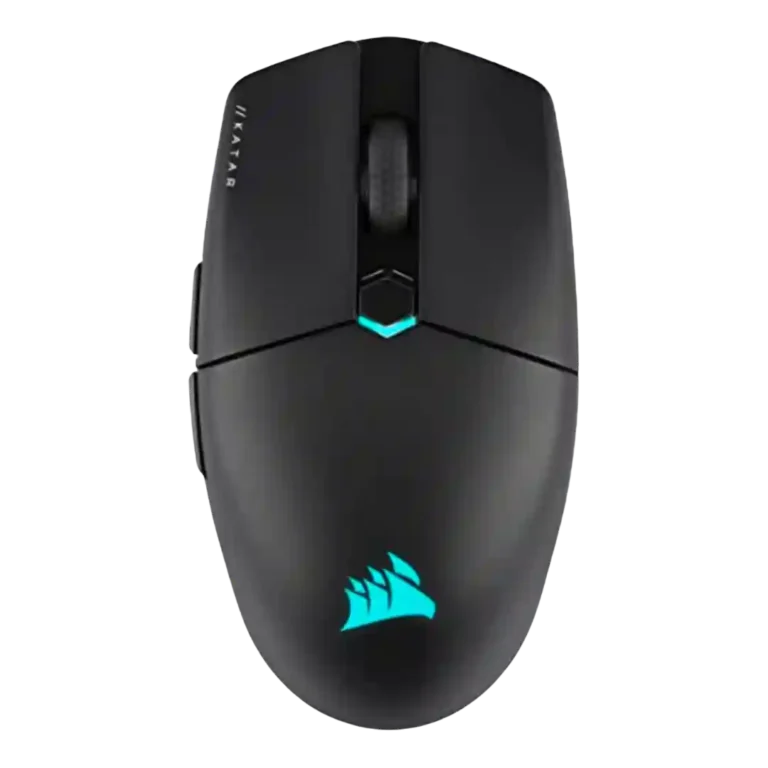
Corsair Katar Elite Wireless

Corsair Katar Elite Wireless Review

Brand: Corsair
Updated: 3 days ago
4.0
Consolidated expert score
289
Review insights
52
Scored features
16
Expert reviews

Bottom Line

Choose the Corsair Katar Elite Wireless for lightweight FPS play, claw/fingertip comfort, smooth glide and stable 2.4GHz wireless. Skip it if you need palm support, MMO buttons, premium materials or a universally comfortable shape.

Best for

Best for small-to-medium-hand claw and fingertip gamers who play FPS or fast action games and want a light wireless mouse with stable 2.4GHz performance. It also suits Corsair ecosystem users who will use iCUE customization.

Not for

Not for palm-grip users, large hands, MMO players who need many buttons, or creative users who want heavier resistance and fine-control stability. It is also less compelling for shoppers sensitive to smudgy materials or scroll-wheel feel.

Verdict

Across the reviews, the Corsair Katar Elite Wireless lands as a focused lightweight gaming mouse rather than an all-purpose shape. Its strongest evidence comes from FPS use: reviewers repeatedly praised the 69g weight, smooth glide, precise tracking, stable Slipstream wireless and strong click response. The tradeoff is that its compact tapered body favors claw and fingertip grips while leaving palm users, large hands, MMO players and creative precision work less well served. iCUE adds deep customization and ecosystem appeal, but the single onboard profile, smudge-prone shell and repeatedly criticized scroll wheel keep it from feeling universally premium.

Compared in Reviews

Products reviewers directly compared with this model, grouped into quick takeaways.

  • Worse: software and rechargeable convenience Windows Central would choose the Katar over the Logitech G305 for iCUE and rechargeable convenience.
  • Better: battery life and price Reviewed says the Katar's battery life falls short of the Logitech G305 at half the price.
  • Compared: egg-shaped design WEPC compares the Katar Elite's egg-like shape to the Logitech G305.
  • More expensive: price and battery TechRadar says the Katar is half the price of the Razer DeathAdder V3 Pro.
  • Better: hand-fit comfort The reviewer found the Katar less naturally hand-fitting than the Razer DeathAdder V3 Pro.
  • Cheaper: lightweight value Tom's Hardware points to the HyperX Pulsefire Haste as a much cheaper lightweight alternative.

Feature Scorecards

Summary

52 reviewed features
  • Very positive 4.5-5.0 21% 11 features
  • Positive 3.5-4.4 56% 29 features
  • Neutral 2.5-3.4 21% 11 features
  • Negative 1.5-2.4 2% 1 feature
  • Very negative below 1.5 0% 0 features

Pros

  • 5.0
    based on 1 review
    software stability: 5.0, based on 1 review
    Software stability had limited but excellent evidence, with one reviewer reporting no lag, bugs, or crashes.
  • 4.8
    based on 1 review
    click latency: 4.8, based on 1 review
    Quickstrike click response was praised as instant in the one review that directly judged click latency.
  • 4.8
    based on 2 reviews
    balance and weight distribution: 4.8, based on 2 reviews
    Balance and weight distribution were praised, especially for lifting and low-sensitivity play.
  • 4.7
    based on 3 reviews
    2.4GHz connectivity: 4.7, based on 3 reviews
    2.4GHz connectivity was praised as fast, reliable, and stable for gaming.
  • 4.7
    based on 3 reviews
    connection stability: 4.7, based on 3 reviews
    Connection stability was strongly positive, with reviewers reporting stable use and no hiccups or slowdowns.
  • 4.6
    based on 9 reviews
    FPS gaming suitability: 4.6, based on 9 reviews
    FPS gaming suitability was one of the strongest use cases, with reviewers repeatedly praising speed, flicking, precision, and shooter performance.
  • 4.6
    based on 7 reviews
    wireless performance: 4.6, based on 7 reviews
    Wireless performance was a major strength, with reviewers reporting stable, no-compromise, low-lag operation over Slipstream.
  • 4.6
    based on 10 reviews
    glide smoothness: 4.6, based on 10 reviews
    Glide smoothness was a consistent highlight, with many reviewers calling movement smooth, airy, effortless, or low-friction.
  • 4.6
    based on 11 reviews
    sensor performance: 4.6, based on 11 reviews
    The Marksman sensor drew broad praise for flawless, responsive tracking, though one reviewer found very high DPI less ideal and another wanted better creative-work control.
  • 4.6
    based on 5 reviews
    grip texture: 4.6, based on 5 reviews
    Grip texture was consistently praised for side traction and control without needing grip tape.
  • 4.5
    based on 4 reviews
    ecosystem integration: 4.5, based on 4 reviews
    Ecosystem integration was positive for users with Corsair gear, especially iCUE synchronization and multi-device setup.
  • 4.4
    based on 10 reviews
    Accuracy and tracking precision: 4.4, based on 10 reviews
    Reviewers generally found tracking precise for FPS aiming and flicking, with caveats from creative-work and DPI-comparison testing where fine control felt harder.
  • 4.4
    based on 3 reviews
    programmable buttons: 4.4, based on 3 reviews
    Programmable buttons were considered useful, especially through iCUE, though the simple six-button layout limits advanced layouts.
  • 4.4
    based on 1 review
    cross-platform compatibility: 4.4, based on 1 review
    Cross-platform compatibility had limited positive evidence tied to Bluetooth use with laptops and tablets.
  • 4.4
    based on 11 reviews
    weight: 4.4, based on 11 reviews
    Weight was one of the clearest strengths, repeatedly praised as light, agile, and easy to move, though a few reviewers found it dense or too light for control.
  • 4.3
    based on 8 reviews
    button responsiveness: 4.3, based on 8 reviews
    Button responsiveness was mostly praised as easy, fast, and satisfying, with one creative-work review saying the buttons felt less sturdy and precise.
  • 4.3
    based on 7 reviews
    software usability: 4.3, based on 7 reviews
    Software usability was generally strong because iCUE is powerful and detailed, though a few reviewers noted a learning curve or unintuitive UI.
  • 4.3
    based on 11 reviews
    battery life: 4.3, based on 11 reviews
    Battery life was usually considered good to impressive, though some reviewers noted it trails certain competitors or drops in 2.4GHz/RGB use.
  • 4.3
    based on 4 reviews
    macro support: 4.3, based on 4 reviews
    Macro support was viewed positively, with iCUE offering game-specific macros, app launchers, text actions, and detailed mapping options.
  • 4.2
    based on 5 reviews
    switch feel: 4.2, based on 5 reviews
    Switch feel was usually satisfying and responsive, though one review called the primary click soft and undefined.
  • 4.2
    based on 7 reviews
    portability: 4.2, based on 7 reviews
    Portability was praised for compact size, low weight, and dongle storage, though one review criticized the fragile dongle cover.
  • 4.2
    based on 7 reviews
    wireless latency: 4.2, based on 7 reviews
    Wireless latency was praised over 2.4GHz, while Bluetooth was treated as useful but not the best gaming mode.
  • 4.2
    based on 1 review
    switch durability: 4.2, based on 1 review
    Switch durability received limited but positive evidence, with one reviewer expecting the advertised click lifespan to be realistic.
  • 4.2
    based on 3 reviews
    charging convenience: 4.2, based on 3 reviews
    Charging convenience was positive because the rechargeable battery, USB-C cable, and wired fallback reduced battery anxiety.
  • 4.2
    based on 4 reviews
    DPI range: 4.2, based on 4 reviews
    The DPI range was seen as strong and highly adjustable, but not every reviewer found the highest settings or comparative DPI feel equally useful.
  • 4.1
    based on 9 reviews
    claw grip comfort: 4.1, based on 9 reviews
    Claw grip comfort was generally positive, especially for small-to-medium hands, though one review found the rear grip lacking.
  • 4.1
    based on 15 reviews
    value for money: 4.1, based on 15 reviews
    Value for money split reviewers: many praised the price-to-performance ratio, while others felt $80 was high for a basic or narrow-purpose mouse.
  • 4.1
    based on 8 reviews
    Bluetooth support: 4.1, based on 8 reviews
    Bluetooth support was valued for work, tablets, laptops, and longer runtime, with a gaming-latency caveat.
  • 4.1
    based on 6 reviews
    button customization: 4.1, based on 6 reviews
    Button customization was a strength through iCUE remapping, but one reviewer ran into a frustrating side-button setup problem in Valorant.
  • 4.1
    based on 8 reviews
    fingertip grip comfort: 4.1, based on 8 reviews
    Fingertip grip comfort was broadly positive for small hands and compact control, but not universal across all hand sizes.
  • 4.0
    based on 5 reviews
    long-session comfort: 4.0, based on 5 reviews
    Long-session comfort was positive for gaming and work in several reviews, but some reported early fatigue or faster finger tiredness outside the ideal grip.
  • 4.0
    based on 6 reviews
    build quality: 4.0, based on 6 reviews
    Build quality was mostly solid to excellent, with a few caveats about minor creaks or not feeling especially premium.
  • 4.0
    based on 1 review
    lift-off distance: 4.0, based on 1 review
    Lift height earned positive mention for helping rapid movements after setup and calibration.
  • 3.8
    based on 3 reviews
    motion consistency: 3.8, based on 3 reviews
    Motion felt fast and consistent in gaming reviews, but one creative-focused review reported jumpy or slipping behavior during precision work.
  • 3.8
    based on 5 reviews
    surface compatibility: 3.8, based on 5 reviews
    Surface compatibility was mixed: the mouse worked well across pads and some surfaces, but bare desks could sound scratchy or grating.
  • 3.7
    based on 3 reviews
    premium feel: 3.7, based on 3 reviews
    Premium feel was mixed, with textured sides and lightweight build earning praise while thin or canny plastic hurt the impression.
  • 3.6
    based on 6 reviews
    side button quality: 3.6, based on 6 reviews
    Side buttons were praised for placement and definition in some reviews, but others disliked their resistance or had game-registration problems.
  • 3.6
    based on 7 reviews
    polling rate: 3.6, based on 7 reviews
    The 2,000Hz polling rate was valued for competitive specs, but several reviewers said the real-world difference would be hard to notice.
  • 3.6
    based on 12 reviews
    shape comfort: 3.6, based on 12 reviews
    Shape comfort was highly subjective: small-hand and claw/fingertip users often liked it, while others found the shape odd, aggressive, or hard to settle into.
  • 3.5
    based on 6 reviews
    RGB features: 3.5, based on 6 reviews
    RGB was mixed: reviewers liked its minimal execution and sync options, but some called it boring, unnecessary, or hidden under the palm.

Cons

  • 3.4
    based on 2 reviews
    profile switching: 3.4, based on 2 reviews
    Profile switching is strong in software but limited by the mouse storing only one onboard profile for game-specific changes.
  • 3.4
    based on 7 reviews
    left and right click quality: 3.4, based on 7 reviews
    Left and right clicks were divisive: several reviewers liked their response, while others found them too light, mushy, imprecise, or loose.
  • 3.3
    based on 6 reviews
    onboard memory: 3.3, based on 6 reviews
    Onboard memory was useful for carrying settings, but multiple reviewers criticized the single-profile limit.
  • 3.3
    based on 2 reviews
    MOBA gaming suitability: 3.3, based on 2 reviews
    MOBA gaming suitability was mixed: one review thought the mouse too basic, while another considered it suited for MOBAs.
  • 3.2
    based on 2 reviews
    cable flexibility: 3.2, based on 2 reviews
    Cable flexibility was acceptable rather than premium, with one review noting modest pushback and another disliking the basic cable.
  • 3.1
    based on 4 reviews
    handedness options: 3.1, based on 4 reviews
    Handedness options were mixed: the shape can feel ambidextrous, but side-button placement and some reviewer comments limit true left-handed appeal.
  • 3.0
    based on 6 reviews
    ergonomic design: 3.0, based on 6 reviews
    Ergonomic design was mixed because the ambidextrous-style body is inclusive but less sculpted and less supportive than ergonomic alternatives.
  • 3.0
    based on 6 reviews
    materials quality: 3.0, based on 6 reviews
    Materials quality was a recurring caveat because the shell or coating often showed fingerprints, smudges, or thin-plastic feel.
  • 3.0
    based on 2 reviews
    durability over time: 3.0, based on 2 reviews
    Durability over time raised concerns around the top shell, smudging, and wear despite some confidence in the side texture.
  • 2.9
    based on 7 reviews
    scroll wheel quality: 2.9, based on 7 reviews
    The scroll wheel was the most repeated control complaint, with reviewers citing weak tactility, stiffness, muddiness, or inconsistent scrolling despite some positive texture notes.
  • 2.7
    based on 6 reviews
    palm grip comfort: 2.7, based on 6 reviews
    Palm grip comfort was the weakest grip category, with most reviewers warning that palm users lose support or should steer clear.
  • 2.3
    based on 1 review
    MMO gaming suitability: 2.3, based on 1 review
    MMO gaming suitability was weak in the only opinionated evidence, which found the six-button layout too basic for MMOs.

Compared With Category Average

Compared with other Gaming Mouse, this product is above average in software stability, below average in ergonomic design, palm grip comfort, scroll wheel quality.

Summary

8 compared features
  • Above average 0.4+ pts higher 13% 1 feature
  • Same as average within 0.3 pts 0% 0 features
  • Below average 0.4+ pts lower 88% 7 features
Attribute This product Category average Difference
software stability 5.0 3.0 +2.0
ergonomic design 3.0 4.3 -1.3
palm grip comfort 2.7 3.8 -1.2
scroll wheel quality 2.9 4.0 -1.1
MMO gaming suitability 2.3 3.5 -1.2
materials quality 3.0 3.9 -1.0
durability over time 3.0 4.0 -1.1
left and right click quality 3.4 4.2 -0.8

FAQ

Is the Corsair Katar Elite Wireless good for FPS games?

Yes. Reviewers repeatedly praised its light weight, smooth glide, precise tracking, low latency and flick-shot control in FPS and fast action games.

Is it comfortable for palm grip?

Usually not. Several reviews said the tapered, compact shape lacks palm support, though one reviewer found it usable in a MOBA with palm grip.

How good is the battery life?

Battery life was generally viewed as good to impressive, especially over Bluetooth, but some reviewers noted it trails certain competitors or drops in 2.4GHz/RGB use.

Is the wireless connection reliable?

Yes over 2.4GHz Slipstream. Reviewers described it as fast, stable and free of noticeable lag, while Bluetooth was treated as better for work or travel than gaming.

How useful is Corsair iCUE with this mouse?

iCUE was often praised for deep button, DPI, macro, lighting and ecosystem customization. The main caveats were a learning curve and the mouse storing only one onboard profile.

What are the biggest drawbacks?

The most repeated drawbacks are subjective shape comfort, weak palm support, scroll-wheel complaints, fingerprint-prone materials and limited MMO-style button count.

Consider This Instead

If you want better scroll wheel quality

Choose Razer Cobra HyperSpeed. It scores 4.9 vs 2.9 for scroll wheel quality, with a 4.3 overall score.

Compare

If you want better ergonomic design

Choose SteelSeries Aerox 3. It scores 5.0 vs 3.0 for ergonomic design, with a 3.9 overall score.

Compare

Overall Top Gaming Mouse Alternatives

#1 ASUS ROG Harpe II Ace
4.4
13 reviews

Choose the ROG Harpe II Ace for ultralight FPS play, precise tracking, smooth glide, and web-based tuning. Skip it if you need palm-grip support, MMO buttons, onboard profiles, or long...

Pros: acceleration control, wireless latency

Cons: onboard memory, MMO gaming suitability

#2 Razer Naga V2 Pro
4.4
16 reviews

Best for MMO/MOBA control, swappable panels, strong wireless performance, and long battery life. Skip it if you want a light FPS mouse, low price, or no Synapse quirks.

Pros: sensor performance, click latency

Cons: software stability, Bluetooth support

#3 SteelSeries Aerox 3 Wireless Gen 2
4.3
18 reviews

Choose the Aerox 3 Wireless Gen 2 if you want a light, fast wireless FPS mouse with strong software and battery life. Skip it if you dislike honeycomb shells, need...

Pros: click latency, motion consistency

Cons: palm grip comfort, fingertip grip comfort

#4 Turtle Beach Kone II
4.3
13 reviews

Choose the Kone II if you want a large, ergonomic mouse with deep customization and strong sensor performance. Skip it if you have small hands, need an ambidextrous mouse, or...

Pros: click latency, motion consistency

Cons: handedness options, portability