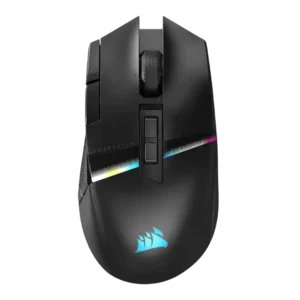
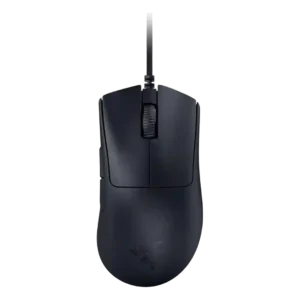
Compare Corsair Darkstar RGB vs Razer DeathAdder V3

P1 Corsair Darkstar RGB
P2 Razer DeathAdder V3

Comparison Takeaways

Corsair Darkstar RGB

Where It Has the Edge

  • wireless performance is 4.5 vs 1.0. Wireless performance was broadly praised for Slipstream speed, stable feel, and strong 2.4GHz operation, despite setup caveats in...
  • tilt gesture controls is 4.4 vs 1.0. Tilt gestures were a signature feature praised by most reviewers as useful and innovative, though a few found...
  • Bluetooth support is 4.2 vs 1.0. Bluetooth support was widely noted as a useful secondary mode for travel, productivity, or extra devices, though not...
  • ecosystem integration is 4.2 vs 1.0. Ecosystem integration was supported through iCUE, Corsair gear management, device syncing, and Corsair lighting or profile control.

Razer DeathAdder V3

Where It Has the Edge

  • battery life is 5.0 vs 2.4. Battery life is not a practical concern because the mouse is wired, and reviewers framed the lack of...
  • charging convenience is 5.0 vs 3.0. Charging convenience is effectively excellent for users who accept a wire because there is no battery to charge...
  • cable flexibility is 3.8 vs 2.2. Cable flexibility was one of the most divided attributes, praised by several reviewers but criticized by others as...
  • skate durability is 4.3 vs 3.0. Skate feedback was mostly positive for thickness, rounded edges, and corrected stock-skate feel, though one reviewer disliked Razer's...
Average score
Product 1: Corsair Darkstar RGB
4.0
Product 2: Razer DeathAdder V3
3.7
2.4GHz connectivity
Product 1: Corsair Darkstar RGB
4.5

2.4GHz connectivity was repeatedly highlighted through Slipstream or dongle support and was consistently treated as the best gaming connection.

Product 2: Razer DeathAdder V3
No score yet
acceleration control
Product 1: Corsair Darkstar RGB
4.5

The reviews that mentioned acceleration treated the 50G rating as part of the mouse’s strong sensor specification set.

Product 2: Razer DeathAdder V3
4.7

Acceleration specs were strong, with reviewers citing high max acceleration and treating it as part of the mouse's competitive performance package.

Accuracy and tracking precision
Product 1: Corsair Darkstar RGB
4.5

Reviewers consistently found tracking accurate and precise across games and surfaces, with strong flick performance and only minor caveats versus slimmer FPS-focused mice.

Product 2: Razer DeathAdder V3
4.7

Reviewers consistently found tracking accurate and precise, with multiple tests describing smooth aiming, stable movement, and dependable precision.

balance and weight distribution
Product 1: Corsair Darkstar RGB
4.4

Weight distribution was consistently positive where discussed, with reviewers saying the mouse felt balanced or easier to flick than heavier MMO competitors.

Product 2: Razer DeathAdder V3
3.8

Balance was acceptable but not perfect, with wired-cable weight making the mouse slightly top- or front-heavy in two hands-on reviews.

battery life
Product 1: Corsair Darkstar RGB
2.4

Battery life was the most repeated weakness, especially with RGB enabled, where reviewers cited roughly 20-25 hours and lagging rivals.

Product 2: Razer DeathAdder V3
5.0

Battery life is not a practical concern because the mouse is wired, and reviewers framed the lack of battery maintenance as a benefit.

Bluetooth support
Product 1: Corsair Darkstar RGB
4.2

Bluetooth support was widely noted as a useful secondary mode for travel, productivity, or extra devices, though not the preferred gaming connection.

Product 2: Razer DeathAdder V3
1.0

Bluetooth support is absent, with reviewers explicitly noting the wired design has no Bluetooth support.

build quality
Product 1: Corsair Darkstar RGB
4.4

Build quality was repeatedly praised as solid, premium, high-quality, and free of creaking or rattly parts.

Product 2: Razer DeathAdder V3
4.7

Build quality was mostly excellent, with repeated praise for solid shells, no creaking, and strong wired-version construction.

button customization
Product 1: Corsair Darkstar RGB
4.6

Button customization was one of the strongest themes, with iCUE enabling remapping, assignments, gestures, lighting, DPI, and macros.

Product 2: Razer DeathAdder V3
4.2

Button customization through Synapse, remapping, Hypershift, and profile setup was useful, though the software experience itself was mixed.

button responsiveness
Product 1: Corsair Darkstar RGB
4.4

Click and button response were usually praised as responsive or snappy, although one reviewer noted accidental DPI-button brushing.

Product 2: Razer DeathAdder V3
4.7

Button responsiveness was widely praised, especially the fast optical-switch feel and responsive click behavior in gaming.

cable flexibility
Product 1: Corsair Darkstar RGB
2.2

Cable flexibility was a repeated weakness: reviewers described the cable as stiff, hard, or not paracord-style.

Product 2: Razer DeathAdder V3
3.8

Cable flexibility was one of the most divided attributes, praised by several reviewers but criticized by others as stiff, heavy, or merely passable.

charging convenience
Product 1: Corsair Darkstar RGB
3.0

Charging convenience was mixed: USB-C wired use helps, but reviewers criticized the lack of a dongle extender, stiff cable, and no wireless charging.

Product 2: Razer DeathAdder V3
5.0

Charging convenience is effectively excellent for users who accept a wire because there is no battery to charge or replace.

claw grip comfort
Product 1: Corsair Darkstar RGB
4.3

Claw grip comfort had limited but positive support, with reviewers saying palm and claw grips felt good or were suitable.

Product 2: Razer DeathAdder V3
3.6

Claw grip comfort was mixed: some reviewers found it comfortable, while others said the slope or size made claw grip less natural.

click latency
Product 1: Corsair Darkstar RGB
4.5

Click and wireless input response were described as fast, instant, or below 1 ms, supporting strong latency impressions.

Product 2: Razer DeathAdder V3
4.8

Click latency was a major strength, with optical switches and high polling repeatedly tied to very fast or near-instant response.

click noise
Product 1: Corsair Darkstar RGB
4.3

Click noise was generally acceptable to quiet, with reviewers describing clicks as whisper quiet, not overly noisy, or moderate in volume.

Product 2: Razer DeathAdder V3
4.3

Click noise was relatively restrained, with reviewers describing muted or quieter clicks rather than loud mechanical feedback.

connection stability
Product 1: Corsair Darkstar RGB
4.1

Connection stability was mostly positive, but one reviewer had out-of-box dongle recognition trouble that required updating iCUE.

Product 2: Razer DeathAdder V3
4.0

Connection stability was strong in normal wired use, but the highest polling settings caused stutters or compatibility issues for some reviewers.

cross-platform compatibility
Product 1: Corsair Darkstar RGB
4.2

Cross-platform support has limited positive evidence, with reviewers showing Steam Deck use and stating Windows and Mac compatibility.

Product 2: Razer DeathAdder V3
No score yet
debounce customization
Product 1: Corsair Darkstar RGB
4.0

Debounce-style customization had limited support through the Button Response Optimization setting mentioned in iCUE.

Product 2: Razer DeathAdder V3
No score yet
DPI range
Product 1: Corsair Darkstar RGB
4.6

The 26K DPI ceiling and fine DPI adjustment were widely noted as high-end, even if several reviewers implied most players would not need the full range.

Product 2: Razer DeathAdder V3
4.7

The 30K DPI ceiling and adjustable DPI stages give the mouse a very wide sensitivity range, though reviewers rarely needed the full maximum.

durability over time
Product 1: Corsair Darkstar RGB
4.3

Durability over time has limited but positive support from the click rating and durable-feeling switch performance.

Product 2: Razer DeathAdder V3
4.3

Durability over time looked promising from switch ratings and solid construction, though one reviewer questioned coating wear over years.

ecosystem integration
Product 1: Corsair Darkstar RGB
4.2

Ecosystem integration was supported through iCUE, Corsair gear management, device syncing, and Corsair lighting or profile control.

Product 2: Razer DeathAdder V3
1.0

Ecosystem integration is limited because the lack of RGB means no Chroma lighting integration for this mouse.

ergonomic design
Product 1: Corsair Darkstar RGB
4.2

The ergonomic design was usually praised for comfort, control, and a right-handed shape, but it remains specialized around its thumb-grip layout.

Product 2: Razer DeathAdder V3
4.5

The right-handed ergonomic design was widely praised for comfort, palm support, and long-session usability.

fingertip grip comfort
Product 1: Corsair Darkstar RGB
3.3

Fingertip comfort was split: one reviewer could transition easily, while another found fingertip grip uncomfortable due to side-button access.

Product 2: Razer DeathAdder V3
2.6

Fingertip comfort was the weakest grip category because the body is large and tall, although a few larger-hand reviewers could use it.

firmware reliability
Product 1: Corsair Darkstar RGB
2.6

Firmware reliability has limited evidence, but one review linked a DPI-dropout concern to possible future firmware fixes.

Product 2: Razer DeathAdder V3
No score yet
FPS gaming suitability
Product 1: Corsair Darkstar RGB
4.2

FPS suitability was better than typical MMO mice thanks to sensor quality and flickability, though it was not framed as a pure FPS specialist.

Product 2: Razer DeathAdder V3
4.7

FPS suitability was one of the clearest strengths because reviewers tied its speed, low weight, sensor, and simple layout to competitive play.

glide smoothness
Product 1: Corsair Darkstar RGB
4.3

Glide was mostly praised thanks to large PTFE feet and smooth movement, though one reviewer noticed edge drag when the mouse was tilted.

Product 2: Razer DeathAdder V3
4.5

Glide smoothness was broadly praised thanks to PTFE feet and low weight, though a few reviewers swapped skates for preference.

grip texture
Product 1: Corsair Darkstar RGB
4.4

Grip texture was a consistent strength, with rubberized or textured side areas helping control, pickup, and stability.

Product 2: Razer DeathAdder V3
4.0

Grip texture was divisive: many liked the smooth grippy coating, while others found it slick, soapy, or insufficient without grip tape.

handedness options
Product 1: Corsair Darkstar RGB
2.0

Handedness support is limited because reviewers described it as right-handed and explicitly warned left-handed gamers away.

Product 2: Razer DeathAdder V3
1.0

Handedness is a clear limitation: the mouse is right-handed only, with no left-handed or ambidextrous version discussed.

left and right click quality
Product 1: Corsair Darkstar RGB
4.4

The left and right clicks were widely praised for optical switches, crisp feel, snappiness, and a pleasant clicking experience.

Product 2: Razer DeathAdder V3
4.1

Left and right clicks were mostly liked for feel and low travel, though a few reviewers found them hollow or floaty.

lift-off distance
Product 1: Corsair Darkstar RGB
4.3

Lift-off distance was configurable through iCUE or lift-height settings, with reviewers noting it as part of the performance tuning toolkit.

Product 2: Razer DeathAdder V3
4.6

Lift-off distance support was unusually strong, including asymmetric lift-off and landing cutoffs plus software tuning for advanced users.

long-session comfort
Product 1: Corsair Darkstar RGB
4.0

Long-session comfort was mostly positive thanks to grip, shape, and weight, though one smaller-hand reviewer reported temporary wrist and finger pain.

Product 2: Razer DeathAdder V3
4.5

Long-session comfort was strong for the right hand and larger grips, helped by the ergonomic hump and low weight.

macro support
Product 1: Corsair Darkstar RGB
4.5

Macro support was broadly supported through iCUE assignments, in-game macros, productivity mappings, and programmable actions.

Product 2: Razer DeathAdder V3
3.4

Macro support exists but is limited, with reviewers mainly pointing to side-button macros and Hypershift rather than many dedicated inputs.

materials quality
Product 1: Corsair Darkstar RGB
4.4

Materials were generally viewed positively, with soft-touch matte plastic, rubberized grips, and premium-feeling construction noted across reviews.

Product 2: Razer DeathAdder V3
3.6

Materials quality was mixed: reviewers liked the minimalist shell and coating, but some criticized the cable sleeving or cheap-looking underside.

MMO gaming suitability
Product 1: Corsair Darkstar RGB
4.3

MMO suitability was strongly supported across every review, mainly because of the programmable controls, side cluster, and genre-focused design.

Product 2: Razer DeathAdder V3
2.2

MMO suitability is weak because the mouse has only a few extra macros and lacks the many side buttons MMO players often use.

MOBA gaming suitability
Product 1: Corsair Darkstar RGB
4.3

MOBA suitability was also strongly supported, with reviewers repeatedly grouping the mouse with MOBA/MMO play and complex-control games.

Product 2: Razer DeathAdder V3
No score yet
motion consistency
Product 1: Corsair Darkstar RGB
4.3

Motion was generally smooth, precise, and consistent, though one reviewer noted accuracy and speed were not as pinpoint as a lighter FPS mouse.

Product 2: Razer DeathAdder V3
4.8

Motion consistency was strong in the reviews that tested it, with no stutters or missed movements in normal use and flawless tracking noted.

onboard memory
Product 1: Corsair Darkstar RGB
4.4

Onboard or hardware profiles were repeatedly noted, including up to five stored profiles and hardware-level settings for use without iCUE running.

Product 2: Razer DeathAdder V3
4.1

Onboard memory was useful for profiles and settings, but at least one review noted that button assignments were not fully stored internally.

palm grip comfort
Product 1: Corsair Darkstar RGB
4.1

Palm grip support was generally positive, especially for larger hands, while one smaller-hand reviewer found the taller shape somewhat unwieldy.

Product 2: Razer DeathAdder V3
4.4

Palm grip comfort was a major positive, especially for medium-to-large or larger hands using the high ergonomic hump.

polling rate
Product 1: Corsair Darkstar RGB
4.5

Reviewers repeatedly highlighted the 2,000Hz wireless polling capability, though one measured run averaged below the advertised maximum.

Product 2: Razer DeathAdder V3
4.3

The 8K polling headline earned praise for speed, but several reviewers noted system-resource demands or game stutter at the highest setting.

portability
Product 1: Corsair Darkstar RGB
3.7

Portability was decent thanks to dongle storage and Bluetooth, but accessory omissions and the lack of a cover or extender limit convenience.

Product 2: Razer DeathAdder V3
2.5

Portability was a weakness because the mouse is large and wired, with a nonremovable cable and less bag-friendly design.

premium feel
Product 1: Corsair Darkstar RGB
4.4

Premium feel was a common strength, tied to the styling, materials, build, lighting, and overall flagship presentation.

Product 2: Razer DeathAdder V3
4.3

Premium feel came from the coating, minimalist finish, and light shell, though it is intentionally plain rather than flashy.

profile switching
Product 1: Corsair Darkstar RGB
4.3

Profile switching was supported through top buttons, on-the-fly changes, software presets, and multiple profile systems, though the software could be confusing.

Product 2: Razer DeathAdder V3
3.9

Profile and DPI switching were supported through onboard profiles and bottom-mounted DPI/profile controls, though bottom placement was often inconvenient.

programmable buttons
Product 1: Corsair Darkstar RGB
4.7

Reviewers repeatedly emphasized the 15 programmable inputs as a core strength for MMO, MOBA, productivity, and complex-control use.

Product 2: Razer DeathAdder V3
3.8

The mouse has enough programmable controls for a simple FPS mouse, but reviewers emphasized that it is not feature-packed.

RGB features
Product 1: Corsair Darkstar RGB
4.0

RGB lighting was feature-rich and customizable, but reviewers often noted that some zones are subtle, hidden by the hand, or costly to battery life.

Product 2: Razer DeathAdder V3
1.1

RGB is essentially absent, with reviewers repeatedly noting no RGB lighting apart from a small DPI indicator in some descriptions.

scroll wheel quality
Product 1: Corsair Darkstar RGB
3.4

The scroll wheel drew mixed feedback, with tactile texture and readable steps offset by repeated complaints that it was stiff or hard to press.

Product 2: Razer DeathAdder V3
3.6

Scroll wheel quality was mixed: some liked the smooth, easy action, while others wanted more defined detents or stronger tactility.

sensor performance
Product 1: Corsair Darkstar RGB
4.6

The Marksman 26K sensor was repeatedly treated as flagship-grade, reliable, and strong for both MMO/MOBA play and faster shooters.

Product 2: Razer DeathAdder V3
4.8

The Focus Pro 30K sensor was treated as a core strength, repeatedly described as high-end, responsive, and reliable in gaming tests.

shape comfort
Product 1: Corsair Darkstar RGB
4.3

Shape comfort was generally praised, especially for larger or medium hands, though smaller-hand and fingertip use could feel less natural.

Product 2: Razer DeathAdder V3
4.0

Shape comfort depended heavily on hand size and grip, with strong comfort for larger hands but problems for smaller, fingertip, or some claw users.

side button quality
Product 1: Corsair Darkstar RGB
3.4

Side-button opinions were mixed: some reviewers found them accessible, while others criticized the unique layout as awkward or hard to manage.

Product 2: Razer DeathAdder V3
4.4

Side buttons were a recurring strength, often described as reachable, tactile, spacious, or well tensioned, with only one reviewer struggling with placement.

skate durability
Product 1: Corsair Darkstar RGB
3.0

Skate durability remains uncertain because reviewers praised glide but explicitly said long-term smoothness was still unknown.

Product 2: Razer DeathAdder V3
4.3

Skate feedback was mostly positive for thickness, rounded edges, and corrected stock-skate feel, though one reviewer disliked Razer's default skates.

software stability
Product 1: Corsair Darkstar RGB
2.4

Software stability was a concern in multiple reviews, including detection issues, profile problems, and random DPI dropouts.

Product 2: Razer DeathAdder V3
3.0

Software stability was mixed because basic settings worked for some reviewers, but high polling produced stutters or issues in several games.

software usability
Product 1: Corsair Darkstar RGB
3.3

Software usability was mixed: iCUE enables deep control, but several reviewers called it confusing, unintuitive, or a slog.

Product 2: Razer DeathAdder V3
3.6

Software usability was mixed: some found Synapse intuitive and useful, while one reviewer strongly criticized it as bloated.

surface compatibility
Product 1: Corsair Darkstar RGB
4.4

Surface compatibility was supported by surface calibration and reports of smooth tracking across surfaces.

Product 2: Razer DeathAdder V3
4.6

Surface compatibility was supported by PTFE feet and hands-on use across different pads, including glass and cloth-style surfaces.

switch durability
Product 1: Corsair Darkstar RGB
4.5

Optical-switch durability was supported by claims of greater reliability and a 100-million-click rating, suggesting strong long-term switch confidence.

Product 2: Razer DeathAdder V3
4.7

Switch durability was strongly supported by 90-million-click ratings and optical switch construction, with no major durability complaints in the reviews.

switch feel
Product 1: Corsair Darkstar RGB
4.4

Switch feel was described as crisp, snappy, quiet, cushiony, or satisfying across reviewers, giving the main clicks a premium feel.

Product 2: Razer DeathAdder V3
4.4

Switch feel was generally positive, ranging from satisfying and crisp to soft or hollow depending on the reviewer.

tilt gesture controls
Product 1: Corsair Darkstar RGB
4.4

Tilt gestures were a signature feature praised by most reviewers as useful and innovative, though a few found them sensitive or unreliable.

Product 2: Razer DeathAdder V3
1.0

Tilt gesture controls are absent, with reviewers noting the scroll wheel does not support tilt functionality.

value for money
Product 1: Corsair Darkstar RGB
3.3

Value is mixed: reviewers liked the features and innovation, but the $170-$250 pricing was repeatedly called steep or a deterrent.

Product 2: Razer DeathAdder V3
4.5

Value was generally positive, especially at sale or standard wired pricing, though a few reviewers wanted more features for the money.

weight
Product 1: Corsair Darkstar RGB
3.9

At about 96-98 grams, reviewers treated the mouse as lighter than some MMO rivals but still heavier than ultralight FPS mice.

Product 2: Razer DeathAdder V3
4.8

Low weight was one of the strongest points across reviews, with the mouse repeatedly measured around 57-59g and praised as easy to move.

weight tuning
Product 1: Corsair Darkstar RGB
No score yet
Product 2: Razer DeathAdder V3
1.0

Weight tuning is absent; the design favors fixed ultralight speed rather than adjustable weights or balance tuning.

wireless latency
Product 1: Corsair Darkstar RGB
4.4

Wireless latency was usually treated as low, with sub-1 ms claims and reviewers reporting little to no practical latency concern.

Product 2: Razer DeathAdder V3
No score yet
wireless performance
Product 1: Corsair Darkstar RGB
4.5

Wireless performance was broadly praised for Slipstream speed, stable feel, and strong 2.4GHz operation, despite setup caveats in one review.

Product 2: Razer DeathAdder V3
1.0

Wireless performance is not a strength because this model is wired; reviewers repeatedly framed wireless as something the Pro version adds.