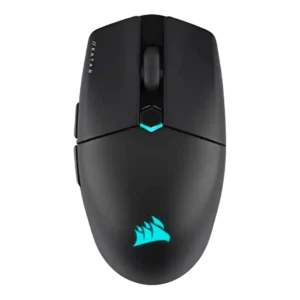

Compare Corsair Katar Elite Wireless vs Razer DeathAdder V3

P1 Corsair Katar Elite Wireless
P2 Razer DeathAdder V3

Comparison Takeaways

Corsair Katar Elite Wireless

Where It Has the Edge

  • portability is 4.2 vs 2.2. Portability was praised for compact size, low weight, and dongle storage, though one review criticized the fragile dongle...
  • fingertip grip comfort is 4.1 vs 2.6. Fingertip grip comfort was broadly positive for small hands and compact control, but not universal across all hand...
  • handedness options is 3.1 vs 2.0. Handedness options were mixed: the shape can feel ambidextrous, but side-button placement and some reviewer comments limit true...
  • programmable buttons is 4.4 vs 3.5. Programmable buttons were considered useful, especially through iCUE, though the simple six-button layout limits advanced layouts.

Razer DeathAdder V3

Where It Has the Edge

  • palm grip comfort is 4.8 vs 2.7. Palm grip comfort was strongly praised, with reviewers repeatedly identifying palm grip and medium-to-large hands as the best...
  • durability over time is 5.0 vs 3.0. Durability over time evidence was positive but limited, with reviewers expecting stable construction to last through years of...
  • ergonomic design is 4.9 vs 3.0. Ergonomic design was a standout strength, repeatedly described as comfortable, hand-friendly, and effective for longer gaming sessions.
  • surface compatibility is 5.0 vs 3.8. Surface compatibility evidence was limited but positive, with one reviewer praising gliding on different surfaces.
Average score
Product 1: Corsair Katar Elite Wireless
4.0
Product 2: Razer DeathAdder V3
4.2
2.4GHz connectivity
Product 1: Corsair Katar Elite Wireless
4.7

2.4GHz connectivity was praised as fast, reliable, and stable for gaming.

Product 2: Razer DeathAdder V3
No score yet
acceleration control
Product 1: Corsair Katar Elite Wireless
No score yet
Product 2: Razer DeathAdder V3
5.0

Acceleration-related performance was praised in the broader performance package, with reviewers reporting no concerns and strong online-game responsiveness.

Accuracy and tracking precision
Product 1: Corsair Katar Elite Wireless
4.4

Reviewers generally found tracking precise for FPS aiming and flicking, with caveats from creative-work and DPI-comparison testing where fine control felt harder.

Product 2: Razer DeathAdder V3
5.0

Reviewers consistently praised tracking accuracy and in-game precision, with no meaningful complaints about aim or cursor accuracy.

balance and weight distribution
Product 1: Corsair Katar Elite Wireless
4.8

Balance and weight distribution were praised, especially for lifting and low-sensitivity play.

Product 2: Razer DeathAdder V3
4.0

Balance was slightly front-heavy in two reviews, but reviewers generally described the imbalance as minor and not disruptive.

battery life
Product 1: Corsair Katar Elite Wireless
4.3

Battery life was usually considered good to impressive, though some reviewers noted it trails certain competitors or drops in 2.4GHz/RGB use.

Product 2: Razer DeathAdder V3
No score yet
Bluetooth support
Product 1: Corsair Katar Elite Wireless
4.1

Bluetooth support was valued for work, tablets, laptops, and longer runtime, with a gaming-latency caveat.

Product 2: Razer DeathAdder V3
No score yet
build quality
Product 1: Corsair Katar Elite Wireless
4.0

Build quality was mostly solid to excellent, with a few caveats about minor creaks or not feeling especially premium.

Product 2: Razer DeathAdder V3
5.0

Build quality was strongly praised, with reviewers repeatedly reporting no creaking, flex, rattling, or quality-control issues.

button customization
Product 1: Corsair Katar Elite Wireless
4.1

Button customization was a strength through iCUE remapping, but one reviewer ran into a frustrating side-button setup problem in Valorant.

Product 2: Razer DeathAdder V3
4.1

Button customization was positive overall through Synapse remapping and Hypershift, but reviewers still considered overall customization limited.

button responsiveness
Product 1: Corsair Katar Elite Wireless
4.3

Button responsiveness was mostly praised as easy, fast, and satisfying, with one creative-work review saying the buttons felt less sturdy and precise.

Product 2: Razer DeathAdder V3
5.0

Button responsiveness was praised across reviews, especially for fast feedback and tight repeated clicking during games.

cable flexibility
Product 1: Corsair Katar Elite Wireless
3.2

Cable flexibility was acceptable rather than premium, with one review noting modest pushback and another disliking the basic cable.

Product 2: Razer DeathAdder V3
4.0

Cable flexibility was highly divisive, ranging from light and unobtrusive to stiff, heavy, or merely passable.

charging convenience
Product 1: Corsair Katar Elite Wireless
4.2

Charging convenience was positive because the rechargeable battery, USB-C cable, and wired fallback reduced battery anxiety.

Product 2: Razer DeathAdder V3
5.0

Charging convenience was praised because the wired design avoids charging and battery maintenance entirely.

claw grip comfort
Product 1: Corsair Katar Elite Wireless
4.1

Claw grip comfort was generally positive, especially for small-to-medium hands, though one review found the rear grip lacking.

Product 2: Razer DeathAdder V3
4.0

Claw grip comfort was mixed-to-positive, working well for some larger-hand users but less naturally for others.

click latency
Product 1: Corsair Katar Elite Wireless
4.8

Quickstrike click response was praised as instant in the one review that directly judged click latency.

Product 2: Razer DeathAdder V3
5.0

Click latency was strongly praised, with reviewers describing the wired optical-switch setup as very fast and responsive.

click noise
Product 1: Corsair Katar Elite Wireless
No score yet
Product 2: Razer DeathAdder V3
5.0

Click noise evidence was limited but positive, with one reviewer saying the clicks were quieter than a comparable Razer mouse.

connection stability
Product 1: Corsair Katar Elite Wireless
4.7

Connection stability was strongly positive, with reviewers reporting stable use and no hiccups or slowdowns.

Product 2: Razer DeathAdder V3
No score yet
cross-platform compatibility
Product 1: Corsair Katar Elite Wireless
4.4

Cross-platform compatibility had limited positive evidence tied to Bluetooth use with laptops and tablets.

Product 2: Razer DeathAdder V3
No score yet
DPI range
Product 1: Corsair Katar Elite Wireless
4.2

The DPI range was seen as strong and highly adjustable, but not every reviewer found the highest settings or comparative DPI feel equally useful.

Product 2: Razer DeathAdder V3
5.0

DPI range evidence was positive, with reviewers treating the 30K ceiling and wider adjustment range as a precision benefit.

durability over time
Product 1: Corsair Katar Elite Wireless
3.0

Durability over time raised concerns around the top shell, smudging, and wear despite some confidence in the side texture.

Product 2: Razer DeathAdder V3
5.0

Durability over time evidence was positive but limited, with reviewers expecting stable construction to last through years of gaming.

ecosystem integration
Product 1: Corsair Katar Elite Wireless
4.5

Ecosystem integration was positive for users with Corsair gear, especially iCUE synchronization and multi-device setup.

Product 2: Razer DeathAdder V3
No score yet
ergonomic design
Product 1: Corsair Katar Elite Wireless
3.0

Ergonomic design was mixed because the ambidextrous-style body is inclusive but less sculpted and less supportive than ergonomic alternatives.

Product 2: Razer DeathAdder V3
4.9

Ergonomic design was a standout strength, repeatedly described as comfortable, hand-friendly, and effective for longer gaming sessions.

fingertip grip comfort
Product 1: Corsair Katar Elite Wireless
4.1

Fingertip grip comfort was broadly positive for small hands and compact control, but not universal across all hand sizes.

Product 2: Razer DeathAdder V3
2.6

Fingertip grip comfort was mixed-to-negative because the large hump and body often limited fingertip control for smaller hands.

FPS gaming suitability
Product 1: Corsair Katar Elite Wireless
4.6

FPS gaming suitability was one of the strongest use cases, with reviewers repeatedly praising speed, flicking, precision, and shooter performance.

Product 2: Razer DeathAdder V3
5.0

FPS gaming suitability was one of the strongest areas, with repeated praise for speed, weight, clicks, tracking, and esports focus.

glide smoothness
Product 1: Corsair Katar Elite Wireless
4.6

Glide smoothness was a consistent highlight, with many reviewers calling movement smooth, airy, effortless, or low-friction.

Product 2: Razer DeathAdder V3
4.4

Glide smoothness was generally strong thanks to PTFE feet and smooth movement, though a few reviewers disliked or replaced the stock skates.

grip texture
Product 1: Corsair Katar Elite Wireless
4.6

Grip texture was consistently praised for side traction and control without needing grip tape.

Product 2: Razer DeathAdder V3
4.3

Grip texture was mostly praised as smooth, grippy, or improved, though a few reviewers found it slippery or requiring extra force.

handedness options
Product 1: Corsair Katar Elite Wireless
3.1

Handedness options were mixed: the shape can feel ambidextrous, but side-button placement and some reviewer comments limit true left-handed appeal.

Product 2: Razer DeathAdder V3
2.0

Handedness options were a limitation because reviewers repeatedly emphasized the right-handed-only shape.

left and right click quality
Product 1: Corsair Katar Elite Wireless
3.4

Left and right clicks were divisive: several reviewers liked their response, while others found them too light, mushy, imprecise, or loose.

Product 2: Razer DeathAdder V3
4.1

Main click quality was mixed: several reviewers liked the left and right clicks, while one found them floaty with too much movement.

lift-off distance
Product 1: Corsair Katar Elite Wireless
4.0

Lift height earned positive mention for helping rapid movements after setup and calibration.

Product 2: Razer DeathAdder V3
4.4

Lift-off distance was viewed as a useful tuning feature, though some reviewers framed it as niche or only useful for advanced users.

long-session comfort
Product 1: Corsair Katar Elite Wireless
4.0

Long-session comfort was positive for gaming and work in several reviews, but some reported early fatigue or faster finger tiredness outside the ideal grip.

Product 2: Razer DeathAdder V3
4.8

Long-session comfort was praised, especially for large-hand users who benefit from the low weight and ergonomic shape.

macro support
Product 1: Corsair Katar Elite Wireless
4.3

Macro support was viewed positively, with iCUE offering game-specific macros, app launchers, text actions, and detailed mapping options.

Product 2: Razer DeathAdder V3
3.5

Macro support was adequate but limited: Hypershift helped, while the small number of extra macro inputs held it back.

materials quality
Product 1: Corsair Katar Elite Wireless
3.0

Materials quality was a recurring caveat because the shell or coating often showed fingerprints, smudges, or thin-plastic feel.

Product 2: Razer DeathAdder V3
3.0

Materials quality was mixed, with criticism of cable fit or cheap-looking underside balanced against otherwise solid construction.

MMO gaming suitability
Product 1: Corsair Katar Elite Wireless
2.3

MMO gaming suitability was weak in the only opinionated evidence, which found the six-button layout too basic for MMOs.

Product 2: Razer DeathAdder V3
No score yet
MOBA gaming suitability
Product 1: Corsair Katar Elite Wireless
3.3

MOBA gaming suitability was mixed: one review thought the mouse too basic, while another considered it suited for MOBAs.

Product 2: Razer DeathAdder V3
No score yet
motion consistency
Product 1: Corsair Katar Elite Wireless
3.8

Motion felt fast and consistent in gaming reviews, but one creative-focused review reported jumpy or slipping behavior during precision work.

Product 2: Razer DeathAdder V3
5.0

Motion consistency evidence was limited but very positive, with one reviewer reporting no stutters, missed movements, or unexpected shifts.

onboard memory
Product 1: Corsair Katar Elite Wireless
3.3

Onboard memory was useful for carrying settings, but multiple reviewers criticized the single-profile limit.

Product 2: Razer DeathAdder V3
3.3

Onboard memory was mixed because profiles exist, but one reviewer criticized internal memory limitations for button assignments.

palm grip comfort
Product 1: Corsair Katar Elite Wireless
2.7

Palm grip comfort was the weakest grip category, with most reviewers warning that palm users lose support or should steer clear.

Product 2: Razer DeathAdder V3
4.8

Palm grip comfort was strongly praised, with reviewers repeatedly identifying palm grip and medium-to-large hands as the best fit.

polling rate
Product 1: Corsair Katar Elite Wireless
3.6

The 2,000Hz polling rate was valued for competitive specs, but several reviewers said the real-world difference would be hard to notice.

Product 2: Razer DeathAdder V3
4.1

Polling-rate feedback was positive overall, but mixed in practice: reviewers liked 8,000Hz support while some saw little benefit or stuttering.

portability
Product 1: Corsair Katar Elite Wireless
4.2

Portability was praised for compact size, low weight, and dongle storage, though one review criticized the fragile dongle cover.

Product 2: Razer DeathAdder V3
2.2

Portability was a weakness because reviewers cited the large body, fixed cable, and wired setup as inconvenient for travel.

premium feel
Product 1: Corsair Katar Elite Wireless
3.7

Premium feel was mixed, with textured sides and lightweight build earning praise while thin or canny plastic hurt the impression.

Product 2: Razer DeathAdder V3
4.8

Premium feel was praised in limited evidence, particularly for the logo finish and improved coating feel.

profile switching
Product 1: Corsair Katar Elite Wireless
3.4

Profile switching is strong in software but limited by the mouse storing only one onboard profile for game-specific changes.

Product 2: Razer DeathAdder V3
3.3

Profile switching was mixed, with convenient profile toggling offset by complaints about the underside DPI/profile button placement.

programmable buttons
Product 1: Corsair Katar Elite Wireless
4.4

Programmable buttons were considered useful, especially through iCUE, though the simple six-button layout limits advanced layouts.

Product 2: Razer DeathAdder V3
3.5

Programmable-button feedback was mixed because the buttons are useful and remappable, but reviewers also saw the mouse as basic with few extra inputs.

RGB features
Product 1: Corsair Katar Elite Wireless
3.5

RGB was mixed: reviewers liked its minimal execution and sync options, but some called it boring, unnecessary, or hidden under the palm.

Product 2: Razer DeathAdder V3
3.0

RGB feedback was context-dependent: some reviewers missed RGB, while esports-focused reviewers liked or accepted the no-RGB design.

scroll wheel quality
Product 1: Corsair Katar Elite Wireless
2.9

The scroll wheel was the most repeated control complaint, with reviewers citing weak tactility, stiffness, muddiness, or inconsistent scrolling despite some positive texture notes.

Product 2: Razer DeathAdder V3
3.6

Scroll wheel quality was one of the more mixed areas, ranging from smooth and reliable to soft, indistinct, loose, or insufficiently clicky.

sensor performance
Product 1: Corsair Katar Elite Wireless
4.6

The Marksman sensor drew broad praise for flawless, responsive tracking, though one reviewer found very high DPI less ideal and another wanted better creative-work control.

Product 2: Razer DeathAdder V3
5.0

Sensor performance was a major strength, with reviewers repeatedly calling the Focus Pro 30K implementation accurate, responsive, stable, or flawless.

shape comfort
Product 1: Corsair Katar Elite Wireless
3.6

Shape comfort was highly subjective: small-hand and claw/fingertip users often liked it, while others found the shape odd, aggressive, or hard to settle into.

Product 2: Razer DeathAdder V3
4.0

Shape comfort was strong for the right user but divisive, praised for large or palm-oriented hands and criticized by some smaller-hand or fingertip users.

side button quality
Product 1: Corsair Katar Elite Wireless
3.6

Side buttons were praised for placement and definition in some reviews, but others disliked their resistance or had game-registration problems.

Product 2: Razer DeathAdder V3
4.7

Side button quality was mostly praised for placement, tactile feel, and low accidental-press risk, though one reviewer struggled with reach.

software stability
Product 1: Corsair Katar Elite Wireless
5.0

Software stability had limited but excellent evidence, with one reviewer reporting no lag, bugs, or crashes.

Product 2: Razer DeathAdder V3
4.5

Software stability evidence was limited but positive, with one reviewer reporting no issues with settings being forgotten.

software usability
Product 1: Corsair Katar Elite Wireless
4.3

Software usability was generally strong because iCUE is powerful and detailed, though a few reviewers noted a learning curve or unintuitive UI.

Product 2: Razer DeathAdder V3
3.5

Software usability was mixed: Synapse was useful and intuitive for settings, but one reviewer called it bloated and frustrating.

surface compatibility
Product 1: Corsair Katar Elite Wireless
3.8

Surface compatibility was mixed: the mouse worked well across pads and some surfaces, but bare desks could sound scratchy or grating.

Product 2: Razer DeathAdder V3
5.0

Surface compatibility evidence was limited but positive, with one reviewer praising gliding on different surfaces.

switch durability
Product 1: Corsair Katar Elite Wireless
4.2

Switch durability received limited but positive evidence, with one reviewer expecting the advertised click lifespan to be realistic.

Product 2: Razer DeathAdder V3
5.0

Switch durability evidence was limited but positive, with the high click-life rating treated as a strong durability point.

switch feel
Product 1: Corsair Katar Elite Wireless
4.2

Switch feel was usually satisfying and responsive, though one review called the primary click soft and undefined.

Product 2: Razer DeathAdder V3
4.6

Switch feel was generally positive thanks to crisp or satisfying optical clicks, though a few reviewers found them hollow, mushy, or less pleasant than mechanical switches.

tilt gesture controls
Product 1: Corsair Katar Elite Wireless
No score yet
Product 2: Razer DeathAdder V3
2.0

Tilt gesture control support was a weakness because one reviewer specifically wished the scroll wheel had tilt functionality.

value for money
Product 1: Corsair Katar Elite Wireless
4.1

Value for money split reviewers: many praised the price-to-performance ratio, while others felt $80 was high for a basic or narrow-purpose mouse.

Product 2: Razer DeathAdder V3
4.8

Value for money was strong overall, especially at lower prices, though one reviewer thought the feature set made the price a little high.

weight
Product 1: Corsair Katar Elite Wireless
4.4

Weight was one of the clearest strengths, repeatedly praised as light, agile, and easy to move, though a few reviewers found it dense or too light for control.

Product 2: Razer DeathAdder V3
5.0

Weight was one of the clearest strengths, with reviewers repeatedly praising the sub-60g build as light, fast, and fatigue-reducing.

wireless latency
Product 1: Corsair Katar Elite Wireless
4.2

Wireless latency was praised over 2.4GHz, while Bluetooth was treated as useful but not the best gaming mode.

Product 2: Razer DeathAdder V3
No score yet
wireless performance
Product 1: Corsair Katar Elite Wireless
4.6

Wireless performance was a major strength, with reviewers reporting stable, no-compromise, low-lag operation over Slipstream.

Product 2: Razer DeathAdder V3
No score yet