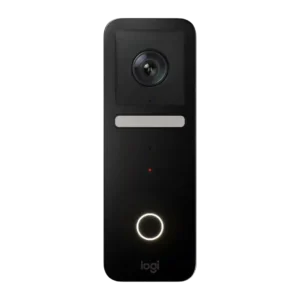
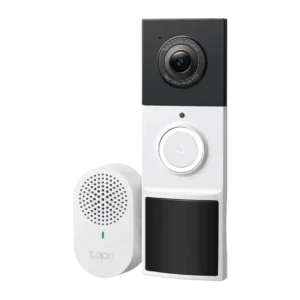
Average score
P1
Product 1: Logitech Circle View Doorbell
3.7
P2
Product 2: Tapo D210 Doorbell
4.2
AI features
P1Product 1: Logitech Circle View Doorbell
No score yet
P2
Product 2: Tapo D210 Doorbell
4.4
Reviewers consistently describe the D210 as offering useful AI detection without a mandatory subscription, usually covering people, pets, and vehicles. The recurring limitation is that package detection is reserved for the more expensive D225.
App, software and firmware
P1
Product 1: Logitech Circle View Doorbell
3.7
Because everything runs through the Apple Home app, the experience is clean for HomeKit users, but reviewers miss richer playback management, sorting, and deeper controls found in dedicated doorbell apps.
P2
Product 2: Tapo D210 Doorbell
4.5
The Tapo app is repeatedly praised for straightforward setup, fast live view access, rich settings, and good device management. Reviewers also note firmware updates, SD-card formatting, and scheduling are handled clearly inside the app.
Audio
P1
Product 1: Logitech Circle View Doorbell
3.9
Two-way talk is generally clear and responsive, though multiple reviewers wish the doorbell speaker were louder for visitors standing back from the button.
P2
Product 2: Tapo D210 Doorbell
4.4
Two-way talk is generally described as clear and quick, and several reviewers highlight the full-duplex or near-instant conversation flow. Audio quality is a meaningful strength rather than a box-ticking extra.
Automation flexibility
P1
Product 1: Logitech Circle View Doorbell
3.6
HomeKit automations can be powerful using motion/light sensors or third-party apps, though some integrations (like richer Apple TV interaction) feel limited compared with smart displays from other ecosystems.
P2
Product 2: Tapo D210 Doorbell
4.8
Automation support is broader than expected at this price, with reviewers calling out Alexa, Google, Amazon smart displays, SmartThings triggers, and useful light/display routines. It is not the most open platform, but it is flexible in common smart-home setups.
Base / Hub integration
P1
Product 1: Logitech Circle View Doorbell
3.5
A HomeKit hub (Apple TV, HomePod, etc.) is commonly required for remote access and full HomeKit Secure Video functionality, making hub ownership an important part of the setup.
P2
Product 2: Tapo D210 Doorbell
4.3
The D210 can work as a standalone doorbell and also pair with the included chime, Tapo Hub, or wider Tapo setup. That makes it easier to fit into an existing Tapo security stack without requiring a separate sync module.
Battery and Charging
P1Product 1: Logitech Circle View Doorbell
No score yet
P2
Product 2: Tapo D210 Doorbell
4.0
Battery life is a strong selling point, with most reviews citing roughly six months per charge in lighter use. Real-world feedback also suggests heavier traffic or aggressive settings can pull that figure down noticeably, though USB-C charging helps.
Chime
P1
Product 1: Logitech Circle View Doorbell
4.2
Chime behavior is a strength: it can ring the existing chime and/or HomePods with audible announcements, but compatibility with older chimes varies and setup can take extra wiring.
P2
Product 2: Tapo D210 Doorbell
4.5
The bundled plug-in chime is a real value add and is usually described as loud, customizable, and easy to pair. Multiple reviewers liked having tone and volume controls available without much setup friction.
Complete kit in box
P1
Product 1: Logitech Circle View Doorbell
3.1
Several reviewers appreciate the included mounts and chime kit, but some criticize missing essentials like a micro-USB setup cable or relying on web-based instructions instead of a full printed guide.
P2
Product 2: Tapo D210 Doorbell
4.8
Reviewers repeatedly note that the box feels complete, with the doorbell, chime, mounts, screws, templates, tape, pin tool, and charging cable included. That reduces the chance of needing extra accessories on day one.
Controls and indicators
P1
Product 1: Logitech Circle View Doorbell
4.2
Status and indicator lights (button ring and recording light) are generally clear and helpful, though some users dislike always-on lighting behavior at night.
P2
Product 2: Tapo D210 Doorbell
4.5
Physical and app-based controls are well covered, including the LED ring, reset or sync buttons, chime tone and volume controls, spotlight settings, and recording controls. Reviewers generally found the interface and indicators easy to understand.
Delivery package monitoring
P1
Product 1: Logitech Circle View Doorbell
2.8
Package-focused coverage is a weak spot: several reviews note limited doorstep visibility and that HomeKit Secure Video does not offer true package detection.
P2
Product 2: Tapo D210 Doorbell
3.3
The D210 can still monitor packages because its wide view often captures the doorstep clearly, but reviewers repeatedly point out that it lacks dedicated package detection. In practice, it can watch deliveries, just not classify them as intelligently as the D225.
Design aesthetics
P1
Product 1: Logitech Circle View Doorbell
4.4
Design is repeatedly praised as sleek, compact, and Apple-like, with a glass-front look that blends well on many door frames.
P2
Product 2: Tapo D210 Doorbell
3.9
Build quality is usually described as solid and reasonably premium, but opinions on looks are mixed. Several reviewers liked the clean, straightforward design, while others found it a bit bulky or plain next to slimmer rivals.
Faceplate/accessory inclusion
P1Product 1: Logitech Circle View Doorbell
No score yet
P2
Product 2: Tapo D210 Doorbell
4.5
Accessory support is good for the price, with reviewers calling out the included wedge mounts, sticky pad, template, cable, chime, and security screw for the microSD cover. No review discussed swappable faceplates, so the strength here is practical accessories rather than cosmetic extras.
Face recognition
P1
Product 1: Logitech Circle View Doorbell
4.2
Face recognition is a highlight for many Apple users, leveraging iCloud Photos/HSV to identify familiar people; reviewers say it works well overall but can be imperfect and needs time/training to improve.
P2Product 2: Tapo D210 Doorbell
No score yetField of view and framing
P1
Product 1: Logitech Circle View Doorbell
3.9
The 3:4 portrait framing is widely liked for capturing more vertical porch context, but several reviewers still note a blind spot very close to the door where packages can sit.
P2
Product 2: Tapo D210 Doorbell
4.2
The 160-degree view is widely seen as a strong balance of breadth and usefulness, giving good head-to-toe porch coverage without the heavier fisheye effect of wider doorbells. It is not as expansive as the D225, but most reviewers still found framing very good.
Installation and Mounting
P1
Product 1: Logitech Circle View Doorbell
3.7
No summary yet.
P2
Product 2: Tapo D210 Doorbell
4.5
Installation is one of the product's clearest strengths, with reviewers calling setup quick, simple, and approachable for non-experts. Battery-only operation, included mounts, and optional adhesive mounting all help reduce friction.
lag)
P1
Product 1: Logitech Circle View Doorbell
4.4
Live view and two-way connections are frequently described as quick to load with minimal lag, though performance can vary depending on network conditions and hub setup.
P2
Product 2: Tapo D210 Doorbell
4.4
Responsiveness is consistently rated well, with reviewers noting quick live-view loading, fast alerts, and reduced conversation delay thanks to Ring Call. The D210 does not appear sluggish in normal use.
Lens distortion handling
P1Product 1: Logitech Circle View Doorbell
No score yet
P2
Product 2: Tapo D210 Doorbell
4.3
Compared with wider fisheye-style doorbells, the D210's image is usually described as cleaner at the edges. Reviewers still acknowledge some wide-angle tradeoff, but distortion is generally better controlled than on the 180-degree sibling.
Light adjustability
P1
Product 1: Logitech Circle View Doorbell
2.8
The integrated light strip helps enable color night vision but can be overly bright or always-on in some configurations; reviewers like that it can be disabled, yet wish it were motion-triggered or automation-controllable.
P2
Product 2: Tapo D210 Doorbell
4.5
The doorbell gives users meaningful control over its lighting, including spotlight behavior, brightness, and LED-ring color in the app. That makes it easier to tune visibility, appearance, and night behavior to the location.
Low-light and Night vision
P1
Product 1: Logitech Circle View Doorbell
4.3
Night performance is a standout in many reviews thanks to color night vision and HDR, but results depend on ambient light if you disable the built-in light strip.
P2
Product 2: Tapo D210 Doorbell
4.5
Night performance is a major positive, with reviewers liking both the infrared mode and the color night option. The one recurring caveat is that color mode depends on the built-in light or other porch lighting, so it is not a free upgrade in every situation.
Motion detection
P1
Product 1: Logitech Circle View Doorbell
3.5
Motion sensing is often described as quick and capable of catching people/animals/vehicles at distance, yet some reviewers report oversensitivity, false triggers, or missed events in certain setups. Motion settings offer strong zone drawing and the ability to filter by people/animals/vehicles, but some reviewers want finer controls like sensitivity sliders, better package handling, and fewer false alerts.
P2
Product 2: Tapo D210 Doorbell
4.4
Motion detection is generally described as fast, dependable, and better than expected for a budget battery model. Reviewers repeatedly say it captures relevant activity well when installed and aimed correctly. Detection settings are unusually granular for the price, with reviewers calling out per-type sensitivity, zones, retrigger timing, clip length, and scheduling controls. That flexibility helps reduce nuisance events and tailor battery use.
Multi-user sharing ease
P1Product 1: Logitech Circle View Doorbell
No score yet
P2
Product 2: Tapo D210 Doorbell
4.0
The app appears to support sharing access with other people, and reviewers mention device-sharing as an available feature. Ease of multi-user management is not explored deeply, but the core capability is present.
Notifications
P1
Product 1: Logitech Circle View Doorbell
3.9
Alerts are typically fast on Wi-Fi and can appear across iPhone, Apple Watch, HomePods, and Apple TV, but some reviewers saw sporadic notifications or less-informative previews (e.g., small subjects or watch limitations).
P2
Product 2: Tapo D210 Doorbell
4.0
Standard alerts are considered quick and useful, while richer notification features are more limited. Several reviews note that snapshot-rich alerts usually depend on the optional cloud plan.
Object and person detection
P1
Product 1: Logitech Circle View Doorbell
4.2
Object recognition via HomeKit Secure Video can distinguish people, animals, and vehicles; accuracy is generally praised but not perfect, especially in tricky nighttime scenes.
P2
Product 2: Tapo D210 Doorbell
4.3
Object detection is a strong point for the class, with repeated mentions of person, pet, and vehicle detection. The notable exception is package detection, which reviewers consistently say is missing on the D210.
Ongoing ownership costs
P1
Product 1: Logitech Circle View Doorbell
3.2
Ongoing costs can include iCloud storage for HomeKit Secure Video recording and sometimes additional Apple hub hardware, which adds up versus subscription-free or local-storage rivals.
P2
Product 2: Tapo D210 Doorbell
5.0
Ongoing costs are low because the D210 works well without a subscription and supports local recording. That makes long-term ownership feel cheaper than many rival doorbells that lock core functions behind monthly fees.
Peace of mind
P1Product 1: Logitech Circle View Doorbell
No score yet
P2
Product 2: Tapo D210 Doorbell
4.8
Peace of mind is a recurring theme across the reviews, especially around seeing visitors, checking deliveries, and monitoring the front door while away. Even budget-focused reviewers frame it as a meaningful security upgrade.
Personalization options
P1Product 1: Logitech Circle View Doorbell
No score yet
P2
Product 2: Tapo D210 Doorbell
4.5
Personalization goes beyond the basics, with support for custom audio responses, LED color choices, display tags, and other interface tweaks. It is not a deeply cosmetic product, but there is enough user control to tailor behavior.
Phone call integration
P1Product 1: Logitech Circle View Doorbell
No score yet
P2
Product 2: Tapo D210 Doorbell
4.8
Ring Call is one of the most praised features in the entire review set. Reviewers repeatedly describe direct phone-call handling as faster and more convenient than opening an app to answer the door.
Porch light brightness
P1Product 1: Logitech Circle View Doorbell
No score yet
P2
Product 2: Tapo D210 Doorbell
3.5
The built-in light can be useful for color night video and door visibility, and brightness can be adjusted. Reviewers also warn that higher brightness can be harsh or draw extra attention, especially when used continuously.
Power Options and Compatibility
P1
Product 1: Logitech Circle View Doorbell
3.7
This is a wired doorbell that depends on compatible doorbell power; some reviewers highlight workarounds using plug-in transformers, but most emphasize you need solid wiring and nearby hub/Wi-Fi.
P2
Product 2: Tapo D210 Doorbell
3.0
Power flexibility is the D210's main compromise: it is battery-only and cannot be hardwired like the D225. That makes installation simpler, but buyers give up 24/7 recording, pre-roll, and wired convenience.
Pre-roll buffer
P1
Product 1: Logitech Circle View Doorbell
2.0
Multiple reviewers call out the lack of a pre-roll buffer, meaning you may miss a few seconds before the motion trigger compared with doorbells that continuously capture a short lead-in.
P2
Product 2: Tapo D210 Doorbell
1.5
Reviews consistently tie pre-roll to the hardwired D225 rather than the D210. For this model, the evidence points to pre-roll being a missing feature rather than a partial or weak implementation.
Price and value
P1
Product 1: Logitech Circle View Doorbell
3.4
Value depends heavily on your ecosystem: Apple-first buyers often feel it earns its price, while others view it as expensive given missing features and occasional reliability concerns.
P2
Product 2: Tapo D210 Doorbell
4.9
Value is the D210's standout theme. Across video and written reviews, it is repeatedly described as one of the best cheap battery doorbells because it combines strong core features with very low upfront and ongoing cost.
Privacy
P1
Product 1: Logitech Circle View Doorbell
4.6
Privacy is a major selling point in the reviews, with HomeKit Secure Video emphasizing local processing and end-to-end encryption before clips are stored in iCloud.
P2
Product 2: Tapo D210 Doorbell
4.0
Privacy features are better than average for a budget doorbell, with reviewers noting privacy mode, privacy zones, and the option to rely on local storage instead of cloud recording. That gives users more control over what is captured and where it is stored.
Quick-reply / pre-recorded message usefulness
P1Product 1: Logitech Circle View Doorbell
No score yet
P2
Product 2: Tapo D210 Doorbell
4.2
Pre-recorded and custom quick responses are consistently framed as genuinely useful for deliveries and missed visitors. Reviewers see them as more than a gimmick because they solve common doorbell scenarios well.
Quiet-time / do-not-disturb scheduling
P1Product 1: Logitech Circle View Doorbell
No score yet
P2
Product 2: Tapo D210 Doorbell
4.0
Review evidence shows the D210 supports quiet-time style scheduling for the chime or effective ringing windows. It is not the headline feature, but it does add useful household control.
Recommendation for new buyers
P1Product 1: Logitech Circle View Doorbell
No score yet
P2
Product 2: Tapo D210 Doorbell
4.5
The D210 is recommended frequently for buyers who want a low-cost battery doorbell and do not need wired-only extras. Reviews position it as an especially easy recommendation in the budget segment.
Recording
P1
Product 1: Logitech Circle View Doorbell
3.8
Recording behavior is flexible (streaming vs recording, audio on/off), but defaults can surprise new users and missing pre-roll/package features leave gaps in coverage.
P2
Product 2: Tapo D210 Doorbell
3.5
Recording is solid for a battery doorbell, with motion-event clips stored locally or in the cloud if desired. The main limitation is that this model does not offer the wired D225's continuous 24/7 capture or pre-roll context.
Reliability (general)
P1
Product 1: Logitech Circle View Doorbell
3.0
Many reviewers report strong day-to-day stability, but a notable minority describe random offline events, HomeKit disconnects, or heat-related failures that hurt confidence.
P2
Product 2: Tapo D210 Doorbell
4.5
Real-world reliability comes across as good, with reviewers describing the D210 as responsive, stable, and dependable once installed. No major pattern of dropouts or day-to-day instability appears in the review set.
Security ecosystem integration
P1
Product 1: Logitech Circle View Doorbell
4.3
Integration with Apple’s ecosystem is the core advantage, with seamless Home app control, HomePod/Apple TV notifications, and HomeKit Secure Video recording for Apple-centered homes.
P2
Product 2: Tapo D210 Doorbell
4.5
Inside the Tapo ecosystem, the D210 integrates well with other cameras, hubs, chimes, and smart-display flows. Reviewers who already use Tapo gear see that ecosystem fit as a practical advantage.
Siren loudness (if built-in)
P1Product 1: Logitech Circle View Doorbell
No score yet
P2
Product 2: Tapo D210 Doorbell
4.0
Several hands-on reviewers demonstrate or describe a tamper alarm and siren when the unit is removed, suggesting the D210 can make itself very noticeable. One written review disputed that point, so the evidence is positive but not perfectly consistent.
Size and form factor
P1
Product 1: Logitech Circle View Doorbell
4.5
The slim, narrow body fits many door frames and is often cited as a key advantage of the wired design.
P2
Product 2: Tapo D210 Doorbell
3.6
The D210 is not tiny, and some reviewers explicitly call it bulky compared with Blink or Ring alternatives. Others were fine with the size, but the overall picture is functional rather than sleek.
Smart-home integration (Alexa, Google, Siri, HomeKit, Matter, Thread)
P1
Product 1: Logitech Circle View Doorbell
3.0
Smart-home support is essentially Apple-only, which is perfect for Siri/HomeKit households but a hard stop for Alexa/Google/Android ecosystems.
P2
Product 2: Tapo D210 Doorbell
3.7
Smart-home support is good for Alexa and Google users, including smart-display viewing and voice-assistant compatibility. Apple-focused buyers get a weaker story, because reviewers repeatedly note the lack of HomeKit and Matter support.
Snapshot capture
P1
Product 1: Logitech Circle View Doorbell
4.2
Snapshot-style notifications are available and helpful for quick triage, but watch and preview limitations can make it harder to identify small or distant subjects at a glance.
P2
Product 2: Tapo D210 Doorbell
3.3
The doorbell can capture snapshots and use them in some workflows, but reviewers often point out that rich snapshot notifications are part of the optional cloud offering. Snapshot support exists, but the best implementation is not fully free.
Storage
P1
Product 1: Logitech Circle View Doorbell
4.2
Recorded clips are stored in iCloud via HomeKit Secure Video with a rolling history (often cited as 10 days), and playback is simple though not always as organized as dedicated platforms.
P2
Product 2: Tapo D210 Doorbell
4.5
Storage is one of the D210's strongest features thanks to local microSD recording up to 512GB plus optional cloud backup. Reviewers like having meaningful storage flexibility without being forced into a subscription.
Subscription
P1
Product 1: Logitech Circle View Doorbell
3.5
To unlock full HomeKit Secure Video recording and smart alerts, most reviewers note you need an eligible iCloud plan, which turns this into a recurring-cost device for many homes.
P2
Product 2: Tapo D210 Doorbell
4.5
Subscription pressure is unusually low here: reviewers repeatedly say the D210 keeps core detection and local recording available for free. Tapo Care exists for cloud storage and richer notifications, but it is framed as optional rather than necessary.
System completeness
P1Product 1: Logitech Circle View Doorbell
No score yet
P2
Product 2: Tapo D210 Doorbell
4.4
For a budget model, the system feels unusually complete because the doorbell includes the chime, app features, local storage support, and useful core detections out of the box. The biggest missing pieces are the wired-only D225 extras.
Theft and Tamper
P1
Product 1: Logitech Circle View Doorbell
2.9
The doorbell can be removed with a simple tool on some mounts, raising theft/tamper concerns compared with models that use security screws.
P2
Product 2: Tapo D210 Doorbell
4.2
Theft and tamper protection is generally viewed as above average because of the locking mount, screw-protected microSD area, and reported anti-removal alarm behavior. There is some conflicting evidence about the alarm, but reviewers still describe the doorbell as harder to steal than some rivals.
Video resolution and detail
P1
Product 1: Logitech Circle View Doorbell
4.3
Across reviews, video looks sharp with HDR and a tall portrait frame that helps show visitors head-to-toe, though a couple reviewers felt overall detail can look grainy compared with top competitors.
P2
Product 2: Tapo D210 Doorbell
4.4
Video quality is widely described as very good for the price, with 2K footage that is sharp enough for faces, packages, and porch activity. Most reviewers see image detail as clearly above typical bargain-bin doorbells.
Warranty and Support
P1
Product 1: Logitech Circle View Doorbell
2.2
Customer support experiences are inconsistent in the reviews, ranging from neutral to highly frustrated when troubleshooting reliability or overheating issues.
P2Product 2: Tapo D210 Doorbell
No score yetWeather and temperature tolerance
P1
Product 1: Logitech Circle View Doorbell
2.9
Weather handling is mixed: some reviewers report solid cold-weather performance, while others warn about overheating or shutdowns in warm climates or direct sunlight.
P2
Product 2: Tapo D210 Doorbell
4.5
Weather resistance is treated as solid, with repeated mentions of IP65 protection and successful outdoor use through rain and changing conditions. Temperature-specific testing is limited, but weather tolerance looks credible.
Wi-Fi range and stability
P1
Product 1: Logitech Circle View Doorbell
4.1
Connectivity is generally stable with dual-band Wi-Fi, and at least one reviewer reports strong uptime even in a spotty signal location, though offline periods are mentioned by others.
P2
Product 2: Tapo D210 Doorbell
4.0
Wi-Fi performance seems acceptable when the doorbell is placed on a solid 2.4GHz signal, and the setup flow even includes a placement check. Reviewers do not present it as a range champion, but they generally found it stable enough for normal use.
Zones and activity areas
P1
Product 1: Logitech Circle View Doorbell
4.3
Activity zones are a big plus, letting users draw multiple custom areas (sometimes with inversion) to reduce street/flag/tree false alerts and focus on the porch.
P2
Product 2: Tapo D210 Doorbell
4.3
Activity zones are a well-liked strength, with multiple reviewers noting that custom zones can be set for different detection types. That helps the D210 adapt better to porches, driveways, and busier street-facing placements.