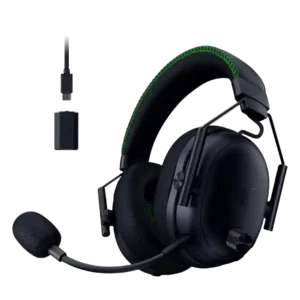
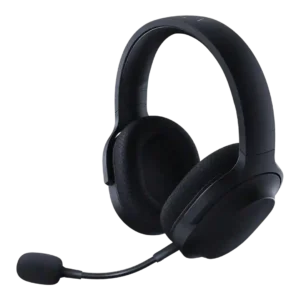
Average score
P1
Product 1: Razer BlackShark V3 Pro
3.9
P2
Product 2: Razer Barracuda X
3.8
Active noise cancellation
P1
Product 1: Razer BlackShark V3 Pro
4.1
ANC drew strong praise from many reviewers for blocking fans, AC, transit, or household noise, but some found it weaker or dependent on seal and pad design.
P2
Product 2: Razer Barracuda X
2.0
Active noise cancellation was treated as an absent premium feature, with one reviewer saying buyers who need ANC should consider another model.
Android compatibility
P1Product 1: Razer BlackShark V3 Pro
No score yet
P2
Product 2: Razer Barracuda X
4.6
Android compatibility was consistently positive when mentioned, with reviewers appreciating USB-C or wireless use on Android phones.
App
P1
Product 1: Razer BlackShark V3 Pro
4.2
The companion apps and software were useful for EQ and mobile/PC control, but one reviewer found the app workflow awkward in simultaneous mode.
P2
Product 2: Razer Barracuda X
3.4
App support was useful for EQ, gaming mode, lighting, or battery status, but multiple reviewers disliked separate apps, limited Synapse control, or app dependence.
aptX
P1Product 1: Razer BlackShark V3 Pro
No score yet
P2
Product 2: Razer Barracuda X
1.5
aptX support was explicitly criticized as absent, with one review calling the lack of AAC or aptX a letdown.
Audio-video sync accuracy
P1
Product 1: Razer BlackShark V3 Pro
5.0
Audio-video sync evidence was limited but excellent, with SoundGuys reporting no noticeable delay on the low-latency wireless connection.
P2
Product 2: Razer Barracuda X
4.1
Audio-video sync and response were mostly strong, with app gaming modes, low-latency wireless, and quick response praised across several reviews.
Bass performance
P1
Product 1: Razer BlackShark V3 Pro
4.0
Bass was generally viewed as punchy and useful for games, though some reviewers said it was only above average, too boosted, or not a true bass-monster.
P2
Product 2: Razer Barracuda X
3.8
Bass was often described as punchy, warm, or strong, but several reviewers noted limits such as less sub-bass depth, less rumble, or occasional overemphasis.
Battery
P1
Product 1: Razer BlackShark V3 Pro
4.1
Battery life was mostly praised as long or solid, though some reviewers noted feature use can reduce runtime and that the 70-hour claim is not always the whole story.
P2
Product 2: Razer Barracuda X
4.2
Battery life was mostly praised as long or excellent, especially 50-70 hour models, though RGB use and older models reduced that advantage.
Bluetooth
P1
Product 1: Razer BlackShark V3 Pro
4.5
Bluetooth was consistently valued for simultaneous or extra-device audio, with reviewers calling it a huge win or a blessing despite some implementation quirks.
P2
Product 2: Razer Barracuda X
3.7
Bluetooth was praised on newer/Chroma models for convenience, but older-model reviews missed it and one long-term 2022 review found Bluetooth switching disruptive.
Build quality
P1
Product 1: Razer BlackShark V3 Pro
4.8
Build quality was strongly praised across reviews, with comments on sturdiness, premium finish, improved robustness, and well-built construction.
P2
Product 2: Razer Barracuda X
4.4
Build quality was generally solid for the price, with many reviewers praising sturdy plastic, metal reinforcement, or strong construction despite budget materials.
Button control usability
P1
Product 1: Razer BlackShark V3 Pro
3.7
Physical controls were generally useful and snappy, but reviewers disagreed on usability, with some loving them and others finding buttons hard to distinguish or unintuitive.
P2
Product 2: Razer Barracuda X
3.8
Controls were usually easy to reach and precise, but reviewers disliked loose volume wheels, unclear mute state, or awkward volume positioning.
Cable quality
P1
Product 1: Razer BlackShark V3 Pro
2.0
Cable quality had one clear negative note: the USB-C-to-3.5mm cable produced distracting cable noise when brushing clothing.
P2
Product 2: Razer Barracuda X
5.0
Cable quality was praised where evaluated, especially the included long, high-quality charging and adapter cables.
Carry case quality
P1Product 1: Razer BlackShark V3 Pro
No score yet
P2
Product 2: Razer Barracuda X
2.9
Carry case support was inconsistent, with praise when a pouch or bag was included and criticism when the headset shipped without even a basic pouch.
Charging
P1Product 1: Razer BlackShark V3 Pro
No score yet
P2
Product 2: Razer Barracuda X
4.0
Charging evidence was positive but mixed: quick charge and use-while-charging were praised, while one Chroma review called charging speed middling.
Clamping force comfort
P1
Product 1: Razer BlackShark V3 Pro
4.5
Clamp comfort evidence was limited but positive, with one reviewer appreciating the reduced clamp force for longer wear.
P2
Product 2: Razer Barracuda X
4.2
Clamping comfort was usually well balanced and secure without too much pressure, but one review found the clamp too weak and prone to sliding.
Codec support
P1Product 1: Razer BlackShark V3 Pro
No score yet
P2
Product 2: Razer Barracuda X
2.0
Codec support was a weak point in reviews that discussed it, because Bluetooth was limited to SBC rather than higher-quality codecs.
Comfort during long use
P1
Product 1: Razer BlackShark V3 Pro
4.7
Comfort was one of the strongest consensus positives, with many reviewers wearing it for long sessions without fatigue, pressure, or discomfort.
P2
Product 2: Razer Barracuda X
4.6
Comfort over long sessions was one of the strongest areas, with repeated praise for multi-hour or all-day use and very few serious comfort complaints.
Connectivity versatility
P1
Product 1: Razer BlackShark V3 Pro
4.6
Connectivity versatility was a major selling point because reviewers valued Bluetooth, 2.4GHz, USB, analog, simultaneous audio, and broad device flexibility.
P2
Product 2: Razer Barracuda X
4.7
Connectivity versatility was one of the clearest strengths, with reviewers praising the ability to use the headset across many devices and connection types.
Console compatibility limitations
P1Product 1: Razer BlackShark V3 Pro
No score yet
P2
Product 2: Razer Barracuda X
2.6
Console limitations centered on Xbox, where reviewers repeatedly noted that wireless support was unavailable and a cable was required.
Design and Aesthetics
P1
Product 1: Razer BlackShark V3 Pro
4.7
Design and aesthetics were highly praised for the aviation-inspired look, premium finish, sleek styling, and recognizable BlackShark identity.
P2
Product 2: Razer Barracuda X
4.5
Design was a major strength: reviewers repeatedly liked the subtle, understated, non-gamery look, with Chroma lighting adding style for RGB fans.
Detachable cable convenience
P1Product 1: Razer BlackShark V3 Pro
No score yet
P2
Product 2: Razer Barracuda X
4.5
The detachable analog cable was useful for broad compatibility, especially for wired fallback on devices without wireless support.
Detachable microphone convenience
P1
Product 1: Razer BlackShark V3 Pro
3.0
Detachable microphone convenience had limited evidence and was mildly negative because one reviewer disliked detachable mic design as a personal preference.
P2
Product 2: Razer Barracuda X
4.3
The detachable microphone was usually praised for convenience, easy removal, stable positioning, or making the headset work better as everyday headphones.
Dongle
P1
Product 1: Razer BlackShark V3 Pro
2.6
Dongle feedback was the clearest hardware complaint: most reviewers disliked the wired/bulky dongle, though one praised its technology and range.
P2
Product 2: Razer Barracuda X
3.2
The dongle enabled broad USB-C wireless use, but reviewers frequently criticized its width, port blocking, storage issues, or occasional reconnection problems.
Ear cup padding quality
P1
Product 1: Razer BlackShark V3 Pro
4.5
Ear cup padding was praised for breathability, sweat control, and softness, though one reviewer found the pads getting warm after about an hour.
P2
Product 2: Razer Barracuda X
4.2
Ear cup padding was mostly praised for memory foam, fabric, breathability, and softness, though a few reviewers found it thin, shallow, or slightly harsh.
Ear cup swivel/rotation range
P1
Product 1: Razer BlackShark V3 Pro
4.1
The added swivel/rotation was welcomed as a comfort and fit improvement, even if the headset still does not rotate fully flat.
P2
Product 2: Razer Barracuda X
2.5
Ear cup swivel and rotation were a recurring annoyance because several reviewers felt the cups folded or rotated the wrong way.
Earpad noise
P1Product 1: Razer BlackShark V3 Pro
No score yet
P2
Product 2: Razer Barracuda X
2.5
Earpad noise was a limited but negative finding, with one reviewer noting audible skin-versus-material contact noise.
Earpad replacement ease
P1
Product 1: Razer BlackShark V3 Pro
3.8
Earpad replacement evidence was limited but mildly positive because removable pads support repairability, even if the clip mechanism could be better.
P2Product 2: Razer Barracuda X
No score yetEqualizer customization
P1
Product 1: Razer BlackShark V3 Pro
4.4
EQ customization was a major strength, with reviewers praising onboard EQ, 10-band controls, Synapse depth, and game-specific tuning flexibility.
P2
Product 2: Razer Barracuda X
3.3
Equalizer customization was mixed: mobile or Synapse EQ could be useful, but some models lacked PC EQ or any meaningful equalizer support.
Fit/seal reliability
P1
Product 1: Razer BlackShark V3 Pro
3.4
Fit and seal were mixed: one reviewer liked the seal, while SoundGuys found the yoke and fabric made a reliable seal difficult.
P2
Product 2: Razer Barracuda X
3.5
Fit and seal reliability was mixed, ranging from good self-adjusting fit to weak clamp that slid forward when leaning over.
Footstep sound level scaling feature
P1
Product 1: Razer BlackShark V3 Pro
3.6
Footstep scaling divided reviewers: some liked it as a competitive extra, while others found it gimmicky, game-dependent, or disruptive to other sounds.
P2Product 2: Razer Barracuda X
No score yetFrequency response accuracy
P1
Product 1: Razer BlackShark V3 Pro
3.6
Frequency response was seen as improved but imperfect, with good tonal accuracy or enjoyable tuning offset by V-shaped balance and treble/bass issues.
P2
Product 2: Razer Barracuda X
3.5
Frequency response evidence was limited to one measured-style review, which found it acceptable for gaming with some bass and treble deviations.
Game/Chat balance control
P1
Product 1: Razer BlackShark V3 Pro
4.7
Game/chat balance control was praised as an extremely welcome and practical control, especially for quickly shifting focus between chat and gameplay.
P2Product 2: Razer Barracuda X
No score yetHeadband adjustability
P1
Product 1: Razer BlackShark V3 Pro
4.2
Headband adjustment had limited positive evidence, with one reviewer finding the sliding earcup mechanism refreshingly different and effective.
P2
Product 2: Razer Barracuda X
3.9
Headband adjustability and padding were generally solid and secure, though a few reviewers wanted plusher or thicker padding.
Hinge durability
P1
Product 1: Razer BlackShark V3 Pro
3.7
Hinge durability evidence was mixed: reviewers noted smoother or reinforced parts, but one still wished the earlier weak spot had been better addressed.
P2
Product 2: Razer Barracuda X
5.0
Hinge and structural durability were praised in the limited evidence, with reviewers noting no rattles, weak feeling, or cracking concerns.
Included accessories
P1
Product 1: Razer BlackShark V3 Pro
4.5
Included accessories had limited positive evidence, with one reviewer appreciating the included 3.5mm cable for passive use.
P2
Product 2: Razer Barracuda X
4.4
Included accessories were usually well received, especially the generous cables, adapters, setup guide, and complete-feeling package.
Instrument separation
P1
Product 1: Razer BlackShark V3 Pro
4.7
Instrument separation and detail were praised, especially by reviewers who heard clearer instruments, better tonal separation, and less congestion than older models.
P2
Product 2: Razer Barracuda X
3.9
Instrument and sound separation was mostly positive, especially in busy game and music mixes, with only one review saying small details were hard to hear.
Integrated microphone
P1Product 1: Razer BlackShark V3 Pro
No score yet
P2
Product 2: Razer Barracuda X
2.5
The integrated microphone evidence was limited to the non-X Barracuda-style review and was negative compared with the rest of the headset.
Maximum volume clarity
P1
Product 1: Razer BlackShark V3 Pro
3.9
Maximum-volume clarity was mixed: one reviewer heard off-sounds at higher volume or peaks, while another heard no crackle or distortion even very loud.
P2
Product 2: Razer Barracuda X
4.3
At high volume, reviewers usually reported clean playback with little or no distortion, supporting good maximum-volume clarity.
Microphone
P1
Product 1: Razer BlackShark V3 Pro
3.8
Microphone quality was the most divisive feature: some reviewers found it clear or excellent, while others saw it as muffled, stuffy, or a downgrade from V2 Pro.
P2
Product 2: Razer Barracuda X
3.8
Microphone performance varied by model and reviewer: Chroma and several X reviews were positive, while some older or integrated mic reviews were merely passable or poor.
Microphone noise reduction
P1
Product 1: Razer BlackShark V3 Pro
3.7
Mic noise reduction was highly variable, from excellent background suppression to complaints about weak rejection or EQ/noise tools changing the voice tone.
P2
Product 2: Razer Barracuda X
3.7
Microphone noise handling was mixed-positive: several reviewers praised voice focus or rejected background noise, while others heard background noise or quality drops with processing.
Microphone quality for calls
P1
Product 1: Razer BlackShark V3 Pro
3.6
Call and chat mic quality was split: PCMag praised Discord clarity after EQ, while other reviewers found it muffled or merely usable.
P2
Product 2: Razer Barracuda X
4.0
Call and chat microphone quality was often clear enough for Discord, Zoom, voice calls, or streaming in a pinch, but a few reviews found it merely serviceable.
Midrange clarity
P1
Product 1: Razer BlackShark V3 Pro
4.1
Midrange comments leaned positive, with reviewers noting natural voices, present mids, and improved accuracy compared with earlier tuning.
P2
Product 2: Razer Barracuda X
3.9
Midrange clarity was usually strong for voices, melodies, and game detail, with isolated criticism that bass could bleed into the mids or leave them recessed.
Multi-platform compatibility
P1
Product 1: Razer BlackShark V3 Pro
5.0
Multi-platform compatibility had limited but very positive evidence, with one reviewer saying it could cover an entire gaming ecosystem.
P2
Product 2: Razer Barracuda X
4.8
Multi-platform compatibility was one of the strongest consensus positives, with repeated praise for PC, PlayStation, Switch, Android, Mac, iOS, and wired fallback.
Multipoint connectivity reliability
P1
Product 1: Razer BlackShark V3 Pro
4.5
Multipoint and simultaneous audio reliability was mostly strong, with reviewers noting calls and dual-device mixing worked well; one found the switching implementation clunky.
P2
Product 2: Razer Barracuda X
4.0
SmartSwitch and dual-wireless behavior were praised when they worked quickly, but one long-term reviewer reported unreliable reconnection and tiresome dongle reseating.
Noise isolation (passive)
P1
Product 1: Razer BlackShark V3 Pro
3.2
Passive isolation was mixed because the cloth pads and fit can leak noise, though one reviewer thought passive isolation was enough for typical gaming.
P2
Product 2: Razer Barracuda X
3.4
Passive isolation was useful in quiet rooms and some home settings, but reviewers repeatedly warned that voices, traffic, or travel noise still came through.
Packaging quality
P1Product 1: Razer BlackShark V3 Pro
No score yet
P2
Product 2: Razer Barracuda X
3.7
Packaging impressions ranged from simple and easy to nicely presented, with one reviewer comparing the budget box to Amazon Basics.
Portability/foldability
P1
Product 1: Razer BlackShark V3 Pro
2.5
Portability was weak because the headset does not fold or rotate flat and is not ideal for travel or handheld setups with the dongle.
P2
Product 2: Razer Barracuda X
3.6
Portability was mixed: light weight, flat cups, and removable mic helped, but odd swivel behavior, no case, and dongle storage issues hurt travel convenience.
Positional audio accuracy
P1
Product 1: Razer BlackShark V3 Pro
4.7
Positional audio was a standout strength, with reviewers repeatedly locating footsteps, gunshots, enemies, and environmental cues accurately.
P2
Product 2: Razer Barracuda X
4.3
Positional audio was frequently praised for footsteps, shots, direction, and game awareness, with only a few caveats about imperfect precision.
Preset EQ profile quality
P1
Product 1: Razer BlackShark V3 Pro
2.0
Preset EQ evidence was negative from SoundGuys, especially for the Music preset, which they said worsened balance and listening quality.
P2
Product 2: Razer Barracuda X
3.3
Preset EQ profiles were mixed, with useful game/music options offset by hit-or-miss tuning and some presets pushing bass or highs too far.
Replaceable earpads
P1
Product 1: Razer BlackShark V3 Pro
4.5
Replaceable earpads had limited positive evidence, with one reviewer noting the pads are user-serviceable.
P2Product 2: Razer Barracuda X
No score yetReplaceable ear plates
P1
Product 1: Razer BlackShark V3 Pro
3.8
Replaceable ear plates were viewed as easy and potentially cool, but some reviewers considered them limited or not very useful out of the box.
P2Product 2: Razer Barracuda X
No score yetRGB lighting customization
P1Product 1: Razer BlackShark V3 Pro
No score yet
P2
Product 2: Razer Barracuda X
4.3
RGB customization was a Chroma strength, with reviewers liking the look and options, though some disliked app dependence or limited interactivity.
Sidetone adjustment quality
P1
Product 1: Razer BlackShark V3 Pro
3.2
Sidetone adjustment was mixed: some reviewers found it fuzzy or unpleasant, while others liked its real-time performance and usability.
P2
Product 2: Razer Barracuda X
2.5
Sidetone and mic monitoring were weak overall: one review valued sidetone, but others criticized delay or lack of adjustment.
Smudge resistance
P1Product 1: Razer BlackShark V3 Pro
No score yet
P2
Product 2: Razer Barracuda X
3.3
Smudge resistance was mixed, with one Chroma review praising fingerprint resistance while another Barracuda review found the finish fingerprint-prone.
Software/setup simplicity
P1
Product 1: Razer BlackShark V3 Pro
3.3
Software/setup simplicity was mixed to negative: setup could be easy, but Synapse and mode switching were described as finicky, clunky, or buggy.
P2
Product 2: Razer Barracuda X
3.8
Setup simplicity was often praised as plug-and-play, but app requirements, missing controls, and a long-term reconnection problem kept it from being universally simple.
Sound leakage
P1Product 1: Razer BlackShark V3 Pro
No score yet
P2
Product 2: Razer Barracuda X
4.5
Sound leakage evidence was limited but positive, with one reviewer finding leakage barely audible even at high volume.
Sound quality
P1
Product 1: Razer BlackShark V3 Pro
4.4
Reviewers broadly praised the headset for strong gaming sound, with several calling it fantastic or greatly improved, while a few found it less convincing for music or all-around use.
P2
Product 2: Razer Barracuda X
4.2
Reviewers generally found the headset's sound good to excellent for gaming and everyday listening, though a few budget-model reviews called it merely fine or not class-leading.
Soundstage width
P1
Product 1: Razer BlackShark V3 Pro
4.1
Soundstage impressions were mostly positive for gaming, with reviewers hearing wider or more open presentation, though one found it narrower and another said it was not open-back wide.
P2
Product 2: Razer Barracuda X
3.6
Soundstage and spatial width were mixed: some reviewers praised immersion and spaciousness, while others found it closed or less wide than pricier headsets.
Spatial audio
P1
Product 1: Razer BlackShark V3 Pro
4.3
Spatial audio was usually positive for immersion and positional depth, though some reviewers preferred stereo for competitive play or found ANC narrowed the presentation.
P2
Product 2: Razer Barracuda X
3.8
Spatial audio was useful for directionality and immersion in supported setups, though some reviewers found it less precise, app-dependent, or not worth the hassle.
Stability
P1
Product 1: Razer BlackShark V3 Pro
3.5
Stability was mixed: one reviewer had game-audio reliability issues, while another praised the wireless range and signal performance.
P2
Product 2: Razer Barracuda X
3.5
Stability was mixed: several reviewers praised solid wireless or secure wear, but others reported drops, sliding, or 2022 connection problems.
Transparency mode quality
P1
Product 1: Razer BlackShark V3 Pro
4.0
Transparency or ambient mode had limited but positive evidence, with one reviewer valuing it for hearing surroundings while wearing the headset.
P2Product 2: Razer Barracuda X
No score yetTreble clarity
P1
Product 1: Razer BlackShark V3 Pro
2.9
Treble was the most repeated audio caveat: several reviewers found harshness, distortion, spiky peaks, or fatiguing high-end energy despite some tunability.
P2
Product 2: Razer Barracuda X
3.8
Treble was commonly called crisp or clean without harshness, though some presets or use cases made upper frequencies airy, thin, or less detailed.
USB-C
P1Product 1: Razer BlackShark V3 Pro
No score yet
P2
Product 2: Razer Barracuda X
4.2
USB-C was praised for broad dongle and charging convenience, but a few reviews noted limitations such as port blocking or no USB-C audio data mode.
Value for money
P1
Product 1: Razer BlackShark V3 Pro
3.7
Value was sharply split: some reviewers said the premium was justified or competitive, while others preferred cheaper V2 or non-Pro alternatives.
P2
Product 2: Razer Barracuda X
4.6
Value for money was strongly positive, with many reviewers calling it a bargain, no-brainer, winner, or strong performer at its price.
Volume output
P1
Product 1: Razer BlackShark V3 Pro
2.7
One reviewer found the available volume headroom initially disappointing until changing PC audio settings.
P2
Product 2: Razer Barracuda X
4.1
Volume output was generally strong, with several reviewers saying it got loud or had enough power, although one review found USB-C wireless quieter.
Weight comfort
P1
Product 1: Razer BlackShark V3 Pro
4.2
Weight comfort was generally good because the headset does not feel too heavy, though a few reviewers noted lighter alternatives or extra weight from new features.
P2
Product 2: Razer Barracuda X
4.6
Weight comfort was strongly praised; reviewers repeatedly described the headset as light, weightless, or easy to wear for long sessions.
Wireless latency
P1
Product 1: Razer BlackShark V3 Pro
4.7
Wireless latency was one of the strongest technical positives, repeatedly described as ultra-low, imperceptible, and among the fastest available.
P2
Product 2: Razer Barracuda X
4.2
Wireless latency was usually low enough for gaming, with several reviews calling it lag-free or well synced, though one cloud-gaming case and one range test were weaker.
Xbox compatibility
P1Product 1: Razer BlackShark V3 Pro
No score yet
P2
Product 2: Razer Barracuda X
2.6
Xbox compatibility was consistently limited: reviewers said Xbox required a 3.5mm cable or lacked native wireless support.