firmware update support
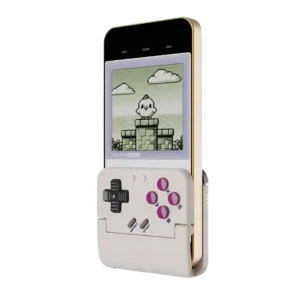
GameSir Pocket Taco
4.2
Firmware support is a quiet plus, with reviewers mentioning updates and Bluetooth fixes through the app. It helps, but it does not fully remove the setup friction some users reported.
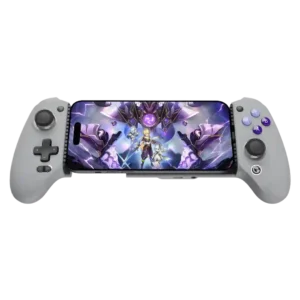
GameSir G8 Galileo
1.0
Firmware updates have added useful features such as faster charging, but the process is not always trouble-free. A few users report failed updates or controllers that malfunctioned afterward.
consistency across sessions
GameSir Pocket Taco
1.5
Consistency across sessions is a real concern. One customer said it was great for a month before D-pad false diagonals and sticking appeared, while other reviews had smooth reconnect behavior.
GameSir G8 Galileo
4.1
Many users report dependable performance over months and across different games. A smaller group encountered calibration drift, intermittent recognition, or controls that behaved inconsistently.
learning curve
GameSir Pocket Taco
2.0
The learning curve is real for newcomers. People comfortable with emulators and controller settings had better results than reviewers who expected the app to guide them clearly.
GameSir G8 Galileo
4.5
Basic play is intuitive, while sensitive sticks, mode switching, and touch mapping can take time to learn. Most users become comfortable after calibration or a short adjustment period.
customer support
GameSir Pocket Taco
3.3
Customer support feedback is split between brief praise for GameSir support and a complaint that support could not give straight answers.
GameSir G8 Galileo
1.0
Customer-support experiences are sparse but include a strongly negative report about help with a failed firmware update. Service quality is therefore a potential risk for buyers needing troubleshooting.
d-pad accuracy
GameSir Pocket Taco
2.1
D-pad accuracy is the most divisive trait. Experts often liked its pivot and texture, but many customers reported missed right inputs, false diagonals, barely registering presses, or unusable play.
GameSir G8 Galileo
4.3
The D-pad handles basic directional inputs accurately and works well for many platformers. Diagonal-heavy tests expose more inconsistency, especially for fighting games.
platformer control precision
GameSir Pocket Taco
2.5
Platformer precision is sharply split. Some reviewers played action platformers confidently, but customers with faulty D-pads said missed inputs made many genres or precision platformers unusable.
GameSir G8 Galileo
4.5
Rear buttons and a satisfying D-pad can make platformers easier and less stressful on the thumbs. Performance is strongest in games that do not depend heavily on rapid diagonal inputs.
portability
GameSir Pocket Taco
4.8
Portability is a major win. Reviewers repeatedly called it tiny, light, pocketable, easy to carry, and a controller they would actually bring along just in case.
GameSir G8 Galileo
3.0
The full-size grips make it far bulkier than most telescopic controllers. It fits a backpack or travel bag, not a pocket, although some reviewers accept the extra size for the comfort gained.
premium feel
GameSir Pocket Taco
3.3
Premium feel is mixed. One reviewer thought it felt better than the price suggests, while another said it felt cheap to the touch, so expectations should stay budget-minded.
GameSir G8 Galileo
4.8
Its full-size controls and rigid construction give it a distinctly premium, console-like feel. That impression is one of the clearest ways it separates itself from cheaper telescopic pads.
overall comfort
GameSir Pocket Taco
3.5
Comfort lands all over the map: several reviewers found the small shell surprisingly pleasant for retro sessions, while others with larger hands called it cramped or awkward.
GameSir G8 Galileo
4.9
Full-size, Xbox-like grips make phone gaming far more comfortable than flatter telescopic controllers. Many reviewers could play for long sessions without the hand discomfort they normally associate with mobile controls.
face button responsiveness
GameSir Pocket Taco
3.6
Button responsiveness is strong in many expert tests, but customer complaints about missed inputs, stuck A/B buttons, and failed right-direction presses show quality control can undercut that experience.
GameSir G8 Galileo
5.0
Button presses normally register cleanly and consistently, including after months of use. Reports of sticking or missed inputs are rare but do appear in isolated units.
phone grip and fit
GameSir Pocket Taco
4.3
The phone grip usually earns praise for silicone padding, secure clamping, and case tolerance, though a few users found thick cases or loose fit problematic.
GameSir G8 Galileo
2.9
Phone fit varies more than any other physical trait. Bare phones and many slim cases sit securely, while thicker cases, large camera modules, off-center ports, and some foldables can require case removal or fail to fit.
included accessories
GameSir Pocket Taco
4.3
Included accessories are better than expected for the price, with a case, cable, strap, manual, and lanyard appearing across reviews.
GameSir G8 Galileo
2.9
Alternate thumbsticks are a welcome inclusion and easy to swap, but only one of each style is supplied. The absence of a hard carrying case is another repeated disappointment.
mobile compatibility
GameSir Pocket Taco
3.4
Compatibility is broad but not effortless. Reviewers used it with iPhone, Android, and emulators, while some customers hit iPhone failures, case problems, or apps that centered the game under the controller.
GameSir G8 Galileo
4.7
USB-C Android phones and newer iPhones are broadly supported, but platform features are not equal. Lightning iPhones, some foldables, and devices with unusual ports or camera housings may be excluded.
size suitability for different hand sizes
GameSir Pocket Taco
2.4
Phone and hand-size fit is mixed. Smaller or normal setups can feel secure and compact, while larger hands, thick cases, or certain phone sizes make the controller cramped or imperfect.
GameSir G8 Galileo
3.7
The larger grips generally suit medium and large hands better than compact mobile controllers. Fit is not universal, and a few very large-handed users wanted more room for their pinkies.
companion app quality
GameSir Pocket Taco
2.6
The companion app is one of the bigger friction points. It enables testing, remapping, firmware, and screen tools, but reviewers also called it confusing, limited, or unhelpful.
GameSir G8 Galileo
3.9
The companion app is powerful for calibration, firmware, touch mapping, and game launching. Its polish and reliability vary, with reports of crashes, clunky navigation, iOS limitations, and recognition problems.
back button placement
GameSir Pocket Taco
2.6
The upper/back button placement is cramped by design. Reviewers liked having extra controls, but L2/R2 and shoulder placement can be awkward for larger hands or combo-heavy play.
GameSir G8 Galileo
3.9
Most reviewers praise the rear-button placement because the controls fall naturally under the middle fingers. A few users press them accidentally or find them lower than ideal.
software customization
GameSir Pocket Taco
4.5
Software customization is deeper than the tiny controller suggests, with remapping, layout swaps, turbo, D-pad tuning, screen tools, and touch mapping all mentioned.
GameSir G8 Galileo
3.3
Software controls allow adjustment of deadzones, sensitivity, layouts, and virtual touch mappings. The range is impressive, but achieving ideal settings can require trial and error.
trigger responsiveness
GameSir Pocket Taco
3.4
The shoulder and trigger buttons add useful controls for systems beyond Game Boy, but the tiny layout makes them a compromise. Several reviewers said they work, while others found them small, close together, or harder to press.
GameSir G8 Galileo
4.6
Trigger response is fast and reliable, with hair-trigger mode adding an instant option for shooters. Most reviewers consider them more responsive than the compact triggers on many mobile pads.
overall satisfaction
GameSir Pocket Taco
3.4
Overall satisfaction is mixed but leans positive among experts and early enthusiasts, especially at the price. Customer reviews add a warning: the concept is loved, but D-pad defects and iPhone/app issues can turn it into a return.
GameSir G8 Galileo
4.5
Owners and experts overwhelmingly describe it as one of the strongest mobile controllers available. Even critical reviews usually frame the drawbacks as compromises around an otherwise excellent gaming experience.
ease of setup
GameSir Pocket Taco
3.5
Setup ranges from seamless to frustrating. Some reviewers paired it in seconds, while others needed firmware, app setup, emulator skins, or repeated Bluetooth attempts before it behaved.
GameSir G8 Galileo
4.5
Native controller-supported games are generally plug-and-play, and attaching a phone is simple. Touch mapping, special modes, and occasional recognition problems can add extra setup for unsupported games.
compatibility with PC
GameSir Pocket Taco
3.5
PC compatibility is treated as a bonus. Reviewers confirmed wired PC use and broader device support, but the small retro layout limits how much PC gaming it replaces.
GameSir G8 Galileo
4.5
PC support is possible through USB on some setups and can resemble a generic Xbox pad. It is not the controller’s main purpose, and the empty center makes desktop use less comfortable.
grip texture
GameSir Pocket Taco
3.0
Grip texture only comes up as a mild drawback. One reviewer said it can get slippery in faster play, while most other fit praise centers on the silicone phone pads.
GameSir G8 Galileo
3.9
Texturing on the rear grips usually keeps the controller secure during play. A few users wanted a more aggressive surface, but slipping is rarely reported as a serious problem.
travel friendliness
GameSir Pocket Taco
4.9
Travel friendliness is a strength when the controller is treated as a toss-in accessory. It is small enough for planes, trains, bags, or quick trips, especially with the case.
GameSir G8 Galileo
4.0
Travel opinions depend on available bag space. Some users carry it everywhere and love it on trips, while frequent commuters prefer smaller controllers that pack down more easily.
button remapping options
GameSir Pocket Taco
4.8
Button remapping is a useful strength, especially for swapping A/B layouts between Nintendo-style and Xbox-style games. It helps classic titles feel more natural.
GameSir G8 Galileo
3.9
Remapping is broad and often easy, whether performed on the controller or through the app. Touch-only games may still require per-game setup and experimentation.
charging speed
GameSir Pocket Taco
4.0
Charging speed has only light coverage, but one reviewer reported a full charge in about an hour and a half. Battery endurance mattered more to reviewers than recharge time.
GameSir G8 Galileo
3.4
Pass-through charging is a major convenience and often maintains useful charging speeds during play. Compatibility is inconsistent with some chargers and phones, and a few users report that charging is slow or does not work.
d-pad feel
GameSir Pocket Taco
3.6
D-pad feel ranges from excellent and nostalgic to loose, mushy, and spongy. The positive reviews like its Game Boy-style character, while the negative reviews make it the main dealbreaker.
GameSir G8 Galileo
4.1
Opinions on the D-pad are split: some find it precise and satisfying, while others call it mushy, wobbly, or overly clicky. Its suitability depends heavily on game genre and personal preference.
brand software support
GameSir Pocket Taco
1.5
Brand support drew a negative customer signal from someone who felt GameSir was aware of first-batch D-pad problems. That sits alongside separate customer-support feedback, which was more positive.
GameSir G8 Galileo
2.0
Android receives the fullest software support, while iPhone owners lose advanced mapping and sometimes controller recognition inside the app. That platform gap is a recurring complaint.
face button travel
GameSir Pocket Taco
4.0
Face button travel is short and retro-feeling rather than modern and crisp. Reviewers generally found it usable, with enough movement or clickiness for classic games.
GameSir G8 Galileo
4.5
The face buttons have enough travel to feel deliberate without becoming slow. Reviewers who discuss the movement usually describe it as satisfying and familiar.
material quality
GameSir Pocket Taco
4.0
Material quality is practical rather than fancy. One reviewer said the plastic does not feel cheap or hollow, which is a good result for a very light budget accessory.
GameSir G8 Galileo
4.5
The plastics feel thicker and more substantial than typical budget mobile-controller materials. Reviewers frequently compare the finish favorably with regular console gamepads.
racing game suitability
GameSir Pocket Taco
4.5
The Pocket Taco can handle simple retro racing controls well enough, including boost-drift style inputs. It is still better suited to classic handheld and arcade games than to racing games that need analog steering or full-size triggers.
GameSir G8 Galileo
5.0
Long analog triggers and precise sticks work particularly well in racing games. Reviewers describe smooth throttle control and a much more console-like driving experience.
connection reliability
GameSir Pocket Taco
4.2
Connection reliability is polarized. Some users got instant reconnects and seamless iPhone pairing, while others saw iOS input failures or unreliable PC connections.
GameSir G8 Galileo
3.8
The direct connection is usually stable and instantly recognized. A minority of users needed to unplug and reconnect the controller or encountered modes that did not register reliably.
button quality
GameSir Pocket Taco
4.0
The face controls are often praised for nostalgic membrane feel and usable tactility, but several customers found them mushy, sticky, clicky, or only adequate.
GameSir G8 Galileo
4.4
Face buttons are typically tactile, responsive, and close to console-controller quality. Critics mainly object to the use of membrane switches at this price rather than to everyday performance.
build quality
GameSir Pocket Taco
4.3
Build quality is generally praised for such a small, inexpensive plastic controller, with reviewers calling it well-made, solid, and better than expected.
GameSir G8 Galileo
4.7
The chassis is consistently praised for tight construction, sturdy plastics, and minimal flex or creaking. Long-term users often say it still feels solid after months of regular use.
wired performance
GameSir Pocket Taco
4.7
Wired mode is a useful fallback. Reviewers confirmed it works for PC or lower-latency play, even though most use cases still center on Bluetooth.
GameSir G8 Galileo
5.0
The wired USB-C connection delivers immediate, dependable control without pairing. Reviewers value the simplicity and responsiveness compared with Bluetooth alternatives.
retro gaming suitability
GameSir Pocket Taco
4.4
Retro gaming is the Pocket Taco’s clearest strength. When used for Game Boy, GBA, NES, SNES, DS, or arcade-style emulation, reviewers often described it as nostalgic, authentic, fun, and purpose-built.
GameSir G8 Galileo
4.7
The controller is a strong companion for emulation, especially on wide-screen phones and more demanding systems. Older 4:3 games leave large side bars, and the D-pad is not ideal for every retro genre.
input lag
GameSir Pocket Taco
4.5
Most expert testing found little or no noticeable input lag during retro games. A small number of customer comments still called it laggy, so latency seems fine for casual play but not guaranteed for every unit.
GameSir G8 Galileo
4.8
Input response is consistently described as nearly instantaneous. The direct USB-C connection makes it especially attractive for action games and remote play.
battery life
GameSir Pocket Taco
4.5
Battery life is one of the more consistently positive traits. Reviewers regularly cited long runtime, 30-hour claims, or simply not having to think about charging often.
GameSir G8 Galileo
4.3
Because the controller draws power from the phone, there is no separate battery to remember or recharge. Most users consider the added phone drain modest, though one owner noticed meaningful power use.
screen obstruction and app fit
GameSir Pocket Taco
2.2
The vertical form factor solves touchscreen smudging for retro games, but it can also cover the lower screen or require emulator skins and careful layout settings.
GameSir G8 Galileo
2.0
Moving the fingers off the touchscreen normally improves visibility, but game aspect ratios and black bars can still reduce the usable display area. The experience depends heavily on the phone and game.
customization depth
GameSir Pocket Taco
4.6
Customization depth is stronger than the size suggests. Reviewers mention modes, shortcuts, remapping, keyboard mode, and D-pad-as-stick behavior, but that flexibility can also make setup feel busier.
GameSir G8 Galileo
4.5
Magnetic faceplates, swappable stick caps, adjustable modes, and mapping options create unusually deep customization. The main frustration is that alternate sticks are supplied as singles rather than matching pairs.
value for money
GameSir Pocket Taco
4.4
Value is strong when the hardware works. Reviewers repeatedly called the roughly $35 price affordable, a steal, or worth it, though defective D-pad reports make that value riskier for unlucky buyers.
GameSir G8 Galileo
4.6
Most reviewers see strong value because it undercuts major rivals while offering Hall controls, rear buttons, charging, and audio. A smaller group considers the price steep for a phone-only accessory.
durability
GameSir Pocket Taco
3.2
Durability is uncertain. One customer praised survival after drops, while another saw repeated D-pad trouble across two units, so long-term confidence depends heavily on unit quality.
GameSir G8 Galileo
3.0
Most long-term reports are positive, but durability is not flawless. Several owners describe broken or worn USB-C connectors, trigger parts, or labels after extended use or impact.
bumper quality
GameSir Pocket Taco
4.0
Bumpers are functional and tactile, though not luxurious. Reviewers generally found them usable, with some noting clickiness or compact placement.
GameSir G8 Galileo
4.1
The shoulder controls are usually solid and responsive. A few reviewers think the bumpers feel cheaper or less textured than the otherwise premium controls.
USB-C convenience
GameSir Pocket Taco
3.8
USB-C convenience is mostly praised because the bottom cutout lets the phone charge while playing. The caveat is clearance: multiple reviewers said not every USB-C cable fits through the opening.
GameSir G8 Galileo
3.9
The pivoting USB-C connector is widely regarded as one of the smartest parts of the design because it simplifies insertion and removal. Some owners nevertheless report that the swivel connection can loosen or break over time.
casual gaming suitability
GameSir Pocket Taco
4.5
Casual gaming suits the Pocket Taco well. Reviewers liked it for retro, arcade, and short phone sessions, not for serious landscape or competitive games.
GameSir G8 Galileo
4.5
Casual games benefit from the comfort and immediate physical controls, although sensitive sticks can require acclimation. Several reviewers say the controller made them play more mobile games than expected.
accessibility features
GameSir Pocket TacoNo score yet
GameSir G8 Galileo
5.0
The full-size spacing can be easier on stiff or arthritic hands than cramped mobile controls. Its larger grip may therefore improve access for some players, though it is not a dedicated adaptive controller.
analog stick precision
GameSir Pocket TacoNo score yet
GameSir G8 Galileo
4.8
The Hall sticks are repeatedly praised for accurate aiming and controlled movement. Their high sensitivity can feel demanding at first, especially for casual players.
analog stick smoothness
GameSir Pocket TacoNo score yet
GameSir G8 Galileo
4.4
Most reviewers find the sticks exceptionally smooth and fluid. Isolated units have shown rough rubbing or imperfect centering, usually resolved by changing a cap or calibrating.
analog stick tension
GameSir Pocket TacoNo score yet
GameSir G8 Galileo
3.5
The sticks feel quick and direct, but their sensitivity and shorter throw can take adjustment. Players who prefer slower, heavier analog movement may need to tune the deadzones.
analog trigger precision
GameSir Pocket TacoNo score yet
GameSir G8 Galileo
3.5
The analog triggers provide a broad, controllable range for racing and other pressure-sensitive actions. Reviewers especially like the nuanced throttle control when streaming console games.
audio jack quality
GameSir Pocket TacoNo score yet
GameSir G8 Galileo
4.3
The 3.5mm jack is appreciated for simple, latency-free wired audio on phones without a headphone port. One reviewer found its sound quality underwhelming, but outright failures are uncommon.
back button usefulness
GameSir Pocket TacoNo score yet
GameSir G8 Galileo
4.5
The rear buttons are useful for jumping, attacks, emulator shortcuts, and other actions that keep the thumbs on the sticks. Their value depends on whether the player actually uses extra inputs.
Bluetooth performance
GameSir Pocket Taco
3.2
Bluetooth performance is usually good once paired, and several reviewers liked quick pairing or stable wireless play. The bad cases are severe, especially where iOS stopped registering inputs or reconnecting.
GameSir G8 GalileoNo score yet
bumper responsiveness
GameSir Pocket Taco
4.3
Bumper responsiveness gets limited but positive coverage. One expert had no trouble using them in Mario Kart DS, and a customer said the shoulders were fine even when other buttons missed inputs.
GameSir G8 GalileoNo score yet
button noise
GameSir Pocket TacoNo score yet
GameSir G8 Galileo
3.7
Control noise is moderate and often quieter than Xbox-style alternatives. Some users still find the clicky D-pad or hollow trigger sound more noticeable than they would like.
cloud gaming compatibility
GameSir Pocket TacoNo score yet
GameSir G8 Galileo
5.0
The controller works especially well with Xbox Cloud Gaming, Steam Link, GeForce Now, Luna, and remote-play services. Streaming quality still depends on the user’s network and the limitations of each service.
compatibility with Nintendo Switch
GameSir Pocket Taco
4.2
Switch support appears as part of the controller’s broader multi-platform pitch. Reviewers treated it as a nice extra, not the reason to buy the Pocket Taco.
GameSir G8 GalileoNo score yet
compatibility with PlayStation
GameSir Pocket TacoNo score yet
GameSir G8 Galileo
4.1
PlayStation Remote Play is an important use case and often works smoothly in PS mode. Some users encountered mode or app recognition failures and resorted to third-party software.
compatibility with Xbox
GameSir Pocket TacoNo score yet
GameSir G8 Galileo
4.9
Its Xbox-style layout and direct connection make it particularly natural for Game Pass and Xbox Remote Play. Multiple reviewers call it one of the best ways to use Xbox cloud gaming on a phone.
competitive gaming suitability
GameSir Pocket TacoNo score yet
GameSir G8 Galileo
5.0
Fast response, precise sticks, rear buttons, and hair-trigger mode make it capable of competitive play. The D-pad and app-dependent setup prevent it from being equally strong in every genre.
design and aesthetics
GameSir Pocket TacoNo score yet
GameSir G8 Galileo
4.1
The gray-and-purple retro styling has plenty of fans, especially among those who like its Super Nintendo influence. Others find the color scheme plain and wish the removable faceplates had more visual options.
ergonomics
GameSir Pocket TacoNo score yet
GameSir G8 Galileo
4.6
The contoured handles and familiar controller shape fit the hands naturally. Its larger body is a deliberate ergonomic choice rather than a compact travel-first design.
fighting game suitability
GameSir Pocket TacoNo score yet
GameSir G8 Galileo
2.5
The D-pad can manage casual fighting-game inputs, but diagonal motions are not its strength. Reviewers who tested demanding Street Fighter-style commands would not choose it primarily for fighters.
FPS performance
GameSir Pocket TacoNo score yet
GameSir G8 Galileo
4.3
Shooters benefit from low latency, accurate Hall sticks, and optional hair triggers. A few reviewers find the small or sensitive sticks less controlled than a full-size console gamepad.
Hall effect stick performance
GameSir Pocket TacoNo score yet
GameSir G8 Galileo
4.8
Hall effect sticks are one of the controller’s defining strengths, combining smooth movement with confidence against wear. Reviewers regularly cite them as a premium feature at this price.
hand fatigue over long sessions
GameSir Pocket TacoNo score yet
GameSir G8 Galileo
3.4
Long-session comfort is a major strength, with several reviewers reporting little or no cramping. A small number of users with very large hands still found the shape uncomfortable after a short time.
macro support
GameSir Pocket TacoNo score yet
GameSir G8 Galileo
2.7
Turbo and macro-style functions are useful for repetitive inputs and can be activated quickly. One owner strongly disliked that the related buttons could not be disabled.
mounting stability
GameSir Pocket TacoNo score yet
GameSir G8 Galileo
3.3
The spring-loaded cradle usually holds phones firmly, even during vigorous movement. One customer reported repeated slipping, so mounting security may vary by device and unit.
onboard profile storage
GameSir Pocket Taco
4.0
Profile storage is lightly covered through the companion app’s saved layouts. It is useful for tinkerers, but not a major reason reviewers recommended the controller.
GameSir G8 GalileoNo score yet
paddle quality
GameSir Pocket TacoNo score yet
GameSir G8 Galileo
3.2
The rear paddles add pro-style flexibility without dominating the grip. Some users find them too easy to hit or wish they had a firmer, more substantial action.
programmable button support
GameSir Pocket TacoNo score yet
GameSir G8 Galileo
4.5
Two programmable rear inputs give the controller more flexibility than many mobile rivals. They can usually be assigned without needing to interrupt play with an app.
screenshot button usefulness
GameSir Pocket TacoNo score yet
GameSir G8 Galileo
2.9
A dedicated capture button is convenient when intentionally used. Its close placement beneath the D-pad causes accidental screenshots for some players.
Start and Select button design
GameSir Pocket TacoNo score yet
GameSir G8 Galileo
1.5
Start, Select, Menu, and mode functions provide useful shortcuts, but the layout can become crowded. The capture and macro controls beneath the D-pad are especially easy to trigger accidentally.
stick drift resistance
GameSir Pocket TacoNo score yet
GameSir G8 Galileo
5.0
The magnetic stick sensors inspire strong confidence against drift, and long-term users usually report no drifting. That durability advantage is a common reason buyers choose it over conventional alternatives.
thumbstick grip
GameSir Pocket TacoNo score yet
GameSir G8 Galileo
4.7
Textured thumbstick edges give the thumbs a secure, non-slip surface. The interchangeable caps also let players choose a shape that better matches their grip preference.
trigger smoothness
GameSir Pocket TacoNo score yet
GameSir G8 Galileo
3.8
Trigger travel is generally smooth and comfortably shaped, but feel is not universally premium. Some reviewers describe the pull as too light, hollow, or less tactile than they prefer.
trigger stop effectiveness
GameSir Pocket TacoNo score yet
GameSir G8 Galileo
4.0
Hair-trigger mode gives shooters a noticeably faster activation point and is easy to toggle. Rare reports of random activation or faulty trigger hardware keep it from being uniformly dependable.
upgrade value
GameSir Pocket TacoNo score yet
GameSir G8 Galileo
4.0
Buyers moving from smaller or older mobile controllers often see a major improvement in comfort, controls, and durability. The upgrade is less compelling for users who prioritize pocket portability.
vibration quality
GameSir Pocket TacoNo score yet
GameSir G8 Galileo
1.5
Vibration support is limited and depends on games, modes, and phone compatibility. Reviewers who expect console-level rumble should treat it as a secondary feature rather than a core strength.
weight balance
GameSir Pocket TacoNo score yet
GameSir G8 Galileo
5.0
The controller feels substantial and usually balances a phone well between the grips. Heavier phones can make the combined setup tiring during marathon sessions.
wireless latency
GameSir Pocket Taco
3.8
Wireless latency is acceptable for casual retro gaming, but reviewers still recognize Bluetooth as a compromise versus wired play. It is not positioned for esports-level responsiveness.
GameSir G8 GalileoNo score yet