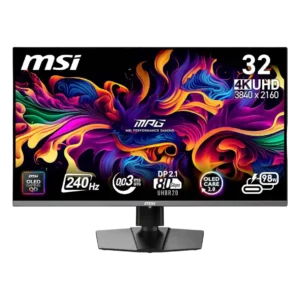
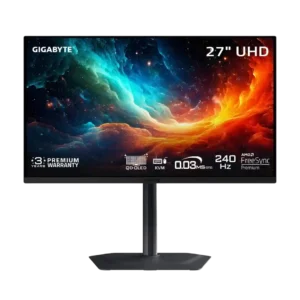
Compare MSI MPG 322URX QD-OLED vs Gigabyte MO27U2 Gaming Monitor

P1 MSI MPG 322URX QD-OLED
P2 Gigabyte MO27U2 Gaming Monitor

Comparison Takeaways

MSI MPG 322URX QD-OLED

Where It Has the Edge

  • color accuracy is 4.8 vs 2.5. Color accuracy is a major strength, with strong factory calibration and excellent measured results after selecting the right...
  • overall satisfaction is 4.9 vs 3.5. Brief customer comments are overwhelmingly enthusiastic, often calling it the best monitor they have owned. These short reviews...
  • single-player cinematic gaming suitability is 5.0 vs 3.7. The large OLED panel excels in cinematic, horror, open-world, and HDR-heavy games. Deep blacks, vivid color, and scale...
  • productivity versatility is 4.8 vs 3.8. The 32-inch 4K desktop is excellent for side-by-side windows, coding, editing, and mixed laptop/desktop use. Text clarity is...

Gigabyte MO27U2 Gaming Monitor

Where It Has the Edge

  • warranty and support service is 4.3 vs 1.1. The three-year warranty includes burn-in coverage, providing useful protection for an OLED monitor. Software support is less reassuring...
  • eye comfort features is 3.3 vs 2.0. Anti-flicker controls may help with VRR flicker, but availability appears firmware-dependent. A small minority may still notice eye...
  • premium feel is 4.2 vs 3.3. The metal stand and refined exterior look and feel premium. Image-processing and software shortcomings keep the total experience...
  • VRR compatibility is 4.3 vs 3.6. Variable refresh operation is generally smooth and tear-free, with stable OLED response across refresh rates. Flicker can appear...
Average score
Product 1: MSI MPG 322URX QD-OLED
4.2
Product 2: Gigabyte MO27U2 Gaming Monitor
4.1
adaptive sync performance
Product 1: MSI MPG 322URX QD-OLED
5.0

Adaptive Sync and G-Sync keep gameplay free of tearing and stutter in the reviews that tested them. Motion stays especially clean at high frame rates.

Product 2: Gigabyte MO27U2 Gaming Monitor
4.3

G-Sync and VRR generally prevent tearing and preserve response consistency across refresh rates. Low, unstable frame rates can still produce OLED flicker.

aspect ratio
Product 1: MSI MPG 322URX QD-OLED
No score yet
Product 2: Gigabyte MO27U2 Gaming Monitor
4.5

Tactical Switch can quickly move from 16:9 to 4:3 or 5:4 and a 24-inch view, which is especially useful for competitive shooters.

backlight bleed control
Product 1: MSI MPG 322URX QD-OLED
No score yet
Product 2: Gigabyte MO27U2 Gaming Monitor
5.0

Because every OLED pixel controls its own light, conventional backlight bleed is effectively absent and dark scenes remain clean.

black equalizer performance
Product 1: MSI MPG 322URX QD-OLED
4.5

The dark-area boost can make enemies easier to spot in competitive games. Reviewers preferred leaving it off for story-driven play because it weakens the OLED’s deep-black immersion.

Product 2: Gigabyte MO27U2 Gaming Monitor
4.0

AI Black Equalizer successfully reveals enemies hidden in dark areas. It is useful for competitive play, though more specialized than essential.

black levels
Product 1: MSI MPG 322URX QD-OLED
4.7

Deep, inky blacks are one of the monitor’s most consistently praised strengths, giving dark games and HDR scenes exceptional depth. Bright ambient light can lift them toward purple or gray.

Product 2: Gigabyte MO27U2 Gaming Monitor
4.3

Blacks look nearly perfect in dim rooms. Direct room light can lift them toward gray or magenta.

brightness
Product 1: MSI MPG 322URX QD-OLED
3.0

Brightness is the clearest image-quality compromise. Small HDR highlights can look brilliant, but full-screen and bright-scene output trails Mini-LED and IPS alternatives, especially in daylight.

Product 2: Gigabyte MO27U2 Gaming Monitor
3.3

Small HDR highlights can reach roughly 1,000 nits, but sustained bright scenes and full-screen images are much dimmer. The monitor performs best in a controlled room.

build quality
Product 1: MSI MPG 322URX QD-OLED
4.3

Most reviewers found the stand and chassis sturdy, stable, and easy to assemble. A few buyers reported loose fittings, dents, or other unit-specific defects.

Product 2: Gigabyte MO27U2 Gaming Monitor
4.7

The thin screen, metal stand, and compact base feel sturdy and well made. The stand is repeatedly singled out as a major strength.

built-in speakers
Product 1: MSI MPG 322URX QD-OLED
3.0

The monitor does not include built-in speakers, which disappointed buyers who expected them. A few customer posts described onboard audio, but expert testing and other owners explicitly found none.

Product 2: Gigabyte MO27U2 Gaming Monitor
3.0

The 5W speakers can get loud and punchy enough for casual videos, but sound quality is divisive and not a substitute for dedicated audio.

burn-in protection
Product 1: MSI MPG 322URX QD-OLED
No score yet
Product 2: Gigabyte MO27U2 Gaming Monitor
4.2

OLED Care tools, automatic maintenance, and burn-in warranty coverage provide solid safeguards. Static desktop use can still cause permanent wear over time.

cable management
Product 1: MSI MPG 322URX QD-OLED
3.4

The stand cutout and downward-facing ports can keep cables reasonably organized. Thick high-bandwidth cables are still awkward to bend, and some reviewers wanted cleaner routing through the base.

Product 2: Gigabyte MO27U2 Gaming Monitor
No score yet
color accuracy
Product 1: MSI MPG 322URX QD-OLED
4.8

Color accuracy is a major strength, with strong factory calibration and excellent measured results after selecting the right mode. Minor warm white balance or preset differences were the main caveats.

Product 2: Gigabyte MO27U2 Gaming Monitor
2.5

Factory accuracy is a consistent weakness, with red tinting, white-balance errors, and problematic HDR modes. Calibration can help, but it is not ideal for critical color work.

color gamut
Product 1: MSI MPG 322URX QD-OLED
4.9

The QD-OLED panel covers a very wide range of color, with strong sRGB, DCI-P3, and HDR coverage. Reviewers consistently described colors as rich, vivid, and well saturated.

Product 2: Gigabyte MO27U2 Gaming Monitor
4.2

The QD-OLED panel covers a wide range of DCI-P3 and Adobe RGB colors. Coverage is strong, though one test measured slightly less than expected.

competitive gaming suitability
Product 1: MSI MPG 322URX QD-OLED
4.4

Near-instant response, 240Hz motion, and low latency make the monitor excellent for competitive play. Fully exploiting 4K at that speed still requires powerful hardware, and some AI aids may be best disabled.

Product 2: Gigabyte MO27U2 Gaming Monitor
4.7

Extremely low latency, 240Hz refresh, clean motion, and tactical aspect-ratio modes make it excellent for competitive gaming. Only the most demanding esports players may want an even higher refresh rate.

console gaming compatibility
Product 1: MSI MPG 322URX QD-OLED
4.5

Dual HDMI 2.1 inputs and low latency work well with current Xbox and PlayStation consoles. Console-only players may not benefit enough from the expensive DisplayPort-focused upgrades.

Product 2: Gigabyte MO27U2 Gaming Monitor
4.3

Dual HDMI 2.1 inputs and 120Hz VRR support make the monitor well suited to modern consoles. VRR anti-flicker support may depend on firmware.

contrast
Product 1: MSI MPG 322URX QD-OLED
5.0

OLED contrast is effectively perfect, with bright elements set against truly dark pixels and none of the gray haze common to LCD panels. This is one of the strongest points of agreement.

Product 2: Gigabyte MO27U2 Gaming Monitor
4.7

Per-pixel OLED control produces excellent contrast and clean separation between bright highlights and dark backgrounds. Ambient light reduces that advantage.

delivery condition
Product 1: MSI MPG 322URX QD-OLED
2.3

Most units arrived intact, but several buyers received damaged packaging, dents, removed protective film, or signs of prior use. Delivery quality appears inconsistent.

Product 2: Gigabyte MO27U2 Gaming Monitor
No score yet
design and aesthetics
Product 1: MSI MPG 322URX QD-OLED
4.4

The slim bezels, restrained branding, and clean black-and-silver styling suit both gaming and workspaces. A few reviewers found it plain or slightly gamer-oriented rather than distinctive.

Product 2: Gigabyte MO27U2 Gaming Monitor
4.5

The understated black-and-gray design looks clean, modern, and premium without excessive RGB. Its compact metal base is especially attractive.

DisplayPort connectivity
Product 1: MSI MPG 322URX QD-OLED
3.9

DisplayPort 2.1 UHBR20 enables uncompressed 4K at 240Hz and adds future-facing bandwidth. Reviewers disagree on its present value, and several owners reported serious early DisplayPort failures.

Product 2: Gigabyte MO27U2 Gaming Monitor
4.0

DisplayPort 1.4 with DSC handles the monitor’s 4K 240Hz output without a meaningful real-world penalty. The lack of DisplayPort 2.1 is mostly academic.

eye comfort features
Product 1: MSI MPG 322URX QD-OLED
2.0

Long sessions can cause fatigue for sensitive users, especially when the large screen is viewed too closely. One reviewer appreciated quick access to blue-light controls, but comfort feedback was limited.

Product 2: Gigabyte MO27U2 Gaming Monitor
3.3

Anti-flicker controls may help with VRR flicker, but availability appears firmware-dependent. A small minority may still notice eye strain from OLED refresh pulsing.

gaming image presets
Product 1: MSI MPG 322URX QD-OLED
3.3

The sRGB and professional profiles can deliver balanced, accurate color, while some gaming presets add useful punch. The FPS mode and split menu organization drew criticism.

Product 2: Gigabyte MO27U2 Gaming Monitor
2.8

The monitor offers many gaming and HDR presets, but tuning them can be frustrating. Some settings introduce artifacts, reset the display, or trade accuracy for brightness.

ghosting control
Product 1: MSI MPG 322URX QD-OLED
5.0

Reviewers repeatedly reported crisp motion with little or no visible ghosting. OLED pixel response keeps fast action exceptionally clean.

Product 2: Gigabyte MO27U2 Gaming Monitor
5.0

Fast OLED response produces clean motion without the overshoot artifacts commonly seen on aggressive LCD overdrive modes.

HDMI 2.1 support
Product 1: MSI MPG 322URX QD-OLED
4.0

The two HDMI 2.1 ports are well suited to consoles and high-bandwidth sources. One failed unit also showed severe HDMI color corruption after its DisplayPort stopped working.

Product 2: Gigabyte MO27U2 Gaming Monitor
4.5

Two full-bandwidth HDMI 2.1 ports provide strong support for high-refresh 4K sources and current consoles.

HDR performance
Product 1: MSI MPG 322URX QD-OLED
4.1

HDR is often stunning in dark or mixed scenes, with vivid color, perfect blacks, and bright small highlights. Larger bright scenes and the choice between True Black 400 and Peak 1000 introduce noticeable compromises.

Product 2: Gigabyte MO27U2 Gaming Monitor
3.2

HDR is impressive in dark, high-contrast scenes but inconsistent overall. Bright-area highlights can clip, full-screen brightness is limited, and the boosted 1,000-nit mode is poorly calibrated.

heat management
Product 1: MSI MPG 322URX QD-OLED
4.0

The fanless heatsink and graphene-based cooling keep normal operation quiet. Two units in one customer report emitted a strong burning-electronics odor, creating a serious isolated concern.

Product 2: Gigabyte MO27U2 Gaming Monitor
No score yet
input lag
Product 1: MSI MPG 322URX QD-OLED
4.6

Input lag is extremely low at high refresh rates, making controls feel immediate. One long-term user found it slightly less class-leading at 60Hz and 120Hz.

Product 2: Gigabyte MO27U2 Gaming Monitor
5.0

Processing delay is extremely low in both SDR and HDR, making controls feel immediate and competitive play highly responsive.

local dimming performance
Product 1: MSI MPG 322URX QD-OLED
5.0

Because each OLED pixel controls its own light, bright objects appear without blooming or halos. Reviewers described dark-scene separation as essentially ideal.

Product 2: Gigabyte MO27U2 Gaming Monitor
5.0

Per-pixel lighting eliminates zone transitions and sharply limits blooming around bright objects. High-contrast scenes look cleaner than on zone-lit LCDs.

motion clarity
Product 1: MSI MPG 322URX QD-OLED
5.0

Motion clarity is consistently exceptional, with fast games looking crisp, fluid, and easy to track. This remains one of the monitor’s strongest gaming advantages.

Product 2: Gigabyte MO27U2 Gaming Monitor
4.8

Motion is one of the monitor’s strongest traits, combining 240Hz refresh with near-instant OLED response. Black-frame insertion can sharpen 120Hz play further when available.

on-screen display usability
Product 1: MSI MPG 322URX QD-OLED
4.2

Most reviewers liked the responsive joystick and found the menus readable once learned. Others criticized split picture settings, confusing organization, or unreliable physical button presses.

Product 2: Gigabyte MO27U2 Gaming Monitor
3.8

The joystick-driven OSD is usually fast and intuitive, but certain changes can reset the monitor or force Windows reconfiguration.

overall picture quality
Product 1: MSI MPG 322URX QD-OLED
4.9

Owners overwhelmingly describe the picture as beautiful, crisp, and dramatically better than previous LCD monitors. The combination of OLED blacks, vivid color, and 4K detail creates the strongest overall impression.

Product 2: Gigabyte MO27U2 Gaming Monitor
4.3

The monitor delivers sharp 4K detail, vibrant color, deep blacks, and outstanding motion. Uneven calibration, bright-room behavior, and HDR processing keep it from being class-leading.

overall satisfaction
Product 1: MSI MPG 322URX QD-OLED
4.9

Brief customer comments are overwhelmingly enthusiastic, often calling it the best monitor they have owned. These short reviews provide little detail beyond strong satisfaction.

Product 2: Gigabyte MO27U2 Gaming Monitor
3.5

The core 4K 240Hz QD-OLED experience is highly enjoyable, but overall enthusiasm varies. Strong picture and gaming performance are offset by software, HDR tuning, and price concerns.

overdrive tuning
Product 1: MSI MPG 322URX QD-OLED
No score yet
Product 2: Gigabyte MO27U2 Gaming Monitor
5.0

OLED response needs only one overdrive behavior across the refresh range, so there is no need to retune it for different frame rates.

panel type
Product 1: MSI MPG 322URX QD-OLED
4.5

The third-generation QD-OLED panel delivers a dramatic jump in contrast, color, and speed over typical IPS or TN screens. Its core panel performance is excellent, though largely unchanged from the previous MSI model.

Product 2: Gigabyte MO27U2 Gaming Monitor
4.3

The tandem QD-OLED panel delivers elite speed, contrast, color, and clarity in controlled lighting. Burn-in risk and limited bright-scene output remain familiar OLED compromises.

PC gaming compatibility
Product 1: MSI MPG 322URX QD-OLED
4.6

The monitor is outstanding with a powerful gaming PC and works across a range of current GPUs. Reaching high frame rates at 4K requires expensive hardware, and some Mac-specific behavior is less reliable.

Product 2: Gigabyte MO27U2 Gaming Monitor
4.8

The 4K 240Hz panel, G-Sync support, low latency, and DisplayPort connection make it an excellent PC gaming display.

picture-in-picture and picture-by-picture
Product 1: MSI MPG 322URX QD-OLED
4.0

MSI’s companion software provides picture-in-picture and picture-by-picture controls for multi-source setups. Feedback on actual day-to-day use was limited.

Product 2: Gigabyte MO27U2 Gaming Monitor
No score yet
port selection
Product 1: MSI MPG 322URX QD-OLED
4.9

DisplayPort 2.1, two HDMI 2.1 ports, USB-C with power delivery, USB-A, and KVM support make the monitor highly flexible. The connection mix suits PCs, consoles, and laptops.

Product 2: Gigabyte MO27U2 Gaming Monitor
4.0

The monitor covers the major gaming and productivity connections, including dual HDMI 2.1, DisplayPort, USB-C, USB hub ports, and audio. DisplayPort 2.1 is the main omission.

premium feel
Product 1: MSI MPG 322URX QD-OLED
3.3

The monitor looks substantial and high-end from the front, with a solid stand and thin panel. Plastic construction and a simplified logo keep it from feeling uniformly premium.

Product 2: Gigabyte MO27U2 Gaming Monitor
4.2

The metal stand and refined exterior look and feel premium. Image-processing and software shortcomings keep the total experience from feeling equally polished.

productivity versatility
Product 1: MSI MPG 322URX QD-OLED
4.8

The 32-inch 4K desktop is excellent for side-by-side windows, coding, editing, and mixed laptop/desktop use. Text clarity is strong for OLED, though 27-inch 4K or IPS can look slightly cleaner at close range.

Product 2: Gigabyte MO27U2 Gaming Monitor
3.8

High pixel density, clear text, low reflections, and a compact stand make everyday work comfortable. Static desktop use and imperfect color accuracy limit professional productivity roles.

reflection handling
Product 1: MSI MPG 322URX QD-OLED
2.9

The glossy coating preserves clarity and color depth, but windows and direct lights remain distracting. QD-OLED blacks can also take on a purple tint in bright rooms.

Product 2: Gigabyte MO27U2 Gaming Monitor
3.5

The glossy coating preserves clarity and manages mirror-like reflections reasonably well. QD-OLED blacks still lift noticeably when ambient light reaches the screen.

refresh rate
Product 1: MSI MPG 322URX QD-OLED
4.9

The 240Hz refresh rate delivers exceptionally smooth gameplay and desktop motion. The main limitation is the GPU power needed to approach 240 frames per second at 4K.

Product 2: Gigabyte MO27U2 Gaming Monitor
4.7

The 240Hz refresh rate makes movement exceptionally fluid and easy to track. Its OLED clarity can resemble much faster LCD gaming monitors.

reliability over time
Product 1: MSI MPG 322URX QD-OLED
2.8

Panel-care tools and the three-year burn-in warranty reassure many owners, but maintenance prompts can be intrusive. More concerning, several buyers reported early DisplayPort failures, wake problems, bricked firmware, or complete unit failure.

Product 2: Gigabyte MO27U2 Gaming Monitor
3.3

The newer multi-layer OLED design may improve durability, and burn-in warranty coverage helps. Long periods of static content still carry permanent burn-in risk.

Resolution
Product 1: MSI MPG 322URX QD-OLED
4.8

The 4K resolution produces detailed games, sharp media, and a spacious desktop. It looks excellent at 32 inches, although 27-inch 4K remains slightly denser for close text work.

Product 2: Gigabyte MO27U2 Gaming Monitor
4.8

The 4K resolution looks exceptionally crisp at 27 inches, with high pixel density that improves games, text, and multitasking.

response time
Product 1: MSI MPG 322URX QD-OLED
5.0

The near-instant OLED response is universally praised, keeping action sharp and controls responsive. Reviewers found it among the best available for gaming.

Product 2: Gigabyte MO27U2 Gaming Monitor
4.8

Pixel response is essentially instantaneous, with no meaningful slowdown at lower refresh rates. Fast motion stays clean and responsive.

screen coating durability
Product 1: MSI MPG 322URX QD-OLED
2.0

The glossy coating scratches, smudges, and marks easily, so owners recommend careful cleaning with appropriate materials. Several buyers found maintenance unusually stressful.

Product 2: Gigabyte MO27U2 Gaming Monitor
No score yet
screen size
Product 1: MSI MPG 322URX QD-OLED
4.2

The 32-inch screen creates strong immersion and useful workspace, especially on deeper desks. It can feel cumbersome in multi-monitor setups or cause discomfort when viewed too closely.

Product 2: Gigabyte MO27U2 Gaming Monitor
4.3

The 27-inch format is a strong match for 4K, delivering dense detail without requiring a huge desk. A selectable 24-inch mode adds flexibility for esports.

screen uniformity
Product 1: MSI MPG 322URX QD-OLED
4.9

Measured brightness and color uniformity were excellent overall, with only minor corner variation in some testing. Most users are unlikely to notice the small deviations.

Product 2: Gigabyte MO27U2 Gaming Monitor
5.0

The tested panel showed excellent uniformity across white and dark-gray screens, with no noticeable dirty-screen effect.

setup ease
Product 1: MSI MPG 322URX QD-OLED
5.0

Assembly, Windows configuration, and arm mounting were generally straightforward. Tool-free stand installation and clear basic setup earned repeated praise.

Product 2: Gigabyte MO27U2 Gaming Monitor
4.5

Assembly is straightforward, with the stand clipping into the display and fastening to the base with a single thumbscrew.

sharpness
Product 1: MSI MPG 322URX QD-OLED
4.8

4K detail and improved QD-OLED text rendering make images and text look crisp. Some fringing remains possible, and 27-inch 4K or LCD can look slightly sharper at close viewing distances.

Product 2: Gigabyte MO27U2 Gaming Monitor
4.8

The glossy 4K panel looks exceptionally sharp, with minimal text fringing and no matte-coating grain. Fine detail and desktop text are both clear.

single-player cinematic gaming suitability
Product 1: MSI MPG 322URX QD-OLED
5.0

The large OLED panel excels in cinematic, horror, open-world, and HDR-heavy games. Deep blacks, vivid color, and scale make visually rich titles especially immersive.

Product 2: Gigabyte MO27U2 Gaming Monitor
3.7

Deep blacks, vivid color, and precise highlights make darker cinematic games look excellent. Bright daytime HDR scenes lack the punch of stronger televisions and some LCD monitors.

sleep and wake behavior
Product 1: MSI MPG 322URX QD-OLED
1.6

Several owners reported slow wake-up, repeated input searching, or failure to restore a signal after sleep or source switching. Power cycling or reopening a laptop was sometimes required.

Product 2: Gigabyte MO27U2 Gaming Monitor
No score yet
software support
Product 1: MSI MPG 322URX QD-OLED
2.7

MSI’s software can simplify control and firmware has improved some panel-care behavior. However, reviewers also reported confusing settings, failed updates, source-switching bugs, and one firmware update that bricked the monitor.

Product 2: Gigabyte MO27U2 Gaming Monitor
2.5

Software is a major weakness: Gigabyte Control Center can fail to detect or sync with the monitor, and advertised firmware features were unavailable in testing. One unit’s basic firmware behavior was otherwise stable.

stand adjustability
Product 1: MSI MPG 322URX QD-OLED
4.4

The stand is sturdy and offers height, tilt, and swivel adjustment with smooth movement. Limited pivot and lack of full portrait rotation are the main ergonomic drawbacks.

Product 2: Gigabyte MO27U2 Gaming Monitor
4.7

The compact stand offers height, tilt, swivel, and pivot adjustment while taking up little desk space. Its flat base also leaves room for accessories.

USB hub functionality
Product 1: MSI MPG 322URX QD-OLED
4.5

The faster USB hub, USB-C power delivery, and KVM switch are highly useful for sharing peripherals between systems. Some Mac wake behavior and default-disabled USB-C charging reduce polish.

Product 2: Gigabyte MO27U2 Gaming Monitor
4.0

USB-C, upstream USB-B, and downstream USB-A ports provide practical hub connectivity. USB-C power delivery is limited to 18W.

value for money
Product 1: MSI MPG 322URX QD-OLED
3.5

Reviewers strongly praise the performance but disagree sharply on value. Sale prices near $1,000 can feel worthwhile, while the $1,300 launch price and small upgrade over the 321URX are frequently criticized.

Product 2: Gigabyte MO27U2 Gaming Monitor
2.8

Value depends heavily on price. Two sources considered the $1,000 launch price uncompetitive beside cheaper rivals, while one considered it fair for the specifications and warranty.

VESA mount compatibility
Product 1: MSI MPG 322URX QD-OLED
4.4

Standard 100×100 VESA support makes arm mounting straightforward for most setups. The recessed mounting area can conflict with some quick-release systems, and the panel’s weight requires a sturdy arm.

Product 2: Gigabyte MO27U2 Gaming Monitor
No score yet
viewing angles
Product 1: MSI MPG 322URX QD-OLED
5.0

Viewing angles are essentially perfect, with little visible color shift from the side. The image remains consistent across wide seating positions.

Product 2: Gigabyte MO27U2 Gaming Monitor
5.0

Viewing angles are essentially perfect, with the image staying strong even from extreme off-axis positions.

VRR compatibility
Product 1: MSI MPG 322URX QD-OLED
3.6

G-Sync and Adaptive Sync support work broadly across PCs and consoles, keeping motion tear-free. Several reviewers still noticed the familiar OLED VRR flicker during loading screens or abrupt frame-rate changes.

Product 2: Gigabyte MO27U2 Gaming Monitor
4.3

Variable refresh operation is generally smooth and tear-free, with stable OLED response across refresh rates. Flicker can appear when frame rates become low and inconsistent.

warranty and support service
Product 1: MSI MPG 322URX QD-OLED
1.1

Support experiences were poor in the negative cases, with buyers describing referral loops, costly shipping, delayed refunds, and damaged RMA returns. These reports amplify concern around early hardware failures.

Product 2: Gigabyte MO27U2 Gaming Monitor
4.3

The three-year warranty includes burn-in coverage, providing useful protection for an OLED monitor. Software support is less reassuring than the hardware warranty.