automatic configuration
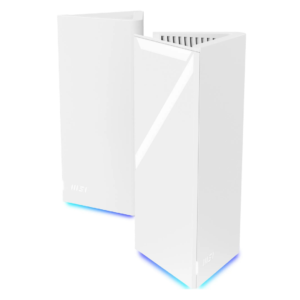
MSI Roamii BE Pro
1.3
Automatic satellite discovery was unreliable in multiple tests, often forcing manual intervention or lengthy retries.
Netgear Nighthawk M7
5.0
Compatible physical SIMs can configure themselves automatically, reducing the amount of manual network setup needed.
320 MHz support
MSI Roamii BE Pro
5.0
The 320MHz channel capability was viewed as a major Wi-Fi 7 advantage, providing substantial throughput headroom for compatible devices.
Netgear Nighthawk M7
1.5
The M7 falls far short of Wi-Fi 7’s 320MHz potential, with its 5GHz radio topping out at 80MHz.
whole-home coverage
MSI Roamii BE Pro
4.9
Several reviewers achieved strong speeds throughout multi-room homes, but larger or more difficult properties may need another node.
Netgear Nighthawk M7
2.0
The M7 is not designed to replace a conventional whole-home router; long-range household coverage is a clear limitation.
content filtering
MSI Roamii BE Pro
2.5
Content controls cover broad categories and family use cases, but one reviewer wanted finer domain-level control.
Netgear Nighthawk M7
4.5
URL filtering adds another layer of control when the M7 is being used as a private gateway on top of public Wi-Fi.
settings organization
MSI Roamii BE Pro
5.0
The web interface presents advanced controls in a clear, well-organized structure that remains approachable.
Netgear Nighthawk M7
3.0
The app is mostly uncluttered, but some settings are buried deeply enough that their locations take time to remember.
wall penetration
MSI Roamii BE Pro
5.0
One home test maintained excellent speed through a closed door, suggesting strong indoor penetration in favorable layouts.
Netgear Nighthawk M7
3.0
Typical interior walls are manageable, but a difficult external wall defeated the signal in testing.
size and footprint
MSI Roamii BE Pro
2.5
The tall, wide towers may be difficult to place discreetly despite their clean styling.
Netgear Nighthawk M7
4.4
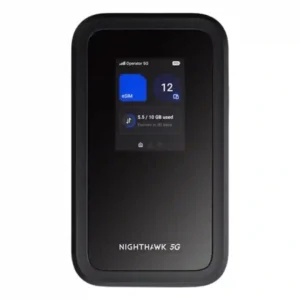
For a full mobile router, the phone-like M7 is impressively easy to carry in a bag or jacket pocket, though a few testers still found it chunky.
interface responsiveness
MSI Roamii BE Pro
1.5
The browser interface was responsive, but the mobile app suffered frequent crashes in one test.
Netgear Nighthawk M7
3.3
The simple button-driven screen works well for basic status on some units, but several testers found app dependence and single-button navigation awkward.
Ethernet port count
MSI Roamii BE Pro
4.5
The generous Ethernet selection on both nodes stood out, giving users room for multiple wired devices at both mesh locations.
Netgear Nighthawk M7
2.7
There is no built-in Ethernet jack, so wired networking requires a USB-C adapter or cradle. That keeps the body compact but adds cost and accessories.
app setup quality
MSI Roamii BE Pro
3.5
App-led setup ranged from pleasantly simple to frustrating and crash-prone, so the experience appears sensitive to phone platform and firmware state.
Netgear Nighthawk M7
4.9
The app-led onboarding is a standout strength: scanning the code, linking the hotspot, and activating a SIM or eSIM are generally fast and smooth.
Wi-Fi 7 support
MSI Roamii BE Pro
4.8
Reviewers saw full tri-band Wi-Fi 7 as strong future-proofing, especially for homes adding newer phones, laptops, and high-speed broadband.
Netgear Nighthawk M7
3.8
Wi-Fi 7 is a real feature, but the experience is mixed: some testers praised its modern performance while others found the implementation too limited to show the standard’s full potential.
value for money
MSI Roamii BE Pro
4.5
Value was the strongest consensus: the system combines Wi-Fi 7, multi-gig ports, and broad features at a price below many competing mesh kits.
Netgear Nighthawk M7
3.5
Value depends heavily on how often you travel. Frequent travelers can justify the premium through flexibility and multi-device use, while occasional users may struggle to make the $499 price worthwhile.
network monitoring
MSI Roamii BE Pro
4.5
Coverage analysis and connected-device information make it easier to understand and manage the network.
Netgear Nighthawk M7
3.5
Data and device visibility are useful, though physical-SIM usage reporting may be less accurate than Netgear eSIM reporting.
2.4 GHz performance
MSI Roamii BE Pro
3.5
The 2.4GHz band delivered respectable nearby throughput and useful coverage, although it weakened at longer distances.
Netgear Nighthawk M7
2.8
The 2.4GHz band works, but it is slower and does not consistently add the range benefit users might expect.
expandability
MSI Roamii BE Pro
4.5
The platform is designed to grow, but standalone node availability may limit practical expansion in some markets.
Netgear Nighthawk M7
3.8
Adapters and the optional cradle can add Ethernet, charging, and failover features, but the lack of built-in ports and external antenna connectors limits out-of-box flexibility.
USB port support
MSI Roamii BE Pro
4.3
USB 3.0 adds useful storage and NAS flexibility, though reviewers differed on how much practical value it offers.
Netgear Nighthawk M7
3.5
USB-C is genuinely useful for charging, tethering, and Ethernet adapters, but it cannot host USB storage.
wired device performance
MSI Roamii BE Pro
5.0
The 2.5GbE ports delivered near-line-rate throughput, making the system well suited to fast broadband and local wired transfers.
Netgear Nighthawk M7
4.3
USB-C tethering and Ethernet adapters work well and can deliver faster, steadier connections than Wi-Fi, though wired use depends on extra hardware.
build quality
MSI Roamii BE Pro
3.8
Opinions were split: one reviewer found the towers lightweight and plasticky, while another considered the construction high quality.
Netgear Nighthawk M7
4.4
Most testers found the chassis solid, rugged, and travel-ready, but the easily marked front panel is a notable blemish.
heat management
MSI Roamii BE Pro
4.3
Passive cooling and generous ventilation kept the nodes only slightly warm, with no fan noise reported.
Netgear Nighthawk M7
5.0
Even under sustained or heavy use, the M7 only became mildly warm and avoided uncomfortable heat.
network stability
MSI Roamii BE Pro
5.0
In favorable homes, speeds remained consistently high throughout the property with no major dropouts.
Netgear Nighthawk M7
4.3
Normal sessions are very stable, though changing between internet sources can cause a temporary client disconnect.
mobile app quality
MSI Roamii BE Pro
4.5
The app is feature-rich and intuitive when stable, but crashes and login problems made it unreliable for at least one reviewer.
Netgear Nighthawk M7
4.0
The Netgear app is mostly clean, capable, and easy to use, especially for SIM management. A few menu quirks, account requirements, and app-only tasks keep it from feeling flawless.
subscription requirements
MSI Roamii BE Pro
5.0
Security and parental-control features are available without recurring fees, a clear advantage over several rivals.
Netgear Nighthawk M7
4.5
Netgear’s travel data can be purchased without long contracts, which is convenient for short trips. The flexibility is better than the pricing, since short-term eSIM packages can cost a lot per gigabyte.
firewall quality
MSI Roamii BE Pro
5.0
The built-in firewall offers extensive controls, including service blocking, rules, URL restrictions, and denial-of-service protection.
Netgear Nighthawk M7
4.5
The built-in firewall is part of a broader security stack that makes public-network use feel substantially safer.
hardware reliability
MSI Roamii BE Pro
5.0
The hardware passed an extended stress test without instability and stayed reliable under sustained use.
Netgear Nighthawk M7
4.5
Hands-on testing did not uncover hardware problems, and the ruggedized body adds confidence for travel use.
latency
MSI Roamii BE Pro
5.0
Reviewers associated the Wi-Fi 7 implementation with low latency and responsive performance for gaming, calls, and heavy traffic.
Netgear Nighthawk M7
4.5
A wired gaming test ran without noticeable stutter or lag.
latency consistency
MSI Roamii BE Pro
5.0
Measured ping stayed low and steady across rooms, including a difficult back-office location.
Netgear Nighthawk M7
4.5
Wired gaming remained steady enough to avoid stutters or lag during the test.
mid-range speed
MSI Roamii BE Pro
4.0
Mid-range performance was generally strong for the price and well suited to typical medium-sized homes.
Netgear Nighthawk M7
4.5
At roughly ten meters with multiple walls in the path, performance remained impressively close to the short-range result.
network segmentation
MSI Roamii BE Pro
5.0
Separate main, guest, child, and IoT networks provide useful isolation and purpose-based control.
Netgear Nighthawk M7
4.5
Wi-Fi Offload keeps clients behind the M7’s own private network rather than exposing them directly to the upstream public hotspot.
Wi-Fi speed
MSI Roamii BE Pro
3.8
Nearby Wi-Fi 7 speed can be exceptional, but other testing found mediocre throughput and weak scaling at distance, making overall speed highly environment-dependent.
Netgear Nighthawk M7
4.2
Wireless speeds are strong enough for streaming, calls, and general work in good coverage, but results fall sharply when the cellular connection is weak.
range
MSI Roamii BE Pro
3.8
Some homes saw excellent reach from two nodes, while other tests found far-range performance variable or poor.
Netgear Nighthawk M7
3.3
Range is adequate to very good for a mobile hotspot, especially in a hotel room or small office, but it is not a substitute for a full home router and can weaken quickly through distance or difficult walls.
download performance
MSI Roamii BE Pro
5.0
Real-world game downloads held close to the reviewer’s full broadband rate even in a difficult room.
Netgear Nighthawk M7
4.6
Strong 5G locations regularly provide plenty of download headroom for streaming, calls, and work, with direct USB-C often going faster still.
connection reliability
MSI Roamii BE Pro
5.0
Several reviewers described the finished network as dependable and easy to forget about once running.
Netgear Nighthawk M7
4.7
Reliability is one of the M7’s best traits in decent coverage, with repeated reports of stable sessions, few drops, and dependable travel use.
2.5 GbE support
MSI Roamii BE Pro
4.8
Reviewers consistently praised the all-2.5GbE layout, which supports fast broadband, NAS devices, and wired clients without falling back to gigabit ports.
Netgear Nighthawk M7
4.5
A third-party USB-C 2.5GbE adapter worked successfully, giving the M7 a practical path to faster wired networking.
device capacity
MSI Roamii BE Pro
5.0
The system is positioned well for smart homes with many connected devices and substantial simultaneous traffic.
Netgear Nighthawk M7
4.7
The 32-device ceiling is more than marketing for typical travel use; testing with large client counts showed the hotspot can handle busy groups.
design and appearance
MSI Roamii BE Pro
4.4
Most reviewers liked the clean triangular towers and subtle RGB lighting, though the bold size and shape may not suit every room.
Netgear Nighthawk M7
4.2
The rectangular, phone-like design is generally sleek and ergonomic, with a premium feel. One tester found the glossy front panel scratches very easily.
wireless performance
MSI Roamii BE Pro
4.2
Overall wireless results ranged from excellent multi-gigabit speeds to merely average throughput, with home layout and client type playing a major role.
Netgear Nighthawk M7
3.9
Overall wireless performance is good for travel and daily work, but it is more impressive for reliability and flexibility than for maximum local Wi-Fi throughput.
multi-device performance
MSI Roamii BE Pro
4.4
The system is built for busy homes and newer Wi-Fi 7 clients, although weaker legacy-band throughput may constrain several simultaneous high-quality streams.
Netgear Nighthawk M7
4.6
The M7 handles several active devices comfortably, and one stress test ran 27 devices at once without falling apart.
web interface quality
MSI Roamii BE Pro
4.4
The browser interface is stable, responsive, and unusually comprehensive, although a few app-only controls remain unavailable there.
Netgear Nighthawk M7
4.3
The browser interface is useful for deeper settings that the app does not expose, and it is generally straightforward to navigate.
setup ease
MSI Roamii BE Pro
4.5
Several reviewers found setup quick and straightforward, but others encountered pairing, login, and platform-specific problems.
Netgear Nighthawk M7
4.6
Getting online is consistently quick and uncomplicated, with QR-code onboarding and SIM activation often taking only minutes.
security features
MSI Roamii BE Pro
4.8
The free FortiSecu tools, network isolation, and built-in protections form a strong security package, with optional third-party traffic scanning as the main caveat.
Netgear Nighthawk M7
4.6
A private hotspot, firewall, filtering, hidden-SSID options, WPA3, and firmware updates make the M7 a reassuring alternative to exposing devices directly to public Wi-Fi.
access controls
MSI Roamii BE Pro
4.5
Family and device access tools were viewed positively, with simple ways to control who can use the network.
Netgear Nighthawk M7
4.5
MAC filtering, URL filtering, and hidden-SSID options give travelers useful control over who and what can use the hotspot.
5 GHz performance
MSI Roamii BE ProNo score yet
Netgear Nighthawk M7
3.5
5GHz can be fast enough for normal work, but its 80MHz ceiling keeps peak local throughput below what many buyers will expect from Wi-Fi 7.
160 MHz support
MSI Roamii BE ProNo score yet
Netgear Nighthawk M7
1.3
The M7 does not deliver 160MHz operation on 5GHz, a limitation that materially holds back its Wi-Fi 7 performance.
automatic firmware updates
MSI Roamii BE ProNo score yet
Netgear Nighthawk M7
4.5
Automatic firmware updates help keep the hotspot current without manual intervention.
automatic route optimization
MSI Roamii BE ProNo score yet
Netgear Nighthawk M7
4.0
The M7 can intelligently favor available Wi-Fi or stronger cellular options, but one test found source changes briefly restart the Wi-Fi network.
backhaul performance
MSI Roamii BE Pro
2.0
Wireless node-to-node performance can be fast, but one review measured a severe throughput drop when connecting through the secondary node.
Netgear Nighthawk M7No score yet
bandwidth controls
MSI Roamii BE Pro
5.0
The software provides practical per-device bandwidth limiting alongside more advanced traffic controls.
Netgear Nighthawk M7No score yet
battery portability
MSI Roamii BE ProNo score yet
Netgear Nighthawk M7
4.1
Battery life usually covers a workday under light or moderate use, with some tests running much longer. Heavy multi-device use shortens runtime, and the non-removable battery is a recurring compromise.
cellular connectivity
MSI Roamii BE ProNo score yet
Netgear Nighthawk M7
4.6
Cellular performance is a major strength: the M7 works across 4G/5G networks, can switch among SIM options, and often holds a stronger, more useful connection than phones. Weak local coverage still sets the ceiling.
channel width support
MSI Roamii BE ProNo score yet
Netgear Nighthawk M7
1.8
The 80MHz maximum on 5GHz is a major technical constraint and directly limits local Wi-Fi throughput.
close-range speed
MSI Roamii BE Pro
5.0
At close range, the system reached exceptional multi-gigabit wireless throughput in one test, though another lab found more ordinary results.
Netgear Nighthawk M7No score yet
congestion handling
MSI Roamii BE ProNo score yet
Netgear Nighthawk M7
4.0
Even in a crowded network environment, everyday performance remained usable, though cleaner spectrum could produce better speeds.
connected-device management
MSI Roamii BE ProNo score yet
Netgear Nighthawk M7
4.5
The app makes it easy to see who is connected and react quickly if an unexpected device appears.
dead-zone elimination
MSI Roamii BE Pro
5.0
The two-node design was praised for reaching rooms that previously had little or no usable Wi-Fi.
Netgear Nighthawk M7No score yet
device identification
MSI Roamii BE ProNo score yet
Netgear Nighthawk M7
4.5
Connected-device visibility is clear enough to serve as a useful security check in public places.
dual-band support
MSI Roamii BE ProNo score yet
Netgear Nighthawk M7
2.5
Dual-band operation is available, but enabling 2.4GHz can reduce 5GHz performance enough to make the implementation feel compromised.
dual-WAN support
MSI Roamii BE ProNo score yet
Netgear Nighthawk M7
5.0
The cradle can combine fixed broadband and cellular as primary and backup internet paths, making the M7 more useful at a desk.
eSIM flexibility
MSI Roamii BE ProNo score yet
Netgear Nighthawk M7
4.7
The strongest differentiator is flexible eSIM use: travelers can buy plans in-app, load third-party eSIMs, keep a physical SIM, and switch networks without hunting for local cards. Netgear’s own plans can be pricey or limited.
firmware update process
MSI Roamii BE Pro
3.3
Firmware updating was seamless in one test but disrupted app connectivity in another, producing a mixed setup experience.
Netgear Nighthawk M7No score yet
gaming optimization
MSI Roamii BE ProNo score yet
Netgear Nighthawk M7
3.5
Casual gaming works well, and wired play can be smooth, but intensive gaming is better with an Ethernet adapter than over hotspot Wi-Fi alone.
installation process
MSI Roamii BE ProNo score yet
Netgear Nighthawk M7
4.5
Physical SIM installation is refreshingly simple and feels much like inserting a SIM into a smartphone.
IoT device compatibility
MSI Roamii BE ProNo score yet
Netgear Nighthawk M7
5.0
A heavy mixed-client test that included smart speakers ran cleanly alongside phones, tablets, and laptops.
long-range speed
MSI Roamii BE ProNo score yet
Netgear Nighthawk M7
1.5
At the most demanding far-range location, the Wi-Fi signal failed entirely, showing the limits of this compact hotspot.
mesh coverage
MSI Roamii BE Pro
4.3
Coverage results varied sharply by home: some reviewers achieved excellent whole-house performance, while others found the two-node kit weak at far range.
Netgear Nighthawk M7No score yet
mesh scalability
MSI Roamii BE Pro
2.0
A two-node kit suits small to mid-sized spaces, but limited availability of individual nodes makes larger deployments less straightforward.
Netgear Nighthawk M7No score yet
multi-gig Ethernet support
MSI Roamii BE ProNo score yet
Netgear Nighthawk M7
4.5
Multi-gig Ethernet is possible through USB-C adapters rather than a built-in port, and tested 2.5GbE hardware worked without issue.
node pairing ease
MSI Roamii BE Pro
2.0
Pairing experiences ranged from a few manageable minutes to repeated failures and exceptionally long waits.
Netgear Nighthawk M7No score yet
node placement guidance
MSI Roamii BE Pro
4.4
The placement tool is a strong concept and often helpful, but its heatmap can become confusing in multi-floor homes.
Netgear Nighthawk M7No score yet
notifications
MSI Roamii BE Pro
4.5
The app can promptly flag new devices and security concerns, adding useful awareness without constant monitoring.
Netgear Nighthawk M7No score yet
outdoor coverage
MSI Roamii BE Pro
2.2
Garden and far-location results were weak overall, ranging from barely usable speeds to complete connection failure on some devices.
Netgear Nighthawk M7No score yet
parental controls
MSI Roamii BE Pro
5.0
Parental controls are broad, free, and unusually capable, though app instability and limited filtering granularity can reduce their usefulness.
Netgear Nighthawk M7No score yet
performance under load
MSI Roamii BE ProNo score yet
Netgear Nighthawk M7
3.8
Under strong network conditions, the M7 can stay fast with many clients, but weak-signal environments become much more vulnerable to heavier loads.
power consumption
MSI Roamii BE ProNo score yet
Netgear Nighthawk M7
3.5
Moderate workloads use roughly a workday’s worth of battery, while heavier multi-device sessions increase power draw noticeably.
privacy controls
MSI Roamii BE Pro
5.0
No mandatory cloud account keeps default privacy risk low, while optional security scanning requires sharing traffic with a third party.
Netgear Nighthawk M7No score yet
quality of service
MSI Roamii BE Pro
5.0
Detailed QoS settings let users prioritize specific devices and manage traffic with more control than many consumer mesh kits.
Netgear Nighthawk M7No score yet
roaming performance
MSI Roamii BE Pro
5.0
Adaptive roaming was praised for maintaining connections as users moved around the home.
Netgear Nighthawk M7No score yet
seamless handoff
MSI Roamii BE Pro
5.0
Switching between nodes was described as automatic and effectively unnoticeable during normal movement.
Netgear Nighthawk M7No score yet
security update support
MSI Roamii BE ProNo score yet
Netgear Nighthawk M7
4.5
Ongoing automatic firmware updates are a useful security safeguard for a device intended to travel across many networks.
status light control
MSI Roamii BE Pro
4.0
RGB lighting is attractive and adjustable, but scheduling behavior was inconsistent across reviews and firmware versions.
Netgear Nighthawk M7No score yet
upload performance
MSI Roamii BE ProNo score yet
Netgear Nighthawk M7
4.4
Uploads are consistently capable enough for work files, presentations, calls, and media, especially on strong 5G or wired connections.
USB storage sharing
MSI Roamii BE Pro
3.3
USB storage can serve files through several protocols, but measured NAS speeds were disappointing compared with the 2.5GbE network.
Netgear Nighthawk M7No score yet
video conferencing optimization
MSI Roamii BE ProNo score yet
Netgear Nighthawk M7
4.8
Video calls are a comfortable workload for the M7 in good coverage, even while other devices and tasks are active.
VPN server support
MSI Roamii BE Pro
5.0
The router offers unusually broad VPN server support, including several popular protocols and client profile management.
Netgear Nighthawk M7No score yet
wall-mounting support
MSI Roamii BE Pro
5.0
Included brackets, screws, and cable clearance make wall installation unusually convenient for a mesh kit.
Netgear Nighthawk M7No score yet
WAN failover
MSI Roamii BE ProNo score yet
Netgear Nighthawk M7
5.0
With the optional cradle, the M7 can automatically take over when fixed broadband fails, creating a strong backup-internet setup.
web interface setup
MSI Roamii BE ProNo score yet
Netgear Nighthawk M7
5.0
Opening the local browser interface and getting to advanced settings is simple and self-explanatory.
Wi-Fi standard support
MSI Roamii BE ProNo score yet
Netgear Nighthawk M7
5.0
Packing Wi-Fi 7 into a pocket-sized hotspot is a genuine strength, even if this implementation does not exploit every high-end Wi-Fi 7 capability.
wired backhaul support
MSI Roamii BE Pro
4.8
Wired backhaul is a major strength, preserving wireless capacity and supporting demanding gaming, storage, and long-distance links.
Netgear Nighthawk M7No score yet
wireless backhaul
MSI Roamii BE Pro
4.8
Wireless backhaul was excellent in some tests and adequate for normal use, though one review found a steep secondary-node slowdown.
Netgear Nighthawk M7No score yet
WPA3 support
MSI Roamii BE ProNo score yet
Netgear Nighthawk M7
4.5
WPA3 encryption strengthens the M7’s private hotspot protection when it is rebroadcasting cellular or public Wi-Fi connections.